This project is about compiler including EBNF input system and parsing analysis tools and AJ language that system programming language.
IDE project is not supported more so don't build the projects in the Application folder.
Build the projects CommandPrompt.Builder and CommandPrompt.Util. The projects is the top layer projects of the system.
To use the compiler for AJ language in the VS Code follow the below sequence.
- Build the projects CommandPrompt.Builder and CommandPrompt.Util.
- Add to the environment variable the path that there is a ajbuild program. (ajbuild program is created after build CommandPrompt.Builder project.)
- Add to the environment variable the path that there is a ajutil program. (ajutil program is created after build CommandPrompt.Util project.)
- Execute the cmd and input ajbuild and ajutil. if you get screen as below then the configure is successed.

- Create solution file by input "ajbuild new --output [path to create sln file] sln". (ex: ajbuild new --output c:\ajtest sln).
- Create the start project file by input "ajbuild new --output [path to create ajproj file] start". (ex: ajbuild new --output c:\ajtest\test start).
- Add project file to the solution by input "ajbuild sln [solution path] add [the full path of project file to create])". (ex: ajbuild sln c:\ajtest add c:\ajtest\test).
- If you completed for now then your solution folder will be as below.
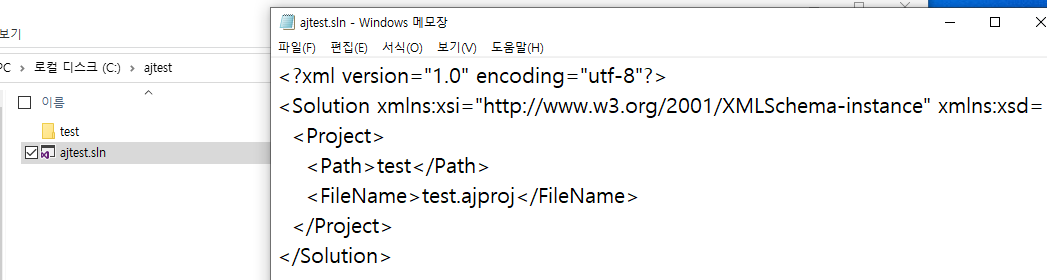
- Ok read the folder (the folder existing sln file) from VS Code.
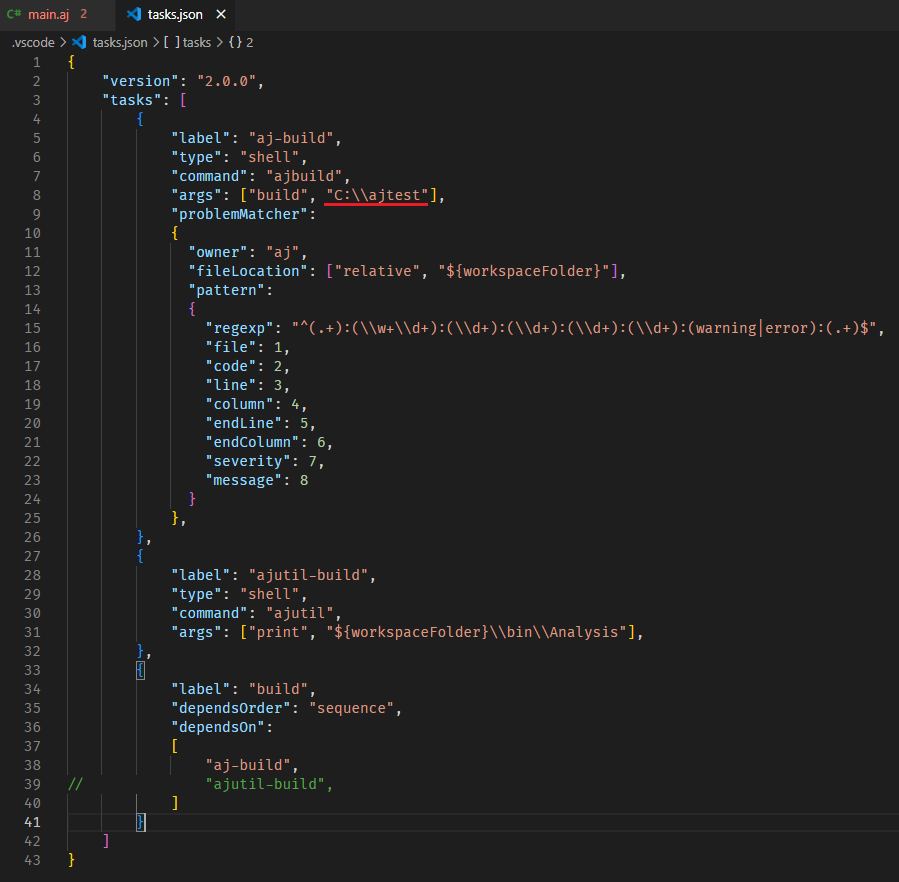
- Create the tasks.json file.
- Type the below content (if your solution path is different change the content of red underline.)
- Add main.aj file (file name does not matter) in the project path as below.

- Build with ctrl + shift + b. if the result is as below then all configure is successed.

- Good, now let's programming with AJ language. Before start need a few library sources. Download from this (https://drive.google.com/file/d/1l8_JHT4MmAtxzy4Gr4zsD225vS5ZgVhL/view?usp=sharing) After download add to the project folder. the result is as below.

- AJ language is similar C#. So syntax highlighting is compatible with C#. Click the language mode button of right bottom and change to C# as below.

OK, if you did basic configure successfully you can use Problems feature of VS Code. click main.aj file in the solution explorer and let's type as below.
using System;

namespace Main;

public class TestMain
{
    public int a;
    public int b;

    public void Test()
    {
        int i=0;
        if(i > 10) i++;
        TTest();

        return 10;
    }
}
The above code has 2 problems. The first is TTest function is used even though is not declared. The second is Test function returns value 10 even though the return type of Test function is void. AJ Compiler will catch this problems and display it. Build with ctrl + shift + b and you can see problems that AJ compiler catch as below.

Good, as above if syntax error or semantic error is fired the position that error fired shows.
AJ Compiler can generate LLVM IR if the code correct. Let's write the code as below in main.aj file.
using System;

namespace Main;

public class TestMain
{
    public int a;
    public int b;

    public void Main()
    {
        Test2();
        Test();
    }

    public int Test2()
    {
        return 10;
    }

    public void Test()
    {
        Main.TestMain c;

        int i = 10;
        int j = i++;

        if(true) i++;
        else i--;

        if(true) i++;

        int z = i / j;

        if(false) j = j%10;
        else j = j * 10;

        while(true)
        {
            i++;
            if(i > 20) continue;
            else if(j > 20) break;

        return;
        }
    }
}
The above code correct according to AJ grammar. if you build with ctrl + shift + b then you can see to generate main.aj.ll file as below.
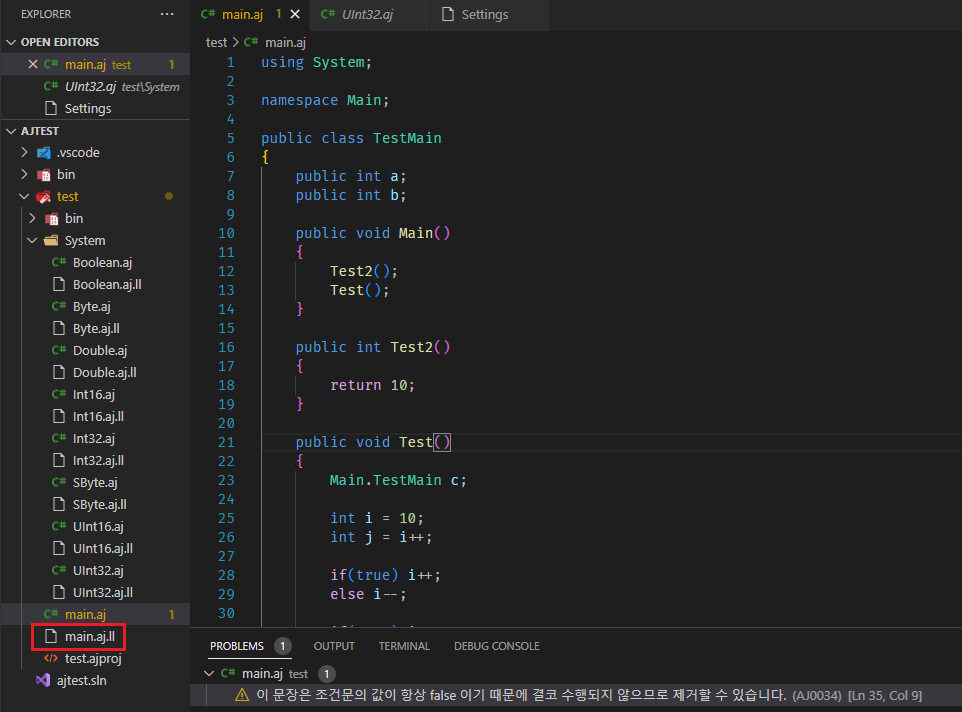
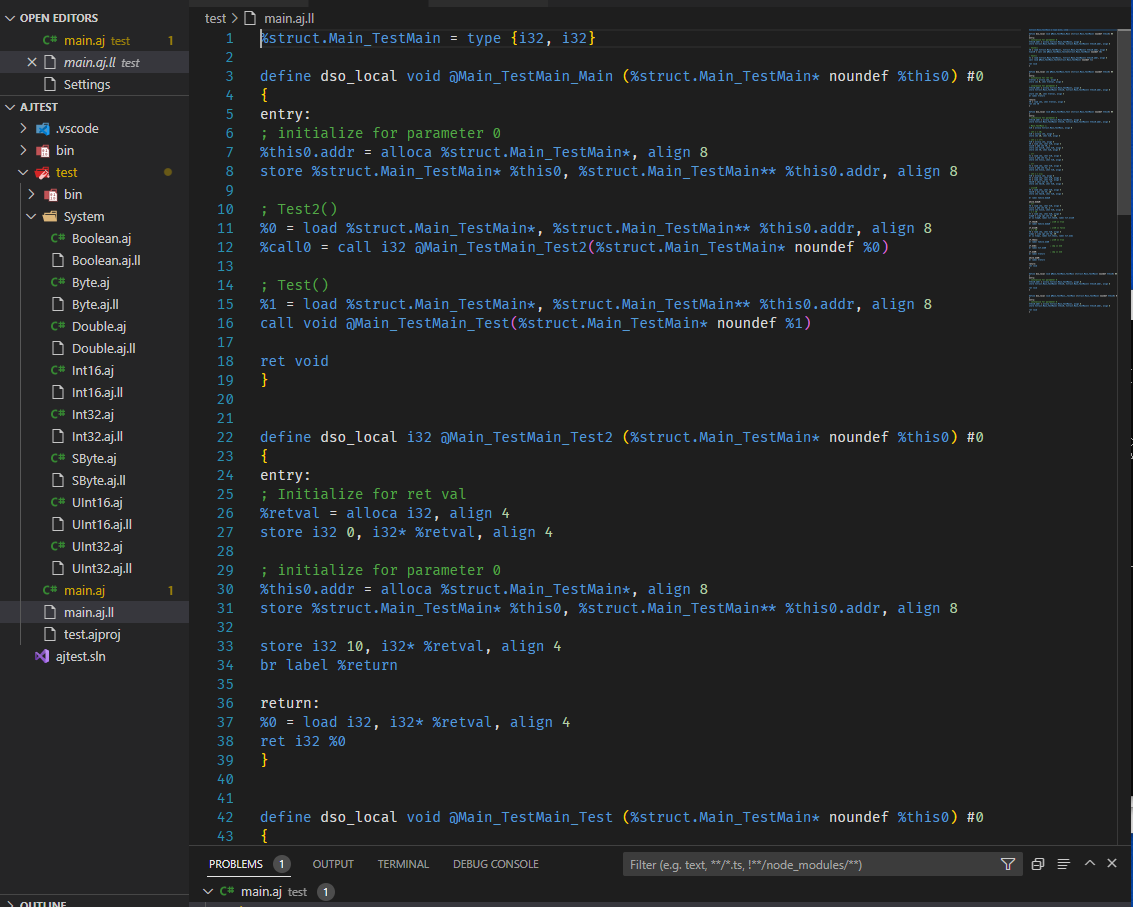
The content of main.aj.ll file is as below. Display original source file for llvm ir.
If you did generate LLVM IR and you have a llc.exe program (this can get through LLVM project) you can generate assembly code with LLVM IR.
- Move to terminal window of VS code.
- Input the command llc.exe main.aj.ll and you can get assembly file as below. (if you don't have llc.exe this work will be failed.)

The below video is that about this project.
https://www.youtube.com/watch?v=oMhS3l0DyLo&t=187s
https://www.youtube.com/watch?v=m1ylQsQRPF8&t=29s
https://www.youtube.com/watch?v=QwPlyto8JAA&t=22s