| title | CI/CD Integration Guide |
|---|---|
| description | Learn how to integrate Autonoma with your CI/CD pipeline to automatically run tests on code changes using GitHub Actions, GitLab CI, Bitbucket Pipelines, or cURL. |
Autonoma supports multiple CI/CD platforms. Choose the one your team uses:
CI/CD stands for Continuous Integration / Continuous Deployment—it's the practice of automatically testing and deploying code changes.
Let's break down what this means in plain language:
Traditional approach: Developers work on features for weeks, then try to merge everything together. Often, things break because changes conflict with each other.
Continuous Integration: Developers integrate (merge) their code changes frequently—multiple times per day. Every time code is merged, automated tests run to catch problems immediately.
Analogy: Instead of writing an entire book and checking for typos at the end (overwhelming!), you check each page as you write it (manageable!).
Traditional approach: After testing, someone manually deploys the code to production—copying files, restarting servers, hoping nothing goes wrong.
Continuous Deployment: Code that passes all tests automatically deploys to production. No manual steps, no human error.
Analogy: Instead of manually mailing each customer their order, you have an automated system that ships orders as soon as they're processed.
Without CI/CD:
- Tests are run manually (slow, easy to forget)
- Broken code can sit undetected for days
- Deployments are risky and stressful
With CI/CD:
- Tests run automatically on every code change
- Problems are caught within minutes
- Deployments become boring and routine (which is good!)
Your development workflow probably looks something like this:
- Developer writes code
- Developer creates a Pull Request (PR) / Merge Request
- ← Autonoma runs tests here
- Code review happens
- Code merges to main branch
- ← Autonoma runs tests here
- Code deploys to production
- ← Autonoma runs tests here
By integrating Autonoma at these checkpoints, you catch issues before they reach users.
Go to the API Keys section in your Autonoma dashboard and generate a key. You will see something like this once done.
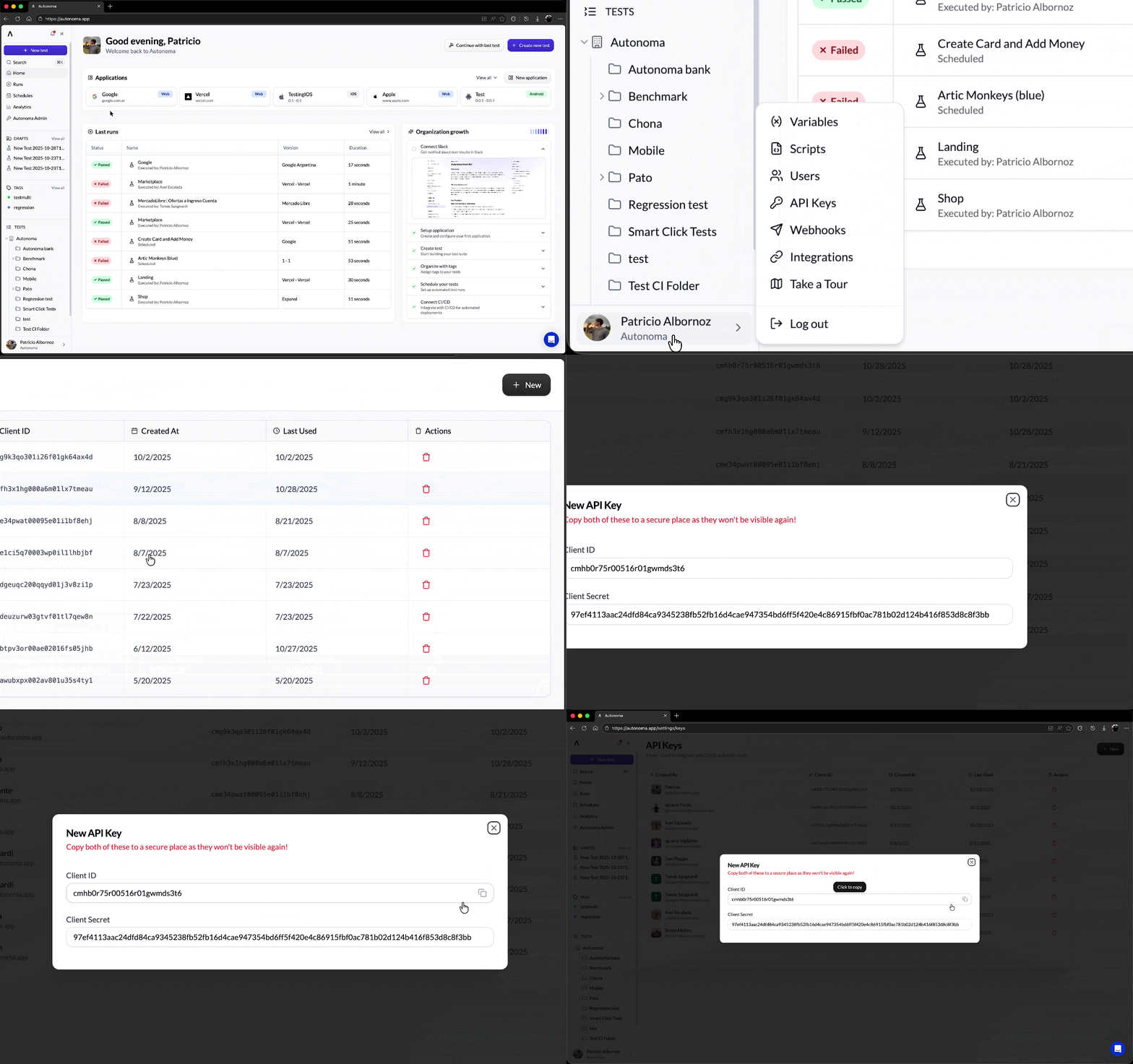
You'll need:
- Client ID: Your unique identifier
- Client Secret: Your secret key (keep this secure!)
GitHub Actions is GitHub's built-in automation platform. If your code is on GitHub, this is the easiest option.
Step 1: Go to Settings > Integrations in your Autonoma dashboard.


Copy the action job configuration from the Integrations page and paste it into your GitHub Actions workflow file (.github/workflows/deploy.yml):
- In your GitHub repository, go to Settings → Secrets and variables → Actions
- Add your API credentials as secrets:
AUTONOMA_CLIENT_ID: Your client ID from the API Keys sectionAUTONOMA_CLIENT_SECRET: Your client secret from the API Keys section
jobs:
  run_autonoma_tests:
    runs-on: ubuntu-latest
    name: Run Autonoma Tests

    steps:
      - name: Run Single Test (cmbi807au0172xv01dqu4drhi)
        id: step-1
        uses: autonoma-ai/actions/test-runner@v1
        with:
          test-id: 'cmbi807au0172xv01dqu4drhi'
          client-id: ${{ secrets.AUTONOMA_CLIENT_ID }}
          client-secret: ${{ secrets.AUTONOMA_CLIENT_SECRET }}
          max-wait-time: '10'
      - name: Show cmbi807au0172xv01dqu4drhi results
        if: always()
        run: |
          echo "Test status: ${{ steps.step-1.outputs.final-status }}"
          echo "Message: ${{ steps.step-1.outputs.message }}"
echo "View results at: ${{ steps.step-1.outputs.url }}"The default configuration runs on every push. You can customize this:
Run on every Pull Request:
on:
  pull_request:
    branches: [ main, develop ]
Run on every push to main:
on:
  push:
    branches: [ main ]
Run on both PR and push:
on:
  pull_request:
    branches: [ main ]
  push:
    branches: [ main ]
Run on schedule (e.g., nightly):
on:
  schedule:
- cron: '0 2 * * *' # Runs at 2 AM UTC every dayOnce configured:
- Developer creates a Pull Request
- GitHub automatically runs your workflow
- Autonoma receives the request and runs your tests
- Results appear in the GitHub PR:
- ✅ Green checkmark if tests pass
- ❌ Red X if tests fail
- Team can see test results before merging
Result: No broken code reaches your main branch!
GitLab CI is GitLab's built-in automation platform. If your code is on GitLab, use this option.
Step 1: Go to Settings > Integrations in your Autonoma dashboard.
- Go to your GitLab project
- Navigate to Settings → CI/CD
- Expand Variables
- Click Add variable
- Key:
CLIENT_ID, Value: Your Autonoma client ID - Key:
CLIENT_SECRET, Value: Your Autonoma client secret - Check Mask variable (hides it in logs)
- Click Add variable
In your repository, create or edit .gitlab-ci.yml:
stages:
  - test

autonoma_tests:
  stage: test
  script:
    - curl -X POST \
        --silent \
        --retry 3 \
        --retry-connrefused \
        --location "https://api.prod.autonoma.app/v1/run/folder/$FOLDER_ID" \
        --header "autonoma-client-id: $CLIENT_ID" \
        --header "autonoma-client-secret: $CLIENT_SECRET" \
        --header "Content-Type: application/json" || true
  only:
    - merge_requests
    - main
👉 Set FOLDER_ID as an environment variable in GitLab → Settings → CI/CD → Variables.
Run only on merge requests:
only:
  - merge_requests
Run different tests on different branches:
smoke_tests:
  stage: test
  script:
    - curl -X POST ... --location "https://api.prod.autonoma.app/v1/run/folder/$SMOKE_FOLDER_ID" ...
  only:
    - merge_requests

regression_tests:
  stage: test
  script:
    - curl -X POST ... --location "https://api.prod.autonoma.app/v1/run/folder/$REGRESSION_FOLDER_ID" ...
  only:
    - main
Bitbucket Pipelines is Bitbucket's built-in automation platform.
Step 1: Go to Settings > Integrations in your Autonoma dashboard.
- Go to your Bitbucket repository
- Navigate to Repository settings
- Click Repository variables (under Pipelines)
- Click Add variable
- Name:
CLIENT_ID, Value: Your Autonoma client ID - Name:
CLIENT_SECRET, Value: Your Autonoma client secret - Check Secured (encrypts the variable)
- Click Add
In your repository, create or edit bitbucket-pipelines.yml:
pipelines:
  default:
    - step:
        name: Deploy
        script:
          - curl -X POST \
              --silent \
              --retry 3 \
              --retry-connrefused \
              --location "https://api.prod.autonoma.app/v1/run/folder/$FOLDER_ID" \
              --header "autonoma-client-id: $CLIENT_ID" \
              --header "autonoma-client-secret: $CLIENT_SECRET" \
              --header "Content-Type: application/json" || true
👉 Set FOLDER_ID in Bitbucket Repository Variables under Repository settings → Pipelines → Repository variables.
If you use Jenkins, CircleCI, Travis CI, or any other CI/CD system, you can use cURL commands directly.
cURL is a command-line tool that makes HTTP requests. It's pre-installed on most systems and works everywhere.
Think of it like this: instead of clicking buttons in a web browser, you're telling your computer to visit a URL and perform an action.
You can build the cURL command manually or find it in Autonoma:
- Log into Autonoma
- Go to a test or folder
- Click the three dots menu
- Select "Get cURL command"
- Copy the generated command
Here's a basic cURL command for running tests:
curl -X POST \
  --silent \
  --retry 3 \
  --retry-connrefused \
  --location 'https://api.prod.autonoma.app/v1/run/folder/<folder-id>' \
  --header 'autonoma-client-id: <client-id>' \
  --header 'autonoma-client-secret: <client-secret>' \
  --header 'Content-Type: application/json' || true
Let's break it down:
curl- The command tool-X POST- Type of request (POST means we're sending data)--silent- Don't show progress meter--retry 3- Retry up to 3 times on failure--retry-connrefused- Retry on connection refused--location- Follow redirects--header- Authentication headers|| true- Don't fail the pipeline if the command fails
Run tests by folder:
curl -X POST \
  --silent \
  --retry 3 \
  --retry-connrefused \
  --location 'https://api.prod.autonoma.app/v1/run/folder/<folder-id>' \
  --header 'autonoma-client-id: <client-id>' \
  --header 'autonoma-client-secret: <client-secret>' \
  --header 'Content-Type: application/json' || true
Run a single test:
curl -X POST \
  --silent \
  --retry 3 \
  --retry-connrefused \
  --location 'https://api.prod.autonoma.app/v1/run/test/<test-id>' \
  --header 'autonoma-client-id: <client-id>' \
  --header 'autonoma-client-secret: <client-secret>' \
--header 'Content-Type: application/json' || trueAdd an Execute Shell build step:
curl -X POST \
  --silent \
  --retry 3 \
  --retry-connrefused \
  --location "https://api.prod.autonoma.app/v1/run/folder/$FOLDER_ID" \
  --header "autonoma-client-id: $CLIENT_ID" \
  --header "autonoma-client-secret: $CLIENT_SECRET" \
--header "Content-Type: application/json" || trueAdd to .circleci/config.yml:
jobs:
  test:
    steps:
      - run:
          name: Run Autonoma Tests
          command: |
            curl -X POST \
              --silent \
              --retry 3 \
              --retry-connrefused \
              --location "https://api.prod.autonoma.app/v1/run/folder/$FOLDER_ID" \
              --header "autonoma-client-id: $CLIENT_ID" \
              --header "autonoma-client-secret: $CLIENT_SECRET" \
--header "Content-Type: application/json" || trueAdd to .travis.yml:
script:
  - curl -X POST \
      --silent \
      --retry 3 \
      --retry-connrefused \
      --location "https://api.prod.autonoma.app/v1/run/folder/$FOLDER_ID" \
      --header "autonoma-client-id: $CLIENT_ID" \
      --header "autonoma-client-secret: $CLIENT_SECRET" \
--header "Content-Type: application/json" || trueOn Pull Requests → Run smoke tests (fast feedback)
Tags: smoke
Time: ~5 minutes
Purpose: Catch critical breaks quickly
Before Merging → Run regression tests (thorough check)
Tags: regression
Time: ~20 minutes
Purpose: Comprehensive verification
After Deployment → Run smoke tests in production
Tags: smoke, production-safe
Time: ~5 minutes
Purpose: Verify deployment succeeded
Configure your CI/CD to stop if Autonoma tests fail:
# Example for GitHub Actions
- name: Run Tests
  run: curl ...
  # If curl returns non-zero (test failed), pipeline stops
This prevents broken code from being deployed.
Configure notifications so the team knows when tests fail:
In Autonoma:
- Go to Integrations
- Set up Slack notifications
- Choose which failures to notify about
In Your CI/CD System: Most platforms (GitHub, GitLab, etc.) automatically notify on pipeline failures.
Bad:
- name: TestsGood:
- name: Autonoma Smoke Tests - Authentication and CheckoutWhen tests fail, the job name tells you what broke.
You don't need to run your entire test suite on every single change.
Smart approach:
- Every PR: Smoke tests (5-10 critical tests)
- Before merge: Regression tests (all tests)
- Nightly: Regression tests (catches accumulated issues)
- After deploy: Smoke tests (verification)
Check:
- Is your API token correct?
- Is the token properly stored as a secret/variable?
- Is the workflow/pipeline file in the correct location?
- Are you triggering the right events (PR, push, etc.)?
Check:
- Do tests pass when run manually in Autonoma?
- Is the test environment accessible from CI/CD?
- Are there environment-specific issues (URLs, credentials)?
Check:
- Are you running too many tests? Run fewer tests more frequently
- Is there a timeout configuration in your CI/CD? Increase it
- Are tests stuck on a loading state? Add better waits
Check:
- Is the cURL command configured to show output?
- Are you checking the right logs/build output?
- Is Autonoma receiving the request? (Check Autonoma dashboard)
- CI/CD automates test execution - no manual test running required
- Catch bugs before they reach users - tests run automatically on code changes
- Multiple integration options - GitHub Actions, GitLab CI, Bitbucket, cURL
- Run different tests at different stages - smoke tests for speed, regression for thoroughness
- Fail fast - stop the pipeline if critical tests fail
- Smart testing strategy - don't run all tests everywhere, be strategic
This ensures your CI/CD pipeline can trigger the API reliably. 🚀