This describes how to use Logic; for more information, see here.
Rules enforce business policy — multi-table derivations, constraints, and actions like messaging. They are Python functions in logic/logic_discovery/ — readable, version-controlled, and owned like any other source file.
But unlike procedural code, rules are declarative — which has important implications:
| Property | What it means | Why it matters |
|---|---|---|
| Auto-reused | Customer.balance = sum of unpaid orders — declared once, enforced over every change path |
No per-path handlers to write or miss |
| Auto-invoked | Rules fire at every commit, from every caller — you never call them | Can't be forgotten, can't be bypassed |
| Auto-ordered | The engine computes dependency order at startup | Add a rule anywhere, it finds its place |
If it helps: think of a spreadsheet — B10 = SUM(B1:B9), and every recalculation just happens. Rules work the same way for database transactions.
Taken together: 40x less code to write, maintain, and debug — see the A/B test for the reproducible comparison.
What is Logic: Multi-table Derivation and Constraint Rules, Extensible with Python
Rules are:
1. Declared in your IDE - 40X more concise
2. Activated on server start
3. Executed - automatically - on updates (using SQLAlchemy events)
4. Debugged in your IDE, and with the console log
For more on rules, click here.
You can provide prompts like this to CoPilot. This is a good approach for new users:
Create Business Logic for on Placing Orders, Check Credit:
    1. The Customer's balance is less than the credit limit
    2. The Customer's balance is the sum of the Order amount_total where date_shipped is null
    3. The Order's amount_total is the sum of the Item amount
    4. The Item amount is the quantity * unit_price
    5. The Item unit_price is copied from the Product unit_price

Use case: App Integration
    1. Send the Order to Kafka topic 'order_shipping' if the date_shipped is not None.
Basic process:
- Create a file such as
logic/logic_discovery/check_credit.py(e.g., copy fromuse_case.py). - Paste the prompt above into CoPilot - it uses
docs/trainingto generate logic - Paste the generated logic into
logic/logic_discovery/check_credit.py
From the Natural Language, Copilot will create Python rules (you can also create these directly using code completion):
    if os.environ.get("WG_PROJECT"):
        # Inside WG: Load rules from docs/expprt/export.json
        load_verify_rules()
    else:
        # Outside WG: load declare_logic function
        from logic.logic_discovery.auto_discovery import discover_logic
        discover_logic()

    # Logic from GenAI: (or, use your IDE w/ code completion)
    from database.models import Product, Order, Item, Customer, SysEmail

    # Ensure the customer's balance is less than their credit limit
    Rule.constraint(validate=Customer, as_condition=lambda row: row.balance <= row.credit_limit, error_msg="Customer balance ({row.balance}) exceeds credit limit ({row.credit_limit})")

    # Derive the customer's balance as the sum of order totals where not yet shipped.
    Rule.sum(derive=Customer.balance, as_sum_of=Order.amount_total, where=lambda row: row.date_shipped is None)

    # Derive the order's total amount from the sum of item amounts.
    Rule.sum(derive=Order.amount_total, as_sum_of=Item.amount)

    # Calculate item amount based on quantity and unit price.
    Rule.formula(derive=Item.amount, as_expression=lambda row: row.quantity * row.unit_price)

    # Copy unit price from product to item.
    Rule.copy(derive=Item.unit_price, from_parent=Product.unit_price)

    # Send order details to Kafka if order is shipped.
    Rule.after_flush_row_event(on_class=Order, calling=kafka_producer.send_row_to_kafka, if_condition=lambda row: row.date_shipped is not None, with_args={'topic': 'order_shipping'})

# End Logic from GenAIIf you are using WebGenAI, you can specify rules in Natural Language. You can also augment them in the IDE using code completion. There are some important usage guidelines.
You should generally not alter any files in the
wg_rulesdirectory. For more information, see WebGenAI, and WebGenAI Logic.
You can declare logic in declare_logic.py,
but that can lead to a lot of rules in 1 file.
A best practice is to create logic files in logic/logic_discovery,
named after the use case (e.g., check_credit.py).
The easiest way to to copy/paste use_case.py to a new file, then
add your logic either by Natural Language (use your Coding Assistant, such as CoPilot),
or your IDE's code completion.
Examples from tutorial project:
- Examples drawn from tutorial project
- Use Shift + "." to view in project mode
You can find the rules here. Below, we explore the syntax of 3 typical rules.
This declares the Customer.Balance as the sum of the unshipped Order.AmountTotal:
    Rule.sum(derive=models.Customer.Balance,
            as_sum_of=models.Order.AmountTotal,
            where=lambda row: row.ShippedDate is None)
It means the rule engine watches for these changes:
- Order inserted/deleted, or
- AmountTotal or ShippedDate or CustomerID changes
Iff changes are detected, the engine reacts by adjusting the Customer.Balance. SQLs are optimized - see Important Notes, below.
This would chain to check the Customers' Constraint rule, described below.
Constraints are multi-field conditions which must be true for transactions to succeed (else an exception is raised). You can express the condition as a lambda or a function:
As a lambda:
    Rule.constraint(validate=models.Customer,
        as_condition=lambda row: row.Balance <= row.CreditLimit,  # parent references are supported
        error_msg="balance ({row.Balance}) exceeds credit ({row.CreditLimit})")
Or, as a function:
    def check_balance(row: models.Customer, old_row: models.Customer, logic_row: LogicRow):
        if logic_row.ins_upd_dlt != "dlt":  # see also: logic_row.old_row
            return row.Balance <= row.CreditLimit
        else:
            return True

    Rule.constraint(validate=models.Customer,
        calling=check_balance,
        error_msg=f"balance ({row.Balance}) exceeds credit ({row.CreditLimit})")
Events are procedural Python code, providing extensibility for declarative rules:
    def congratulate_sales_rep(row: models.Order, old_row: models.Order, logic_row: LogicRow):
        pass  # event code here - sending email, messages, etc.

    Rule.commit_row_event(on_class=models.Order, calling=congratulate_sales_rep)
Note there are multiple kinds of events, so you can control whether they run before or after rule execution. For more information, see here.
A key argument to functions is logic_row:
- Wraps row and old_row, plus methods for insert, update and delete - rule enforcement
- Additional instance variables: ins_upd_dlt, nest_level, session, etc.
- Helper Methods: are_attributes_changed, set_same_named_attributes, get_parent_logic_row(role_name), get_derived_attributes, log, is_inserted, etc
Here is an example:
"""
    STATE TRANSITION LOGIC, using old_row
"""
def raise_over_20_percent(row: models.Employee, old_row: models.Employee, logic_row: LogicRow):
    if logic_row.ins_upd_dlt == "upd" and row.Salary > old_row.Salary:
        return row.Salary >= Decimal('1.20') * old_row.Salary
    else:
        return True

Rule.constraint(validate=models.Employee,
                calling=raise_over_20_percent,
                error_msg="{row.LastName} needs a more meaningful raise")
Note the log method, which enables you to write row/old_row into the log with a short message:
logic_row.log("no manager for this order's salesrep")
Logic declarative, which differs from conventional procedural logic:
-
Automatic Invocation: you don't call the rules; they execute in response to updates (via SQLAlchemy events).
-
Automatic Ordering: you don't order the rules; execution order is based on system-discovered depencencies.
-
Automatic Optimizations: logic is optimized to reduce SQLs.
- Rule execution is pruned if dependent attributes are not altered
- SQL is optimized, e.g.,
sumrules operate by adjustment, not expensive SQLselect sum
These simplify maintenance / iteration: you can be sure new logic is always called, in the correct order.
Debug rules using system-generated logic log and your IDE debugger; for more information, see here.
Use the debugger as shown below. Note you can stop in lambda functions.
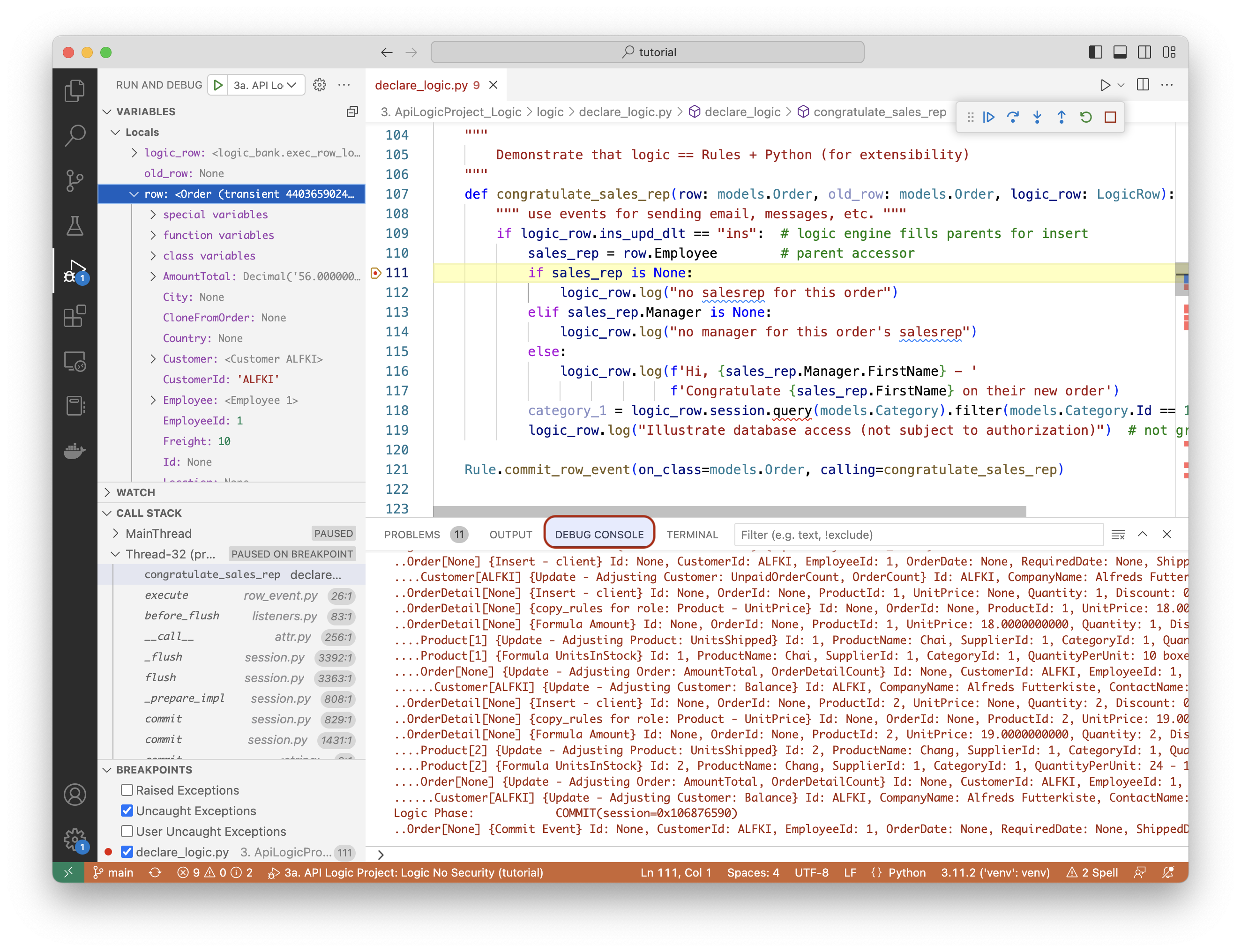
Logging is performed using standard Python logging, with a logger named logic_logger. Use info for tracing, and debug for additional information (e.g., all declared rules are logged).
In addition, the system logs all rules that fire, to aid in debugging. Referring the the screen shot above:
- Each line represents a rule execution, showing row state (old/new values), and the {reason} that caused the update (e.g., client, sum adjustment)
- Log indention shows multi-table chaining
Activation occurs in api_logic_server_run.py:
LogicBank.activate(session=session, activator=declare_logic, constraint_event=constraint_handler)This installs the rule engine as a SQLAlchemy event listener (before_flush). So, Logic runs automatically, in response to transaction commits (typically via the API).
Rules plug into SQLAlchemy events, and execute as follows:
| Logic Phase | Why It Matters |
|---|---|
| Watch for changes at the attribute level | Performance - Automatic Attribute-level Pruning |
| React by recomputing value | Ensures Reuse - Invocation is automatic Derivations are optimized (e.g. adjustment updates - not aggregate queries) |
| Chain to other referencing data | Simplifies Maintenance - ordering is automatic Multi-table logic automation |
This pattern is sometimes called Reactive Dependency Propagation. Automatic dependency management accounts is why 5 declarative lines represent the same logic as 200 lines of declarative Python
- To view a AI procedural/declarative comparison, click here
- Rules typically automate over 95% of your logic, so the results can be significant. Consider a 100 table system: 1,000 rules vs. 40,000 lines of code