The project is all about touch typing and tracking performance. The user can select from different modes like classic and time attack and can choose the difficulty level easy, medium, hard accordingly in both modes and can track the performance immediately after finishing the test from terminal or as well from their personalized scoreboard, which can be accessed from the menu which shows all the stats like accuracy, words per minute(WPM), no. of times test taken and more.
The program can recognize new users and previous users, using their names and show options accordingly.
The project makes use of the following different features in OOPS:
1. Inheritance
2. Abstraction
3. Encapsulation
4. Friend functions
- Users
- Menu
- Time
- UserInput
- Paragraph
- Report
- ClassicMode
- TimeAttackMode
Class variables :
- users: It is a vector holding the names of the registered users in the Database.
- scores: It is a vector holding the scores of an individual player along with the average accuracy, wpm (words per minute) & number of test taken
Class functions :
- Users(): It is the constructor and is used to intialize the users vector if a vector is passed as a parameter.
- menu(): It displays the available User Reports sub options to the users like : User Data, User List, Register User.
- getUsers(): This function injects the number of users in the users vector after traversing through the Database files.
- printUsers(): This function prints all the registered users list on the screen.
- getUserData(): This function injects the scores of a particular user in the scores vector after traversing through that user's .txt file.
- printUserData(): This function prints all the information along with the users scores on the screen.
- addUserStarting(): This function prompts an upcoming user to register before the game starts
- updateUserInfo(): This function updates the user informations like average accuracy, wpm and no. of tests taken.
- updateScores(): This function updates the scores in all the levels of Classic and TimeAttack game mode.
- pressEnter(): This function just prompts the user to press the Enter key wherever required. It has been implemented as a friend function.
Class variables :
- choice: Variable that stores the users choice in the menu.
- playerName: Variable that stores the name entered by the user for storing scores.
- userObj: An object of the Users class that is responsible for managing the scores of the various users.
Class functions :
- logo(): It displays the intro banner for the program.
- start(): This function sets the username of the player in the userObj object.
- menu(): This function displays the application menu and allows the user to select the mode, view user data or quit.
- modes(): This function is responsible for selecting and initializing the game mode as selected by the user.
Class variables :
- start: Static inline variable of the clock instance in C++ used to set starting time.
- stop: Static inline variable of the clock instance in C++ used to set stoping time.
- target: Variable that stores the time limit for time attack mode.
Class functions :
- Time(): It is the constructor and is used to initialize the class variables.
- startClock(): Static function to set the start time to the current time.
- stopClock(): Static function to set the stop time to the current time.
- lap(): Static function to lap over the current elapsed time and set the stop time to current time.
- getTime(): Static function to get the elapsed time between start and stop.
- getTarget(): Static funciton to get the target value.
- setTarget(): Static function to set the target value.
- startIn(): Static function that informs the user about the selected mode being started.
Class variables :
- errors: Variable to store the count of errors made.
- mode: Variable to store the mode selected by the user.
- timeFinished: Variable to check if the time is up.
- wpm: Variable to store the words per minute of the user.
- total: Variable to store the total count.
- fixed: Variable to store the fixed errors.
- position: Variable that stores the current typing position.
- s: Variable that stores the string to be typed.
- typed: Variable that stores the typed string.
- current: Variable that stores the current character.
- accuracy: Variable that stores the accuracy of the user.
- terminate: Variable to check program termination.
Class functions :
- UserInput(): It is the constructor and is used to initialize the class variables to the default values as well as set s and mode based on passed arguments.
- type(): This function is responsible for managing the typing interface.
- isTimeFinished(): This function returns the finish time of the application.
- isTerminated(): This function returns if the program is to be terminated or not.
- getErrors(): This function returns the count of errors made during typing.
- getTotal(): This function returns the position till which has been typed.
- getAccuracy(): This function returns the accuracy of the user.
- getFixedErrors(): This function returns the count of the errors that were fixed.
- getWordCount(): This function returns the number of words typed.
- ~UserInput(): It is the destructor and is used to free the memory once the object is no longer needed.
Class variables :
- difficulty: Variable to store the difficulty selected by the user.
- toType: Variable that stores the entire string to be typed.
Class functions :
- Paragraph(): It is the constructor and is used to initialize the class variables and set the difficulty based on passed parameters.
- getParagraph(): This function is responsible for splitting the paragraph into different lines.
Class variables :
- words: Variable to save words typed.
- errors: Variable to save errors count.
- total: Variable to save total count.
- fixedErr: Variable to save count of fixed errors.
- avgAccuracy: Variable to save average accuracy of the user.
- time: Variable to save the time taken by the user.
Class functions :
- Report(): It is the constructor and is used to initialize the class variables.
- getWords(): It is used to get count of words.
- getErrors(): This function saves the count of errors.
- getTotal(): This function saves the count of total.
- getFixedErr(): This function returns the count of fixed errors.
- getAvgAccuracy(): This function returns the average accuracy.
- getTime(): This function returns the time elapsed.
- setWords(): This function sets the count of words.
- setErrors(): This function sets the count of errors.
- setTotal(): This function sets the count of total.
- setFixedErr(): This function sets the count of fixed errors.
- setAvgAccuracy(): This function sets the average accuracy.
- setTime(): This function sets the time.
- updateDetails(): This function updates the scores of the user to be saved.
- printDetails(): This function prints the details of the user to the screen.
Class variables :
- level: variable to store the difficulty level.
- playerName: variable to store the name of the player.
- userObj: object of the Users class to store details of the user.
Class functions :
- ClassicMode(): It is the constructor and is used to initialize the class variables.
- menu(): This function shows the menu options for classic mode.
- takeTest(): This function starts the typing test.
- easy(): This function starts the easy mode.
- medium(): This function starts the medium mode.
- hard(): This function starts the hard mode.
- pressEnter(): Friend function.
Class variables :
- level: variable to store the difficulty level.
- playerName: variable to store the name of the player.
- userObj: object of the Users class to store details of the user.
Class functions :
- TimeAttackMode(): It is the constructor and is used to initialize the class variables.
- menu(): This function shows the menu options for time attack mode.
- takeTest(): This function starts the typing test.
- sec_30(): This function starts the 30 second mode.
- sec_60(): This function starts the 60 second mode.
- sec_90(): This function starts the 90 second mode.
- pressEnter(): Friend function.
1. Classic Mode :
Classic Mode
|--- Easy
|--- Medium
|--- Hard
- Classic Mode Menu : It allows user to select the mode or navigate back to the Main Menu
Output :
************************************************************************************************
  _______                   _                     __  __                 _
 |__   __|                 (_)                   |  \/  |               | |
    | |     _   _   _ __    _   _ __     __ _    | \  / |   __ _   ___  | |_    ___   _ __
    | |    | | | | | '_ \  | | | '_ \   / _` |   | |\/| |  / _` | / __| | __|  / _ \ | '__|
    | |    | |_| | | |_) | | | | | | | | (_| |   | |  | | | (_| | \__ \ | |_  |  __/ | |
    |_|     \__, | | .__/  |_| |_| |_|  \__, |   |_|  |_|  \__,_| |___/  \__|  \___| |_|
             __/ | | |                   __/ |
            |___/  |_|                  |___/
************************************************************************************************

                                  Welcome to Typing Master

Welcome pratul!

Select the Mode:-

1. Classic Mode
2. Time Attack Mode
3. User Reports
4. Exit
Enter Your Choice: 1

Select the level:-
1. Easy
2. Medium
3. Hard
4. Back To Main Menu
Enter your choice: 1
- Easy Mode : 30 seconds test in Time Attack Mode
Output :
************************************************************************************************
  _______                   _                     __  __                 _
 |__   __|                 (_)                   |  \/  |               | |
    | |     _   _   _ __    _   _ __     __ _    | \  / |   __ _   ___  | |_    ___   _ __
    | |    | | | | | '_ \  | | | '_ \   / _` |   | |\/| |  / _` | / __| | __|  / _ \ | '__|
    | |    | |_| | | |_) | | | | | | | | (_| |   | |  | | | (_| | \__ \ | |_  |  __/ | |
    |_|     \__, | | .__/  |_| |_| |_|  \__, |   |_|  |_|  \__,_| |___/  \__|  \___| |_|
             __/ | | |                   __/ |
            |___/  |_|                  |___/
************************************************************************************************

                                  Classic Mode (easy)

To stop, press ^
Starting in 3... 2... 1...

You can decide what you want to do in life, but I suggest doing something that creates

You can decide what you want to do in life, but I suggest doing something that creates (2 lines Remaining)

Something that leaves a tangible thing once you're done

Something that leaves a tangible thing once you're done (1 lines Remaining)

That way even after you're gone, you will still live on in the things you created

That way even after you're gone, you will still live on in the things you created (0 lines Remaining)


           Results
******************************
    Errors   |     5
     Fixed   |     5
     Speed   |    55
  Accuracy   | 98.06 %
Time Taken   | 42.94 seconds

Press Enter to continue.
2. Time Attack Mode :
Time Attack Mode
|--- 30 seconds
|--- 60 seconds
|--- 90 seconds
- Time Attack Mode Menu : It allows user to select the mode or navigate back to the Main Menu
Output :
************************************************************************************************
  _______                   _                     __  __                 _
 |__   __|                 (_)                   |  \/  |               | |
    | |     _   _   _ __    _   _ __     __ _    | \  / |   __ _   ___  | |_    ___   _ __
    | |    | | | | | '_ \  | | | '_ \   / _` |   | |\/| |  / _` | / __| | __|  / _ \ | '__|
    | |    | |_| | | |_) | | | | | | | | (_| |   | |  | | | (_| | \__ \ | |_  |  __/ | |
    |_|     \__, | | .__/  |_| |_| |_|  \__, |   |_|  |_|  \__,_| |___/  \__|  \___| |_|
             __/ | | |                   __/ |
            |___/  |_|                  |___/
************************************************************************************************

                                  Welcome to Typing Master

Welcome pratul!

Select the Mode:-

1. Classic Mode
2. Time Attack Mode
3. User Reports
4. Exit
Enter Your Choice: 2

Select the Time:-
1. 30 seconds
2. 60 seconds
3. 90 seconds
4. Back To Main Menu
Enter your choice: 1
- 30 Seconds Mode : 30 seconds test in Time Attack Mode
Output :
************************************************************************************************
  _______                   _                     __  __                 _
 |__   __|                 (_)                   |  \/  |               | |
    | |     _   _   _ __    _   _ __     __ _    | \  / |   __ _   ___  | |_    ___   _ __
    | |    | | | | | '_ \  | | | '_ \   / _` |   | |\/| |  / _` | / __| | __|  / _ \ | '__|
    | |    | |_| | | |_) | | | | | | | | (_| |   | |  | | | (_| | \__ \ | |_  |  __/ | |
    |_|     \__, | | .__/  |_| |_| |_|  \__, |   |_|  |_|  \__,_| |___/  \__|  \___| |_|
             __/ | | |                   __/ |
            |___/  |_|                  |___/
************************************************************************************************

                                  Time Attack Mode (30 seconds)

To stop, press ^
Starting in 3... 2... 1...

Out of another, I get a lovely view of the bay and a little private wharf belonging to the estate

Out of another, I get a lovely view of the bay and a little private wharf belonging to the estate (9.49034 seconds remaining)

There is a beautiful shaded lane that runs down there from the house

There is a beautiful shaded lane that runs down there

***************Time Finished***************

           Results
******************************
    Errors   |     5
     Fixed   |     5
     Speed   |    56
  Accuracy   | 96.99 %
Time Taken   | 30.03 seconds

Press Enter to continue.
3. User Reports :
User Reports
|--- User Data
|--- Users List
|--- Register User
- User Data : It allows the users to get information about any users registered in the Database.
Output :
************************************************************************************************
  _______                   _                     __  __                 _
 |__   __|                 (_)                   |  \/  |               | |
    | |     _   _   _ __    _   _ __     __ _    | \  / |   __ _   ___  | |_    ___   _ __
    | |    | | | | | '_ \  | | | '_ \   / _` |   | |\/| |  / _` | / __| | __|  / _ \ | '__|
    | |    | |_| | | |_) | | | | | | | | (_| |   | |  | | | (_| | \__ \ | |_  |  __/ | |
    |_|     \__, | | .__/  |_| |_| |_|  \__, |   |_|  |_|  \__,_| |___/  \__|  \___| |_|
             __/ | | |                   __/ |
            |___/  |_|                  |___/
************************************************************************************************

                                  Welcome to Typing Master

Welcome gurpreet!

Select the Mode:-

1. Classic Mode
2. Time Attack Mode
3. User Reports
4. Exit
Enter Your Choice: 3

Select from the follwing choice:-
1. User Data
2. Users List
3. Register User
Enter your choice: 1
Enter the player's name you want to search:- gurpreet
***************************************
        gurpreet's Scoreboard :
***************************************
              Classic Mode
            Easy   |      12
          Medium   |     100
            Hard   |   34.81

           Time Attack Mode
      30 seconds   |      90
      60 seconds   |      65
      90 seconds   |      79

                 Stats
        Accuracy   | 49.4899
Words per Minute   |      49
     Tests Taken   |      49
***************************************

Press Enter to continue.
- Users List : It allows the users to get the list of all the registered users in the Database.
Output :
************************************************************************************************
  _______                   _                     __  __                 _
 |__   __|                 (_)                   |  \/  |               | |
    | |     _   _   _ __    _   _ __     __ _    | \  / |   __ _   ___  | |_    ___   _ __
    | |    | | | | | '_ \  | | | '_ \   / _` |   | |\/| |  / _` | / __| | __|  / _ \ | '__|
    | |    | |_| | | |_) | | | | | | | | (_| |   | |  | | | (_| | \__ \ | |_  |  __/ | |
    |_|     \__, | | .__/  |_| |_| |_|  \__, |   |_|  |_|  \__,_| |___/  \__|  \___| |_|
             __/ | | |                   __/ |
            |___/  |_|                  |___/
************************************************************************************************

                                  Welcome to Typing Master

Welcome gurpreet!

Select the Mode:-

1. Classic Mode
2. Time Attack Mode
3. User Reports
4. Exit
Enter Your Choice: 3

Select from the follwing choice:-
1. User Data
2. Users List
3. Register User
Enter your choice: 2

1. anant
2. anonymous
3. gurpreet
4. pratul

Press Enter to continue.
- Register User : One can freshly register a new user by choosing this option.
Output :
************************************************************************************************
  _______                   _                     __  __                 _
 |__   __|                 (_)                   |  \/  |               | |
    | |     _   _   _ __    _   _ __     __ _    | \  / |   __ _   ___  | |_    ___   _ __
    | |    | | | | | '_ \  | | | '_ \   / _` |   | |\/| |  / _` | / __| | __|  / _ \ | '__|
    | |    | |_| | | |_) | | | | | | | | (_| |   | |  | | | (_| | \__ \ | |_  |  __/ | |
    |_|     \__, | | .__/  |_| |_| |_|  \__, |   |_|  |_|  \__,_| |___/  \__|  \___| |_|
             __/ | | |                   __/ |
            |___/  |_|                  |___/
************************************************************************************************

                                  Welcome to Typing Master

Welcome gurpreet!

Select the Mode:-

1. Classic Mode
2. Time Attack Mode
3. User Reports
4. Exit
Enter Your Choice: 3

Select from the follwing choice:-
1. User Data
2. Users List
3. Register User
Enter your choice: 3
Enter your user name:- test101
test101 has been registered succesfully
Press Enter to continue.
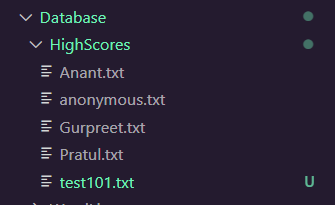
As you can see, a new test101.txt file has been created in Database/HighScores folder, whenever a new un-registered user register and all the scores and userInfo has been intialised "0" be default
The above Typing-Master program is of great use for those who want to improve their typing speed.