en dev star guides listen message event
Event listeners can receive message content delivered by the platform and implement features such as commands, command groups, and event listening.
Event listener decorators are located in astrbot.api.event.filter and must be imported first. Please make sure to import it, otherwise it will conflict with Python's built-in filter higher-order function.
from astrbot.api.event import filter, AstrMessageEventAstrBot receives messages delivered by messaging platforms and encapsulates them as AstrMessageEvent objects, which are then passed to plugins for processing.

AstrMessageEvent is AstrBot's message event object, which stores information about the message sender, message content, etc.
AstrBotMessage is AstrBot's message object, which stores the specific content of messages delivered by the messaging platform. The AstrMessageEvent object contains a message_obj attribute to retrieve this message object.
class AstrBotMessage:
    '''AstrBot's message object'''
    type: MessageType  # Message type
    self_id: str  # Bot's identification ID
    session_id: str  # Session ID. Depends on the unique_session setting.
    message_id: str  # Message ID
    group_id: str = "" # Group ID, empty if it's a private chat
    sender: MessageMember  # Sender
    message: List[BaseMessageComponent]  # Message chain. For example: [Plain("Hello"), At(qq=123456)]
    message_str: str  # The most straightforward plain text message string, concatenating Plain messages (text messages) from the message chain
    raw_message: object
    timestamp: int  # Message timestamp
Here, raw_message is the raw message object from the messaging platform adapter.
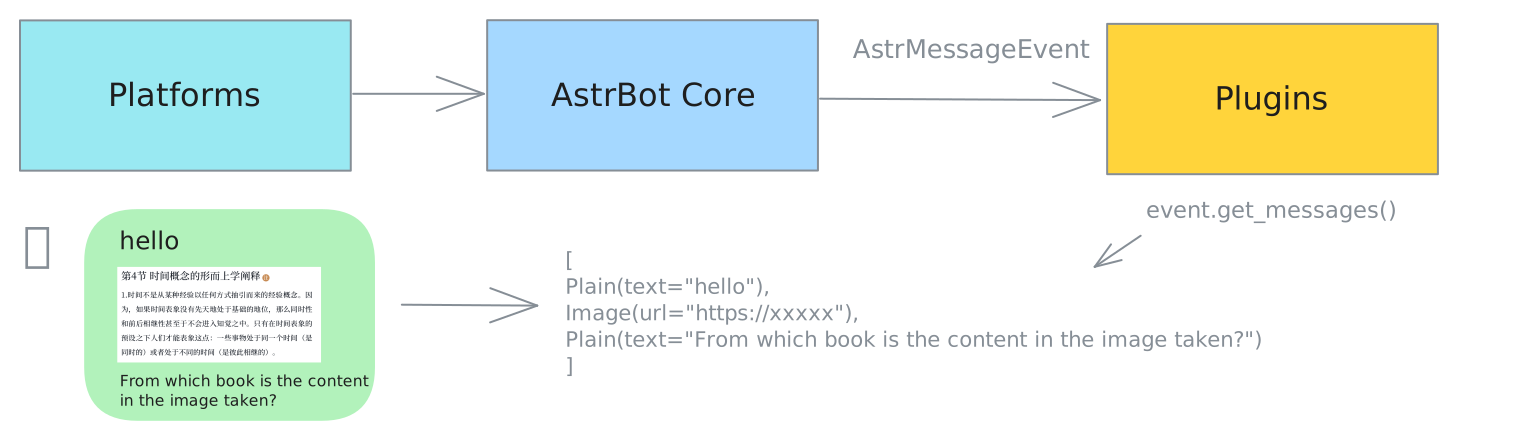
A message chain describes the structure of a message. It's an ordered list where each element is called a message segment.
Common message segment types include:
-
Plain: Text message segment -
At: Mention message segment -
Image: Image message segment -
Record: Audio message segment -
Video: Video message segment -
File: File message segment
Most messaging platforms support the above message segment types.
Additionally, the OneBot v11 platform (QQ personal accounts, etc.) also supports the following common message segment types:
-
Face: Emoji message segment -
Node: A node in a forward message -
Nodes: Multiple nodes in a forward message -
Poke: Poke message segment
In AstrBot, message chains are represented as lists of type List[BaseMessageComponent].

from astrbot.api.event import filter, AstrMessageEvent
from astrbot.api.star import Context, Star

class MyPlugin(Star):
    def __init__(self, context: Context):
        super().__init__(context)

    @filter.command("helloworld") # from astrbot.api.event.filter import command
    async def helloworld(self, event: AstrMessageEvent):
        '''This is a hello world command'''
        user_name = event.get_sender_name()
        message_str = event.message_str # Get the plain text content of the message
        yield event.plain_result(f"Hello, {user_name}!")
Tip
Commands cannot contain spaces, otherwise AstrBot will parse them as a second parameter. You can use the command group feature below, or use a listener to parse the message content yourself.

AstrBot will automatically parse command parameters for you.
@filter.command("add")
async def add(self, event: AstrMessageEvent, a: int, b: int):
    # /add 1 2 -> Result is: 3
    yield event.plain_result(f"Wow! The answer is {a + b}!")
Command groups help you organize commands.
@filter.command_group("math")
def math():
    pass

@math.command("add")
async def add(self, event: AstrMessageEvent, a: int, b: int):
    # /math add 1 2 -> Result is: 3
    yield event.plain_result(f"Result is: {a + b}")

@math.command("sub")
async def sub(self, event: AstrMessageEvent, a: int, b: int):
    # /math sub 1 2 -> Result is: -1
    yield event.plain_result(f"Result is: {a - b}")
The command group function doesn't need to implement any logic; just use pass directly or add comments within the function. Subcommands of the command group are registered using command_group_name.command.
When a user doesn't input a subcommand, an error will be reported and the tree structure of the command group will be rendered.
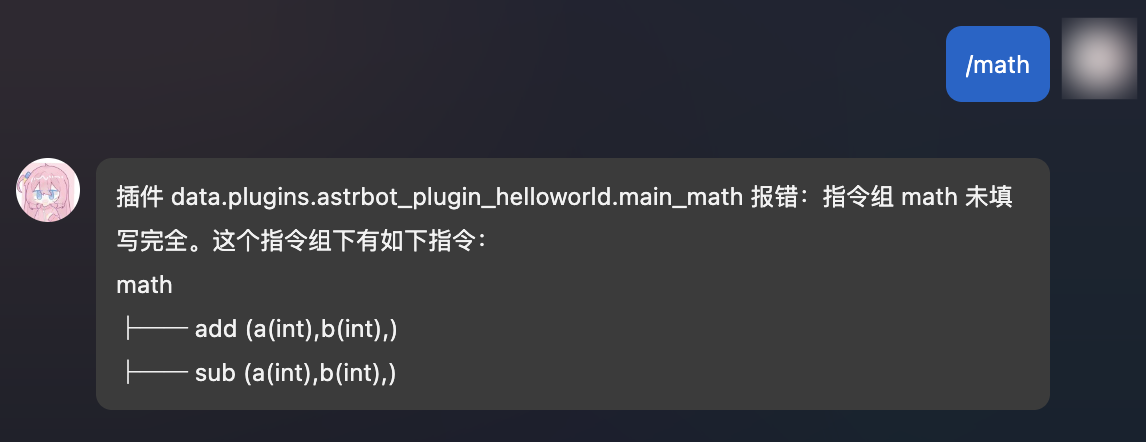
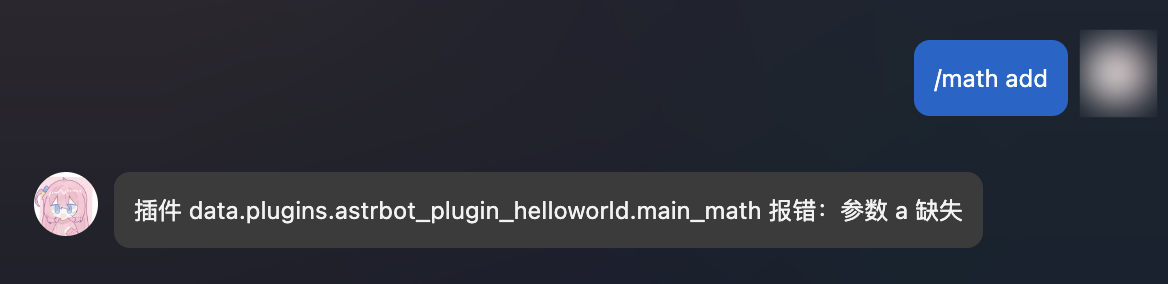
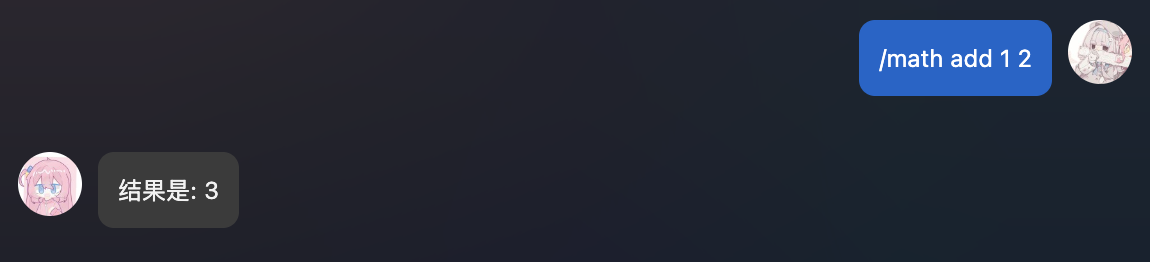
Theoretically, command groups can be nested infinitely!
'''
math
├── calc
│   ├── add (a(int),b(int),)
│   ├── sub (a(int),b(int),)
│   ├── help (command with no parameters)
'''

@filter.command_group("math")
def math():
    pass

@math.group("calc") # Note: this is group, not command_group
def calc():
    pass

@calc.command("add")
async def add(self, event: AstrMessageEvent, a: int, b: int):
    yield event.plain_result(f"Result is: {a + b}")

@calc.command("sub")
async def sub(self, event: AstrMessageEvent, a: int, b: int):
    yield event.plain_result(f"Result is: {a - b}")

@calc.command("help")
async def calc_help(self, event: AstrMessageEvent):
    # /math calc help
yield event.plain_result("This is a calculator plugin with add and sub commands.")Available after v3.4.28
You can add different aliases for commands or command groups:
@filter.command("help", alias={'帮助', 'helpme'})
async def help(self, event: AstrMessageEvent):
yield event.plain_result("This is a calculator plugin with add and sub commands.")This will receive all events.
@filter.event_message_type(filter.EventMessageType.ALL)
async def on_all_message(self, event: AstrMessageEvent):
yield event.plain_result("Received a message.")@filter.event_message_type(filter.EventMessageType.PRIVATE_MESSAGE)
async def on_private_message(self, event: AstrMessageEvent):
message_str = event.message_str # Get the plain text content of the message
yield event.plain_result("Received a private message.")EventMessageType is an Enum type that contains all event types. Current event types are PRIVATE_MESSAGE and GROUP_MESSAGE.
@filter.platform_adapter_type(filter.PlatformAdapterType.AIOCQHTTP | filter.PlatformAdapterType.QQOFFICIAL)
async def on_aiocqhttp(self, event: AstrMessageEvent):
    '''Only receive messages from AIOCQHTTP and QQOFFICIAL'''
    yield event.plain_result("Received a message")
In the current version, PlatformAdapterType supports the following values: AIOCQHTTP, QQOFFICIAL, QQOFFICIAL_WEBHOOK, TELEGRAM, WECOM, WECOM_AI_BOT, LARK, DINGTALK, DISCORD, SLACK, KOOK, VOCECHAT, WEIXIN_OFFICIAL_ACCOUNT, SATORI, MISSKEY, LINE, MATRIX, WEIXIN_OC, MATTERMOST, WEBCHAT, ALL.
@filter.permission_type(filter.PermissionType.ADMIN)
@filter.command("test")
async def test(self, event: AstrMessageEvent):
    pass
Only admins can use the test command.
Multiple filters can be used simultaneously by adding multiple decorators to a function. Filters use AND logic, meaning the function will only execute if all filters pass.
@filter.command("helloworld")
@filter.event_message_type(filter.EventMessageType.PRIVATE_MESSAGE)
async def helloworld(self, event: AstrMessageEvent):
yield event.plain_result("Hello!")Tip
Event hooks do not support being used together with @filter.command, @filter.command_group, @filter.event_message_type, @filter.platform_adapter_type, or @filter.permission_type.
Available after v3.4.34
from astrbot.api.event import filter, AstrMessageEvent

@filter.on_astrbot_loaded()
async def on_astrbot_loaded(self):
print("AstrBot initialization complete")This hook is triggered when AstrBot is preparing to call the LLM but has not yet acquired the session lock.
It is suitable for sending feedback such as "Waiting for request..." to the user, or for obtaining the LLM request outside the lock without waiting for it to be released.
from astrbot.api.event import filter, AstrMessageEvent

@filter.on_waiting_llm_request()
async def on_waiting_llm(self, event: AstrMessageEvent):
    await event.send(event.plain_result("🤔 Waiting for request..."))
You cannot use yield to send messages here. If you need to send, please use the
event.send()method directly.
In AstrBot's default execution flow, the on_llm_request hook is triggered before calling the LLM.
You can obtain the ProviderRequest object and modify it.
The ProviderRequest object contains all information about the LLM request, including the request text, system prompt, etc.
from astrbot.api.event import filter, AstrMessageEvent
from astrbot.api.provider import ProviderRequest

@filter.on_llm_request()
async def my_custom_hook_1(self, event: AstrMessageEvent, req: ProviderRequest): # Note there are three parameters
    print(req) # Print the request text
    req.system_prompt += "Custom system_prompt" # If there is another suitable approach, avoid using this to append prompts that change every round. It can break prompt caching and greatly increase cost (7 - 20x).
Warning
About appending prompts
req.system_prompt += ... is suitable for stable, long-lived role settings or global rules. Do not append content that changes every round to system_prompt, such as the current time, affinity score, status panel, short-term memory snippets, or retrieval summaries. Doing so makes the system prompt different for each request, which can break provider-side prompt caching and significantly increase both cost and time to first token.
For small or medium-sized dynamic prompts that change every round, prefer appending them through req.extra_user_content_parts. These parts are added after the current user input as extra user-message content, which is more suitable for dynamic context such as "current time", "character affinity", or "relevant memory snippets":
from astrbot.core.agent.message import TextPart

@filter.on_llm_request()
async def add_dynamic_prompt(self, event: AstrMessageEvent, req: ProviderRequest):
    req.extra_user_content_parts.append(
        TextPart(
            text=(
                "<dynamic_context>\n"
                "Current time: 2026-05-03 20:00\n"
                "Affinity: 72\n"
                "Relevant memory: The user prefers concise and direct answers.\n"
                "</dynamic_context>"
            )
        )
    )
If the appended content should only affect the current LLM request and should not be persisted into conversation history, call .mark_as_temp() to mark it as temporary:
req.extra_user_content_parts.append(
    TextPart(text="<runtime_hint>This hint only applies to the current request.</runtime_hint>").mark_as_temp()
)
For long-term memory, knowledge bases, or external system queries that may be large or unnecessary for every round, do not put everything directly into the prompt. Prefer registering them as llm_tool functions so the model can call them when needed, or retrieve only a small relevant summary in your plugin and append that summary through extra_user_content_parts.
You cannot use yield to send messages here. If you need to send, please use the
event.send()method directly.
After the LLM request completes, the on_llm_response hook is triggered.
You can obtain the ProviderResponse object and modify it.
from astrbot.api.event import filter, AstrMessageEvent
from astrbot.api.provider import LLMResponse

@filter.on_llm_response()
async def on_llm_resp(self, event: AstrMessageEvent, resp: LLMResponse): # Note there are three parameters
    print(resp)
You cannot use yield to send messages here. If you need to send, please use the
event.send()method directly.
Requires AstrBot version > v4.23.1
When the Agent starts running, the on_agent_begin hook is triggered.
from astrbot.api.event import filter, AstrMessageEvent
from astrbot.core.agent.run_context import ContextWrapper
from astrbot.core.astr_agent_context import AstrAgentContext

@filter.on_agent_begin()
async def on_agent_begin(self, event: AstrMessageEvent, run_context: ContextWrapper[AstrAgentContext]): # Note there are three parameters
    print("Agent started")
You cannot use yield to send messages here. If you need to send, please use the
event.send()method directly.
Requires AstrBot version > v4.23.1
When the Agent is about to call an LLM tool, the on_using_llm_tool hook is triggered.
You can obtain the FunctionTool object and tool call arguments.
from astrbot.api.event import filter, AstrMessageEvent
from astrbot.core.agent.tool import FunctionTool

@filter.on_using_llm_tool()
async def on_using_llm_tool(
    self,
    event: AstrMessageEvent,
    tool: FunctionTool,
    tool_args: dict | None,
):
    print(tool.name, tool_args)
You cannot use yield to send messages here. If you need to send, please use the
event.send()method directly.
Requires AstrBot version > v4.23.1
After the LLM tool call completes, the on_llm_tool_respond hook is triggered.
You can obtain the FunctionTool object, tool call arguments, and tool call result.
from mcp.types import CallToolResult

from astrbot.api.event import filter, AstrMessageEvent
from astrbot.core.agent.tool import FunctionTool

@filter.on_llm_tool_respond()
async def on_llm_tool_respond(
    self,
    event: AstrMessageEvent,
    tool: FunctionTool,
    tool_args: dict | None,
    tool_result: CallToolResult | None,
):
    print(tool.name, tool_args, tool_result)
You cannot use yield to send messages here. If you need to send, please use the
event.send()method directly.
Requires AstrBot version > v4.23.1
After the Agent finishes running, the on_agent_done hook is triggered. This hook is triggered after on_llm_response.
from astrbot.api.event import filter, AstrMessageEvent
from astrbot.api.provider import LLMResponse
from astrbot.core.agent.run_context import ContextWrapper
from astrbot.core.astr_agent_context import AstrAgentContext

@filter.on_agent_done()
async def on_agent_done(self, event: AstrMessageEvent, run_context: ContextWrapper[AstrAgentContext], resp: LLMResponse): # Note there are four parameters
    print(resp)
You cannot use yield to send messages here. If you need to send, please use the
event.send()method directly.
Before sending a message, the on_decorating_result hook is triggered.
You can implement some message decoration here, such as converting to voice, converting to image, adding prefixes, etc.
from astrbot.api.event import filter, AstrMessageEvent
import astrbot.api.message_components as Comp

@filter.on_decorating_result()
async def on_decorating_result(self, event: AstrMessageEvent):
    result = event.get_result()
    chain = result.chain
    print(chain) # Print the message chain
    chain.append(Comp.Plain("!")) # Add an exclamation mark at the end of the message chain
You cannot use yield to send messages here. This hook is only for decorating event.get_result().chain. If you need to send, please use the
event.send()method directly.
After a message is sent to the messaging platform, the after_message_sent hook is triggered.
from astrbot.api.event import filter, AstrMessageEvent

@filter.after_message_sent()
async def after_message_sent(self, event: AstrMessageEvent):
    pass
You cannot use yield to send messages here. If you need to send, please use the
event.send()method directly.
Commands, event listeners, and event hooks can have priority set to execute before other commands, listeners, or hooks. The default priority is 0.
@filter.command("helloworld", priority=1)
async def helloworld(self, event: AstrMessageEvent):
yield event.plain_result("Hello!")@filter.command("check_ok")
async def check_ok(self, event: AstrMessageEvent):
ok = self.check() # Your own logic
if not ok:
yield event.plain_result("Check failed")
event.stop_event() # Stop event propagation
When event propagation is stopped, all subsequent steps will not be executed.
Assuming there's a plugin A, after A terminates event propagation, all subsequent operations will not be executed, such as executing other plugins' handlers or requesting the LLM.