-
Notifications
You must be signed in to change notification settings - Fork 3.4k
{Codespaces} Refactor MCP server #32233
New issue
Have a question about this project? Sign up for a free GitHub account to open an issue and contact its maintainers and the community.
By clicking “Sign up for GitHub”, you agree to our terms of service and privacy statement. We’ll occasionally send you account related emails.
Already on GitHub? Sign in to your account
Merged
Merged
Changes from all commits
Commits
Show all changes
10 commits
Select commit
Hold shift + click to select a range
486e7e9
refactor: apply modern project structure
necusjz cd64b19
build: use hatchling as backend
necusjz 37f97bd
chore: remove useless configuration
necusjz d9f86f9
build: add hatchling configuration
necusjz e89dda9
doc: update changelog
necusjz c9ebfbd
docs: update hyperlink
necusjz a430ca5
docs: rephrase sentence
necusjz e64f3cf
docs: update codespaces accordingly
necusjz ca74a76
Update tools/aaz-flow/LICENSE
necusjz 379ac1c
Update tools/aaz-flow/pyproject.toml
necusjz File filter
Filter by extension
Conversations
Failed to load comments.
Loading
Jump to
Jump to file
Failed to load files.
Loading
Diff view
Diff view
There are no files selected for viewing
This file contains hidden or bidirectional Unicode text that may be interpreted or compiled differently than what appears below. To review, open the file in an editor that reveals hidden Unicode characters.
Learn more about bidirectional Unicode characters
This file contains hidden or bidirectional Unicode text that may be interpreted or compiled differently than what appears below. To review, open the file in an editor that reveals hidden Unicode characters.
Learn more about bidirectional Unicode characters
This file contains hidden or bidirectional Unicode text that may be interpreted or compiled differently than what appears below. To review, open the file in an editor that reveals hidden Unicode characters.
Learn more about bidirectional Unicode characters
| Original file line number | Diff line number | Diff line change |
|---|---|---|
| @@ -0,0 +1,207 @@ | ||
| # Byte-compiled / optimized / DLL files | ||
| __pycache__/ | ||
| *.py[codz] | ||
| *$py.class | ||
|
|
||
| # C extensions | ||
| *.so | ||
|
|
||
| # Distribution / packaging | ||
| .Python | ||
| build/ | ||
| develop-eggs/ | ||
| dist/ | ||
| downloads/ | ||
| eggs/ | ||
| .eggs/ | ||
| lib/ | ||
| lib64/ | ||
| parts/ | ||
| sdist/ | ||
| var/ | ||
| wheels/ | ||
| share/python-wheels/ | ||
| *.egg-info/ | ||
| .installed.cfg | ||
| *.egg | ||
| MANIFEST | ||
|
|
||
| # PyInstaller | ||
| # Usually these files are written by a python script from a template | ||
| # before PyInstaller builds the exe, so as to inject date/other infos into it. | ||
| *.manifest | ||
| *.spec | ||
|
|
||
| # Installer logs | ||
| pip-log.txt | ||
| pip-delete-this-directory.txt | ||
|
|
||
| # Unit test / coverage reports | ||
| htmlcov/ | ||
| .tox/ | ||
| .nox/ | ||
| .coverage | ||
| .coverage.* | ||
| .cache | ||
| nosetests.xml | ||
| coverage.xml | ||
| *.cover | ||
| *.py.cover | ||
| .hypothesis/ | ||
| .pytest_cache/ | ||
| cover/ | ||
|
|
||
| # Translations | ||
| *.mo | ||
| *.pot | ||
|
|
||
| # Django stuff: | ||
| *.log | ||
| local_settings.py | ||
| db.sqlite3 | ||
| db.sqlite3-journal | ||
|
|
||
| # Flask stuff: | ||
| instance/ | ||
| .webassets-cache | ||
|
|
||
| # Scrapy stuff: | ||
| .scrapy | ||
|
|
||
| # Sphinx documentation | ||
| docs/_build/ | ||
|
|
||
| # PyBuilder | ||
| .pybuilder/ | ||
| target/ | ||
|
|
||
| # Jupyter Notebook | ||
| .ipynb_checkpoints | ||
|
|
||
| # IPython | ||
| profile_default/ | ||
| ipython_config.py | ||
|
|
||
| # pyenv | ||
| # For a library or package, you might want to ignore these files since the code is | ||
| # intended to run in multiple environments; otherwise, check them in: | ||
| # .python-version | ||
|
|
||
| # pipenv | ||
| # According to pypa/pipenv#598, it is recommended to include Pipfile.lock in version control. | ||
| # However, in case of collaboration, if having platform-specific dependencies or dependencies | ||
| # having no cross-platform support, pipenv may install dependencies that don't work, or not | ||
| # install all needed dependencies. | ||
| #Pipfile.lock | ||
|
|
||
| # UV | ||
| # Similar to Pipfile.lock, it is generally recommended to include uv.lock in version control. | ||
| # This is especially recommended for binary packages to ensure reproducibility, and is more | ||
| # commonly ignored for libraries. | ||
| #uv.lock | ||
|
|
||
| # poetry | ||
| # Similar to Pipfile.lock, it is generally recommended to include poetry.lock in version control. | ||
| # This is especially recommended for binary packages to ensure reproducibility, and is more | ||
| # commonly ignored for libraries. | ||
| # https://python-poetry.org/docs/basic-usage/#commit-your-poetrylock-file-to-version-control | ||
| #poetry.lock | ||
| #poetry.toml | ||
|
|
||
| # pdm | ||
| # Similar to Pipfile.lock, it is generally recommended to include pdm.lock in version control. | ||
| # pdm recommends including project-wide configuration in pdm.toml, but excluding .pdm-python. | ||
| # https://pdm-project.org/en/latest/usage/project/#working-with-version-control | ||
| #pdm.lock | ||
| #pdm.toml | ||
| .pdm-python | ||
| .pdm-build/ | ||
|
|
||
| # pixi | ||
| # Similar to Pipfile.lock, it is generally recommended to include pixi.lock in version control. | ||
| #pixi.lock | ||
| # Pixi creates a virtual environment in the .pixi directory, just like venv module creates one | ||
| # in the .venv directory. It is recommended not to include this directory in version control. | ||
| .pixi | ||
|
|
||
| # PEP 582; used by e.g. github.com/David-OConnor/pyflow and github.com/pdm-project/pdm | ||
| __pypackages__/ | ||
|
|
||
| # Celery stuff | ||
| celerybeat-schedule | ||
| celerybeat.pid | ||
|
|
||
| # SageMath parsed files | ||
| *.sage.py | ||
|
|
||
| # Environments | ||
| .env | ||
| .envrc | ||
| .venv | ||
| env/ | ||
| venv/ | ||
| ENV/ | ||
| env.bak/ | ||
| venv.bak/ | ||
|
|
||
| # Spyder project settings | ||
| .spyderproject | ||
| .spyproject | ||
|
|
||
| # Rope project settings | ||
| .ropeproject | ||
|
|
||
| # mkdocs documentation | ||
| /site | ||
|
|
||
| # mypy | ||
| .mypy_cache/ | ||
| .dmypy.json | ||
| dmypy.json | ||
|
|
||
| # Pyre type checker | ||
| .pyre/ | ||
|
|
||
| # pytype static type analyzer | ||
| .pytype/ | ||
|
|
||
| # Cython debug symbols | ||
| cython_debug/ | ||
|
|
||
| # PyCharm | ||
| # JetBrains specific template is maintained in a separate JetBrains.gitignore that can | ||
| # be found at https://github.com/github/gitignore/blob/main/Global/JetBrains.gitignore | ||
| # and can be added to the global gitignore or merged into this file. For a more nuclear | ||
| # option (not recommended) you can uncomment the following to ignore the entire idea folder. | ||
| #.idea/ | ||
|
|
||
| # Abstra | ||
| # Abstra is an AI-powered process automation framework. | ||
| # Ignore directories containing user credentials, local state, and settings. | ||
| # Learn more at https://abstra.io/docs | ||
| .abstra/ | ||
|
|
||
| # Visual Studio Code | ||
| # Visual Studio Code specific template is maintained in a separate VisualStudioCode.gitignore | ||
| # that can be found at https://github.com/github/gitignore/blob/main/Global/VisualStudioCode.gitignore | ||
| # and can be added to the global gitignore or merged into this file. However, if you prefer, | ||
| # you could uncomment the following to ignore the entire vscode folder | ||
| # .vscode/ | ||
|
|
||
| # Ruff stuff: | ||
| .ruff_cache/ | ||
|
|
||
| # PyPI configuration file | ||
| .pypirc | ||
|
|
||
| # Cursor | ||
| # Cursor is an AI-powered code editor. `.cursorignore` specifies files/directories to | ||
| # exclude from AI features like autocomplete and code analysis. Recommended for sensitive data | ||
| # refer to https://docs.cursor.com/context/ignore-files | ||
| .cursorignore | ||
| .cursorindexingignore | ||
|
|
||
| # Marimo | ||
| marimo/_static/ | ||
| marimo/_lsp/ | ||
| __marimo__/ |
This file contains hidden or bidirectional Unicode text that may be interpreted or compiled differently than what appears below. To review, open the file in an editor that reveals hidden Unicode characters.
Learn more about bidirectional Unicode characters
| Original file line number | Diff line number | Diff line change |
|---|---|---|
| @@ -0,0 +1,17 @@ | ||
| # Changelog | ||
|
|
||
| All notable changes to this project will be documented in this file. | ||
|
|
||
| The format is based on [Keep a Changelog](https://keepachangelog.com/en/1.0.0/), | ||
| and this project adheres to [Semantic Versioning](https://semver.org/spec/v2.0.0.html). | ||
|
|
||
| ## [Unreleased] | ||
|
|
||
| [1.0.0] - 2025-10-13 | ||
|
necusjz marked this conversation as resolved.
|
||
| - Applied `hatchling` as build backend. | ||
| - Refined the project structure. | ||
|
|
||
| [0.1.0] - 2025-10-08 | ||
| - Added tool for code generation. | ||
| - Added tool for test generation. | ||
| - Initialized MCP server. | ||
This file contains hidden or bidirectional Unicode text that may be interpreted or compiled differently than what appears below. To review, open the file in an editor that reveals hidden Unicode characters.
Learn more about bidirectional Unicode characters
| Original file line number | Diff line number | Diff line change |
|---|---|---|
| @@ -0,0 +1,21 @@ | ||
| MIT License | ||
|
|
||
| Copyright (c) 2025 Microsoft Corporation | ||
|
|
||
| Permission is hereby granted, free of charge, to any person obtaining a copy | ||
| of this software and associated documentation files (the "Software"), to deal | ||
| in the Software without restriction, including without limitation the rights | ||
| to use, copy, modify, merge, publish, distribute, sublicense, and/or sell | ||
| copies of the Software, and to permit persons to whom the Software is | ||
| furnished to do so, subject to the following conditions: | ||
|
|
||
| The above copyright notice and this permission notice shall be included in all | ||
| copies or substantial portions of the Software. | ||
|
|
||
| THE SOFTWARE IS PROVIDED "AS IS", WITHOUT WARRANTY OF ANY KIND, EXPRESS OR | ||
| IMPLIED, INCLUDING BUT NOT LIMITED TO THE WARRANTIES OF MERCHANTABILITY, | ||
| FITNESS FOR A PARTICULAR PURPOSE AND NONINFRINGEMENT. IN NO EVENT SHALL THE | ||
| AUTHORS OR COPYRIGHT HOLDERS BE LIABLE FOR ANY CLAIM, DAMAGES OR OTHER | ||
| LIABILITY, WHETHER IN AN ACTION OF CONTRACT, TORT OR OTHERWISE, ARISING FROM, | ||
| OUT OF OR IN CONNECTION WITH THE SOFTWARE OR THE USE OR OTHER DEALINGS IN THE | ||
| SOFTWARE. |
This file contains hidden or bidirectional Unicode text that may be interpreted or compiled differently than what appears below. To review, open the file in an editor that reveals hidden Unicode characters.
Learn more about bidirectional Unicode characters
| Original file line number | Diff line number | Diff line change |
|---|---|---|
| @@ -1,14 +1,15 @@ | ||
| ## AAZ MCP Server | ||
| MCP Server for the AAZ API, enabling prune command-line interface, implement custom logic, generate meaningful example, and more. | ||
| ## AAZ Flow | ||
| AAZ Flow is the MCP server for the AAZ APIs, enabling pruning of command-line interfaces, implementing custom logic, generating test cases, and more. | ||
|
|
||
| Please note that AAZ Flow is currently in early development. The functionality and available tools are subject to change and expansion as we continue to develop and improve the server. | ||
|
|
||
| ### Tools | ||
| `generate_code` | ||
|
|
||
| ## Implementation | ||
| 1. Performs elicitation for user input to perform workflow | ||
| 2. Generates content using llm sampling | ||
| 3. Executes AAZ Flow commands directly | ||
| 4. Generates tests using llm sampling | ||
| 5. Uses tool transformation to make the internal tooling more friendly for llms | ||
| You can easily start the MCP server within your codespace environment: | ||
| 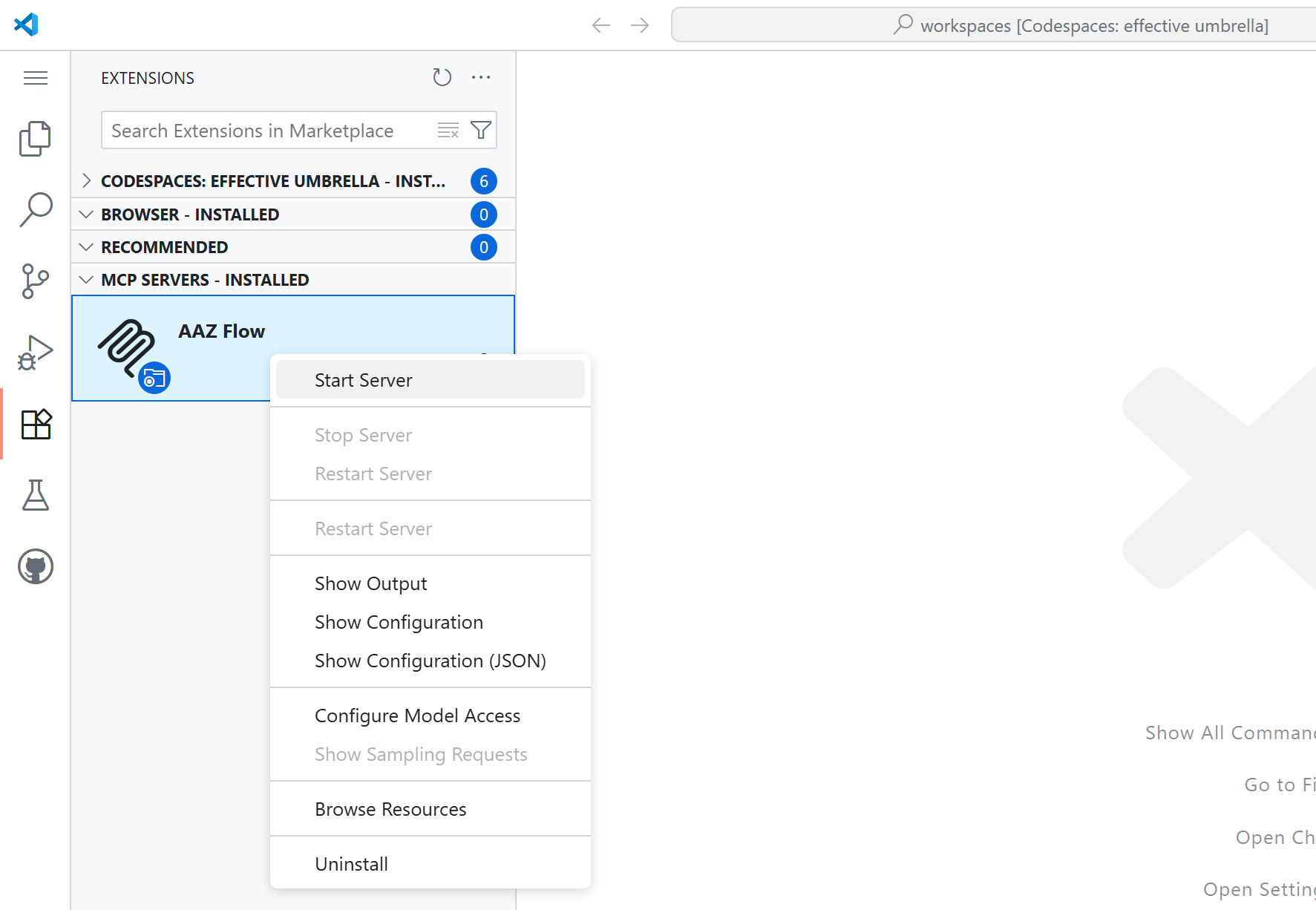 | ||
|
|
||
| Please setup your Copilot to use the AI features (**Ctrl** + **Alt** + **I** to open a chat): | ||
| 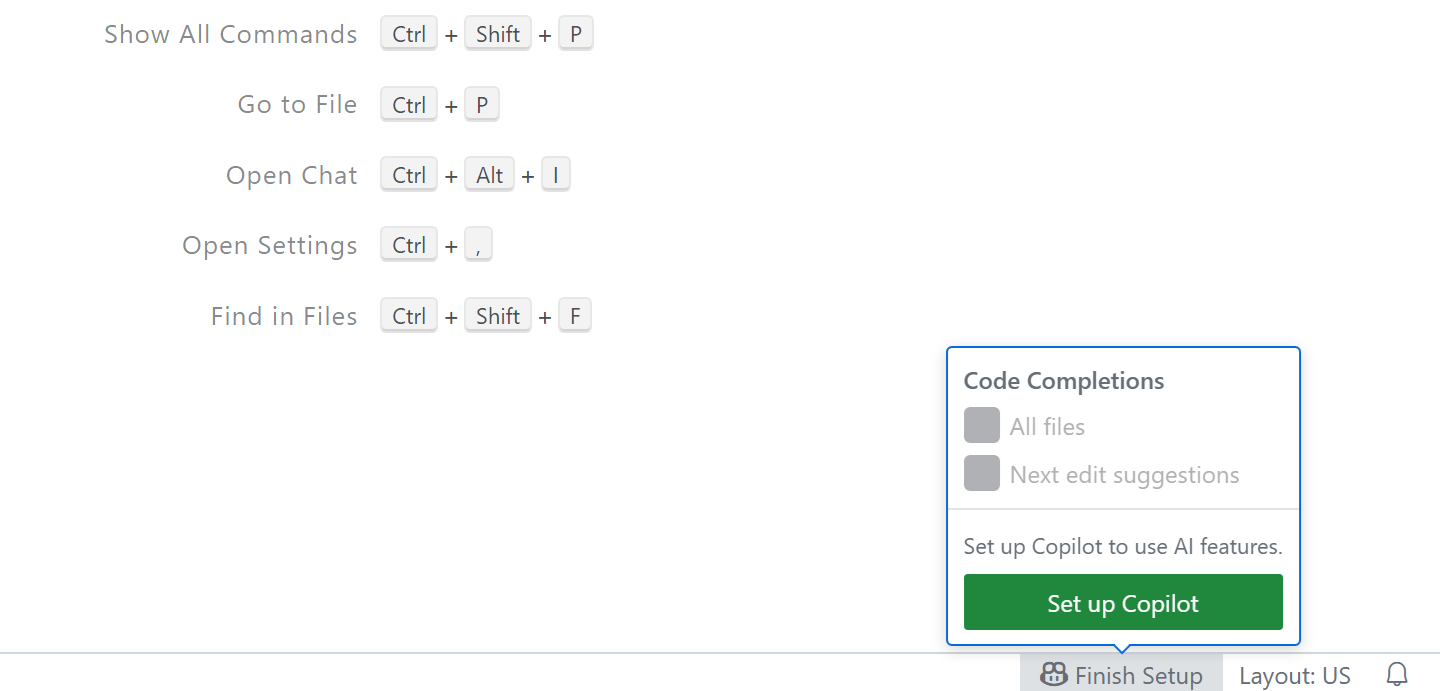 | ||
|
|
||
| After that, set the mode to `Agent` and the model to `Claude Sonnet`. The following is the use case of the tools: | ||
| 1. "generate test for chaos module" to generate test cases in _chaos_ module. | ||
| 2. "generate code for azure cli" to generate models AND codes. |
This file contains hidden or bidirectional Unicode text that may be interpreted or compiled differently than what appears below. To review, open the file in an editor that reveals hidden Unicode characters.
Learn more about bidirectional Unicode characters
| Original file line number | Diff line number | Diff line change |
|---|---|---|
| @@ -1,12 +1,19 @@ | ||
| [build-system] | ||
| requires = ["hatchling"] | ||
| build-backend = "hatchling.build" | ||
|
|
||
| [project] | ||
| name = "aaz-flow" | ||
| version = "0.1.0" | ||
| description = "The MCP server utilized for code generation in Azure CLI (AAZ)." | ||
| version = "1.0.0" | ||
| description = "AAZ Flow is the MCP server for the AAZ APIs." | ||
| readme = "README.md" | ||
| requires-python = ">=3.12" | ||
| dependencies = [ | ||
| "fastmcp>=2.11.3" | ||
| "fastmcp>=2.11.0,<3.0.0" | ||
| ] | ||
|
|
||
| [tool.setuptools] | ||
| py-modules = ["helpers", "main", "models"] | ||
| [tool.hatch.build] | ||
| packages = ["src/aaz-flow"] | ||
|
|
||
| [tool.hatch.version] | ||
| path = "src/aaz-flow/__init__.py" |
This file contains hidden or bidirectional Unicode text that may be interpreted or compiled differently than what appears below. To review, open the file in an editor that reveals hidden Unicode characters.
Learn more about bidirectional Unicode characters
File renamed without changes.
File renamed without changes.
File renamed without changes.
File renamed without changes.
File renamed without changes.
Oops, something went wrong.
Add this suggestion to a batch that can be applied as a single commit.
This suggestion is invalid because no changes were made to the code.
Suggestions cannot be applied while the pull request is closed.
Suggestions cannot be applied while viewing a subset of changes.
Only one suggestion per line can be applied in a batch.
Add this suggestion to a batch that can be applied as a single commit.
Applying suggestions on deleted lines is not supported.
You must change the existing code in this line in order to create a valid suggestion.
Outdated suggestions cannot be applied.
This suggestion has been applied or marked resolved.
Suggestions cannot be applied from pending reviews.
Suggestions cannot be applied on multi-line comments.
Suggestions cannot be applied while the pull request is queued to merge.
Suggestion cannot be applied right now. Please check back later.
There was a problem hiding this comment.
Choose a reason for hiding this comment
The reason will be displayed to describe this comment to others. Learn more.
So may I ask — do we no longer have these environments, or have they just been moved elsewhere?
There was a problem hiding this comment.
Choose a reason for hiding this comment
The reason will be displayed to describe this comment to others. Learn more.
we added them to the image via #32195.