Take control of the cloud like never before. Simplify, enhance, and secure your digital environment with HomeDock OS.
Deploy HomeDock OS Everywhere, availaible for ALL platforms









Make your apps follow your path, not your steps, transform the way you manage your apps and data in the cloud, prioritizing privacy and control in a world where everything is tracked.
- 🌍 Universal Compatibility — Any device is your new device. HomeDock OS runs on Linux, Windows, macOS, and Raspberry Pi, supporting both legacy and modern hardware.
- 🔒 Privacy by Design — Your data, your rules. HomeDock OS is crafted to keep your digital life private and secure, both on-premise and in cloud environments.
- 🔗 Seamless Integration — Access from anywhere, on any device with a web browser, with SSL-ready deployments and cross-platform functionality, just a few clicks away.
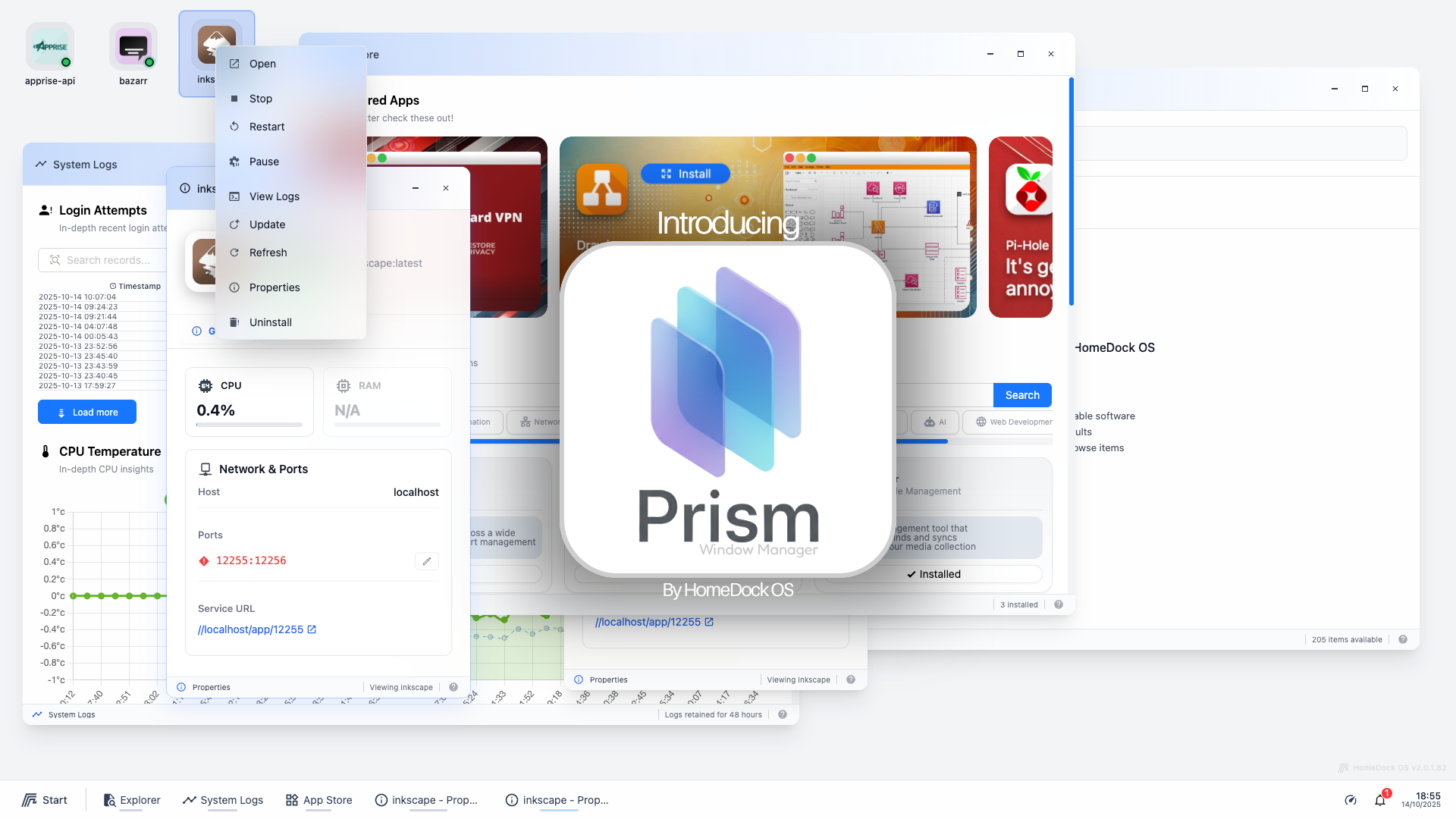
- 🖥️ Next-Gen Cloud OS Look & Feel — Powered by our Prism Window Manager, HomeDock OS brings a seamless, visually rich desktop experience to cloud environments.
- 🪟 Prism Window Manager — A full desktop environment with resizable, draggable, maximizable, and minimizable windows. True multitasking: check logs while installing an app and uploading files, all at once. Resize handles on all 8 directions, double-click to maximize, smooth minimize animations, window state persistence, z-index management, and snap-to-edge support.
- 📱 Mobile-First Desktop — Horizontal page navigation with touch gestures, fullscreen windows on mobile, visual page indicators, and long-press context menus. Feels like a real mobile OS home screen.
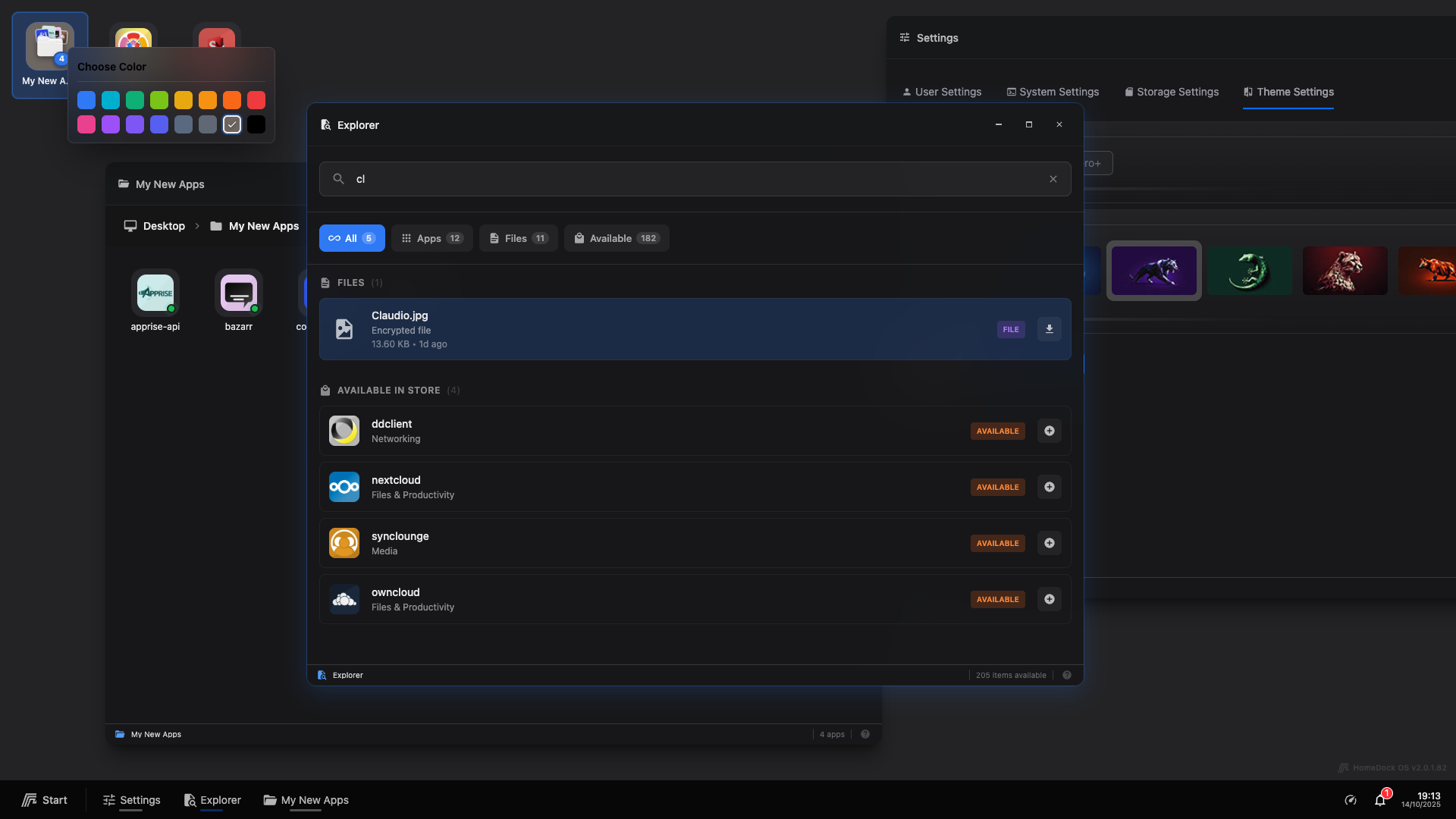
- 🎨 Three Themes — Default (Light), Noir (Dark), and Aero+ (translucent / glassmorphism). Every component, every window, every context menu is themed. Upload your own wallpaper for Aero+ with magic-byte validated image uploads.
- 🖱️ Desktop Icons & Folders — Drag-and-drop icons with snap-to-grid, desktop folders with 18 custom icons and color pickers, multi-selection with Ctrl+Click and rubber-band selection, drag ghost previews, and persistent layouts across sessions.
- 📌 Start Menu & Taskbar — Application search, quick access, system tray with real-time CPU/RAM/disk/network stats, notification bell, audio indicator, calendar events, upload progress, app update badges, and a Show Desktop button.
- 🚀 Official App Store — Browse 200+ applications in an Apple-style layout with infinite scroll, category pills, screenshot galleries, and fullscreen preview. Install anything from Nextcloud to Plex in seconds.
- ⚙️ Advanced Install Config — Configure ports, volumes, environment variables, network mode (Host/Bridge/HomeDock Network), capabilities, and privileged mode before installing. Port conflict detection tells you exactly which app is using a port. Default credentials are shown with copy-to-clipboard and auto-generated passwords where needed.
- 📦 HDS Package System — Create, import, and share custom app packages in
.hdsformat via the Packager system tool. Bundle Docker Compose files with icons, metadata, and configs into shareable packages. Export/import.hdstorebundles with multiple apps at once. - 🌐 Third-Party Stores — Import entire app stores from Casa-compatible and Zima-compatible community projects. 3 predefined stores (BigBearTechWorld, TMC Store, Zima App Store) as one-click imports. Migrate single Compose files too.
- 🏷️ Share Badges — Generate custom SVG/PNG badges ("Get AppName on HomeDock OS App Store") in light and dark themes for READMEs and websites.
- 🔄 Automatic Updates — Background update checker scans every 6 hours if the app is pointing to the
:latesttag. Taskbar badge shows pending updates. "Update All" button when 2+ updates are available.
- 🗄️ Unified File Explorer — Four storage backends in one interface: Storage (unencrypted local files), DropZone (AES-256-GCM encrypted), App Drive (Docker container volumes) and Disks+ (physically connected hard-drives). Sidebar navigation, favorites (50 max), recents (100 items), breadcrumb paths, dual view modes (grid/list), sorting, multi-selection, and context menus.
- 💿 Disks+ — Browse every physical disk on the machine: internal SSDs, external USBs, optical drives. Password-protected with sliding session timer, Protected Zones for system-critical paths, hot-plug detection, dead remote mount protection, and full file operations including recursive search and folder uploads with nested subdirectories.
- 🔐 DropZone Encryption — AES-256-GCM with HKDF key derivation (v3) from
os.urandom(32)secrets. Per-user keys, atomic file writes, folder support with hierarchical navigation, and transparent migration from legacy formats. - 📁 App Drive — Browse and manage files inside Docker container volumes without terminal access. Upload, download, create folders, rename, delete, and multi-select with full folder hierarchy support.
- 📤 Upload System — Unified upload progress in the system tray for all storage backends. Per-backend tray indicators, progress bubbles, queues, and badges. Full folder drops with nested subdirectories.
- 📝 Notepad — Full-featured text editor with auto-save, and Markdown preview with three view modes (Edit, Live Preview side-by-side with sync scroll, and full Preview). Theme-aware syntax highlighting in code blocks. Keyboard shortcuts: Ctrl+L, Ctrl+P.
- 💻 Code Editor — Dedicated editor for programming files (.js, .ts, .py, .vue, .json, .css, .html, .sh, .yml, and many more) with syntax highlighting, multi-tab editing, Save/Save As, and auto-save-all dialog on window close.
- 📅 Calendar & World Clock — Full calendar with colour-coded events, calendar groups (macOS-style), ICS import/export, duplicate removal, and responsive layout. World Clock with up to 12 timezone clocks. System tray clock shows proximity-aware pulsing event indicators (blue → yellow → orange → red as events approach).
- 🖼️ Image Viewer & Brusher — View JPG, PNG, GIF, WebP, BMP, ICO, TIFF with zoom, pan, and rotation. Brusher is just... Our Paint, for quick image annotation and markups.
- 🎵 Media Player — Audio and video playback (MP4, WebM, OGG, MP3, WAV, AAC, FLAC, M4A) with volume controls, fullscreen, and real-time spectrum analyzer using Web Audio API. Dynamic volume icon and audio indicator in the taskbar when something is sounding.
- 📄 PDF Viewer — Powered by PDF.js with page navigation, resize and zoom.
- 🧮 Calculator — Standard arithmetic with full keyboard support.
- 🔑 Two-Factor Authentication (2FA) — TOTP-compatible with Google Authenticator, Authy, Microsoft Authenticator, and more. QR code setup, 10 backup recovery codes, and "Trust this device" for 30 days.
- 🔐 Hybrid RSA + AES-GCM Encryption — 4096-bit RSA-OAEP for key exchange, AES-256-GCM for bulk data. All sensitive data (passwords, settings, Disks+ unlock) encrypted end-to-end even when HTTPS is not available. Centralized crypto module on both client and server.
- 🧱 Hardened by Default — Path traversal protection, symlink validation, null byte injection prevention, CSRF validation on all endpoints, rate limiting, DoS limits (file counts + time limits), regex injection prevention, and comprehensive input sanitization.
- 🩹 Proactive CVE Patching — We patch vulnerabilities within hours of disclosure, often before they're even a day old. The changelog speaks for itself.
- 🔄 Reverse Proxy Support — Toggle in Settings with Werkzeug ProxyFix middleware,
X-Forwarded-*header trust, secure session cookies, and proper 421 Misdirected Request handling. - 🔒 SSL/HTTPS Native — Support for SSL with cross-platform certificate detection (Linux, macOS, Windows). Automatic HTTP→HTTPS redirect, HSTS headers, and SSL certificate inheritance for installed apps. Check the HTTPS documentation.
- 🐳 Docker-in-Docker — Run HomeDock OS inside a Docker container. Automatic host detection, path translation, and DinD label filtering. Alpine-based image (~441MB).
- 📡 Server-Sent Events (SSE) — Real-time dashboard with a single SSE stream replacing 11 polling endpoints. Delta-only broadcasting, heartbeat keep-alives, exponential backoff reconnect, and ~90% HTTP request reduction.
- 🏠 Local DNS (mDNS) — Access your instance at
homedock.localvia Zeroconf with graceful conflict handling.
- 🧠 iOS-Style Window Memory Management — 3-tier persistence strategy for minimized windows with device-aware limits, real-time heap monitoring, and silent background recycling. No notifications, no console logs.
- 📜 Virtual Scroll — App Store renders only visible rows, fixing crashes on iPhone and improving performance for large catalogs.
- ⚡ Lazy Loading — Window components load on demand. Parallel fetches for App Store data. Code splitting for faster initial loads.
- 🔔 Smart Notifications — External announcements, smart system reminders, security tips, community invites, and persistent dismissal across sessions.
HomeDock OS is designed to be universally compatible across platforms and architectures:
| Supported | |
|---|---|
| Operating Systems | Linux ✔️ · macOS ✔️ · Windows ✔️ |
| Architectures | x86 ✔️ · x86_64 ✔️ · ARM ✔️ · ARM64 ✔️ |
| Hardware | Raspberry Pi (even the Zero) · Legacy systems · Workstations · Mini-PCs & NUCs · ZimaBoard · Umbrel Home |
| Deployment | Bare metal · Docker Compose · Docker-in-Docker · Oracle Cloud Free Tier |
Whether you’re using a Raspberry Pi, an old laptop, or the latest workstation, HomeDock OS adapts effortlessly to your setup. It automatically detects applications previously installed by other similar systems, ensuring a smooth migration process.
Discover cutting-edge cloud solutions tailored for individuals and enterprises alike.
| Plan | Price | Features |
|---|---|---|
| Free | €0 | Transform any device into your own cloud environment, free forever, no commitments. |
| Cloud Instances | Starting at €9.95/mo | Enhanced features via our administration panel such as automatic SSL configuration and backups. |
| Enterprise | ~ | Unlock unparalleled cloud performance with tailored solutions and dedicated premium support, designed for the unique needs of your business. |
Free Download: Install HomeDock OS on your devices to transform them into your personal cloud.
HomeDock OS Enterprise: Tailored solutions for business excellence including Enterprise modules.
All the guidance you need to unlock the potential of HomeDock OS is available in our documentation.
📘 Documentation: https://docs.homedock.cloud
🛟 Discord Support: Open a Ticket on our Official Discord Server
✉️ Email us: support@homedock.cloud
Stay Ahead with HomeDock OS Updates
Join our vibrant community and keep up with the latest updates, features, and tips.
- GitHub: Star HomeDock OS on GitHub
- Discord: Join the conversation and get support!
A huge thanks to all contributors, partners, and users who make HomeDock OS a reality. Together, we’re redefining how the world experiences the cloud.
"Take control of your apps with HomeDock OS and empower your cloud experience."
Big thanks to our friend Adrián Barrio for his homedock-oci-free project, integrating HomeDock OS with Terraform on Oracle Free Tier. It looks stunning! Check it out!