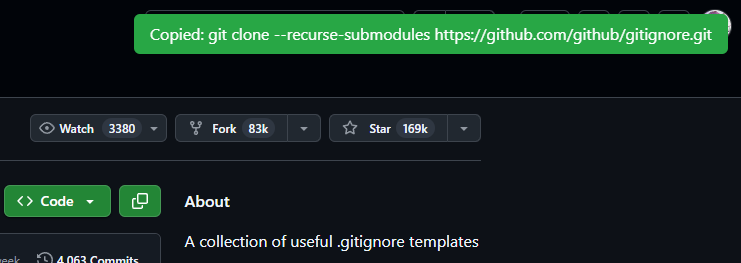
简体中文 | English | 한국어 | Tiếng Việt | 繁體中文 👆️訪問 GitHub 上的自述文件以獲得更好的體驗。 GitHub查看勤務員的腳本Github:@ChinaGodManGreasyFork查看勤務員的腳本目前頁面查看勤務員的腳本 ⭐如果腳本對你有幫助,可以點亮星星以資鼓勵⭐ 推薦使用: 💡 Tip: 以上已列出的腳本管理器和瀏覽器不代表全部 腳本在以下環境中運作正常 GitHub 複製複製指令按鈕(fork) 「 在 GitHub 倉庫頁面的「程式碼」按鈕之後,新增一個使用「git clone --recurse-submodules ...」指令的一鍵複製按鈕。 」 Download:Github | ⭐Greasy Fork更新記錄🛠️ github-clone 更新日誌 📅 2026.3.16.1 新增: •初始版本 GitHub 一鍵複製帶子模組的 Clone 命令 用於在 GitHub 倉庫頁面的 Code 按鈕旁邊新增一個複製按鈕,可以一鍵複製包含 submodules(子模組) 的完整 git clone 命令。 功能 在 GitHub 倉庫頁面 Code 按鈕旁邊新增複製按鈕 一鍵複製包含子模組的克隆命令:git clone --recurse-submodules https://github.com/<owner>/<repo>.git 修復使用中文腳本無法顯示按鈕的問題 使用幫助 推薦瀏覽器和腳本管理器: Greasemonkey + Waterfox Tampermonkey/Violentmonkey + Firefox Tampermonkey/Violentmonkey + Chrome Userscripts + ios Safari Violentmonkey/KiWiBrowser + Android 如果你需要了解更多關於如何安裝使用者腳本,點擊我查看圖文教學! 查看所有發布腳本 更多用戶腳本 /回到頂部↑