Hi @puria,
I had a question from Pablo (@elaragon) at Eurecat who noticed an issue when reading and decrypting data from the DECODE IoT pilot datastore. The error he was seeing when running was [Errno 24] Too many open files which happened when requesting data for a number of hours from the datastore. The logic of this read operation involves first requesting a page of results and for each event in that page of results we decrypt using zenroom via the zenroom_exec method, and then repeat for the next page of events until all have been consumed.
He located the issue to the line where zenroom is invoked (https://github.com/thingful/decode-data-collector-example/blob/zenroom-update/collector.py#L51-L52), which I think I was able to verify.
I looked in the zenroom wrapper source, and I see we are now doing something clever using multiprocessing, so my suspicion is that something in that Process or Manager usage is not being cleaned up properly so we end up leaking file descriptors until the process crashes.
Steps to reproduce.
We were using an old version of the zenroom wrapper, so I wanted to make sure that the problem still occurred with the latest published build, so I updated my little test script which you can find in the zenroom_update branch of the following repo: https://github.com/thingful/decode-data-collector-example/blob/zenroom-update/collector.py
If you check out this branch, install the dependencies into a Python 3.x virtualenv and then run python collector.py.
What you should see is that the script starts printing out data events as it pulls them from the datastore and decrypts using Zenroom. I've added the basic prometheus client to this little script as it has a built in data collector looking at file descriptors, so if you then open the following url: http://localhost:8000/metrics you should see the number of open file descriptors racing upwards (process_open_fds) until it reaches the process_max_fds value.
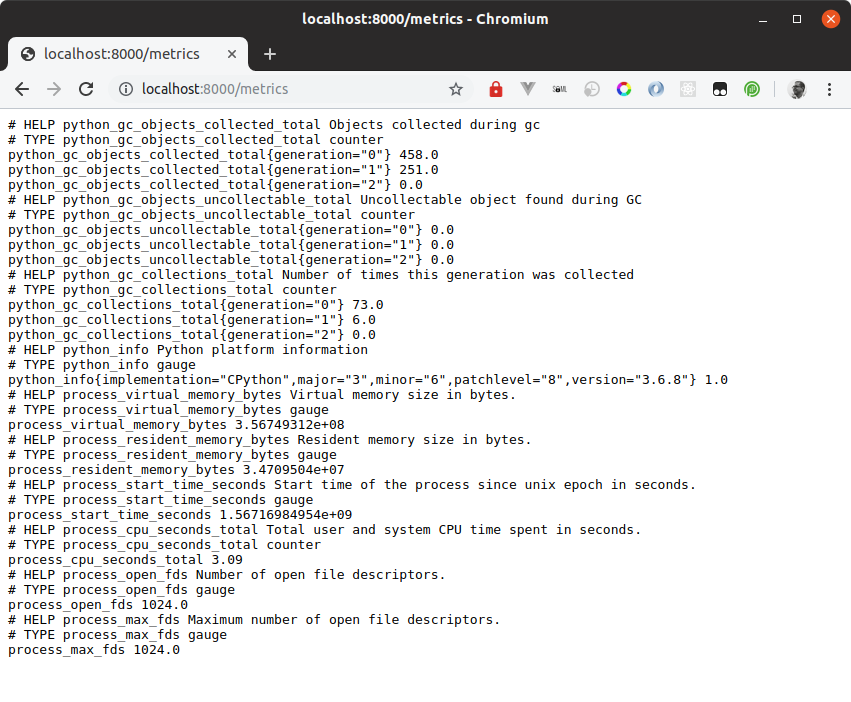
Because I added the prometheus client which runs an HTTP server, the script will just stall at this point with no new events being displayed, however if you comment out the start_http_server(8000) line (https://github.com/thingful/decode-data-collector-example/blob/zenroom-update/collector.py#L14), then you should see the script just crash when it runs out of file descriptors.
I understand that we can ask Pablo to change the limits on the server, but I wondered if you had any ideas on a fix.
many thanks
Sam

Hi @puria,
I had a question from Pablo (@elaragon) at Eurecat who noticed an issue when reading and decrypting data from the DECODE IoT pilot datastore. The error he was seeing when running was
[Errno 24] Too many open fileswhich happened when requesting data for a number of hours from the datastore. The logic of this read operation involves first requesting a page of results and for each event in that page of results we decrypt using zenroom via thezenroom_execmethod, and then repeat for the next page of events until all have been consumed.He located the issue to the line where zenroom is invoked (https://github.com/thingful/decode-data-collector-example/blob/zenroom-update/collector.py#L51-L52), which I think I was able to verify.
I looked in the zenroom wrapper source, and I see we are now doing something clever using
multiprocessing, so my suspicion is that something in thatProcessorManagerusage is not being cleaned up properly so we end up leaking file descriptors until the process crashes.Steps to reproduce.
We were using an old version of the zenroom wrapper, so I wanted to make sure that the problem still occurred with the latest published build, so I updated my little test script which you can find in the
zenroom_updatebranch of the following repo: https://github.com/thingful/decode-data-collector-example/blob/zenroom-update/collector.pyIf you check out this branch, install the dependencies into a Python 3.x virtualenv and then run
python collector.py.What you should see is that the script starts printing out data events as it pulls them from the datastore and decrypts using Zenroom. I've added the basic prometheus client to this little script as it has a built in data collector looking at file descriptors, so if you then open the following url: http://localhost:8000/metrics you should see the number of open file descriptors racing upwards (
process_open_fds) until it reaches theprocess_max_fdsvalue.Because I added the prometheus client which runs an HTTP server, the script will just stall at this point with no new events being displayed, however if you comment out the
start_http_server(8000)line (https://github.com/thingful/decode-data-collector-example/blob/zenroom-update/collector.py#L14), then you should see the script just crash when it runs out of file descriptors.I understand that we can ask Pablo to change the limits on the server, but I wondered if you had any ideas on a fix.
many thanks
Sam