-
Notifications
You must be signed in to change notification settings - Fork 0
Expand file tree
/
Copy pathshowcases_old
More file actions
184 lines (98 loc) · 23.3 KB
/
showcases_old
File metadata and controls
184 lines (98 loc) · 23.3 KB
1
2
3
4
5
6
7
8
9
10
11
12
13
14
15
16
17
18
19
20
21
22
23
24
25
26
27
28
29
30
31
32
33
34
35
36
37
38
39
40
41
42
43
44
45
46
47
48
49
50
51
52
53
54
55
56
57
58
59
60
61
62
63
64
65
66
67
68
69
70
71
72
73
74
75
76
77
78
79
80
81
82
83
84
85
86
87
88
89
90
91
92
93
94
95
96
97
98
99
100
101
102
103
104
105
106
107
108
109
110
111
112
113
114
115
116
117
118
119
120
121
122
123
124
125
126
127
128
129
130
131
132
133
134
135
136
137
138
139
140
141
142
143
144
145
146
147
148
149
150
151
152
153
154
155
156
157
158
159
160
161
162
163
164
165
166
167
168
169
170
171
172
173
174
175
176
177
178
179
180
181
182
The following apps have been developed with Dear PyGui by various developers and show the versatility of Dear PyGui. Dear PyGui is a fast, easy to use and powerful Python cross-platform GUI library (Windows, Linux and MacOS) available under a permissive MIT license. With Dear PyGui, one can build traditional desktop apps, yet one can create more graphically dynamic applications as well.
### FlowTutor: A graphical programming environment using flowcharts
[FlowTutor](https://github.com/thomasroessl/FlowTutor) is an application to help teach programming to engineering students. It illustrates the structure of a Python application, inclusing loops, if-else clauses and function calls visually while the Python application runs. FlowTutor shows the values of the variables, a log of the output and allows for setting of breakpoints.
[](https://github.com/thomasroessl/FlowTutor)
### KrxImpExp: 3D asset import/export Blender add-on
[KrxImpExp](https://gitlab.com/Patrix9999/krximpexp/-/tree/dev) is an open-source 3D asset import and export Blender add-on for modding Gothic 1 and 2 games. It is a hard fork for modern 2.8+ Blender and has been written with use of Dear PyGui as the original wxWidgets framework UI project was unmaintainable. The team decided to use Dear PyGui due to it's language (Blender uses Python for add-ons), size, simplicity and extensibility to further improve the user experience. The Dear PyGui UI offers seamless integration with the Blender user interface. The source code is available in the [GitLab repository](https://gitlab.com/Patrix9999/krximpexp/-/tree/dev).
[](https://gitlab.com/Patrix9999/krximpexp/-/tree/dev)
### P1125: Profiling current of battery powered devices
The [P1125](https://www.sistemi.ca/p1125) is hardware device for profiling current of battery powered devices with deep sleep modes and high current active states, made by [Sistemi Corp](https://www.sistemi.ca/home). This is useful for developing and testing IoT devices. The P1125 is designed to be used by the designer at their desk to gain insight into the target current usage profile. The P1125 makes measuring current as easy as measuring voltage. The hardware is used in combination with a custom application written in Python with a user interface made with Dear PyGui. The application includes many controls and plotting options for interactively gaining insight into a dataset containing over a million data points. The software is proprietary, which is in accordance with Dear PyGui's [MIT license](https://github.com/hoffstadt/DearPyGui/blob/master/LICENSE). The MIT license allows you to keep your app proprietary, to sell it commercially or make it open source applications without any obligations. A more extensive demonstration of this app can been viewed on [YouTube](https://www.youtube.com/watch?v=DVrme3DW32A).
[](https://www.sistemi.ca/home)
### Image processing node editor
[Image processing node editor](https://github.com/Kazuhito00/Image-Processing-Node-Editor) is an application that performs image processing with the node editor (see [video](https://youtu.be/8jwH3WB6Mgg?t=103)). It is used for processing verification and comparison. The node editor allows the user to select a video source to process nodes. Process nodes can apply processing in the form of cropping, blurring, generating a colour map or RGB graph, changing brightness or contrast or other filter types. The processed node can then be used as input for multiple deep learning nodes, such as classification, face detection, object detection or others. The results of the various nodes can be combined into multiple output nodes, for example a video writer to export the results to a video file. All of the processing, plotting and output is executed in real-time. The source code is available in the [Github repository](https://github.com/Kazuhito00/Image-Processing-Node-Editor).
[](https://github.com/Kazuhito00/Image-Processing-Node-Editor)
### TRESMENT - Team Resource Management
TRESMENT is a proprietary Team Resource Management tool built with Python and Dear PyGui. The app combines many features of Dear PyGui to create an intuitive and user friendly interface. The interface forges tables, listboxes, checkboxes, drop-down menus, tree nodes and modal popup menus into a singular, smooth workflow. In addition, the program leverages Dear PyGui's flexible theming system to provide the users with the option to choose between a light or dark mode.

### DearEIS: Electrochemical Impedance Spectroscopy
[DearEIS](https://vyrjana.github.io/DearEIS/) is a Python package that includes both a program with a graphical user interface (GUI) and an application programming interface (API) for working with impedance spectra. The target audience is researchers who use electrochemical impedance spectroscopy (EIS) though the program can also be used in educational settings. DearEIS has a project-based workflow and multiple projects can be open at the same time. Each project has a user-definable label and a section for keeping notes. Multiple projects can also be merged to form a single project. You can read more about DearEIS in this [article](https://joss.theoj.org/papers/10.21105/joss.04808).
[](https://github.com/vyrjana/DearEIS)
Data sets and their corresponding results (Kramers-Kronig tests and equivalent circuit fits) are visualized using simple Nyquist plots, Bode plots, and residual plots. More complex plots containing multiple data sets, Kramers-Kronig test results, equivalent circuit fitting results, and/or simulation results can also be created. More information is available on the [DearEIS project page](https://vyrjana.github.io/DearEIS/) and in the [Github repository](https://github.com/vyrjana/DearEIS).
[](https://github.com/vyrjana/DearEIS)
### Asset Builder
[Asset Builder](https://github.com/xMGZx/asset-builder) is a tool for choosing, recolorizing, and stacking images together of the same type, typically used for creating 2D games. The source code is available under an MIT license and can be downloaded from the project's [Github repository](https://github.com/xMGZx/asset-builder). A stand-alone [executable version](https://github.com/xMGZx/asset-builder/releases), built with Nuitka, is available for Linux and Windows.
[](https://github.com/xMGZx/asset-builder)
### Froyo: Utility for downloading works from Archive Of Our Own
[Froyo](https://github.com/fIux-dev/froyo) is a small graphical application for downloading works from Archive Of Our Own ([AO3](https://archiveofourown.org/)). It supports batch downloading of works to supported formats (AZW3, EPUB, HTML, MOBI, PDF). The app is small, fast and functional, a perfect fit for Dear PyGui. Not every app has to be complex. Sometimes a tool just needs to get the job done. The source code is available in the [Github repository](https://github.com/fIux-dev/froyo).
[](https://github.com/fIux-dev/froyo)
### Raccoon Music Player
[Raccoon Music Player](https://github.com/bandit-masked/raccoon) is a pocket-sized music player that shows raccoons dancing around a campfire while songs are playing. It's a proof-of-concept app that was made with Python using the excellent Dear PyGui and PyMiniAudio libraries and has no other dependencies. Raccoon Music Player can play MP3, WAV and FLAC music files. A longer and higher quality video as well as the source code can be found in the [Github repository](https://github.com/bandit-masked/raccoon).
[](https://github.com/bandit-masked/raccoon)
### RaViewer: parsing and displaying binary data acquired straight from camera
[RaViewer](https://github.com/antmicro/raviewer) is an open-source utility dedicated to parsing and displaying binary data acquired straight from camera. After opening a binary image, you can specify the color format, the image size and append or remove n bytes from the beginning of the image series. The binary image will be processed and shown based on these values. You can control which color channels are displayed and zoom in and out. For detailed information, you can view the hexadecimal pixel values in table format. The resulting image can be exported entirely or just a selected part to more complex formats (JPEG, PNG) or raw data. The source code is available in the project's [GitHub repository](https://github.com/antmicro/raviewer).
[](https://github.com/antmicro/raviewer)
### DearBagPlayer
[DearBagPlayer](https://github.com/Magic-wei/DearBagPlayer) is a flexible rosbag player based on Dear PyGui in Python. ROS stands for Robot Operating System. A bag is a file format in ROS for storing ROS message data. Bags, so named because of their .bag extension, have an important role in ROS. This tool allows the user to load various data file and visualize the distinct, but related data in four different graphs simultaneously. The app allows for dragging and dropping of files on the the four graph areas and dynamically zooming in on parts of graphs. The interactive and dynamic graphs are a feature of Dear PyGui. The source code is available in the [Github repository](https://github.com/Magic-wei/DearBagPlayer).
[!](https://github.com/Magic-wei/DearBagPlayer)
### Pomodoro Timer
[Pomodoro timer](https://github.com/gnikkoch96/Python-Pomodoro-Timer-GUI/) is a GUI utility for setting a Pomodoro timer for task, short and long break time. The source code is available in the [Github repository](https://github.com/gnikkoch96/Python-Pomodoro-Timer-GUI/).
[](https://github.com/gnikkoch96/Python-Pomodoro-Timer-GUI/)
### WeDX
[WeDX](https://github.com/motojinc25/WeDX) is an open-source utility built with Python and Dear PyGui. The app provides a platform for building intelligent video applications with the capability to capture, record, and analyze videos. After that, you can publish the video and insights from video to your local computer or the cloud. You can define a flow with no-code while checking in real-time so that you can combine the three types of nodes (source, processor, and sink) in the node editor, infer the video source with the AI model, and provide the result to the service or application. The source code is available in the project's [GitHub repository](https://github.com/motojinc25/WeDX).
[](https://github.com/motojinc25/WeDX)
### YouTube captions to e-book
The [YouTube captions to e-book](https://github.com/maticahacic/transcript_to_ebook) app takes any YouTube video URL and downloads the video cover and captions in any available language and turns it into an e-book. Such e-books can provide a valuable resource for learning and studying a language. The source code is available in the project's [GitHub repository](https://github.com/maticahacic/transcript_to_ebook).
[](https://github.com/maticahacic/transcript_to_ebook)
### ELPath: An algorithm visualizer
[ELPath](https://github.com/ChrisOh431/ELPath) is lovingly built using DearPyGui as a basis for its GUI and plotting functions. This is aimed at providing understandable visualizations of common sorting and pathfinding algorithms. Visualizations include Quick Sort, Merge Sort, Bubble Sort, Insertion Sort, Selection Sort, Cocktail Sort, Breadth and Depth-First Search, Dijkstra's Algorithm, and A* Search.
[](https://github.com/ChrisOh431/ELPath)
### Heron: A Hybrid Approach to Data Pipelines in Python
[Heron](https://github.com/georgedimitriadis/Heron) is a Python only graphical editor designed to initiate, connect and orchestrate multiple processes, potentially running on multiple computers. Each process is graphically represented as a node with inputs and outputs. Connecting an output of one process to the input of another will result in the data generated by the output process to be passed to the input one, subsequently triggering the input processes functionality. The philosophy behind this app has been described in this [article](https://python.plainenglish.io/heron-a-hybrid-approach-to-data-pipelines-in-python-aa7719fe8f2e). All visual items shown in the screenshot below, including the node editor, are created with Dear PyGui. The source code is available in the [Github repository](https://github.com/georgedimitriadis/Heron).

### TAP ADQL Sandbox
[TAP ADQL Sandbox](https://github.com/retifrav/tap-adql-sandbox) is an application for executing ADQL queries via TAP interface of various data sources, such as astronomical databases. TAP stands for Table Access Protocol, which is a way to query data from a database. ADQL stands for Astronomical Data Query Language and it is very similar to SQL, just with extended functionality for performing various operations on the data, such as geometrical functions. Essentially, it's a GUI for PyVO. The idea is that one can quickly run and test ADQL queries using this application and then add the final query to an application or notebook. This would be of interest to planetary scientists and astronomers, as most astronomical databases expose their data via TAP interface. The source code is available in the [Github repository](https://github.com/retifrav/tap-adql-sandbox).
[](https://github.com/retifrav/tap-adql-sandbox)
### Tetris
[Tetris](https://github.com/RahulShagri/OG-Tetris-Game) is a remake of the original Tetris tile-matching game as adopted by IBM PC. Even though Dear PyGui is not a game engine, it can easily handle graphical animations such as these. The source code is available in the [Github repository](https://github.com/RahulShagri/OG-Tetris-Game).
[](https://github.com/RahulShagri/OG-Tetris-Game)
### Snake
[Snake](https://github.com/RahulShagri/OG-Snake-Game) is a simple game with customisable settings for changing the speed and colours and fixing the snake length. Entirely made with Dear PyGui. The source code is available in the [Github repository](https://github.com/RahulShagri/OG-Snake-Game).
[](https://github.com/RahulShagri/OG-Snake-Game)
***
## APPS MADE WITH DEAR PYGUI 0.6
The following apps were made with an older version of Dear PyGui (version 0.6) and are not compatible with the latest version of Dear PyGui. Still, they provide good examples of the type of apps that can be made with Dear PyGui.
***
### A visual instrument for fiber analysis research
The fiber analysis tool is a scientific instrument used to determine local fiber volume fraction distribution in order to build accurate Finite Element Modelling simulations. In addition, it is used to determine the fiber volume fraction of manufactured parts. The source code is available in the [GitLab repository](https://gitlab.com/Fliegenpilz/fiberanalysis).
[](https://gitlab.com/Fliegenpilz/fiberanalysis)
### MultiPy: organizing your Python scripts
[MultiPy](https://github.com/RahulShagri/MultiPy) is a GUI application for Windows 10 that lets you conveniently keep a track of your python scripts for personal use or showcase by loading and grouping them into categories. It allows you to either run each script individually or together with just one click. The source code is available in the [Github repository](https://github.com/RahulShagri/MultiPy).
[](https://github.com/RahulShagri/MultiPy)
### Text-to-speech dataset tools
[Text to speech data set tools](https://github.com/youmebangbang/TTS-dataset-tools) supports generating TTS datasets using audio and associated text automatically. Make cuts under a custom length. Uses Google Speech to text API to perform diarization and transcription or aeneas to force align text to audio. Transcribe audio via Google Speech to Text API with speaker separation (diarization). Quickly proofread and edit cuts. The tool is demonstrated in a [YouTube video](https://www.youtube.com/watch?v=tE7pUi2XEJE). The source code is available in the [Github repository](https://github.com/youmebangbang/TTS-dataset-tools).
[](https://www.youtube.com/watch?v=tE7pUi2XEJE)
### CoolName: Dataflow simulator
[CoolName](https://github.com/jeffreyspaan/coolname) is a cycle-accurate, application-level static dataflow simulator, which can be used for analyzing high-level synthesis for application-specific hardware. CoolName can be used as a tool to compare and optimize dataflow graphs for application-specific hardware by reporting performance metrics such as latency, energy and utilization. For ease of use, the user can set input parameters, control the execution and gather performance results through the GUI. The source code is available in the [Github repository](https://github.com/jeffreyspaan/coolname).
[](https://github.com/jeffreyspaan/coolname)
### Interactive Assembly Line Balancer
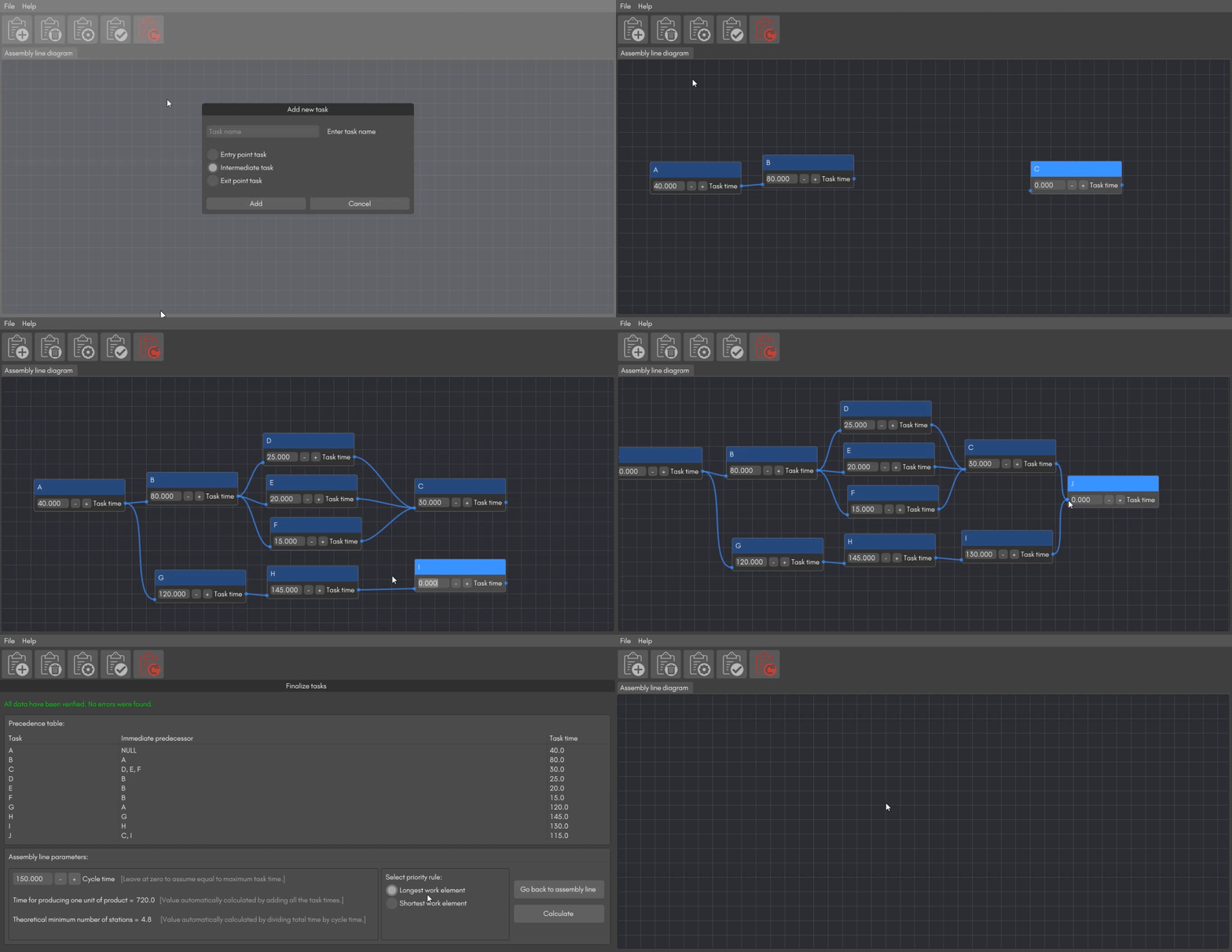
The interactive assembly line balancer lets the user add multiple tasks and link them together to create and balance an assembly line by assigning tasks to various workstations to achieve the desired output rate with the smallest number of workstations according to the longest or shortest work element rule. This helps create well-balanced workloads for each workstation and minimizes bottlenecks. The app makes extensive use of the built-in node editor of Dear PyGui. The source code is available in the [Github repository](https://github.com/RahulShagri/Interactive-Assembly-Line-Balancer).
[](https://github.com/RahulShagri/Interactive-Assembly-Line-Balancer)
### Sarfis Pro: powerful distributed computing made easy
The goal of SARFIS Pro is to allow users to distribute any kind of compute task across multiple machines or even schedule a one-time task to run on all machines or specific machines, LAN and/or WAN. It will let people in CGI create render farms to use locally and/or in the cloud. Programmers can schedule tasks to compile software on multiple machines and run regression tests. Web designers can queue tasks that are too slow to be returned to the user in the request (such as exporting 10 years of banking data). For more information, check out the [Sarfis Pro](http://sarfispro.com/) website.
[ ](http://sarfispro.com/)
### Planar Truss Element FEM Solver
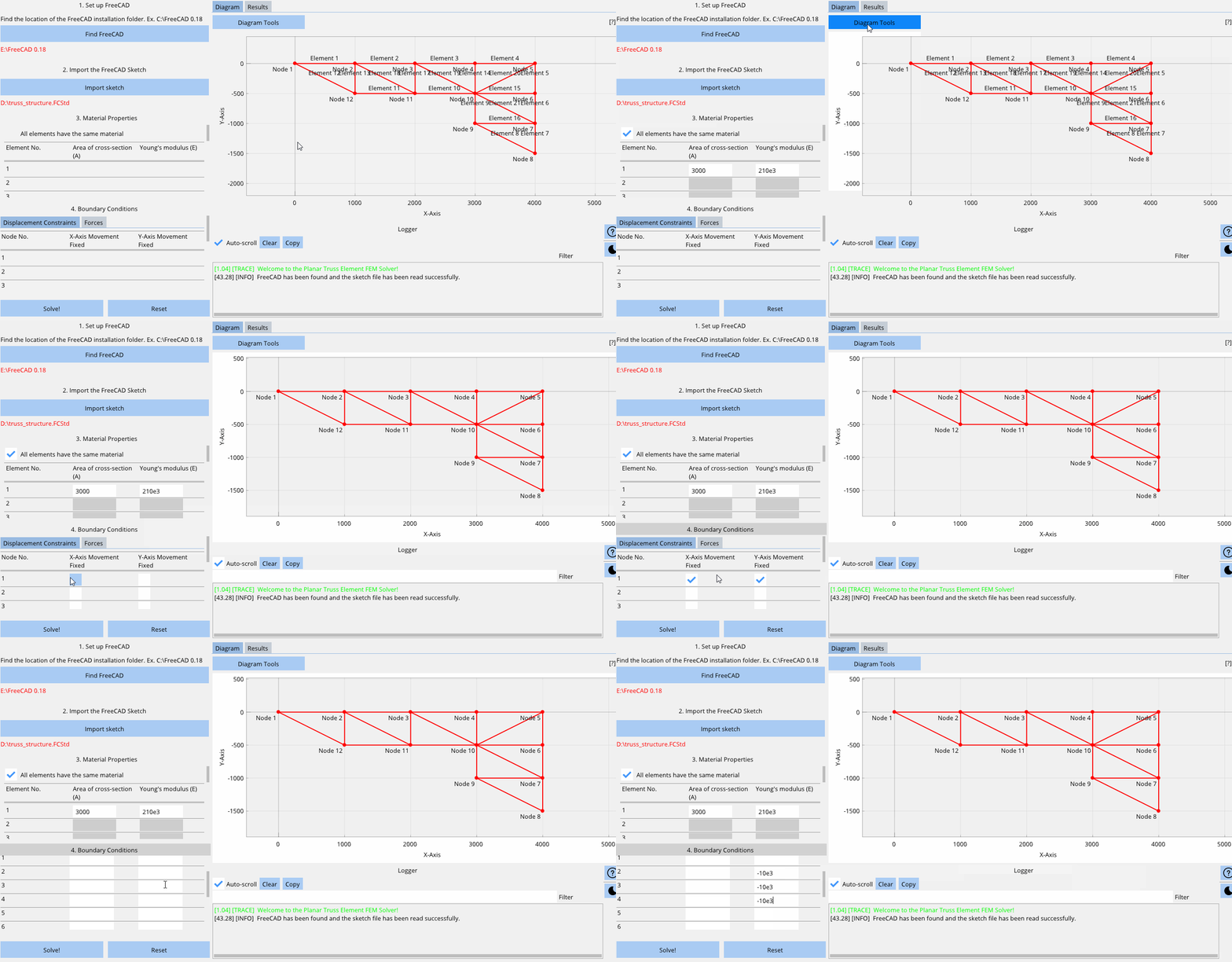
This solver can be used to analyse planar (2 dimensional) truss element structures made of 1D bar elements connected at various nodes that include movement constraints and 1D forces acting at the nodes. A more detailed explanation and the source code can be found in the [Github repo](https://github.com/RahulShagri/Planar-Truss-Element-FEM-Solver).
[](https://github.com/RahulShagri/Planar-Truss-Element-FEM-Solver)
### Drawing app
A simple drawing app that draws straight and dotted lines, rectangles, Bézier curves, freehand, circles and arrows. It offers the ability to undo/redo, save and open files and even has light/dark mode options. Check out the code in the [Github repo](https://github.com/RahulShagri/SimpleDrawing-Desktop-App).
[](https://github.com/RahulShagri/SimpleDrawing-Desktop-App)
### Python Digital Phosphor Display with RTLSDR ([YouTube](https://www.youtube.com/watch?v=GPoQYTfQMxw))
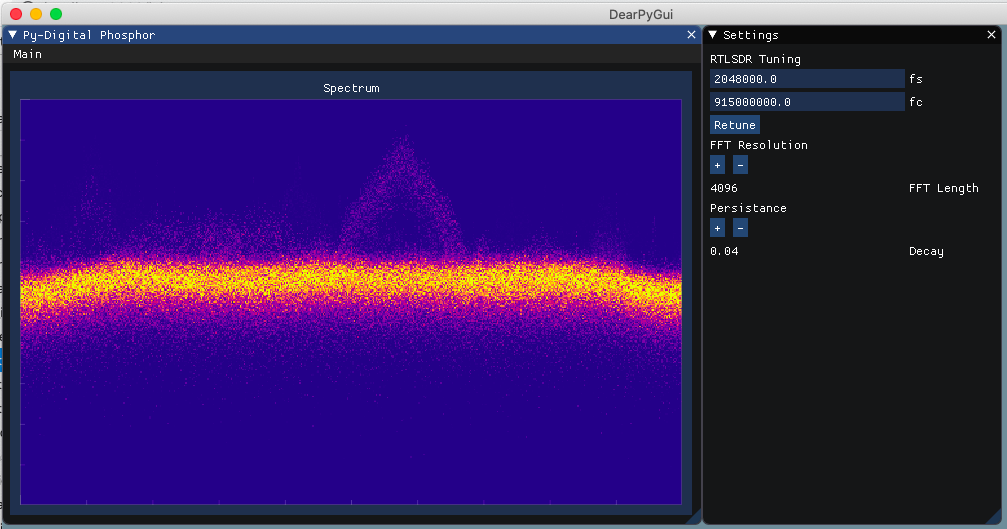
This [video](https://www.youtube.com/watch?v=GPoQYTfQMxw) demonstrates an Intensity graded FFT or Python Digital Phosphor Display by Thomas Schucker. The accompanying [blog post](https://teaandtechtime.com/python-digital-phosphor-display-with-dearpygui/) shows how to create a this dynamic graph. The code can be downloaded from the [Github repo](https://github.com/Tschucker/Python-Digital-Phosphor-Display).
[](https://www.youtube.com/watch?v=GPoQYTfQMxw)
## Scientific apps made with Dear PyGui
### Hyperspectral Imaging Acquisition
[Hyperspectral Imaging](https://mdpi-res.com/d_attachment/sensors/sensors-22-02159/article_deploy/sensors-22-02159-v2.pdf) (HSI) techniques have demonstrated potential to provide useful information in a broad set of applications in different domains, from precision agriculture to environmental science. A custom built system has been developed with Dear PyGui to control individual cameras and other devices and visualise data in order to perform hyperspectral imaging acquisition and analysis.
[](https://github.com/DataExplorerUser/dpg_resources/blob/main/hyperspectral_image_acquisition_system.pdf)
### Ultrasonic Tracking of Surgical Needle
Researchers at the School of Biomedical Engineering & Imaging Sciences, UCL and UCH have developed an ultrasonic surgical [needle tracking technology](https://www.kcl.ac.uk/news/ultrasonic-tracking-novel-technology-identifies-tip-of-surgical-needle-during-surgeries) which for the first time identifies the tip of a needle during surgeries. With ultrasonic tracking, a miniature fibre-optic ultrasound sensor is integrated within a thin needle to communicate with an external ultrasound imaging probe. The GUI was built using Dear PyGui, which was chosen for its real-time data acquisition and plotting abilities.
[](https://www.kcl.ac.uk/news/ultrasonic-tracking-novel-technology-identifies-tip-of-surgical-needle-during-surgeries)