As a user, I want to see a To-Do app page so that I can create, edit and manage my to do items.
Success Criteria
Page look and feel
- Setup a new project with REACT
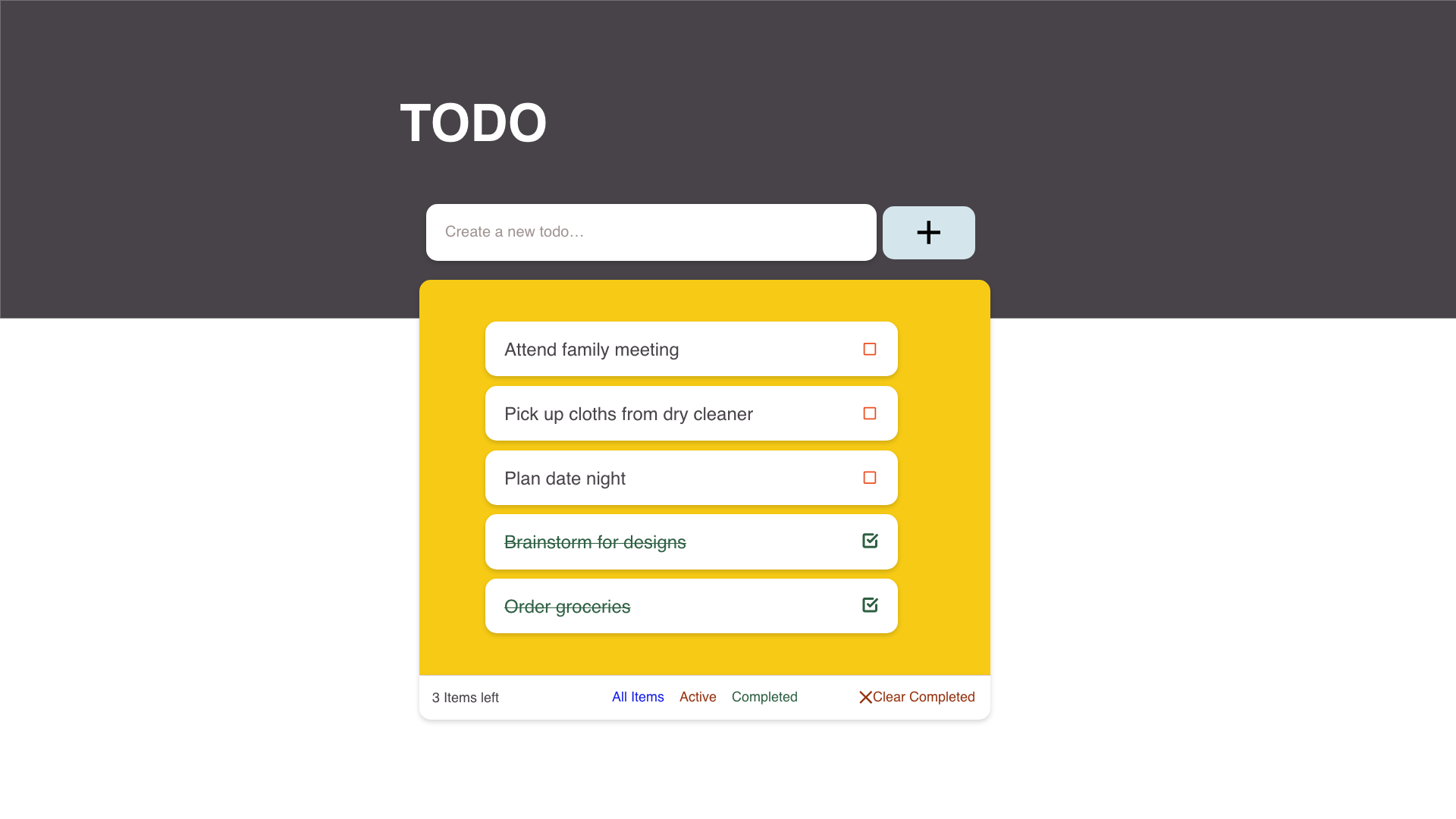
- Build a To do App following the attached design.
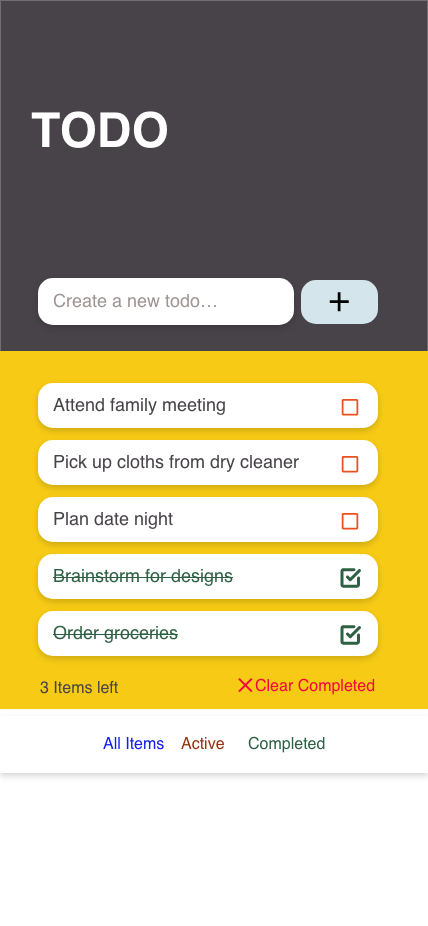
- Ensure that the attached mobile view design is how the user views this page when on mobile.
Creating To-do entries
- Given that a user enters the to-do entry in the
create a new to do input field and then clicks on the + button, a new to-do entry with the inputted text should be added to the list of to-dos with the status Active (ie red checkbox)
- If the input field is empty, ensure the user cannot click the
+ button at all.
To-Do list Interaction
- Ensure the user can mark an entry as
Done by clicking into the checkbox for the entry. Marking as Done here means (1) Changing the text colour from red to green (2) adding a strikethrough on the text for that entry (3) Changing the checkbox colour to green and adding a marked sign to it.
Filters
- Ensure that the number of Active entries is shown on the filter below as the
xx items left
Don't
- Don't use Redux
- Use react state management system or custom hooks. Every method should be within the main component i.e App.js.
- Don't push
package-lock.json, node_modules, App.test.js, setupTests.js, reportWebVitals.js as part of your PR
- Add the following to your
.gitignore file :
package-lock.json README.md /public/logo192.png /public/logo512.png /public/manifest.json /public/robots.txt
Mockups
1. Web View
2. Mobile View
PS - You can use you own colour combinations but must keep the standard of RED = Active entries and GREEN = Done issues

As a user, I want to see a To-Do app page so that I can create, edit and manage my to do items.
Success Criteria
Page look and feel
Creating To-do entries
create a new to doinput field and then clicks on the+button, a new to-do entry with the inputted text should be added to the list of to-dos with the statusActive(ie red checkbox)+button at all.To-Do list Interaction
Doneby clicking into the checkbox for the entry. Marking as Done here means (1) Changing the text colour from red to green (2) adding a strikethrough on the text for that entry (3) Changing the checkbox colour to green and adding a marked sign to it.Filters
xx items leftDon't
package-lock.json,node_modules,App.test.js,setupTests.js,reportWebVitals.jsas part of your PR.gitignorefile :package-lock.json README.md /public/logo192.png /public/logo512.png /public/manifest.json /public/robots.txtMockups
1. Web View

2. Mobile View

PS - You can use you own colour combinations but must keep the standard of RED = Active entries and GREEN = Done issues