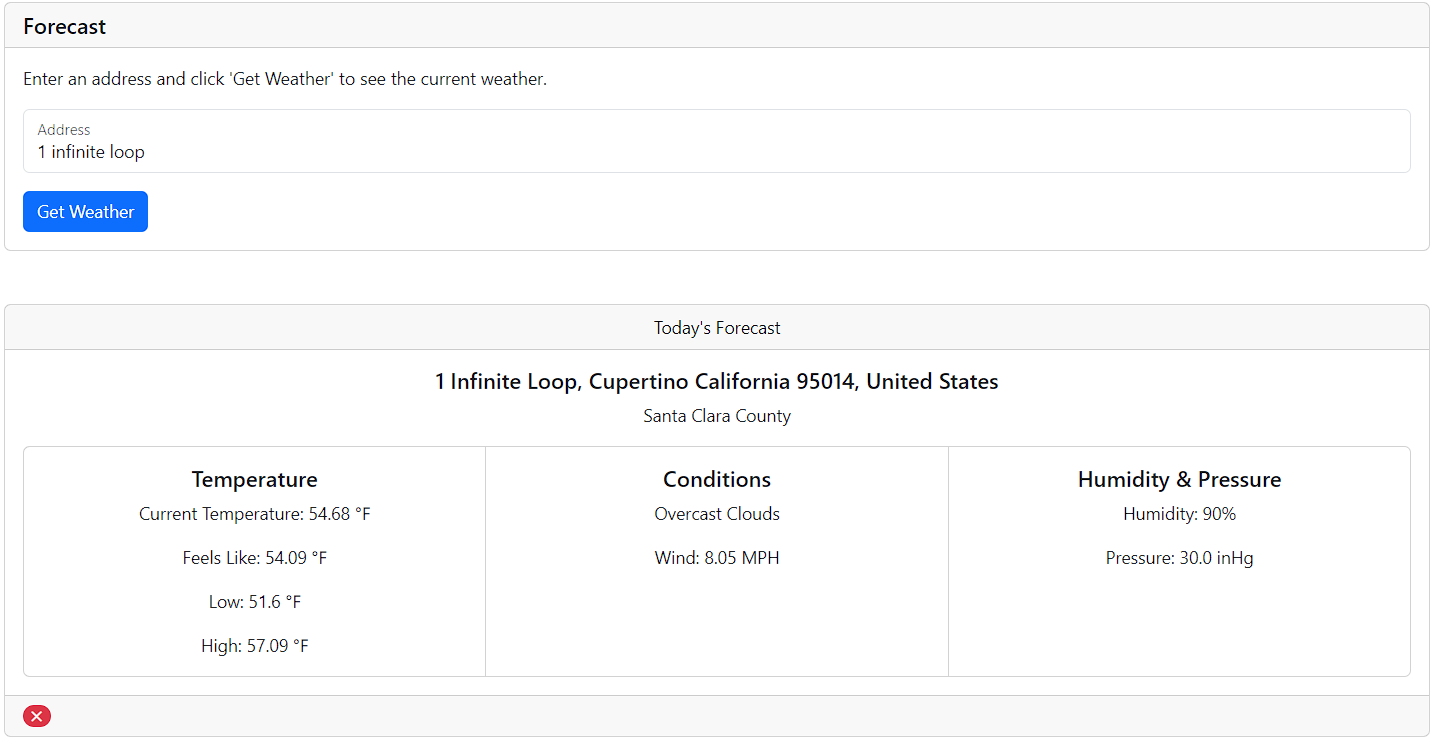
Forecaster is a Ruby on Rails application that provides users with up-to-date weather forecasts and information. This application allows users to check the current weather conditions based on an address.
-
Current Weather: Get real-time information about the current weather conditions based on user-specified address.
-
Responsive Design: A responsive and mobile-friendly design for a seamless user experience.
-
TEMPERATURE:
- Current Temperature
- Feels Like Temperature
- Low of Temperature
- High of Temperature
-
CONDITIONS:
- Weather Conditions
- Wind speed (Mph)
- Wind Gust (Mph)
-
Humidity & Pressure:
- Humidity
- Pressure (inHg)
- Wind Gust
- Clone the repository:
git clone https://github.com/EvanRPavone/forecaster-app.git
- Install Dependencies
bundle install
- Configure API Keys
This application utilizes OpenWeatherMap and ArcGIS
- Create an account
- In the top right, there is your name, click it and go to "My API Keys"
- Create an account and set your account as developer
- Go to the dashboard and there is a section called "Recent API Keys" or In the top right next to "Dashboard" there is "API keys"
- Your username that you signed up with is going to be your
arcgis_userand thearcgis_secretis the API key you found on your dashboard
I used rails credentials to store my api keys, but you can use .env (Not Recommended) too
EDITOR="code --wait" bin/rails credentials:edit
ArcGIS and GeoCoder gem is used to get the latitude and longitude of a given address,
  arcgis_user: < YOUR-ArcGIS-USERNAME >
  arcgis_secret: < YOUR-API-KEY >
The latitude and longitude is passed to the openWeatherMapAPI (WeatherService.rb)
openweather_api_key: < YOUR-OPEN-WEATHER-API-KEY>
You need to change the code in geocoder.rb located in initializers
  Geocoder.configure(
    esri: {
      api_key: [
        ENV["WHATEVER YOU NAMED THE USER VARIABLE"],
        ENV["WHATEVER YOU NAMED THE SECRET VARIABLE"]
      ],
      for_storage: true
    }
  )
- Enable Development Cache
rails dev:cache
- Start your rails server
rails s
or
bin/dev
Open your browser and visit http://localhost:3000 to use the application
This application utilizes bootstrap5, if you want to be creative, go for it.
If you want to add or remove information retrieved from the weatherservice or geocodeservice:
REMOVE OR ADD WHAT YOU WANT TO RETURN
to see what the api returns put puts data somewhere in the function to see. From there you can choose what you want and don't want
  # app/services/geocode_service.rb
  class GeocodeService

    def self.call(address)
      ...
      geocode.address = "#{data["address"]["house_number"]} #{data["address"]["road"]}, #{data["address"]["city"]} #{data["address"]["state"]} #{data["address"]["postcode"]}, #{data["address"]["country"]}"
      geocode.latitude = data["lat"].to_f
      geocode.longitude = data["lon"].to_f
      geocode.country_code = data["address"]["country_code"]
      geocode.postal_code = data["address"]["postcode"]
      geocode.display_name = data["display_name"]
      geocode.county = data["address"]["county"]
      ...
    end

  end
  # app/services/weather_service.rb
  class WeatherService

    def self.call(latitude, longitude)
      ...
      response = conn.get('/data/2.5/weather', {
        appid: Rails.application.credentials.openweather_api_key,
        # passes in the lat and long retrieved from GeocodeService
        lat: latitude,
        lon: longitude,
        # sets unit of measurement to imperial
        units: "imperial", # Change to metric to use metric system
      })
      ...
      weather.temperature = body["main"]["temp"]
      weather.temperature_min = body["main"]["temp_min"]
      weather.temperature_max = body["main"]["temp_max"]
      weather.feels_like = body["main"]["feels_like"]
      weather.wind = body["wind"]["speed"]
      weather.wind_gust = body["wind"]["gust"]
      weather.humidity = body["main"]["humidity"]
      weather.pressure = body["main"]["pressure"]
      weather.description = body["weather"][0]["description"]
      ...
      # ALL WEATHER DATA:
      # {
      #   "coord"=>{"lon"=>-78.8498, "lat"=>35.8971},
      #   "weather"=>[{"id"=>804, "main"=>"Clouds", "description"=>"overcast clouds", "icon"=>"04d"}],
      #   "base"=>"stations",
      #   "main"=>{"temp"=>48.27, "feels_like"=>47.73, "temp_min"=>44.62, "temp_max"=>50.36, "pressure"=>1035, "humidity"=>47},
      #   "visibility"=>10000,
      #   "wind"=>{"speed"=>3, "deg"=>311, "gust"=>4},
      #   "clouds"=>{"all"=>100},
      #   "dt"=>1706025683,
      #   "sys"=>{"type"=>2, "id"=>2031626, "country"=>"US", "sunrise"=>1706012517, "sunset"=>1706049118},
      #   "timezone"=>-18000,
      #   "id"=>4480285,
      #   "name"=>"Morrisville",
      #   "cod"=>200
      # }
    end

  end
rails test
rails test:system