- Introduction
- New In Activity Schema 2.0
- Conceptual Overview
- Structure
- Managing an Activity Schema
- Querying
- Appendix
An Activity Schema data model is a new paradigm designed for modern data warehouses. It was created and implemented by Ahmed Elsamadisi at Narrator.
This new standard for data enables:
- Standardized data modeling accross industry, sector and use-case
- A simpler structure that is easily understandable
- A warehouse-native solution for modeling data.
The Activity Schema model aims for these design goals
- only one definition for each concept - know exactly where to find the right data
- single model layer - no layers of dependencies
- simple definitions - no thousand-line SQL queries to model data
- no relationships in the modeling layer - all concepts are defined independently of each other
- no foreign key joins - all concepts can be joined together without having to identify how they relate in advance
- analyses can be run anywhere — analyses can be shared and reused across companies with vastly different data.
- high performance - reduced joins and fewer columns leverages the power of modern column-oriented data warehouses
- incremental updates - no more rebuilding data models on every update
- dynamically queried at analysis time - create any table at the moment you need it
At its core an activity schema approach consists of transforming raw tables into a time series table called an Activity Stream. All downstream plots, tables, materialized views, etc used for BI are built directly from that table, with no other dependencies.
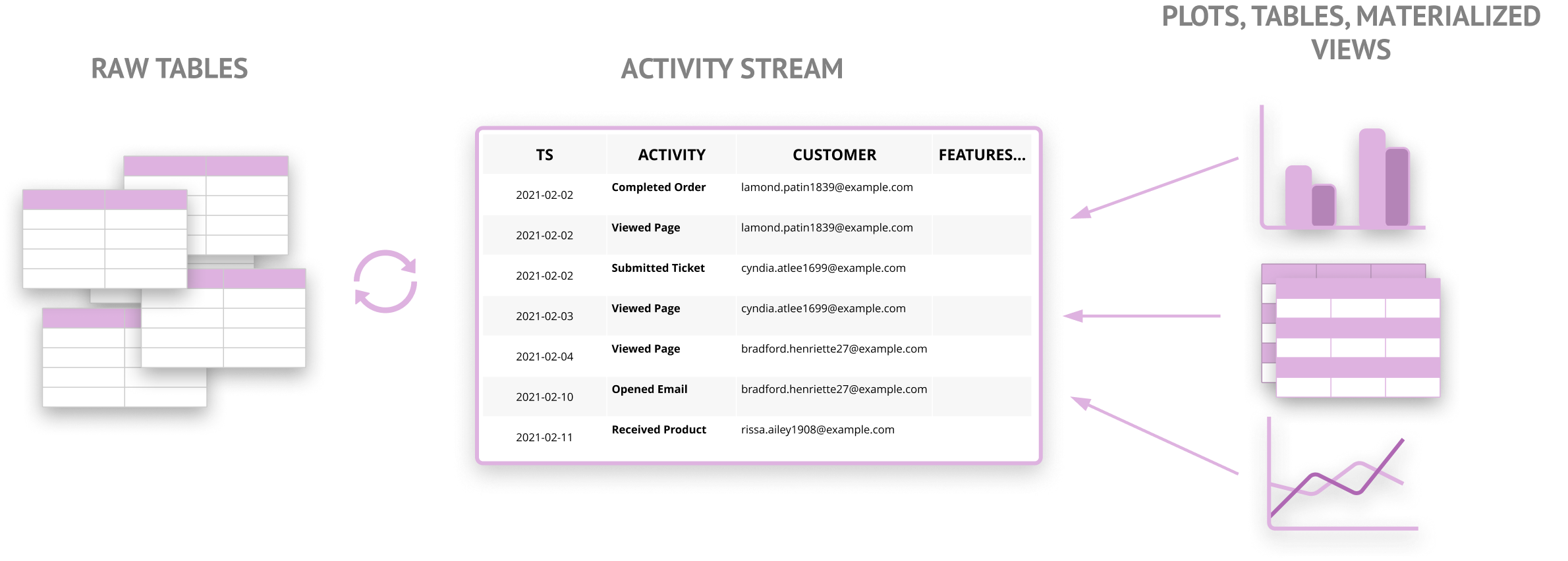
The diagram above is the entire dependency graph: only three layers and a single data model. The modeling layer is able to create any kind of aggregation or table needed, and the consistent table structure allows data analyses to be written once and reused elsewhere.
The V1 spec uses feature_1, feature_2, feature_3 as fixed feature columns. This was simple and worked on most warehouses. Three features worked for 90% of activities so it was generally good enough.
Warehouse support for unstructured data is robust enough to allow more flexibility. As a result a single feature_json column now contains all features.
See the Types section for more info on the structure.
The V1 spec relies on a single table, called the Activity Stream, to hold all activity data. Data warehouse partitioning and clustering generally allow this to work extremely well.
V2 optionally also supports a table per activity. This was motivated partially by performance: for some warehouses, including BigQuery, it can be faster and less expensive to query manually-partitioned tables.
The V1 spec had support for additional dimensional data on activities beyond the three allowed. This had to be done through special enrichment tables, which were joined at query time using activity_id.
With V2, we no longer need special tables to add metadata to an activity. This is partly because the feature_json column can store any number of additional features, and partly because enrichment tables are a query-time concept.
It's easy to join additional data into an activity stream at the time that it's queried. This is already done in dimensional modeling with fact and dimension tables. Because of this, there's no real benefit to maintaining an activity schema-specific approach.
An activity schema models an entity taking a sequence of activities over time. For example, a customer (entity) viewed a web page (activity).
An activity schema is implemented as a single, time series table with (optionally) a table per activity.
Each row in the table represents a single activity taken by the entity at a point in time. In other words, it has an activity identifier, an entity identifier, a timestamp, and some basic metadata called features. The specific structure is covered in the next section.
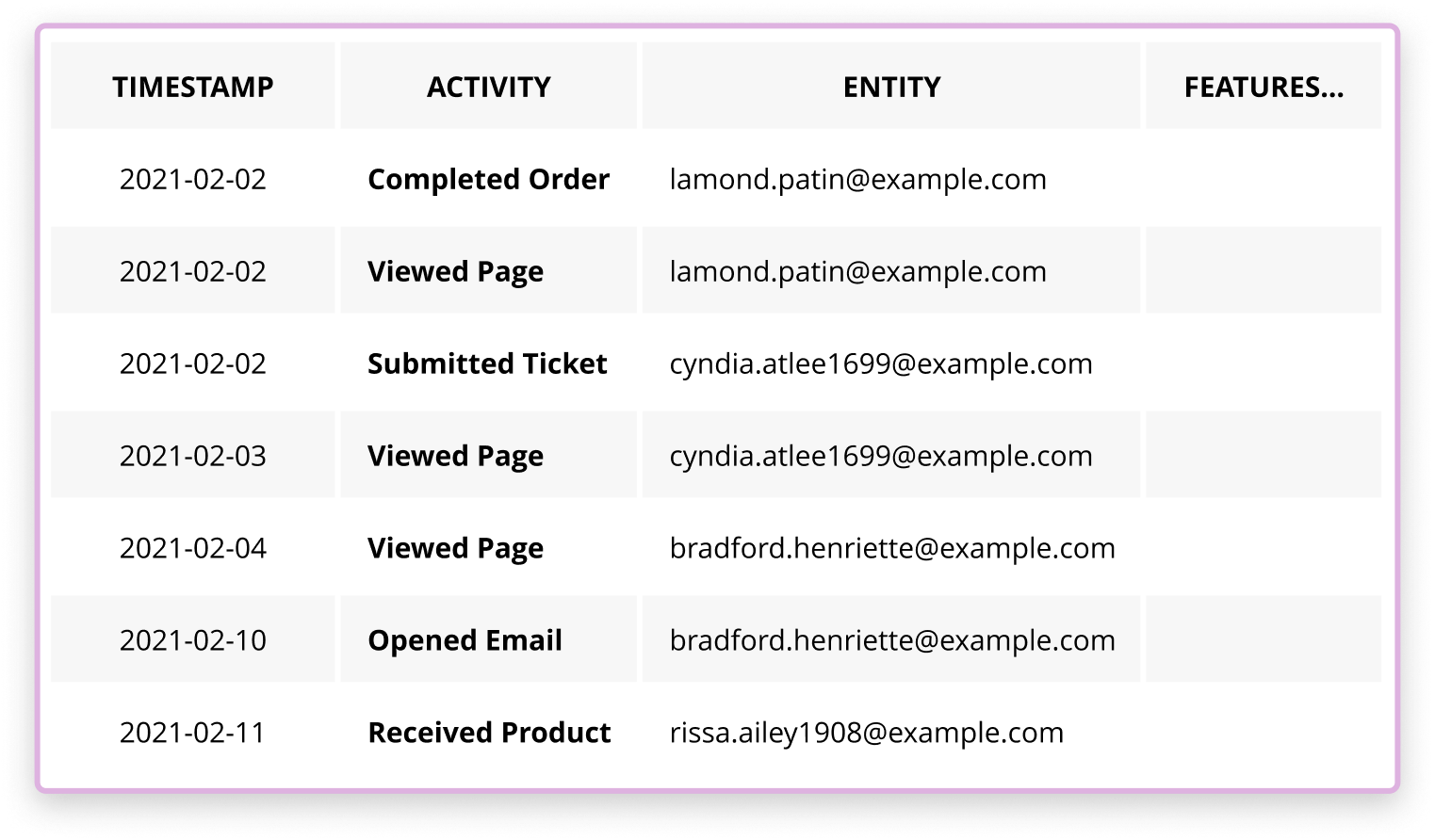
Entities are the subject, or actor in the data. Every activity in the activity schema is an action taken by a specific entity with a unique identifier
The most common entity is a customer, but there can be other types as well. For example, a bike-sharing company could also have a bike entity to analyze things like repair frequency, mileage over time, etc.
An activity schema table will only have one entity type and is typically named <entity>_stream. For example, an activity schema implementation for customers would be customer_stream, and one for bikes would be bike_stream
Some examples of streams in practice include
customer_stream- customer behavior questions (B2C)company_stream- account behavior questions (B2B)student_stream- ed-techvehicle_stream- analysis around a fleet of vehiclesproduct_streamorsku_stream- questions for retail fulfillment
This stream naming is primarly relevant for multiple streams. For a single stream, the term 'customer' for the entity is a good default.
Activities represent specific actions taken by an entity. For example, if the entity is a customer an activity could be 'opened an email' or 'submitted a support ticket'. Each row in a table modeled as an activity schema is a single instance of an activity taken by a specific entity.
Activities are intended to model real business processes. Taken together, the series of activities for a given entity would represent all relevant interactions that entity has had with a company.
Because an activity is a specific event that happened at a moment in time, for data modeling purposes it's immutable. An activity should never change.
If an activity holds data that can change (order_status), it's a clear indication that other activities need to be created (order_shipped, order_returned).
Every activity has metadata associated with it beyond the customer, the activity, and the timestamp. A 'viewed page' activity will want to store the actual page viewed, while an 'invoice paid' activity will store the total amount paid.
Unlike dimensional modeling, activities should only store metadata that they are authoritative for. For example, a
completed_orderactivity can storeorder_date, but it shouldn't storeshipped dateororder_attribution_sourcebecause those are 'owned' by other activities (shipped_orderandstarted_session)
The primary benefit of an activity schema is that all data is in a consistent format. This means that it requires tables with specific names, types, and numbers of columns.
There are two types of tables in an Activity Schema
- activity stream (either a singular table for all activities or one table per activity)
- entity table (optional - one per activity schema)
The activity stream table(s), (typically called <entity>_stream) stores all activities, their timestamps, the entity's identifier, and some metadata.
The entity table (typically called <entity>_dim) stores metadata for each entity. For example, a customer_dim table can store date of birth, first and last name, etc.
The diagram below shows the two types of tables for our example bike stream.
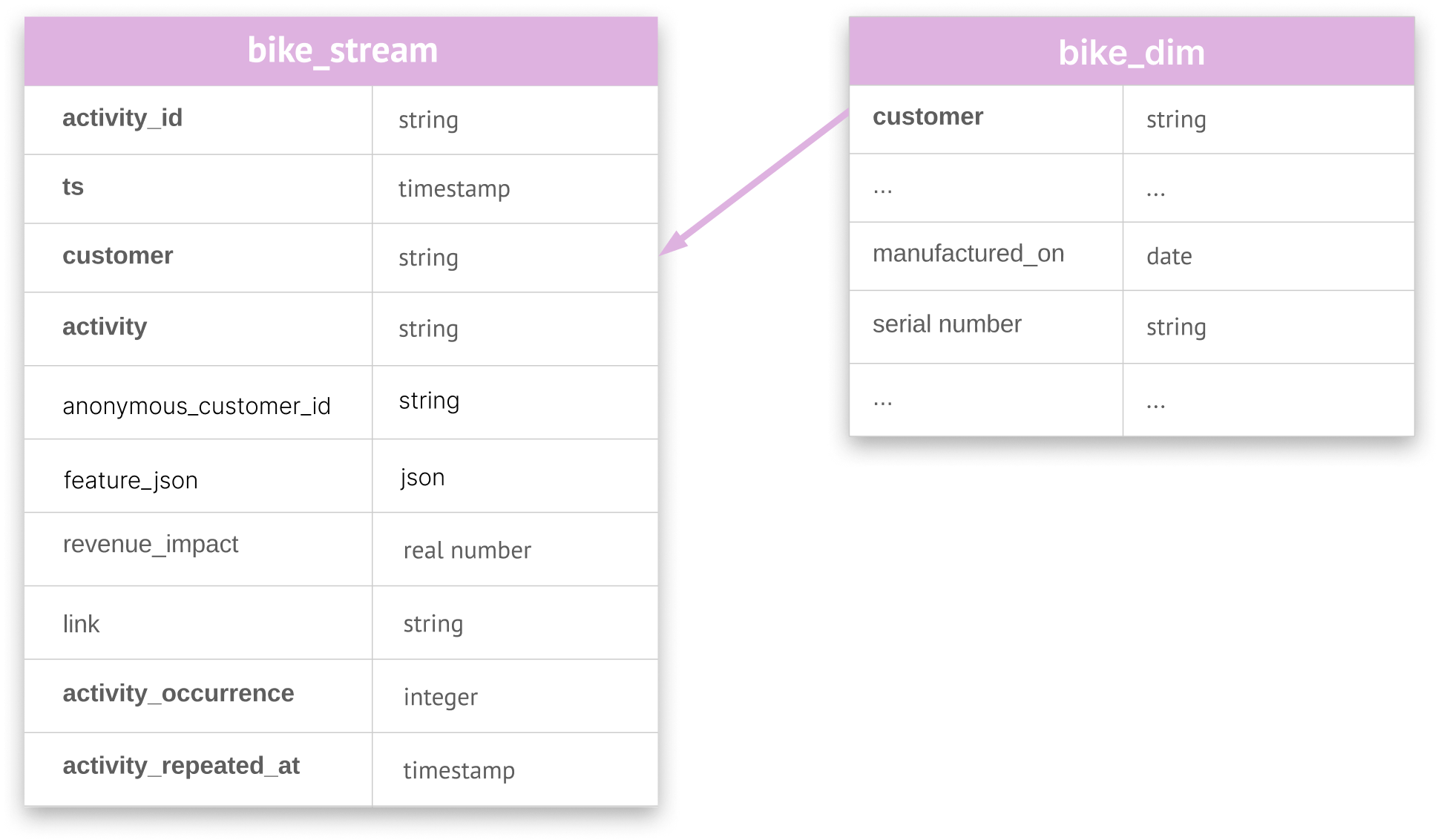
An activity stream is usually one table containing all activities. However, there are some cases when one table per activity can be useful.
| Table type | Allowed | Notes |
|---|---|---|
| Single table for all activities | yes | Preferred default approach |
| One table per activity | yes | Can be helpful in specific cases |
| One activity across several tables | no | An activity can be in at most one table |
| Multiple activities in many tables | no | Only allowewd if one table holds ALL activities |
By convention, a table with one activity is named <entity>_stream_<activity_name>
For example: customer_stream_opened_email
The choice to use a single activity table or multiple is mostly implementation and warehouse-dependent. For example, it can be easier to build one table per activity, but it's slightly harder to query.
There are no functional differences between either approach and any activity schema implemention is free to support one or both. If in doubt a single table containing all activities is the preferred approach. The implementation guide covers this decision in more detail.
The activity stream table is the primary table in an activity schema and is the only one required. The single stream table (or the per-activity tables as a group) houses the bulk of the modeled data in the warehouse.
For the sake of clarity the rest of this specification will only discuss a singular table, but everything applies equally to the one table per activity approach as well.
| Column | Description | Type | Required |
|---|---|---|---|
| activity_id | Unique identifier for the activity record | string | yes |
| ts | Timestamp in UTC for when the activity occurred | timestamp | yes |
| customer | Globally unique identifier for the customer | string | yes |
| activity | Name of the activity (ex. 'completed_order') | string | yes |
| anonymous_customer_id | A unique customer id specific to the source of this activity | string | no |
| feature_json | Activity-specific features | JSON | yes |
| revenue_impact | Revenue or cost associated with the activity | float | no |
| link | URL associated with the activity | string | no |
A minimal activity schema only requires the following columns
- activity_id
- ts
- customer
- activity
- feature_json
See Column Notes below for more information on the optional columns. Note that they are still extremely useful and most implementations will use them.
Exact types can differ depending on the warehouse. For the purposes of the activity schema, most column types are strings with a maximum length of 255 characters. This limit is in place for performance and to keep the activity stream table compact.
Features
The feature_json column is a warehouse's semi-structured data type. It's generally JSON but can be called SUPER in Redshift, OBJECT in Snowflake, etc. It can contain any number of entries.
It is used for storing additional 'columns' into the activity stream. As a result it supports the same types that would fit in an ordinary column in the warehouse. It's effectively a set of key / value pairs.
Represented as json it has this form
{
  "product_id": 12,
  "product_name": "Rubby ducky",
  "total_price": 13,
  "tax": 3.23,
  "product_category": null
}
It's possible to store non-scalar types in fields_json -- arrays, json objects -- but they aren't treated specially (i.e flattened or unpacked). The schema only treats top-level entries as features on the activity.
Each activity should have a consistent feature_json structure -- i.e. every row for a given activity must have the same set of keys. Different activities, even if in the same table, can have different feature_json structures.
Other Columns
-
The ts is a timestamp with no time zone. Any type that specifies a specific date and time (TIMESTAMP for most warehouses), timezone independent, will work.
-
By convention ts is always understood to be in UTC.
-
The revenue_impact column is a real number (float, decimal, numeric etc). The exact type or precision is unspecified. There is no dedicated field for currency type (i.e USD), since all activities in an activity stream are the same currency.
activity_id
The activity_id can be any string as long as it's unique for the given activity. It is used to identify a single activity instance. It can never be null.
activity
The activity column is a simple string denoting the name of the activity — 'viewed_page' or 'opened_support_ticket'. By convention it's in the form verb_noun from the perspective of the entity — it should read as entity performed action. Any other form is fine as well. It's a best practice to use the same form across all activities when possible. It is case-sensitive and can never be null.
customer
The customer column is the global identifier for the entity. It's typically an email address, but can be a phone number or serial number (eg. for a bike) or anything else that uniquely identifies the entity. IDs, uuids, and other computed identifiers ideally should be avoided, since they're not naturally unique.
A single entity should have exactly one identifier in the activity stream across all their activities. In other words, don't mix multiple types of identifiers for different activities. A single entity cannot be identified with an email in one activity and a phone number in another. If so they will effectively be different entities. In fact, a given activity schema should only use one type of identifier for the customer column throughout.
Note that the column name is always customer regardless of what kind of entity is modeled in a given activity stream. This is to keep the exact same structure for all activity stream tables. The more specific term 'customer' was chosen over the generic term 'entity', because in the vast majority of the time an entity is some form of customer. For example, the diagram at the beginning of this section, showing a bike_stream table, has a customer column to represent bikes.
The customer column can only be null if anonymous_customer_id is not null.
anonymous_customer_id
In some cases the desired customer identifier is not yet available. When that happens the anonymous_customer_id columns are used in its place. They allow the activity stream to store an alternate identifier for an entity — called a local identifier (in contrast to the global identifier in the customer column).
For example, say we're tracking customer page views on a web site. Visits are typically anonymous, so trackers like Segment or Google Analytics assign a proprietary id to the site visitor. This allows them to track the same person across sessions, even if we know nothing else about them.
In this situation, store that anonymous identifier in anonymous_customer_id. By convention we prepend the name of the service providing the identify to the identifier in the anonymous_customer_id column. For example: 'segment_abd5d3...' or 'ga4_f9b9c...' It's not strictly necessary, but it can help with ensuring uniqueness and quickly identifying the origin of the anonymous ids.
When customer and anonymous_customer_id are both available it creates an association at that point in time that can be used for identity resolution: all previous activities with only anonymous_customer_id can now be understood to be from that customer. A common practice is to fill in the customer column in older records once that link has been established.
feature_json
The feature_json column houses all activity-specific fields. It is very good practice to only put the data that was generated by the activity at that time.
For example, a 'completed_order' activity can have 'coupon_code', 'tax', etc. It would be bad practice to add 'first_touch_ad_source' or 'delivery_date' or 'returned_at' since they all can change and are owned by another activity.
revenue_impact is a number that captures money coming in (or out). For example, a 'paid_invoice' activity would likely have revenue impact set to the invoice total. This field is frequently summed in aggregation queries to compute things like total revenue over a time period.
link is used to store a hyperlink relevant to the activity. For example, a 'submitted support ticket' activity could have a link to the actual support ticket in Zendesk. This provides one click access to the source record for the data, which helps immensely when exploring or debugging.
Any columns in an activity table starting with an underscore (_) are ignored. These are assumed to be implementation-specific and outside the spec. As an example, Narrator uses an _activity_source column to store which transformation script created an activity.
The activity stream table is designed for fast queries on common data warehouses like Redshift, BigQuery, and Snowflake. Nearly all modern data warehouses are column-oriented — tables with fewer columns and many rows perform fastest. In addition, the activity stream table typically only needs to be joined with itself when queried, which further increases performance over other modeling approaches.
That said, it's important to pick the correct sort / dist / partition / cluster / index (depending on warehouse technology) to ensure high performance. A detailed discussion is out of scope for this specification. See implementation for some suggestions.
The entity table stores an unlimited number of metadata columns. By convention it takes its name directly from the entity. For example, for an activity schema with an entity named 'customer', the table would be called customers. For an activity schema about bikes the table would be called bikes.
Conceptually the table contains a primary key column to identify the unique customer and an unlimited amount of optional columns containing the metadata. This is similar to dimension tables in a star schema. When querying the activity schema this table can be joined in when required by using the entity identifier.
The primary key column is the only required column and by convention is always named customer — the same name as the corresponding column in the activity stream. ****It must store the same entity identifier as the activity stream.
SELECT *
FROM bike_stream
LEFT JOIN customers
ON bike_stream.customer = bikes.customerActivities can store an unlimited amount of extra features in the feature_json column. Most activities only need two or three additional features, so this approach works in nearly all cases.
There are two other ways to associate data to an activity at query time: by borrowing features from other activities, and through dimension joins. These are discussed in the querying section.
In its simplest form an activity schema only has a single model table — the activity stream. An activity stream table can be reassembled to generate any table for BI, reporting, and analysis.
Using an activity schema in practice consists of two things
- Modeling - transforming raw tables into an activity stream
- Querying - retrieving data from the activity stream for BI (aka running at analysis time)
Both are a bit different than in more traditional approaches, so it's worth looking at them in more detail. This section discusses the overall approach at a high level. For some specific tips on how to build an activity schema refer to the implementation doc.

Modeling here is the step to transform source tables in a data warehouse into the activity stream format. Querying is running SQL queries against the activity stream table to generate tables, materialized views, etc to be used for BI.
There is a strong separation between modeling and querying. Any changes to how activities are built has no downstream impact on the queries depending on them. This makes it extremely easy to keep up with changes in production systems. Any type of source data change — from a changed column to swapping out to a completely different system with a new set of tables — simply requires updating the activity, while changing none of the downstream queries. This makes each activity the actual source of truth for each concept in the warehouse.
An activity schema is built by running simple SQL queries to transform raw source data to the activity stream format. This process should be familiar — it is no different than the Transform step (T) of an ELT approach to data ingestion and modeling.
In an activity schema there is only a single model layer — the activity stream table, and the primary modeling concept is an activity (rather than a noun like an 'order' or an 'invoice').
The process is straightforward
- choose your activities
- find relevant raw table(s)
- write a SQL query to create each activity
Not all raw tables are modeled directly. Instead of thinking about what to do with each raw table, it helps to first identify which activities make sense. Generally they'll map to well known business processes or customer touch points, all from the perspective of the entity. It's fairly easy to add new activities or to change them, so it's also a good idea to start with a question, figure out which activities are needed, and add those. Pretty quickly this will converge to a core set.
For example, for our bike sharing app some activities for the bike stream could be
- ride started
- ride ended
- maintenance requested
- moved to new location
Some activities for the customer could be
- purchased daily pass
- started ride
- purchased yearly subscription
- submitted maintenance request
- viewed web page
- opened ride app
- viewed bike availability
Once the activities have been identified then it's usually fairly straightforward to find which source table(s) will be needed. The only requirement is that we can identify an entity, a relevant activity, and a timestamp.
SQL Transformations are short SQL queries that map from source data to the activity stream format. They are typically fairly small and easy to write.
For example, this is how completed_order is built from Shopify data in Redshift
SELECT
  o.id AS activity_id
  , o.processed_at AS ts
  , NULL     AS anonymous_customer_id
  , o.email  AS customer

  , 'completed_order' AS activity
  , object (
    'discount_code', d.code,
    'order_name', o.name
  ) AS feature_json

  , (o.total_price - o.total_discounts) AS revenue_impact

FROM shopify.order AS o
LEFT JOIN shopify.order_discount_code d
  ON (d.order_id = o.id)

WHERE
  o.cancelled_at is NULL
  and o.email is not NULL
  and o.email <> ''
This SQL is pretty straightforward
- the completed_order activity is defined independently — it doesn't have to join with any other tables. We just need to find the customer's unique identifier (in this case email)
- activities generally conform to well-known business processes, so the data is frequently close to the desired format already
In practice nearly all transformation scripts are less than 30 lines and one or two joins.
In addition, there's no reason that transformation scripts and activities have to be 1:1. For example, a 'received_email' activity could be defined from source tables from multiple systems. Or a single transformation can create multiple activities.
Companies maintaining data models in their warehouse run scheduled tasks to keep all tables up to date. In practice, this is done with a periodically running scheduled task (using a tool like dbt) that carefully manages a graph of table dependencies.
The activity schema approach is effectively the same, only without the layers of dependencies. A common approach is to create a single SQL query per activity desired, and append the results of each query to the activity stream table.
This approach also means that incremental updates to the activity stream are straightforward (identify all activity rows created by the given transformation, find the maximum timestamp, and insert rows with a newer timestamp).
The implementation guide has more information on how to create and maintain an activity schema in production.
An activity schema differs in some fundamental ways to more traditional approaches
- data is in a time-series format
- queries only select from the activity stream table (and optionally join in dimension tables)
- any activity can be related (joined) to any other activity using only the entity and timestamp
This means that querying is a bit different but substantially more powerful.
An activity schema does not require any foreign key joins. All joins are self-joins to the activity_stream table, and they only use the entity and timestamp columns. This means there is always a way to relate any data in an activity schema to anything else.
Another way of phrasing this is that
- Any query can substitute different activities by merely changing the activity name(s) where present in the query
- Any query can be run on any activity schema implementation (say at a different company) by substituting activities if necessary
This means that someone could build a customer lifetime value analysis, and run it on any number of companies' data with minimal modification.
Or one could compute the conversion rate over time of one activity to another (what percent of signups converted to orders) then quickly substitute the activities to answer a related question (what percent of orders converted to another order). In existing approaches, this usually requires restructuring the query, and in some cases in-depth work to find the right foreign keys to join.
Lastly, a consistent table structure coupled with easily-modified queries means that it is far more useful to automatically generate SQL than before. An activity schema is best queried by specifying which kinds of activities and relationships matter and allowing a system to generate the actual SQL. See the Known Implementations section for some examples.
To better explain the concepts above we'll show a few hand-built queries.
Simple queries are largely the same. Let's take a hypothetical bike-sharing company as an example. The monthly number of day passes sold, along with revenue, is pretty straightforward.
SELECT
	DATE_TRUNC('month', ts) AS month,
	COUNT(1) as total_orders,
	SUM(revenue_impact) as total_revenue
FROM customer_stream AS c
WHERE c.activity = 'purchased_day_pass'

GROUP BY month
ORDER BY month
It's fairly obvious that counting total yearly subscriptions instead of day passes simply requires substituting 'subscribed_to_yearly_pass' for 'purchased_day_pass'.
SELECT
	DATE_TRUNC('month', ts) AS month,
	COUNT(1) as total_orders,
	SUM(revenue_impact) as total_revenue
FROM customer_stream AS c
WHERE c.activity = 'subscribed_to_yearly_pass'
GROUP BY month
ORDER BY month
Now let's see how this works when relating multiple activities together.
Relating multiple activities together is done by joining the single activity stream table to itself using the customer identifier and timestamps. Since these two things are present on all activities, swapping out different activities will still work.
Let's say our hypothetical bike share company wants to see how many day passes each customer bought before getting their first yearly subscription.
The approach is to get all first-time yearly subscriptions (using a special activity_occurrence column), then for each one join in all the day pass activities that came before.
SELECT
  year_sub.customer,
  COUNT(1) AS "total_purchased_day_pass_before"
FROM customer_stream AS year_sub
INNER JOIN customer_stream AS day_pass
  ON (
      day_pass.customer = year_sub.customer AND
      day_pass.ts < year_sub.ts
  )
WHERE (
  year_sub.activity = 'subscribed_to_yearly_pass' AND
  year_sub.activity_occurrence = 1 AND
  day_pass.activity = 'purchased_day_pass'
)
GROUP BY year_sub.customer
This query returns all customers who have at some point subscribed to a yearly pass, along with the count of the total number of day passes they bought before their first subscription.
Now what if we wanted to see how many marketing emails customers received before opening their first email? It's the same query. Simply substitute 'marketing_email_received' for 'purchased_day_pass' and 'marketing_email_opened' for 'subscribed_to_yearly_pass'
The activity schema is designed around customers and timestamps instead of foreign keys. As a result, in-depth querying requires a different way of thinking.
Relationships are a concept designed express all the ways activities can relate (i.e. be joined) with each other.
For example, the data question 'which email did a user open before completing an order' can be expressed as a 'last before' relationship. "For each 'Completed Order', find the last 'Opened Email' before that order".
Relationships are intended to be used to query the activity schema -- through a tool that reads the relationships and generates and runs SQL against the activity stream tables. This language helps express joins that can't be done easily with SQL directly. Once they are expressed as relationships, translating into actual SQL is straightforward.
Relationships have two parts: an initial cohort activity, and one or more append activities brought in with a specific relationship.
The cohort is the primary activity in a query. It defines the rows in the result table. In the example above the cohort activity is 'Completed Order'.
Each activity appended to the cohort activity via a relationship will simply add columns to the result table. Appending activities via relationships will never change the rows returned -- it will never duplicate or drop rows. A cohort is roughly analogous to a FROM in SQL, while each relationship to an append activity can be thought of as a LEFT JOIN.
For examples below, we will use visited_website as the cohort activity.
First Ever: For every customer visit add the first occurrence of the append activity.
For every 'visited_website' append First Ever 'called_us'
This will add the customer's first time calling to every row, regardless of whether it happened before or after visiting the website.
Last Ever: For every visit, add the last occurrence of the append activity.
For every 'visited_website' append Last Ever 'called_us'
This will add the customer's last time calling on every row, regardless of when it happened.
Last Before: For every visit, add the last time the activity was done before that specific activity
For every 'visited_website' append Last Before 'updated_opportunity_stage'
This will add the stage of the customer at the moment they visited the website. (ideal for slowly changing dimensions)
First After: For every visit, give me the first time a customer does an activity after the visit
For the first 'visited_website' append First After 'signed_up'
For each customer add whether or not they converted any time after their first visit to the site.
First In Between: For every visit, give me the first time a customer does an activity before the next visit.
For every 'visited_website' append First In Between 'completed_order'
On every website visit, did the customer order before the next visit. (generally used for event-based conversion)
Aggregate In Between: for every visit, apply an agg function on all the occurrences of an activity before the next visit.
For every 'visited_website' append Aggregate In Between 'viewed_page'
On every website visit, count the number of pages before the next visit.
Aggregate In Before: For every visit, apply an agg function on all the occurrence of an activity before the this visit.
For every 'visited_website' append Aggregate Before Completed Order
On every website visit, sum the revenue that was spent on completed orders before this visit.
The following are less commonly used
Last After For every visit, give me the last time a customer does an activity after the visit
Ex. For the first 'visited_website' append Last After 'returned_item'
Te most recent time a customer returned an item after their first visit.
First Before: For every visit, add the first time the activity was done before that specific activity
For every 'visited_website' append First Before 'opened_email'
This will add the the first email that the customer opened before their first visit.
Last In Between: For every visit, give me the last time a customer does an activity before the next visit.
For every 'visited_website' append Last In Between 'viewed_page'
On every website visit, what was the last page that they viewed before leaving.
This set of relationships is sufficient to query anything from the activity schema. It's outside the scope of this specification to show how relationships can be translated directly into SQL. However, unlike foreign key-based joins, relationships are always the same. The SQL for 'first in between' will have the same structure across all activity schemas -- all that differs is the name of the activities involved.
In traditional data modeling, tables built for reporting or analysis can have many columns, many of them joined in from other tables. Though the activity stream itself has a small number of columns, when querying the activity stream, activities can be assembled together to create any kind of wide table needed for analysis.
There are two main approaches to creating wide tables when querying an activity schema: borrowing features from other activities, and directly joining dimensional data.
Activities can 'borrow' additional features from other activities at query time. This is the most common and more powerful approach when working with activities.
Say we want to build an 'orders' table with 'ordered_at', 'shipped_at', 'refunded_at', and 'total_completed_orders'. In a well-built activity schema these columns are generally found across several activities.
To build this table start with the'completed_order' activity, and join in the 'shipped_order', and 'refunded_order' activities. We can also add in the count of all previous completed_order activities.
It's sometimes useful when querying the activity stream to join in other tables. These are called dimensional joins and are typically joined against activity ids or feature values.
The main benefit of dimensional joins is to provide a consistent way to reuse existing dimension tables in a star schema. These query-time joins are most often done when a corresponding dimension table already exists. This avoids duplicating data from an existing dimension table into the feature_json of an activity.
By convention a table used for dimensional joins has the following structure
| Column | Description | Type |
|---|---|---|
| id | id of the activity or features that this row will enrich | string |
| feature columns | (optional) These columns are the additional features used to enrich an activity or activities. | various |
Say that a 'purchased_product' activity has a product_id field.
An existing 'products' dimension table can be joined into the activity stream directly:
LEFT JOIN products AS p
  ON (
	customer_stream.activity = 'purchased_product'  AND
	customer_streams.feature_json.product_id = p.id
)A table joining by activity id will have a row per activity. Common examples could include enriching a 'page view' activity with UTM params, device_id, etc.
The id must be the same id as the corresponding activity_id in the activity stream.
Note that since activity_id is unique per activity, not globally, the proper way to join is like this:
LEFT JOIN dim_pages AS p
  ON (
	customer_stream.activity = 'viewed_page'  AND
	customer_streams.activity_id = p.id
  )
By convention a dimension table built for the activity schema is named after the activity it enriches, taking the structure dim_<activity>.
The single, fixed table approach of the activity schema is designed for automatic query generation.
At its core, querying an activity schema is really about specifying a set of activities and how they relate. Expressing a query this way, and allowing a tool to generate the actual SQL, is far easier than writing it by hand. Activity stream queries are generally somewhat complex and very repetitive.
And because the activity schema ensures all activities can relate to each other, there are no queries that have to be hand-built. As long as an activity exists, it can be used for querying, analysis, etc with no extra work.
| Version | Date | Notes |
|---|---|---|
| 2.0 | 2022-12-19 | Spec version 2.0. See changelog for full updates |
| 1.1 | 2021-12-01 | Replaced source and source_id with anonymous_customer_id |
| 1.0 | 2021-04-30 | Initial Spec |
The following are breaking changes to the specification
sourceandsource_idare no longer supportedfeature_1,feature_2andfeature_3have been replaced withfeature_json
Activity stream table
| Removed Column | Replacement | Notes |
|---|---|---|
| source | anonymous_customer_id | Replaced source and source_id with anonymous_customer_id |
| source_id | anonymous_customer_id | Replaced source and source_id with anonymous_customer_id |
| feature_1 | feature_json | The feature_json column replaces the three previous feature columns |
| feature_2 | feature_json | The feature_json column replaces the three previous feature columns |
| feature_3 | feature_json | The feature_json column replaces the three previous feature columns |
| activity_occurrence | none | Implementation-specific -- used for faster queries. |
| activity_repeated_at | none | Implementation-specific -- used for faster queries. |
| _activity_source | none | This was an implementation-specific column |
An activity stream table is no longer required to be a single table. Multiple tables (typically one per activity) can be used together as one activity stream.
Enrichment tables are no longer part of the activity schema specification. Instead simply join standard dimension tables at query time.
The activity schema is now licensed with Apache 2.0
Non-breaking: added anonymous_customer_id as a more compact way to represent source and source_id