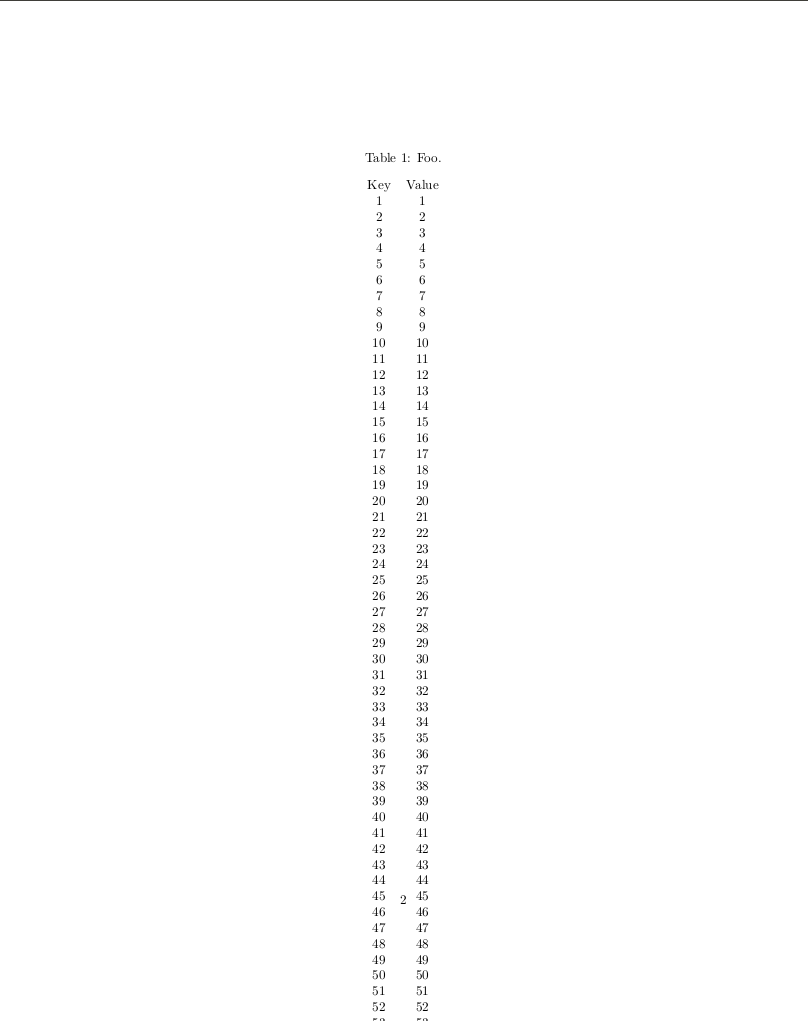
I'd like to add a caption and label to a LongTable. https://tex.stackexchange.com/questions/525327/how-to-add-a-caption-to-a-pylatex-tabular-table suggests wrapping the tabular in a Table, but doing this with a LongTable leads to the generated table running off the edge of the page as shown below. https://tex.stackexchange.com/questions/219138/how-to-have-a-caption-on-top-of-longtable, which is longtable specific, places the caption and labels within the longtable, but I'm not sure how to do that from within PyLaTeX.
What can I do to work around this constraint?
I'm using pylatex==1.3.3. Here's code that demonstrates the generated table running off the edge.
from pylatex import Document, Section, LongTable, Table

if __name__ == "__main__":
    doc = Document()

    with doc.create(Section("Test")):
        with doc.create(Table()) as table:
            table.add_caption("Foo.")
            with doc.create(LongTable("cc")) as t:
                t.add_row(("Key", "Value"))
                for x in range(1, 100):
                    t.add_row((x, x))

    doc.generate_pdf("main", clean_tex=False)
Generated .tex output
\documentclass{article}%
\usepackage[T1]{fontenc}%
\usepackage[utf8]{inputenc}%
\usepackage{lmodern}%
\usepackage{textcomp}%
\usepackage{lastpage}%
\usepackage{longtable}%
%
%
%
\begin{document}%
\normalsize%
\section{Test}%
\label{sec:Test}%


\begin{table}%
\caption{Foo.}%
\begin{longtable}{cc}%
Key&Value\\%
1&1\\%
2&2\\%
3&3\\%
4&4\\%
5&5\\%
6&6\\%
7&7\\%
8&8\\%
9&9\\%
10&10\\%
11&11\\%
12&12\\%
13&13\\%
14&14\\%
15&15\\%
16&16\\%
17&17\\%
18&18\\%
19&19\\%
20&20\\%
21&21\\%
22&22\\%
23&23\\%
24&24\\%
25&25\\%
26&26\\%
27&27\\%
28&28\\%
29&29\\%
30&30\\%
31&31\\%
32&32\\%
33&33\\%
34&34\\%
35&35\\%
36&36\\%
37&37\\%
38&38\\%
39&39\\%
40&40\\%
41&41\\%
42&42\\%
43&43\\%
44&44\\%
45&45\\%
46&46\\%
47&47\\%
48&48\\%
49&49\\%
50&50\\%
51&51\\%
52&52\\%
53&53\\%
54&54\\%
55&55\\%
56&56\\%
57&57\\%
58&58\\%
59&59\\%
60&60\\%
61&61\\%
62&62\\%
63&63\\%
64&64\\%
65&65\\%
66&66\\%
67&67\\%
68&68\\%
69&69\\%
70&70\\%
71&71\\%
72&72\\%
73&73\\%
74&74\\%
75&75\\%
76&76\\%
77&77\\%
78&78\\%
79&79\\%
80&80\\%
81&81\\%
82&82\\%
83&83\\%
84&84\\%
85&85\\%
86&86\\%
87&87\\%
88&88\\%
89&89\\%
90&90\\%
91&91\\%
92&92\\%
93&93\\%
94&94\\%
95&95\\%
96&96\\%
97&97\\%
98&98\\%
99&99\\%
\end{longtable}%
\end{table}

%
\end{document}
Output PDF
The output PDF has two pages.

I'd like to add a caption and label to a
LongTable. https://tex.stackexchange.com/questions/525327/how-to-add-a-caption-to-a-pylatex-tabular-table suggests wrapping the tabular in a Table, but doing this with aLongTableleads to the generated table running off the edge of the page as shown below. https://tex.stackexchange.com/questions/219138/how-to-have-a-caption-on-top-of-longtable, which islongtablespecific, places the caption and labels within thelongtable, but I'm not sure how to do that from withinPyLaTeX.What can I do to work around this constraint?
I'm using
pylatex==1.3.3. Here's code that demonstrates the generated table running off the edge.Generated
.texoutputOutput PDF
The output PDF has two pages.