
Template project for deploying cross-chain tokens (OFT) powered by the LayerZero protocol, demonstrating how to connect chains with Alt Endpoints (ERC-20 fee payment) to standard EVM chains (native gas fee payment).
- Primary Use Case
- What is OFTAlt?
- Key Differences from Standard OFT
- Requirements
- Scaffold this example
- Helper Tasks
- Setup
- Build
- Deploy
- Enable Messaging
- Sending OFTs
- Next Steps
- Appendix
This example demonstrates the most common scenario for OFTAlt deployments:
┌─────────────────────────────────┐         ┌─────────────────────────────────┐
│           Tempo                 │         │        Arbitrum Sepolia         │
│    (Alt Endpoint Chain)         │◄───────►│   (Standard EVM Chain)          │
│                                 │         │                                 │
│  ┌───────────────────────────┐  │         │  ┌───────────────────────────┐  │
│  │       MyOFTAlt            │  │         │  │        MyOFT              │  │
│  │  (ERC-20 fee payment)     │  │         │  │  (Native gas payment)     │  │
│  └───────────────────────────┘  │         │  └───────────────────────────┘  │
└─────────────────────────────────┘         └─────────────────────────────────┘
This example includes both contracts:
MyOFT.sol- Standard OFT for regular EVM chains with native gas fees (deployed on Arbitrum)MyOFTAlt.sol- OFTAlt for chains with Alt Endpoints using ERC-20 fees (deployed on Tempo)
The lz:oft:send task automatically detects which endpoint type is being used and handles fee payment accordingly.
The OFTAlt (Omnichain Fungible Token Alt) is a variant of the standard OFT designed for blockchains that use Alt Endpoints. Alt Endpoints are deployed on chains where transaction fees are paid in ERC-20 stablecoins rather than native tokens.
Examples of chains using Alt Endpoints:
- Tempo: A payments-focused blockchain where fees are paid in TIP-20 stablecoins
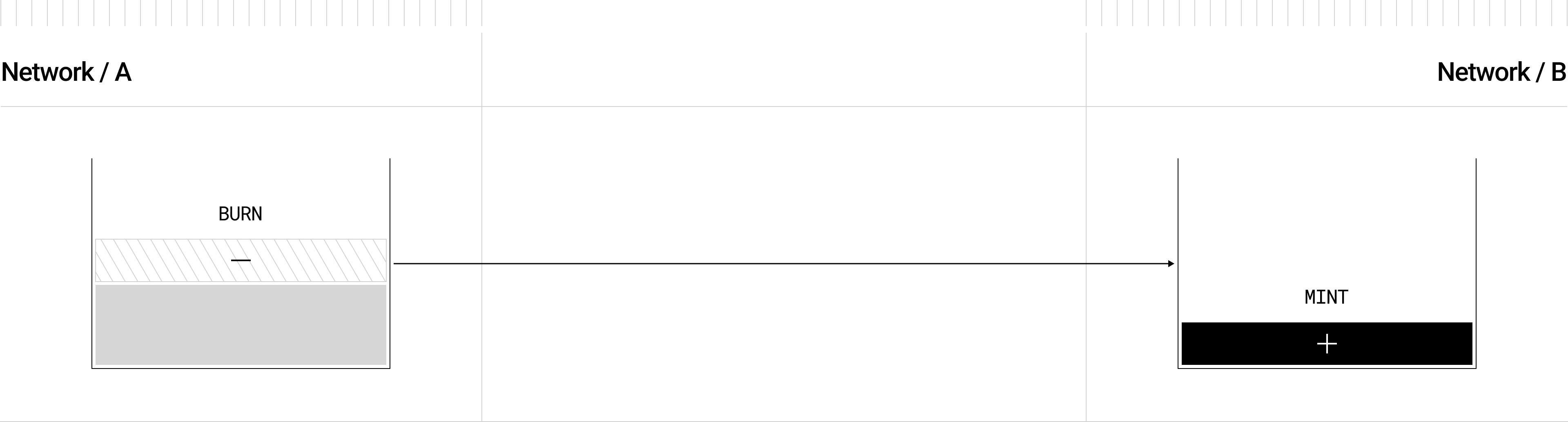
The OFTAlt works identically to standard OFT in terms of token transfer mechanics—burning on the source chain and minting on the destination chain—but handles fee payment differently.
| Aspect | Standard OFT | OFTAlt |
|---|---|---|
| Fee Payment | msg.value (native ETH/AVAX/etc.) |
ERC-20 transferFrom |
| Pre-requisite | None | Approve Endpoint for fee spending |
| Cross-chain Logic | Standard | Standard (no changes) |
| Endpoint Type | EndpointV2 | EndpointV2Alt |
- Discover the fee token: Query
endpoint.nativeToken()to get the stablecoin address - Quote fees: Call
quoteSend()- returns fees in the fee token denomination - Approve spending: Before sending, approve the OFTAlt contract to spend fee tokens
- Send with value: 0: Call
send()with{value: 0}- fees are pulled viatransferFrom
Node.js->=18.16.0pnpm(recommended) - or another package manager of your choice (npm, yarn)forge(optional) ->=0.2.0for testing, and if not using Hardhat for compilation
Create your local copy of this example:
LZ_ENABLE_ALT_EXAMPLE=1 pnpm dlx create-lz-oapp@latest --example oft-altSpecify the directory, select OFT Alt and proceed with the installation.
Note that create-lz-oapp will also automatically run the dependencies install step for you.
Throughout this walkthrough, helper tasks will be used. For the full list of available helper tasks, refer to the LayerZero Hardhat Helper Tasks section. All commands can be run at the project root.
Create a .env file in the project root and configure your deployer credentials:
# Authentication (choose one)
MNEMONIC="test test test test test test test test test test test junk"
# or...
PRIVATE_KEY="0xabc...def"

# RPC URLs
# Standard EVM chains
RPC_URL_ARB_SEPOLIA="https://arbitrum-sepolia.gateway.tenderly.co"

# Alt Endpoint chains (ERC-20 fee payment)
RPC_URL_TEMPO_TESTNET="https://rpc.testnet.tempo.xyz"
Fund this deployer address/account with:
- Native tokens for gas on standard EVM chains (e.g., ETH on Arbitrum Sepolia)
- ERC-20 fee tokens (stablecoins) on Tempo testnet for LayerZero fees
This project supports both hardhat and forge compilation. By default, the compile command will execute both:
pnpm compileIf you prefer one over the other, you can use the tooling-specific commands:
pnpm compile:forge
pnpm compile:hardhat
Deploy the appropriate contract type to each chain based on its endpoint type:
For chains with standard EndpointV2 (native gas fee payment):
pnpm hardhat lz:deploy --tags MyOFTSelect arbitrum-sepolia when prompted.
For chains with EndpointV2Alt (ERC-20 fee payment):
pnpm hardhat lz:deploy --tags MyOFTAltSelect tempo-testnet when prompted.
For chains where you want to adapt an existing ERC-20 token instead of creating a new one:
# For Tempo (Alt Endpoint)
pnpm hardhat lz:deploy --tags MyOFTAdapterAltThe OFTAlt standard builds on top of the OApp standard, which enables generic message-passing between chains. After deploying the OFTAlt on the respective chains, you enable messaging by running the wiring task.
ℹ️ This example uses the Simple Config Generator, which is recommended over manual configuration.
Wire your deployed contracts:
pnpm hardhat lz:oapp:wire --oapp-config layerzero.config.tsThe layerzero.config.ts file is organized into clear sections:
- SECTION 1: Contract definitions (define your OFTAlt contracts per chain)
- SECTION 2: Gas options (enforced options for destination execution)
- SECTION 3: Pathway configuration (bidirectional connections between contracts)
- SECTION 4: Export configuration
Submit all the transactions to complete wiring. After all transactions confirm, your OApps are wired and can send messages to each other.
With your OFTAlts wired, you can now send them cross-chain.
When sending from Tempo (Alt Endpoint), the task automatically:
- Detects the Alt Endpoint via
endpoint.nativeToken() - Approves the OFTAlt contract for ERC-20 fee spending
- Sends with
{value: 0}(fees pulled viatransferFrom)
# Send from Tempo testnet to Arbitrum Sepolia
pnpm hardhat lz:oft:send --src-eid <TEMPO_TESTNET_EID> --dst-eid 40231 --amount 1 --to <EVM_ADDRESS>When sending from a standard EVM chain, the send works normally with native gas:
# Send from Arbitrum Sepolia to Tempo testnet
pnpm hardhat lz:oft:send --src-eid 40231 --dst-eid <TEMPO_TESTNET_EID> --amount 1 --to <EVM_ADDRESS>
ℹ️ View the list of chains and their Endpoint IDs on the Deployed Endpoints page.
Upon a successful send, the script will provide you with the link to the message on LayerZero Scan.
Once the message is delivered, you will be able to click on the destination transaction hash to verify that the OFT was sent.
Congratulations, you have now sent an OFTAlt cross-chain!
If you run into any issues, refer to Troubleshooting.
Now that you've gone through a simplified walkthrough, here are what you can do next.
- Read the Alt Endpoint documentation
- Read on DVNs / Security Stack
- Read on Message Execution Options
Similar to the contract compilation, we support both hardhat and forge tests. By default, the test command will execute both:
pnpm testIf you prefer one over the other, you can use the tooling-specific commands:
pnpm test:forge
pnpm test:hardhatIf you're adding another EVM chain, first, add it to the hardhat.config.ts.
Then, modify layerzero.config.ts with the following changes:
- Declare a new contract object (specifying the
eidandcontractName) - Decide whether to use an existing EVM enforced options variable or declare a new one
- Create new entries in the
pathwaysvariable - Add the new contract into the
contractsarray in the export
After applying the desired changes, make sure you re-run the wiring task:
pnpm hardhat lz:oapp:wire --oapp-config layerzero.config.tsThe wiring task supports the usage of Safe Multisigs.
To use a Safe multisig as the signer for these transactions, add the following to each network in your hardhat.config.ts and add the --safe flag to lz:oapp:wire --safe:
// hardhat.config.ts

networks: {
  // Include configurations for other networks as needed
  fuji: {
    /* ... */
    // Network-specific settings
    safeConfig: {
      safeUrl: 'http://something', // URL of the Safe API, not the Safe itself
      safeAddress: 'address'
    }
  }
}
LayerZero Devtools provides several helper hardhat tasks to easily deploy, verify, configure, connect, and send OFTs cross-chain.
pnpm hardhat lz:deploy
Deploys your contract to any of the available networks in your hardhat.config.ts when given a deploy tag (by default contract name) and returns a list of available networks to select for the deployment. For specifics around all deployment options, please refer to the Deploying Contracts section of the documentation. LayerZero's lz:deploy utilizes hardhat-deploy.
'arbitrum-sepolia': {
    eid: EndpointId.ARBSEP_V2_TESTNET,
    url: process.env.RPC_URL_ARBSEP_TESTNET,
    accounts,
},
'base-sepolia': {
    eid: EndpointId.BASESEP_V2_TESTNET,
    url: process.env.RPC_URL_BASE_TESTNET,
    accounts,
},
More information about available CLI arguments can be found using the --help flag:
pnpm hardhat lz:deploy --help pnpm hardhat lz:oapp:wire --oapp-config YOUR_OAPP_CONFIG
Calls the configuration functions between your deployed OApp contracts on every chain based on the provided layerzero.config.ts.
Running lz:oapp:wire will make the following function calls per pathway connection for a fully defined config file using your specified settings and your environment variables (Private Keys and RPCs):
To use this task, run:
pnpm hardhat lz:oapp:wire --oapp-config YOUR_LAYERZERO_CONFIG_FILEWhenever you make changes to the configuration, run lz:oapp:wire again. The task will check your current configuration, and only apply NEW changes.
pnpm hardhat lz:oapp:config:get --oapp-config YOUR_OAPP_CONFIG
Returns your current OApp's configuration for each chain and pathway in 3 columns:
-
Custom Configuration: the changes that your
layerzero.config.tscurrently has set -
Default Configuration: the default placeholder configuration that LayerZero provides
-
Active Configuration: the active configuration that applies to the message pathway (Defaults + Custom Values)
If you do NOT explicitly set each configuration parameter, your OApp will fallback to the placeholder parameters in the default config.
pnpm hardhat lz:oapp:config:get:executor --oapp-config YOUR_OAPP_CONFIG
Returns the LayerZero Executor config for each network in your hardhat.config.ts. You can use this method to see the max destination gas in wei (nativeCap) you can request in your execution options.
This section only applies if you would like to configure manually instead of using the Simple Config Generator.
Define the pathway you want to create from and to each contract:
connections: [
  // Chain A <--> Chain B PATHWAY: START
  {
    from: chainAContract,
    to: chainBContract,
  },
  {
    from: chainBContract,
    to: chainAContract,
  },
  // Chain A <--> Chain B PATHWAY: END
];
Finally, define the config settings for each direction of the pathway:
connections: [
  {
    from: chainAContract,
    to: chainBContract,
    config: {
      sendLibrary: contractsConfig.chainA.sendLib302,
      receiveLibraryConfig: {
        receiveLibrary: contractsConfig.chainA.receiveLib302,
        gracePeriod: BigInt(0),
      },
      sendConfig: {
        executorConfig: {
          maxMessageSize: 10000,
          executor: contractsConfig.chainA.executor,
        },
        ulnConfig: {
          confirmations: BigInt(15),
          requiredDVNs: [contractsConfig.chainA.lzDVN],
          optionalDVNs: [],
          optionalDVNThreshold: 0,
        },
      },
      receiveConfig: {
        ulnConfig: {
          confirmations: BigInt(20),
          requiredDVNs: [contractsConfig.chainA.lzDVN],
          optionalDVNs: [],
          optionalDVNThreshold: 0,
        },
      },
      enforcedOptions: [
        {
          msgType: 1,
          optionType: ExecutorOptionType.LZ_RECEIVE,
          gas: 65000,
          value: 0,
        },
      ],
    },
  },
];You can verify EVM chain contracts using the LayerZero helper package:
pnpm dlx @layerzerolabs/verify-contract -n <NETWORK_NAME> -u <API_URL> -k <API_KEY> --contracts <CONTRACT_NAME>Cause: Sending msg.value to an Alt Endpoint.
// ❌ Wrong - Alt endpoints don't accept native value
oft.send{value: fee.nativeFee}(sendParam, fee, refund);

// ✅ Correct - Fees are paid via ERC20 transferFrom
oft.send{value: 0}(sendParam, fee, refund);Cause: OFTAlt can't transfer stablecoins for fees.
// Approve stablecoin spending before calling send()
IERC20(feeToken).approve(address(oft), fee.nativeFee);Cause: Insufficient stablecoin balance for fees. Acquire fee tokens for the Alt Endpoint chain.
For additional troubleshooting, refer to Debugging Messages or Error Codes & Handling.
Join our community! | Follow us on X (formerly Twitter)