인터셉터는 @Injectable() 데코레이터를 사용하는 클래스이며 NestInterceptor 인터페이스를 구현해야 한다.
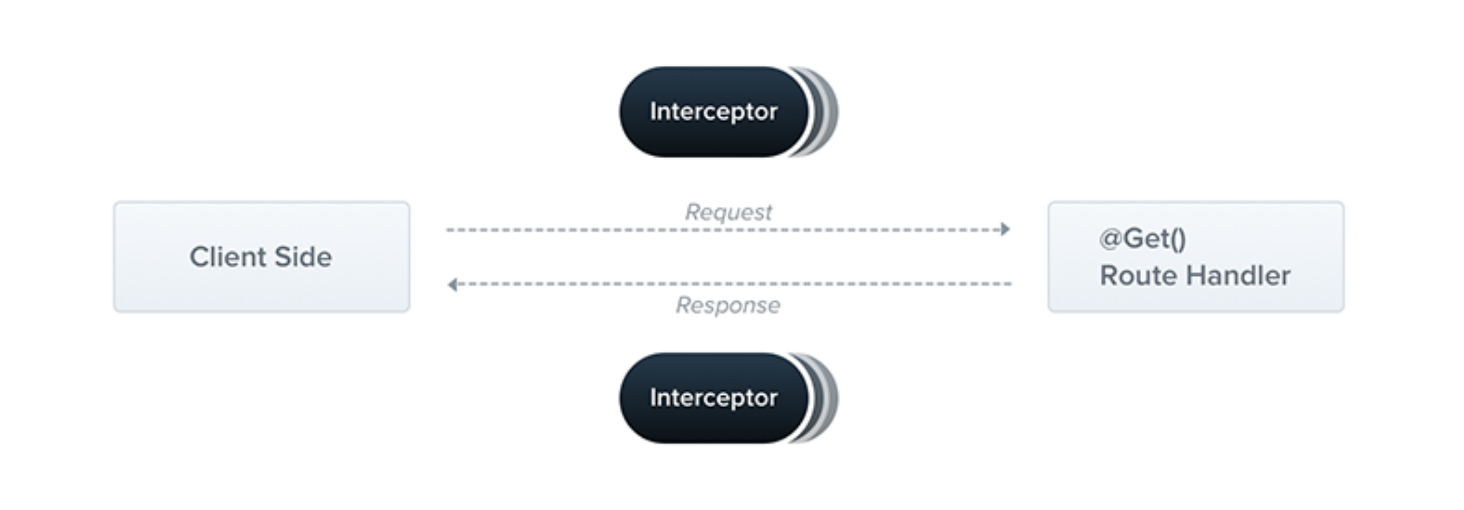
인터셉터는 AOP(Aspect Oriented Programming) 에서 영감을 받은 기능들이 있다. 인터셉터를 통해 다음을 수행할 수 있다.
- 메소드 실행 전/후 추가 로직 바인딩
- 함수에서 반환된 결과를 변환
- 함수에서 던져진 예외 변환
- 기본 기능 동작 확장
- 특정 조건에 따라 기능을 완전히 재정의한다(ex 캐싱)
인터셉터는 2개의 인자를 갖는 intercept() 메소드를 구현한다. 첫째는 ExecutionContext 인스턴스이다. (가드와 동일한 객체), → 이 객체로 인해 광범위한 컨트롤러, 메서드 및 실행 컨택스트에 접근 가능.
두번째 인자는 CallHanlder 이다. CallHandler 인터페이스는 인터셉터의 특정 지점에서 라우터 핸들러 메서드를 호출하는데 사용할 수 있는 handle() 메서드를 구현한다. (이걸 호출 하지 않으면 라우트 핸들러 메서드가 실행되지 않는다)
→ 결과적으로 최종 라우터 핸들러 실행 전과 후에 커스텀 로직을 구현할 수 있다.
handle() 메서드는 Observable 을 반환하기 때문에 RxJS 연산자를 사용하여 응답을 추가로 조작할 수 있다.
AOP 용어에서, 라우트 핸들러 호출을 Pointcut 이라고 하며 추가 로직이 삽입된다.
예를들어
POST /cats 요청이 왔을때 이 요청은 CatsController 내에 정의된 create() 핸들러를 대상으로 한다.
이후 인터셉터에서 handle() 메서드를 호출하기 전에는 create() 메소드가 실행되지 않고, 호출된다면 (Observable 반환) create() 핸들러가 트리거 (실행) 된다.
이후 응답 스트림이 Observable 을 통해 수신되면 스트림에서 추가 작업을 통해 최종 결과가 호출자에게 반환된다.
인터셉터를 사용하여 상호작용을 기록하는것을 해보면
- logging.interceptor.ts
import {
    Injectable,
    NestInterceptor,
    ExecutionContext,
    CallHandler,
} from "@nestjs/common";
import { Observable } from "rxjs";
import { tap } from "rxjs/operators";

@Injectable()
export class LoggingInterceptor implements NestInterceptor {
    intercept(context: ExecutionContext, next: CallHandler): Observable<any> {
        console.log("Before...");

        const now = Date.now();
        return next
            .handle()
            .pipe(tap(() => console.log(`After... ${Date.now() - now}ms`)));
    }
}
NestInterceptor<T, R>는 T 가Observable<T>(응답 스트림 지원)의 타입을 나타내고, R은Observable<R>로 래핑된 값이다.
인터셉터 또한 constuctor 를 통해 종속성 주입 할 수 있다.
handle() 은 RxJS Observable 을 반환하므로 스트림을 조작하는데 사용할 수 있는 다양한 연산자를 선택할 수 있다...
위 예시에서는 익명 로깅함수를 호출하지만 응답주기를 방해하지 않는 tap() 연산자를 사용함.
@UseInterceptors() 데코레이터를 사용해 파이프 및 가드와 마찬가지로 컨트롤러, 메서드, 전역 범위에서 적용 가능하다.
-
컨트롤러
@UseInterceptors(LoggingInterceptor)
export class CatsController {}
or;
@UseInterceptors(new LoggingInterceptor())
export class CatsController {}
-
메서드
- 파이프 및 가드와 동일
-
전역
const app = await NestFactory.create(AppModule);
app.useGlobalInterceptors(new LoggingInterceptor());
import { Module } from "@nestjs/common";
import { APP_INTERCEPTOR } from "@nestjs/core";

@Module({
    providers: [
        {
            provide: APP_INTERCEPTOR,
            useClass: LoggingInterceptor,
        },
    ],
})
export class AppModule {}
handle() 을 통해 반환한 값은 라우트 핸들러에서 반환된 값이 포함되므로 RxJS의 map() 연산자를 사용하여 쉽게 변경이 가능하다
라이브러리별 응답 전략 (
@Res()객체 직접 사용) 에서는 작동하지 않는다.
- transform.interceptor.ts
import {
    Injectable,
    NestInterceptor,
    ExecutionContext,
    CallHandler,
} from "@nestjs/common";
import { Observable } from "rxjs";
import { map } from "rxjs/operators";

export interface Response<T> {
    data: T;
}

@Injectable()
export class TransformInterceptor<T>
    implements NestInterceptor<T, Response<T>> {
    intercept(
        context: ExecutionContext,
        next: CallHandler
    ): Observable<Response<T>> {
        return next.handle().pipe(map((data) => ({ data })));
    }
}
위 경우 응답은
{
  "data": []
}
다른 사용 예시로 null 값을 빈 문자열 ' ' 로 매핑하려고 할때 인터셉터를 전역적으로 등록해서 사용하면 쉽게 변환 가능하다.
import {
    Injectable,
    NestInterceptor,
    ExecutionContext,
    CallHandler,
} from "@nestjs/common";
import { Observable } from "rxjs";
import { map } from "rxjs/operators";

@Injectable()
export class ExcludeNullInterceptor implements NestInterceptor {
    intercept(context: ExecutionContext, next: CallHandler): Observable<any> {
        return next
            .handle()
            .pipe(map((value) => (value === null ? "" : value)));
    }
}RxJS의 catchError() 연산자를 활용해 throw 예외를 재정의해서 줄 수도 있다.
import {
    Injectable,
    NestInterceptor,
    ExecutionContext,
    BadGatewayException,
    CallHandler,
} from "@nestjs/common";
import { Observable, throwError } from "rxjs";
import { catchError } from "rxjs/operators";

@Injectable()
export class ErrorsInterceptor implements NestInterceptor {
    intercept(context: ExecutionContext, next: CallHandler): Observable<any> {
        return next
            .handle()
            .pipe(catchError((err) => throwError(new BadGatewayException())));
    }
}간혹 핸들러 호출을 완전히 방지하고, 대신 다른 값을 반환하려는 이유가 있다. → 응답시간을 개선하기 위해 캐시를 구현하는 것.
캐시에서 응답을 반환하는 간단한 캐시 인터셉터예시를 살펴보자.
import {
    Injectable,
    NestInterceptor,
    ExecutionContext,
    CallHandler,
} from "@nestjs/common";
import { Observable, of } from "rxjs";

@Injectable()
export class CacheInterceptor implements NestInterceptor {
    intercept(context: ExecutionContext, next: CallHandler): Observable<any> {
        const isCached = true;
        if (isCached) {
            return of([]);
        }
        return next.handle();
    }
}
위 코드에서 작성한 CacheInterceptor 에서는 하드 코딩된 isCached 와 응답 [] 가 있다.
RxJs의 of() 연산자에 의해 생성된 새 스트림을 여기에 반환하므로 라우트 핸들러가 전혀 호출되지 않는다.
누군가 이 인터셉터가 적용된 엔드포인트를 호출하면 응답이 즉시 반환된다.
추후에 Reflector 을 활용해 맞춤 데코레이터를 만들 수 있다.
또 다른 사용 사례를 살펴보면 라우트 요청에서 시간초과를 처리하고 싶을때, 일정 시간이 지나도 엔드포인트가 아무것도 반환하지 않으면 오류 응답으로 종료하려고 한다.
- timeout.interceptor.ts
import {
    Injectable,
    NestInterceptor,
    ExecutionContext,
    CallHandler,
    RequestTimeoutException,
} from "@nestjs/common";
import { Observable, throwError, TimeoutError } from "rxjs";
import { catchError, timeout } from "rxjs/operators";

@Injectable()
export class TimeoutInterceptor implements NestInterceptor {
    intercept(context: ExecutionContext, next: CallHandler): Observable<any> {
        return next.handle().pipe(
            timeout(5000),
            catchError((err) => {
                if (err instanceof TimeoutError) {
                    return throwError(new RequestTimeoutException());
                }
                return throwError(err);
            })
        );
    }
}
5초후 요청이 해제된다.