Define your types once. Generate code and diagrams everywhere.
typeDiagram is a tiny, language-neutral DSL for describing algebraic data types — records, tagged unions, generics, aliases. From one .td file, you get:
- Source code in Typeshed, TypeScript, Python, Rust, Go, C#, F#, Dart, PHP, and Protobuf — DTOs, data classes, free functions, discriminated unions, and enums — converted through one model.
- SVG diagrams with automatic orthogonal layout — no dragging, no fiddling, versionable in git.
- Round-trip conversion from existing Typeshed/TypeScript/Python/Rust/Go/C#/F#/Dart/PHP/Protobuf back to the DSL, so you can retrofit an existing codebase.
This is not a diagramming tool dressed up with a text input like Mermaid or PlantUML. typeDiagram is a shared schema for your data model — the diagram is a side effect, not the goal. The primary output is code, in as many languages as you need, kept strictly in sync by construction.
When your backend is Python, your mobile app is Swift/Kotlin, your web client is TypeScript, and your data pipeline is Rust, keeping DTOs aligned across nine languages is a full-time job. typeDiagram inverts the problem: one definition, N outputs. Change a field, regenerate, done. Every consumer of the schema stays honest because they all build from the same source.
The full thing runs in your browser. Playground, converter, docs — all live. Paste a schema, get a diagram. Paste TypeScript, get a diagram. Export SVG. Done.
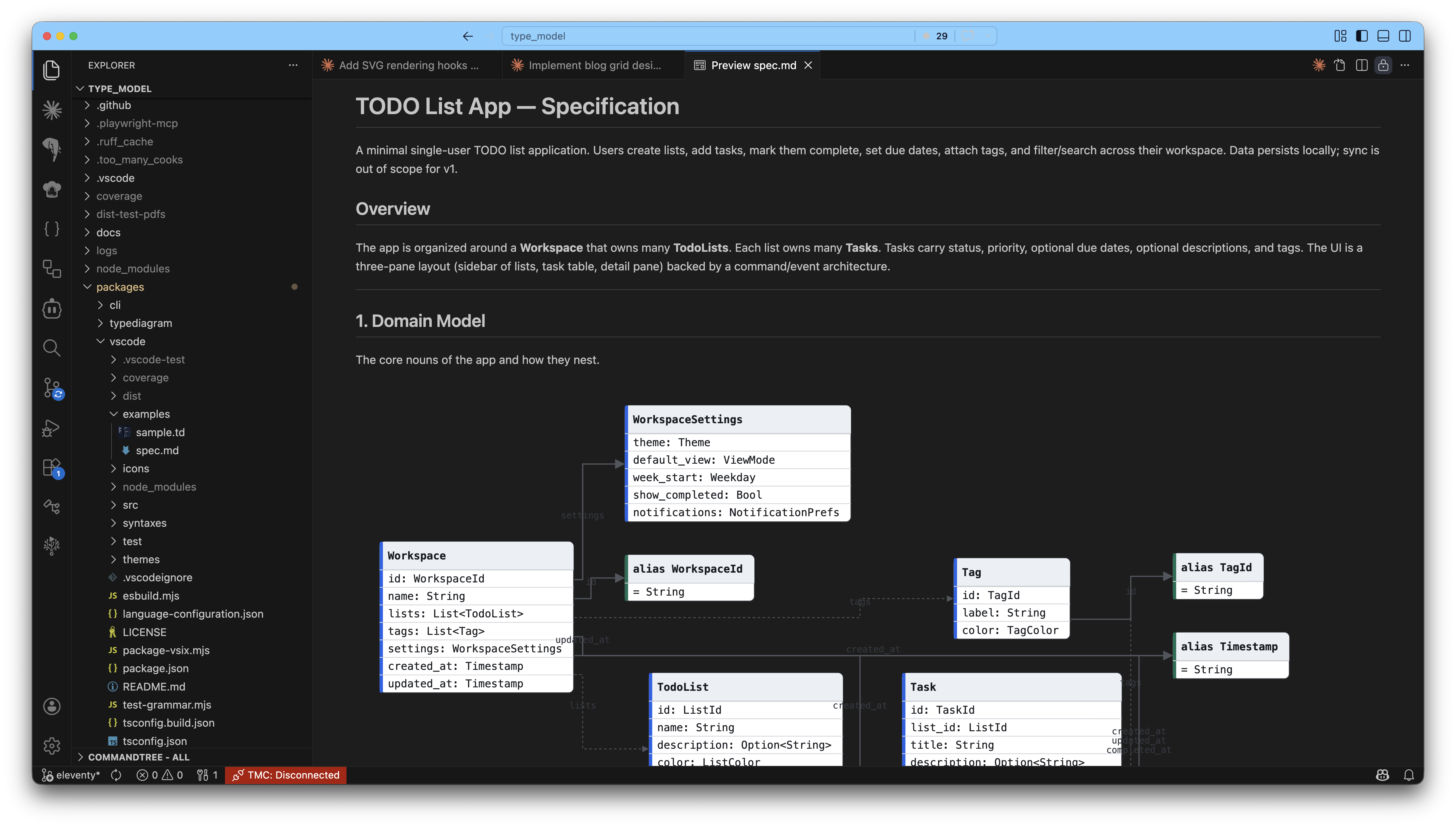
Live SVG preview, syntax highlighting, hover docs, and PDF export — right next to your schema. Right-click any .md file and pick Export to PDF with typeDiagrams to get a printable document with every ```typediagram fence rendered as a vector diagram (not a screenshot — zoom in, pixels stay sharp).
Install:
- Marketplace: marketplace.visualstudio.com/items?itemName=Nimblesite.typediagram
- Rate it: leave a 5-star review
- VSIX download: typediagram.vsix
Install the .vsix manually:
- Download
typediagram.vsix. - In VS Code, press
Ctrl+Shift+P/Cmd+Shift+Pand run Extensions: Install from VSIX…, then pick the file. - Or from a terminal:
code --install-extension typediagram.vsix
# CLI
npm install -g typediagram

# Library
npm install typediagram-core

# VS Code extension
code --install-extension Nimblesite.typediagram
# or search "TypeDiagram" by Nimblesite in the Marketplace:
# https://marketplace.visualstudio.com/items?itemName=Nimblesite.typediagramtypeDiagram
type User {
id: Uuid
name: String
email: Option<Email>
}
union Option<T> {
Some { value: T }
None
}
alias Email = String
Three constructs: type (records), union (tagged sum types), alias (newtypes). Generics with <T>. Comments with #.
typediagram schema.td > diagram.svg          # DSL → SVG
typediagram --from typescript types.ts > diagram.svg   # TS → SVG
typediagram --from typeshed --emit td module.pyi       # .pyi → typeDiagram
typediagram-typeshed /path/to/typeshed generated/      # complete checkout
typediagram --to rust schema.td > types.rs    # DSL → Rust
Full reference at typediagram.dev/docs/.
The SVG renderer ships a typed, phase-based hook API. Inspect the laid-out graph and emit or transform SVG at well-defined points — drop shadows, grid backgrounds, per-field colour coding, CSS classes, even absolute positioning — without forking the renderer.
import { renderToString, svg } from "typediagram-core";

const result = await renderToString(source, {
  hooks: {
    defs: () => svg`<filter id="drop"><feDropShadow dx="1" dy="2" stdDeviation="2"/></filter>`,
    node: (ctx, def) => svg`<g filter="url(#drop)">${def}</g>`,
  },
});
Six phases: defs, background, node, row, edge, post. Hooks receive typed context (NodeBox, EdgeRoute, resolved geometry, theme) and return SafeSvg. See docs/specs/render-hooks.md for the full API.
Try it interactively on the web playground — the Hooks tab has preset chips (shadow, grid, field color, union glow, css classes) that paste real JavaScript into an editor you can hand-edit.
The VS Code extension turns any markdown file containing ```typediagram fences into a PDF where every diagram is embedded as vector paths — not rasterised, not flattened. Same source, printable doc, infinite zoom.
- How: right-click a
.mdfile in the explorer → Export to PDF with typeDiagrams. PDF is written next to the source. No save dialog — just generate and write. - Command:
typediagram.exportMarkdownPdf(Command Palette works too for the active markdown editor). - Theme: set
typediagram.pdfExport.themetolightordark(the page background stays white for print).
No Chromium download, no extra binaries — the extension reuses VS Code's built-in Electron webview + printToPDF.
| Package | What |
|---|---|
| packages/typediagram/ | Core framework: parser, model, layout, render-svg, converters |
| packages/cli/ | typediagram CLI binary |
| packages/web/ | Web playground + docs site (typediagram.dev) |
| packages/vscode/ | VS Code extension |
See CONTRIBUTING.md for the full workflow, repo layout, and rules. Always run make ci before opening a PR — it runs exactly what CI runs.
make setup   # install deps + build framework (first time only)
make fmt     # auto-format your changes
make ci      # full CI simulation — MUST pass before you push
MIT © Nimblesite