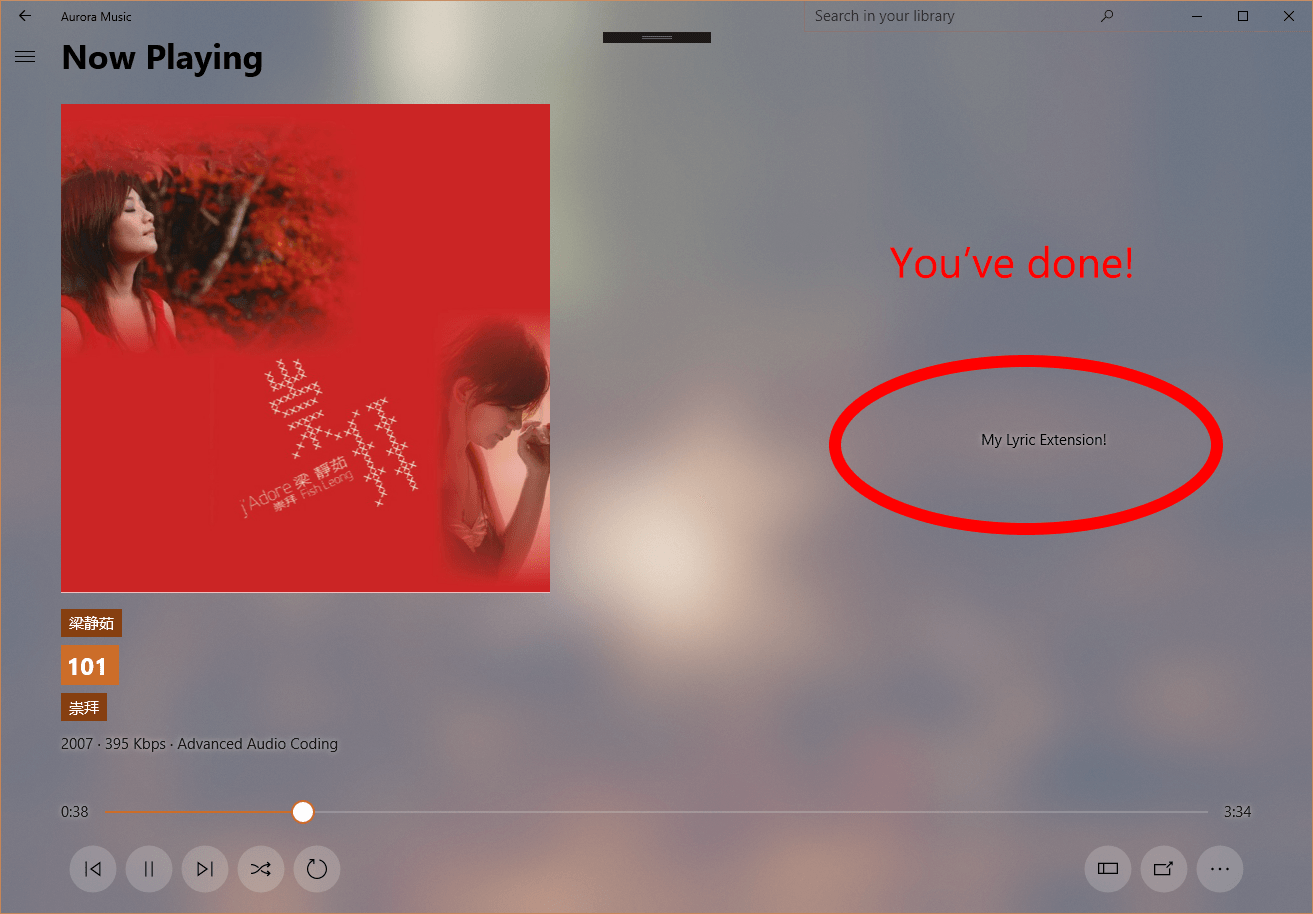
Aurora Music have implemented the support for Extensions (1: Extend your app with services, extensions, and packages, 2: Create and consume an app service). Here's what extensions in Aurora Music can do:
- Perform as a lyric provider
- Perform as an online music provider
- Perform as an online metadata provider
You can get the full sample here
Just as what you see in the link above, Aurora Music uses Windows.ApplicationModel.Extensions namespace to retrieve installed extensions, and uses Windows.ApplicationModel.AppService to call a specific service associated with an extension. In UWP, AppService is just like web service, we send query strings to it and wait for a response. So, it is easy to implement an extension in the following steps:
- Complete app declaration in appxmanifest
- Write the code of your core service
- Implement Background Task and AppService Handler
Because Windows Store doesn't have the ability to search an extension now, we recommend you to add a search term: Aurora Music Extension in "Submission - Store listing - Addtional information", like this:

Now, it's play time, You can follow these steps to create a basic extension!
To declare your app as an extension, you should add these lines to the Package.appxmanifest. First, you should check if it already included such namespaces at the first line:
<Package xmlns="http://schemas.microsoft.com/appx/manifest/foundation/windows10"
         xmlns:mp="http://schemas.microsoft.com/appx/2014/phone/manifest"
         xmlns:uap="http://schemas.microsoft.com/appx/manifest/uap/windows10"
         xmlns:uap3="http://schemas.microsoft.com/appx/manifest/uap/windows10/3"
         xmlns:uap4="http://schemas.microsoft.com/appx/manifest/uap/windows10/4"
         IgnorableNamespaces="uap mp uap3 uap4">
         ...
         Properties
         ...
</Package>
Then, you should declare this is an appExtension, under the Extension Node:
<Application ...>
    ...
    ...
    <Extensions>
        <uap3:Extension Category="windows.appExtension">
            <uap3:AppExtension Name="Aurora.Music.Extensions" Id="BuiltIn" PublicFolder="Public" DisplayName="Lyric" Description="Aurora Music Lyric Provider">
                <uap3:Properties>
                    <Service>Aurora.Music.Services</Service>
                    <Category>Lyric</Category>
                </uap3:Properties>
            </uap3:AppExtension>
        </uap3:Extension>
    </Extensions>
</Application>
NOTE
-
The
Name="Aurora.Music.Extensions"in theuap3:AppExtensionnode must be "Aurora.Music.Extensions", so the app can recognize. and theIdcan't beBuiltIn, it is reserved. -
The
uap3:Propertiesis aPropertySet, which is a declaration of your extension's features described below:
| Key | Value | Description |
|---|---|---|
Service |
string |
Name of your app service |
Category |
Lyric;OnlineMusic;OnlineMeta |
three kinds: Lyric, OnlineMusic, OnlineMeta, if you provide multiple services, you can join them with; |
LaunchUri |
string |
an activate Uri of your app, optional |
In this scenario, we add two properties: Service and Category. Service is the name of your app service(added below), Category is what kind of service you would to provide(here is a lyric provider).
When Providing AppService, you should first declare it, this time you can add it in the manifest manager:
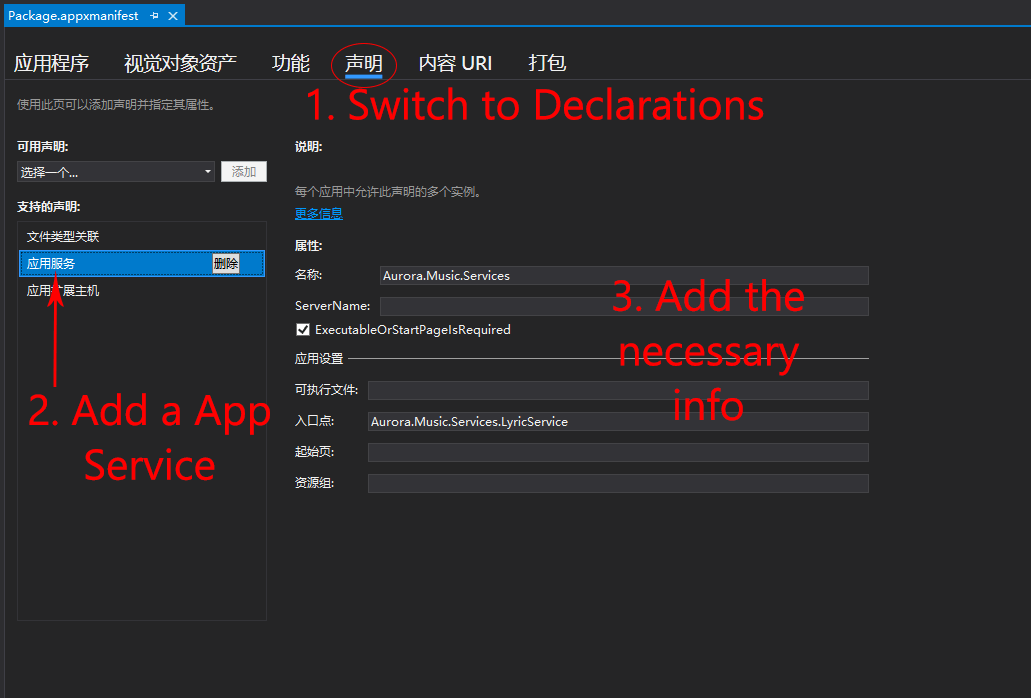
In order to deploy the app service, you need a background task, so you can add a .winmd runtime component to do it. The full description and tutorial is posted on Create and consume an app service.
Now, let's see what you will receive when the main app calls your service.
When we call SendMessageAsync in main app, we pass a ValueSet which contains necessary parameters. For lyric extensions, we pass these:
| Key | Value | Description |
|---|---|---|
q |
"lyric" |
The type of request |
title |
"lorem ipsum" |
The title of the song |
*artist |
"a man" |
The performer of the song |
*album |
"a album" |
The album name of the song |
*ID |
"OnlineID" |
If you are an online music provider you may need this |
*:optional
NOTICE: Because the tag of the song may be corrupt, so the key: artist or album, may be null or empty.
Here's an example:
private async void OnRequestReceived(AppServiceConnection sender, AppServiceRequestReceivedEventArgs args)
{
    // Get a deferral because we use an awaitable API below to respond to the message
    // and we don't want this call to get cancelled while we are waiting.
    var messageDeferral = args.GetDeferral();

    ValueSet message = args.Request.Message;
    ValueSet returnData = new ValueSet();
    string command = message["q"] as string;

    switch (command)
    {
        case "lyric":

            var title = message["title"] as string;
            message.TryGetValue("artist", out object art);
            var artists = art as string;
            message.TryGetValue("album", out object alb);
            var album = alb as string;

            // get lyric from somewhere
            var result = await LyricSearcher.GetLyricAsync(title, artists, album);
            if (result != null)
            {
                returnData.Add("result", result);
                returnData.Add("status", 1);
            }
            else
            {
                returnData.Add("result", null);
                returnData.Add("status", 1);
            }
            break;
        default:
            returnData.Add("status", 0);
            break;
    }

    await args.Request.SendResponseAsync(returnData);
    // Return the data to the caller.
    // Complete the deferral so that the platform knows that we're done responding to the app service call.
    // Note for error handling: this must be called even if SendResponseAsync() throws an exception.
    messageDeferral.Complete();
}
In the returnData above, you should provide:
| Key | Value | Description |
|---|---|---|
status |
1 or 0 |
Response is success or failed |
result |
raw string |
The lyric string |
The value of result is a string which contain the raw text of a .lrc file, or just plain text with linebreaks. My LrcParser will parse it.
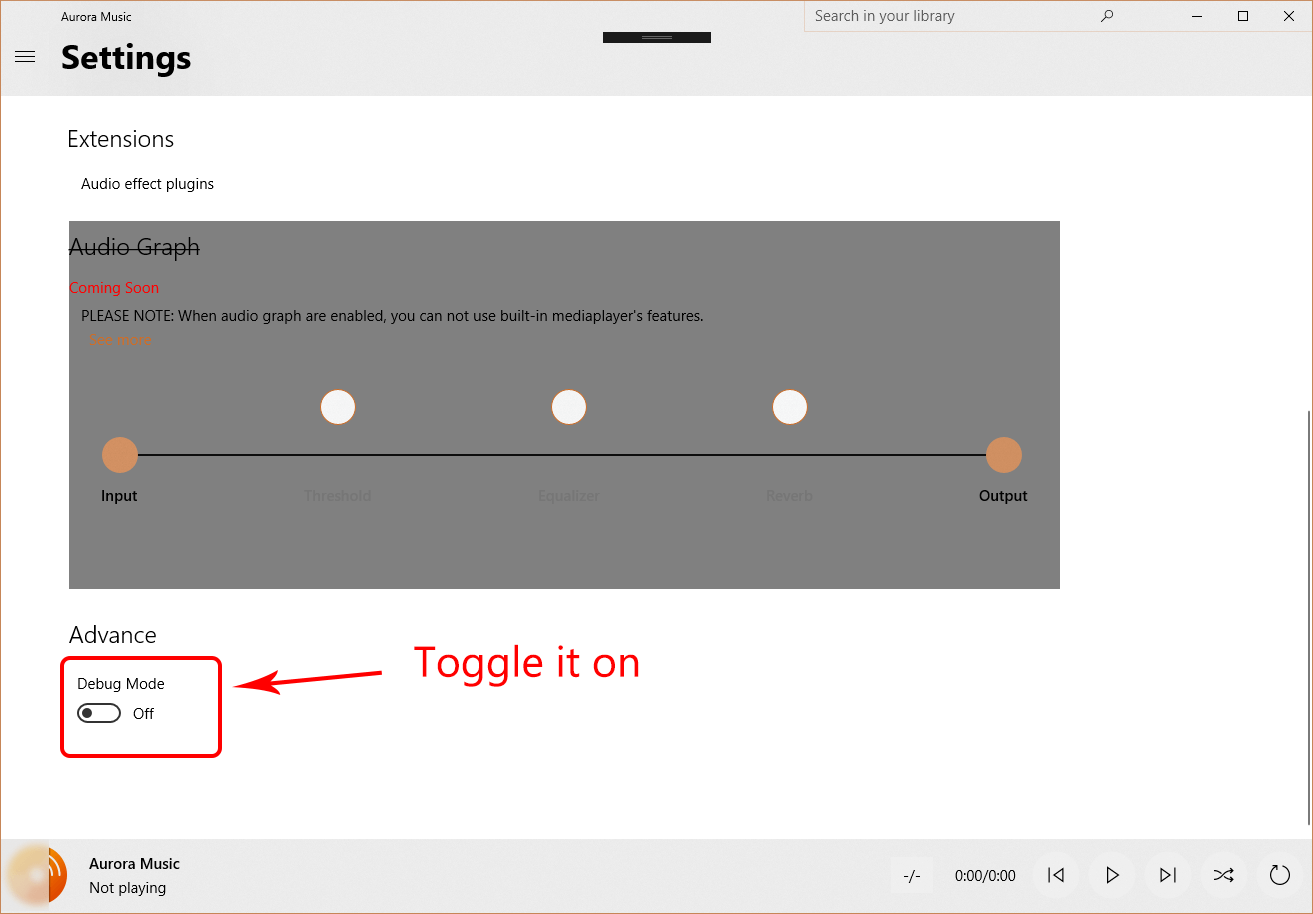
You can get the full example at Samples/ExtensionSample, so how to let the main application know you have added an extension in the computer? Just deploy it in the Visual Studio, and switch the Debug Mode to "On" in Aurora Music->Settings->Advance
All done! Feeling lucky~