
StreamDeckSharp is a simple (unofficial) library (.NET 10+) for the Elgato Stream Deck family


First things first, StreamDeckSharp is not official software by Elgato, nor is it endorsed by them.
StreamDeckSharp is a device provider implementation for OpenMacroBoard.SDK.
Create a new console project in Visual Studio (.NET 10+), add OpenMacroBoard.SDK as a reference and at least one device provider.
In this example we use
OpenMacroBoard.SocketIOto support theVirtualMacroBoardStreamDeckSharpto support the Elgato Stream Deck family
Note: Neither OpenMacroBoard nor StreamDeckSharp are made or endorsed by Elgato
Once you added the NuGet packages copy-paste the following lines:
using OpenMacroBoard.SDK;
using OpenMacroBoard.SocketIO;  // for VirtualMacroBoard
using StreamDeckSharp;          // for StreamDeck

// create a device context (fluent API)
// and add listener for devices (device provider)
using var ctx = DeviceContext.Create()
    .AddListener<SocketIOBoardListener>()   // VirtualMacroBoard
    .AddListener<StreamDeckListener>()      // StreamDeck
    ;

Console.WriteLine("Waiting for a device... (press Ctrl+C to cancel)");
using var board = await ctx.OpenAsync();
Console.WriteLine("Device found.");
Console.WriteLine("1) Try to press some buttons on the device.");
Console.WriteLine("2) Press any key in this console to end the demo.");

// react to key press event by setting a random color
board.KeyStateChanged += (sender, arg) => board.SetKeyBitmap(arg.Key, GetRandomColorKey());

// Wait for a key press in the console window to exit
// the application and disconnect the device.
Console.ReadKey();

// Helper function to create a random color KeyBitmap
static KeyBitmap GetRandomColorKey()
{
    var r = GetRandomByte();
    var g = GetRandomByte();
    var b = GetRandomByte();

    return KeyBitmap.Create.FromRgb(r, g, b);
}

// Helper function to get a random byte
static byte GetRandomByte()
{
    return (byte)Random.Shared.Next(255);
}
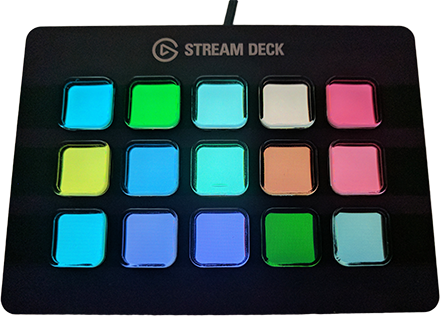
Here is what the example looks like after pressing some keys:
NuGet: StreamDeckSharp
| Device | Description |
|---|---|
| Stream Deck (original/legacy) | 5 x 3 |
| Stream Deck (MK2) | 5 x 3 |
| Stream Deck XL | 8 x 4 |
| Stream Deck Mini | 3 x 2 |
Keep in mind that Elgato sometimes releases new revisions of their devices with different PIDs (USB product IDs) which might break compatibility. If you have a device like that, please open an issue on GitHub with the new PID.
You can find a lot of examples in our example collection
Play games on a macro board, for example minesweeper (also part of the example projects)
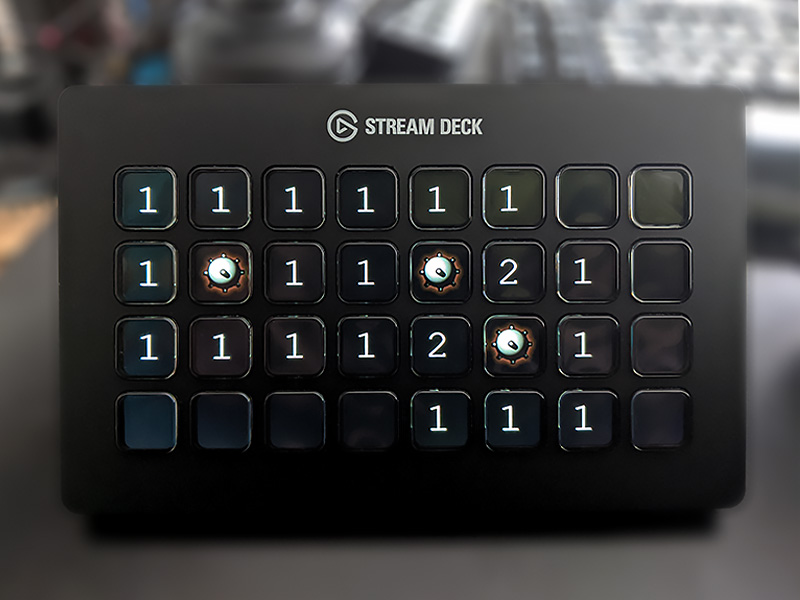
*The glitches you can see are already fixed.
