Releases: PowerShell/vscode-powershell
Release list
v1.7.0

1.7.0
Wednesday, April 25, 2018
-
PowerShell/vscode-powershell #1285 -
Add a community snippet for date-annotatedWrite-Verbosemessages. -
PowerShell/vscode-powershell #1228 -
Make comment-based help trigger always be##with a new settingpowershell.helpCompletionto
allow you to select between help comment styles:BlockComment(default) orLineComment.
You can also specify Disabled to disable this functionality. -
PowerShell/vscode-powershell #603 -
Fix PowerShell crashing on machines with IPv6 disabled. -
PowerShell/vscode-powershell #1243 -
Support custom PowerShell executable paths in user configuration which can be selected (via name)
in either user or workspace configuration. -
PowerShell/vscode-powershell #1264 -
Add support for Visual Studio Live Share. -
PowerShell/vscode-powershell #1261 -
Add support for$psEditor.GetEditorContext.CurrentFile.SaveAs("NewFileName.ps1"). -
PowerShell/vscode-powershell #1252 -
Change the way the extension builds and runs, so that PowerShellEditorServices is self-contained. -
PowerShell/vscode-powershell #1248 -
Replace$global:IsOSXwith$global:IsMacOS. -
PowerShell/vscode-powershell #1246 -
Create community_snippets.md for user created snippets. -
PowerShell/vscode-powershell #1155 -
Fix PSES crashes caused by running "Set PSScriptAnalyzer Rules" on an untitled file. -
PowerShell/vscode-powershell #1236 -
Stop an error occurring when VSCode trims trailing whitespace and sends document update messages. -
PowerShell/vscode-powershell #996 -
FixInstall-PSCode.ps1crashing due to$IsLinuxvariable in older PowerShell versions. -
PowerShell/vscode-powershell #1234 -
Add snippets for Hashtable and PSCustomObject. (Thanks to @rschaeferhig!) -
PowerShell/vscode-powershell #1233 -
Add a keybinding for Show Addtional Commands to Shift-Alt-S. (Thanks to @dsolodow!) -
PowerShell/vscode-powershell #1227 -
Add an indicator for when PowerShell is running in the status bar. -
PowerShell/vscode-powershell #1225 -
Fix launch config not using temporary integrated console setting. -
PowerShell/vscode-powershell #1208 -
Stop configured temporary windows closing after running Pester tests.
v1.6.0

Fixes and Improvements
-
PowerShell/vscode-powershell #907 - Persist temp console debug session.
-
PowerShell/vscode-powershell #1198 - Enhance Start-EditorServices.ps1 for better logging and fix bugs.
-
PowerShell/PowerShellEditorServices #413 - Allow opening files as not previews to allow Open-EditorFile to open multiple files passed in.
-
PowerShell/vscode-powershell #1177 - Add function-advanced snippet. Thanks to Benny1007!
-
PowerShell/vscode-powershell #1179 - Switch onDebug to onDebugResolve:type for better debugging perf.
-
PowerShell/vscode-powershell #1086 - Add tslint to vscode-powershell and address all issues.
-
PowerShell/vscode-powershell #1153 - Add docs for ps remoting in vscode.
-
PowerShell/vscode-powershell #1161 - Check for the expected version of the PowerShell Editor Services module fails because of the wrong function parameters. Thanks to ant-druha!
-
PowerShell/vscode-powershell #1141 - Updated install script minified URL. Thanks to tabs-not-spaces!
-
PowerShell/PowerShellEditorServices #258 - add .Save() to FileContext API.
-
PowerShell/vscode-powershell #1137 - Added 64bit support & vscode-insiders install support. Thanks to tabs-not-spaces!
-
PowerShell/vscode-powershell #1115 - Fixed "Open in ISE" keyboard shortcut from overwriting basic editing keyboard shortcut.
-
PowerShell/vscode-powershell #1111 -
Update examples tasks.json for 2.0.0 schema.
v1.5.1
-
PowerShell/vscode-powershell #1100 - Fixed CodeLens on Pester test invocation fails with "Error: command 'vscode.startDebug' not found".
-
PowerShell/vscode-powershell #1091 - Fixed crash when editing remote file using psedit.
-
PowerShell/vscode-powershell #1084 - Fixed authenticode signature 'HashMismatch' on Start-EditorServices.ps1.
-
PowerShell/vscode-powershell #1078 - Fixed debug adapter process terminating when setting breakpoint in an Untitled file or in a Git diff window.
-
Update download.sh to remove macOS OpenSSL check since PowerShell Core Beta and higher no longer depend on OpenSSL. Thanks to elovelan!
-
Get-Help -ShowWindow will no longer error in the PowerShell Integrated Console. The help window will appear but at the moment, it will appear behind VSCode.
-
Fix language server crash when processing a deep directory structure that exceeds max path.
v1.5.0

Fixes and Improvements
-
PowerShell/vscode-powershell #820 - Added new "Upload Bug Report to GitHub" command to make it easy to post an issue to the vscode-powershell GitHub repo. Thanks to Mark Schill!
-
PowerShell/vscode-powershell #910 - Set-VSCodeHtmlContentView cmdlet now exposes
JavaScriptPathsandStyleSheetPathsparameters to allow using JavaScript code and CSS stylesheets in VS Code HTML preview views. -
PowerShell/vscode-powershell #909 - Write-VSCodeHtmlContentView's AppendBodyContent now accepts input from the pipeline
-
PowerShell/vscode-powershell #1071 - Updated session menu to find PowerShell Core installs with the new pwsh.exe path
-
PowerShell/vscode-powershell #842 - psedit can now open empty files in remote sessions
-
PowerShell/vscode-powershell #1040 - Non-PowerShell files opened in remote sessions using psedit can now be saved back to the remote server
-
PowerShell/vscode-powershell #660 - Set/Enable/Disable/Remove-PSBreakpoint commands now cause the VS Code breakpoint UI to be updated while the debugger is active
-
PowerShell/vscode-powershell #625 - Breakpoints are now cleared from the session when the debugger starts so that stale breakpoints from previous sessions are not hit
-
PowerShell/vscode-powershell #1004 - Handle exception case when finding references of a symbol
-
PowerShell/vscode-powershell #942 - Temporary debugging session now does not hang when running "PowerShell Interactive Session" debugging configuration
-
PowerShell/vscode-powershell #917 - Added PowerShell.InvokeRegisteredEditorCommand command to be used from HTML preview views for invoking editor commands registered in PowerShell. Thanks to Kamil Kosek!
-
PowerShell/vscode-powershell #872 - Watch variables with children are now expandable
-
PowerShell/vscode-powershell #1060 - $psEditor.Workspace.NewFile() now works again in VSC 1.18.0 Insiders builds
-
PowerShell/vscode-powershell #1046 - Debugging now works again in VSC 1.18.0 Insiders builds
-
PowerShell/PowerShellEditorServices #342 - Unexpected file URI schemes are now handled more reliably
-
PowerShell/PowerShellEditorServices #396 - Resolved errors being written to Integrated Console when running native applications while transcription is turned on
-
PowerShell/PowerShellEditorServices #529 - Fixed an issue with loading the PowerShellEditorServices module in PowerShell Core 6.0.0-beta3
-
PowerShell/PowerShellEditorServices #533 - Added new $psEditor.GetCommand() method for getting all registered editor commands. Thanks to Kamil Kosek!
-
PowerShell/PowerShellEditorServices #535 - Type information is now exposed on hover for variables in the Variables view
v1.4.3
v1.4.2
- #993 -
powershell.powerShellExePathusing Sysnative path should be automatically corrected when using 64-bit Visual Studio Code - #1008 - Windows PowerShell versions (x64 and x86) are not enumerated correctly when using 64-bit Visual Studio Code
- #1009 - PowerShell version indicator in status bar is missing tooltip #1020 - "Show Session Menu", "Show Integrated Console", and "Restart Current Session" commands should cause PowerShell extension to be activated
- #1020 - "Show Session Menu", "Show Integrated Console", and "Restart Current Session" commands should cause PowerShell extension to be activated
v1.4.1
- PowerShell/PowerShellEditorServices#529 -
Fixed an issue with loading the extension with in PowerShell Core 6.0.0-beta3
v1.4.0
New HTML content view commands enabling custom UI tabs
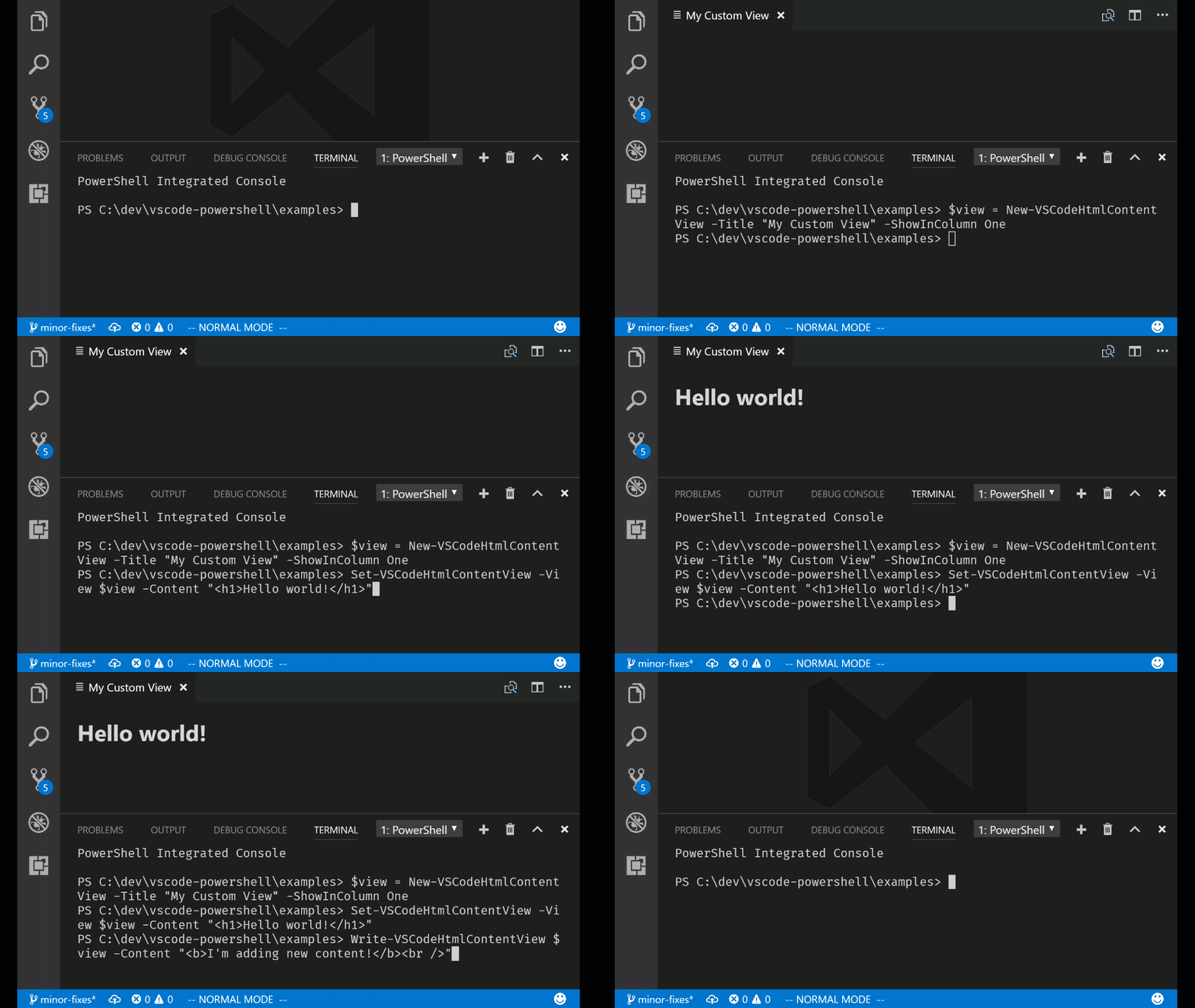
You can now show editor tabs with custom HTML-based UI by using the new HTML content view commands! This is the first step toward UI extensions for VS Code written in PowerShell.
Here's an example:
$view = New-VSCodeHtmlContentView -Title "My Custom View" -ShowInColumn One
Set-VSCodeHtmlContentView -View $view -Content "<h1>Hello world!</h1>"
Write-VSCodeHtmlContentView $view -Content "<b>I'm adding new content!</b><br />"
And here's the result:
Check out the cmdlet help for the following commands to learn more:
New-VSCodeHtmlContentViewShow-VSCodeHtmlContentViewClose-VSCodeHtmlContentViewSet-VSCodeHtmlContentViewWrite-VSCodeHtmlContentView
Since this is a first release, we've restricted the use of JavaScript inside of the HTML. We will add this capability in a future release!
Code formatting setting presets for common styles
We've now added code formatting presets for the most common code style conventions used in the PowerShell community. You can now set the powershell.codeFormatting.preset setting to one of the following presets:
-
OTBS - Known as the "One True Brace Style". Causes
else,catch, and other keywords to be "cuddled", keeping them on the same line as the previous closing brace:if ($var -eq $true) { # Do the thing } else { # Do something else }
-
Stroustrup - Causes beginning curly braces to be placed on the same line as the statement:
if ($var -eq $true) {
  # Do the thing
} else {
  # Do something else
}
-
Allman - All curly braces are preceded by a newline:
if ($var -eq $true) {
  # Do the thing
}
else {
  # Do something else
}
-
Custom - Allows full customization of the code formatting settings.
In addition, code formatting now respects your editor.insertSpaces and editor.tabSize settings!
Debugging in a temporary PowerShell Integrated Console
We've added the ability to debug your PowerShell code in a temporary PowerShell Integrated Console so that you have a fresh runspace and PowerShell process each time you hit F5!
This setting is necessary if you are developing with PowerShell 5 classes or modules using .NET assemblies because .NET types cannot be reloaded inside of the same PowerShell process. This new setting
saves you from reloading your PowerShell session each time you debug your code!
You can configure this behavior in two ways:
-
Use the
launch.jsonconfiguration parametercreateTemporaryIntegratedConsole:{ "type": "PowerShell", "request": "launch", "name": "PowerShell Launch Current File in Temporary Console", "script": "${file}", "args": [], "cwd": "${file}", "createTemporaryIntegratedConsole": true }, -
Configure the setting
powershell.debugging.createTemporaryIntegratedConsole:"powershell.debugging.createTemporaryIntegratedConsole": true,
The default value for these settings is false, meaning that the temporary console behavior is opt-in.
Configuring the user or workspace setting will cause all debugging sessions to be run in a temporary Integrated Console so it's useful if you would prefer this to be the default behavior. The launch.json setting overrides the user setting so you can always customize the behavior for a specific launch configuration.
NewFile() API and Out-CurrentFile command
You can now create a new untitled file from within the Integrated Console by using the $psEditor.Workspace.NewFile() command! Also, you can send the formatted output of any PowerShell command to the current file by using the Out-CurrentFile command:
Get-Process | Out-CurrentFileSpecial thanks to Doug Finke for the contribution!
Other fixes and improvements
v1.3.2
Fixes and improvements
-
PowerShell/vscode-powershell#864 - Improved the visibility of hyphen characters on the currently edited line in the PowerShell ISE theme (thanks Stefan Stranger!)
-
PowerShell/vscode-powershell#857 - Typing a new function into a file no longer causes the language server to crash
-
PowerShell/vscode-powershell#855 - "Format Document" no longer hangs indefinitely
-
PowerShell/vscode-powershell#859 - Language server no longer hangs when opening a Pester test file containing dot-sourced script references
-
PowerShell/vscode-powershell#856 - CodeLenses for function definitions no longer count the definition itself as a reference and shows "0 references" when there are no uses of that function
-
PowerShell/vscode-powershell#838 - Right-clicking a debugger variable and selecting "Add to Watch" now has the desired result
-
PowerShell/vscode-powershell#837 - Debugger call stack now navigates correctly to the user's selected stack frame
-
PowerShell/vscode-powershell#862 - Terminating errors in the language server now close the Integrated Console immediately and prompt the user to restart the session
-
PowerShell/PowerShellEditorServices#505 - Added improved cmdlet help in the PowerShellEditorServices.Commands module
-
PowerShell/PowerShellEditorServices#509 - Importing the PowerShellEditorServices.Commands module no longer causes errors to be written about missing help languages
v1.3.1
Fixes and improvements
-
#850 -
Fixed an issue where lower-cased "describe" blocks were not identified by
the CodeLens feature. -
#851 -
Fixed an issue where the language server would hang when typing out a describe
block. -
#852 -
Fixed an issue where Pester test names would not be detected correctly when
other arguments like -Tags were being used on a Describe block.