GitHub IO is a LuaIO-compatible filesystem driver that makes a GitHub repository look and behave like a file system inside the Barracuda App Server.
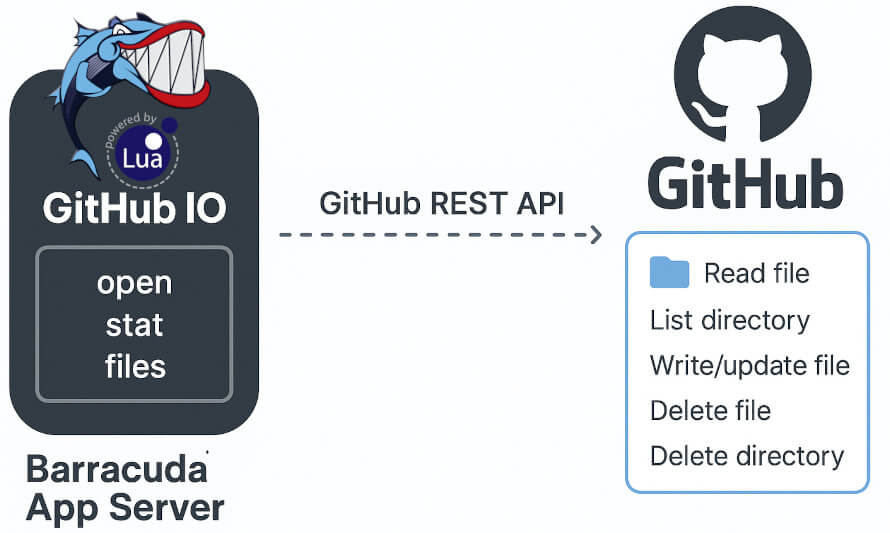
Instead of reading and writing local disk files, the driver translates file operations into GitHub API calls:
- reading files uses GitHub's raw-content support
- writing files uses the repository contents API
- deleting files and directories uses the contents API, including recursive directory removal
- directory listings come from GitHub JSON directory metadata
- empty directories are emulated with
.keepfiles because Git does not store empty folders
Because the returned object follows the BAS IO model, you can use it anywhere a BAS IO is accepted, including with the WebDAV/Web File Server. That means a GitHub repository can be exposed as a versioned network file system. Keep in mind that WebDAV clients can generate a lot of file traffic, so this pattern is best suited for small repositories and source files rather than large binary payloads.
When used from Xedge, the same GitHub-backed IO can also be mounted into the IDE through xedge.auxapp(), which makes the repository appear like a local project inside the UI.
www/.lua/GitHubIo.lua- GitHub IO driver module.www/.preload- Example startup script that creates the GitHub-backed file system and mounts it at/git/.
Before running the example:
- Create a new empty GitHub repository.
- Generate a fine-grained personal access token limited to that repository.
- Open
GitHubIo/www/.preload. - Replace the placeholder values for:
- repository owner
- repository name
- GitHub token
- Remove the intentional
error(...)line at the top of.preload.
Then start the example:
cd GitHubIo
mako -l::www
For more detail on starting the Mako Server, see the command line video tutorial and the command line options documentation.
After the server starts, open:
http://localhost/git/
You can then use the Web File Manager for upload and download operations, or mount http://localhost/git/ as a WebDAV drive.
The example startup script creates the driver with:
local ghio = require"GitHubIo".create{
   owner  = "RealTimeLogic",
   repo   = "GitHubIoTest",
   token  = "github_pat_xxxxx",
   branch = "main",
   log=function(url,code,message) trace(url,code,message) end,
   mtime=os.time()
}
It then creates a Web File Server on top of that IO and mounts it at /git/.
create(...) returns a BAS IO interface object that supports common methods such as open, files, stat, mkdir, rmdir, and remove.
That is what makes the module practical: code written against the BAS IO abstraction can often be reused with minimal change, even though the backing storage is now GitHub instead of a local disk.
GitHub username or organization name that owns the repository.
Repository name.
GitHub Personal Access Token used for authentication.
The original example text assumed a PAT with repository access only, which is still the recommended way to test the driver safely.
Branch to operate on. Defaults to main.
GitHub API base URL. Use this for GitHub Enterprise installations.
Controls error reporting:
trueprints GitHub errors to the trace buffer- a function receives
(url, code, message)for each reported error
GitHub does not provide normal filesystem modification timestamps through this interface, so you can assign a normalized value to all returned nodes.
Lock-directory name used when the IO is mounted behind WebDAV. The default is .LOCK.
- Empty directories are represented with
.keepfiles. open("r")reads raw file content.open("w")buffers the data and uploads it onclose().flush()is effectively a no-op for write mode in this driver.rmdir()removes complete directory trees recursively.- Each GitHub request creates its own HTTP client, which makes the driver safe for concurrent BAS cooperative threads.
mtimeis normalized because the GitHub contents API does not expose normal filesystem timestamps in the same way a local file system does.- The
lockdirvalue should match the WebDAV lock-directory configuration if you combine the driver with a WebDAV server.
- The shipped
.preloadintentionally stops with an error until you edit it. That prevents accidental use with placeholder credentials. - If you use this driver with WebDAV, keep the repository small and expect a higher GitHub API call volume than with direct browser editing.
- In Xedge, the same driver can also be integrated into the IDE through
xedge.auxapp(). - For routine testing, start with a new empty repository so you can clearly see how file operations map to Git commits and repository contents.