Android application with a local Python server and plugin system
PyServe is an Android application that runs a local Python server (built with Bottle) directly on the device and allows dynamic loading of plugins.
It is designed as a lightweight mobile backend framework for testing, prototyping, and local API development.
- The app starts a local server at: http://127.0.0.1:9666
- Backend is built using Bottle
- On startup, the application scans the plugin directory
- Each plugin is dynamically imported using Python import system
- Plugins can extend server functionality (routes, logic, APIs)
Plugins are located at:
/storage/emulated/0/PyServe/
Each plugin is a separate folder:
PyServe/
 ├── demo/
 │   └── default.py
 └── my_plugin/
     └── main.py
Official plugin collection for PyServe:
Contains:
- ready-to-use plugins
- streaming providers
- web scrapers
- integrations for external applications (e.g. Streamlet)
Plugins can be placed into:
/storage/emulated/0/PyServe/
The application automatically creates a demo plugin on first launch.
- Located in:
/storage/emulated/0/PyServe/demo/ - File:
default.py
The demo plugin provides a basic example endpoint available at:
This allows you to immediately verify that the server is running correctly.
You can open it directly using the web button inside the app.
Each plugin must include:
- Entry file:
- main.py (recommended)
- or default.py (fallback)
- Optional function:
def register(app):
    pass
This function is called when the plugin is loaded.
- The app scans the plugin directory
- Each folder is treated as a separate plugin
- Python files are loaded via importlib
- Plugin errors:
- are shown in the UI log
- are written to an error log file
- do NOT crash the main application
Runs locally at: http://127.0.0.1:9666
Built using:
- Bottle (routing and API)
- Python standard library
You can use:
- json
- time
- os
- threading
- datetime
- beautifulsoup4
- websocket-client
- m3u8
- bottle
- requests
To ensure the app works correctly on Android:
- You must allow "All files access"
- Required because plugins are stored in:
/storage/emulated/0/PyServe/
- Server runs as a foreground service
- Prevents Android killing it in background
- Persistent notification is shown while running
- Disable battery optimization for best stability
- Otherwise Android may stop the server
- Plugins run in the same Python runtime as the app
- Broken plugin does NOT crash the server
- Errors are isolated and logged
- Intended for local development use only
PyServe/
 ├── main.py
 ├── plugin_loader.py
 ├── service.py (Bottle backend)
 ├── ui/
 │    └── layout.kv
 ├── assets/
 └── /storage/emulated/0/PyServe/
      ├── demo/
      └── plugins...
- Start / stop local server
- Plugin system with dynamic loading
- Error isolation per plugin
- UI logging system
- Android foreground service support
- Open local web interface
- Built-in WebDAV server (file transfer over LAN)
PyServe includes a built-in WebDAV server running on:
- upload plugins to another device (e.g. Android TV)
- transfer files over local network
- access storage without USB cables
- MiXplorer (Android)
- Solid Explorer
- other WebDAV-compatible file managers
- Open file manager on another device (e.g. Android TV)
- Add new WebDAV connection
- Enter your device IP: http://YOUR_IP:9667/
- Browse and upload files directly
Use it to quickly deploy plugins without rebuilding the app.
- Works only on the same local network (LAN)
- No additional setup required
def register(app):

    @route("/hello")
    def hello():
return "Hello from plugin!"- Local API testing on Android
- Backend prototyping
- Plugin-based architecture experiments
- Offline server tools
- Learning Bottle and Python web servers
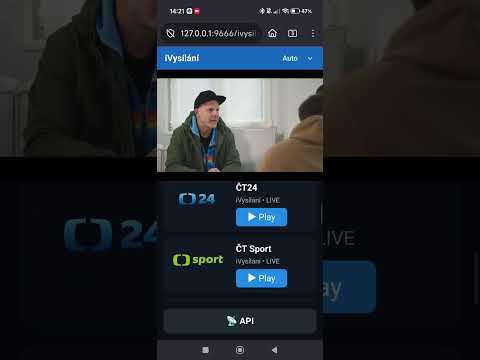
Short demonstration of the app running on Android device (plugin loading, UI, and local server).