Seeed Jetson Develop Tool is a desktop client for Seeed Jetson developers. It brings the common bring-up and development workflow into one GUI: firmware flashing, first-boot initialization, device diagnostics, remote development, app deployment, skill-based automation, OTA updates, and community resources.



| Module | Purpose |
|---|---|
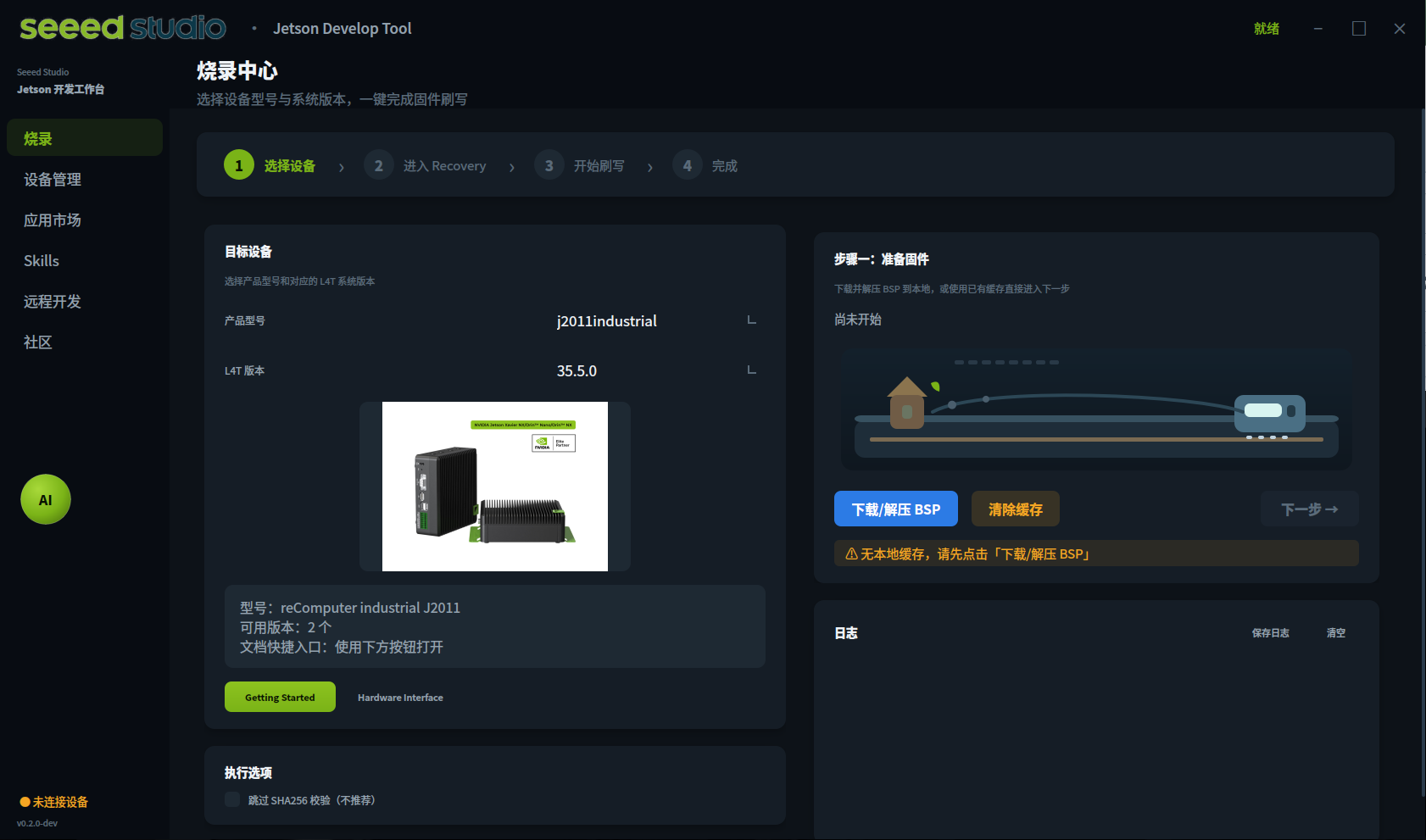
| Flash Center | Select a Seeed Jetson model and L4T version, download BSP packages, verify SHA256, extract, detect Recovery mode, and flash firmware. |
| Remote Connection | Connect to a Jetson over SSH, scan LAN hosts, open a terminal, configure first-boot serial setup, and share the PC network with Jetson. |
| Device Manager | Collect Jetson system information, run diagnostics, check peripherals, and install compatible PyTorch profiles. |
| App Market | Install and run Jetson applications and examples such as Jupyter Lab, Node-RED, jtop, YOLO/GMSL demos, Depth Anything, LLM, RAG, audio, and robotics examples. |
| Skills Center | Browse and install OpenClaw, Claude, and Codex-style skills for Jetson deployment, troubleshooting, AI, CV, robotics, networking, and system tuning. |
| OTA Update | Run supported JetPack/L4T OTA upgrade paths through a guided four-step workflow. |
| Community | Open Seeed Wiki, forum, GitHub, video resources, NVIDIA NGC, Hugging Face, and product purchase links. |
The current command-line entry point launches the GUI. Product selection, flashing, OTA, app install, and skills workflows are handled from the desktop client.
- Python 3.8 or newer.
- A graphical desktop environment for the PyQt6 GUI (via qtpy).
- Ubuntu 20.04 / 22.04 / 24.04 is recommended for firmware flashing.
- Windows is supported for the GUI and includes WSL2 + usbipd assisted flashing, but native Ubuntu is still the most reliable flashing host.
- SSH access to the Jetson is required for remote development, app installation, skills installation, diagnostics over network, and OTA.
- Internet access is required when downloading BSP packages, apps, skills dependencies, OTA payloads, or refreshing BSP metadata.
Python dependencies are declared in pyproject.toml and include qtpy + PyQt6, paramiko, requests, pyserial, pyte, rich, tqdm, click, and anthropic.
Install the packaged client:
pip install seeed-jetson-developer
seeed-jetson-developer
Install from source:
git clone https://github.com/Seeed-Projects/Seeed-Jetson-DevelopTool.git
cd Seeed-Jetson-DevelopTool
python3 -m venv .venv
source .venv/bin/activate
pip install -e .
seeed-jetson-developer
Run directly from the repository:
python3 run_v2.pyUseful debug option:
python3 run_v2.py --debug-console- Open Flash Center and select the target product and L4T version.
- Download and extract the BSP package. Existing firmware archives are reused from the local cache when possible.
- Follow the built-in Recovery guide for the selected device, then click Detect Device.
- Start flashing. On Linux the tool runs the NVIDIA initrd massflash workflow; on Windows it guides the WSL2 + usbipd flow.
- After flashing, use Jetson Initialization in the Remote page to complete first boot through serial if needed.
- Connect over SSH, then use Device Manager, App Market, Skills, Remote Desktop, Jupyter, VS Code Server, or OTA as needed.
- Model and L4T matching based on bundled BSP metadata.
- Runtime BSP metadata refresh from the Seeed Wiki repository when network is available.
- Firmware download with resume support, multi-part download when possible, SHA256 verification, and archive extraction.
- Recovery-mode device detection for NVIDIA APX USB IDs.
- Built-in Recovery guides with required cable, operation steps, USB IDs, and reference images.
- Local cache controls for downloaded archives and extracted work directories.
- Windows flashing helper for WSL2, usbipd-win, USB attach, WSL extraction, and flashing.
Firmware archives are stored under:
~/jetson_firmware
- SSH connection with username, password, sudo password, and key-auth support.
- LAN SSH host scan.
- Built-in terminal entry.
- VS Code Remote SSH guide.
- One-click code-server deployment for browser-based VS Code.
- Jupyter Lab install and launch on Jetson.
- Remote Desktop deployment using VNC/noVNC, including headless Xvfb fallback.
- PC network sharing with gateway/DNS/proxy setup.
- Serial Jetson initialization and serial network configuration.
- AI agent installation for Claude Code CLI, Codex CLI, and OpenClaw.
- Collects device information such as model, L4T/JetPack, kernel, disk, memory, and network status.
- Runs quick checks for network, PyTorch/CUDA, Docker, jtop, camera, and disk.
- Checks common peripherals such as USB Wi-Fi, 5G modules, Bluetooth, NVMe, video devices, and HDMI.
- Provides compatibility-aware PyTorch installation commands for detected JetPack/L4T and Python environments.
The App Market loads built-in apps and generated Jetson examples. It can run locally on a Jetson or remotely through the active SSH connection.
Included categories cover:
- Development tools: jtop, Jupyter Lab, Node-RED, browser tooling.
- Computer vision: YOLO, DeepStream-style workflows, GMSL demos, Depth Anything.
- LLM and GenAI: local model demos, RAG/vector database examples, Llama/Qwen/LLaVA-style examples.
- Audio and speech examples.
- Robotics and ROS examples.
The client bundles skill libraries in multiple formats:
- OpenClaw skills:
skills/openclaw/ - Claude skills:
skills/claude/ - Codex skills:
skills/codex/
Skills are grouped by topic and can be installed to a connected Jetson through SFTP. They cover flashing, JetPack setup, PyTorch, Docker, cameras, VNC, OTA, USB Wi-Fi, LLMs, CV demos, robotics workflows, and system troubleshooting.
The OTA page provides a guided workflow:
- Select a supported product.
- Connect over SSH and detect the current JetPack/L4T release.
- Match an available OTA path and download payloads.
- Transfer files, run pre-checks, execute OTA, and handle reboot.
Current bundled OTA paths target supported JetPack 5.1.3 / L4T 35.5.0 to JetPack 6.2 / L4T 36.4.3 upgrades for selected J401, J301, reServer, Industrial, and Orin Nano Dev Kit variants. The exact available paths are shown in the client.
The bundled BSP metadata currently includes 30+ product entries across these families:
- reComputer Super, Mini, Robotics, Classic, and Industrial
- reServer Industrial
- reComputer / reServer J501 AGX Orin carrier variants
- NVIDIA Jetson Orin Nano Developer Kit Super
- Xavier NX based J201 Industrial variants
Available L4T versions are read from seeed_jetson_develop/data/l4t_data.json and can be refreshed at runtime from the Seeed Wiki data source, so the client UI is the source of truth for the exact model and version combinations.
| Path | Purpose |
|---|---|
~/.cache/seeed-jetson/app.log |
GUI startup and runtime log. |
~/jetson_firmware |
Downloaded and extracted BSP firmware packages. |
~/.cache/seeed-jetson-develop/data |
Refreshed BSP metadata cache. |
~/.cache/seeed-jetson/ota |
OTA payload and tools cache. |
Check that a desktop session is available:
echo $DISPLAYIf running in a headless or constrained X11 session, install Xvfb:
sudo apt install xvfbThe launcher writes details to ~/.cache/seeed-jetson/app.log.
- Use a data-capable USB cable.
- Put the Jetson into Recovery mode using the guide shown for the selected product.
- On Linux, check
lsusbfor an NVIDIA device such as0955:7323,0955:7423,0955:7523,0955:7623, or0955:7023. - On Windows, ensure WSL2 and usbipd-win are available and allow the USB attach prompt.
Remote tools require an active SSH connection. Open Remote Connection, enter the Jetson IP, username, and password, then connect before using Jupyter, VS Code Server, Remote Desktop, App Market remote install, Skills install, or OTA.
Most install actions run on the Jetson. Confirm that the Jetson has internet access, enough disk space, and working DNS. If needed, use PC Network Share from the Remote page.
Run from source during development:
python3 -m venv .venv
source .venv/bin/activate
pip install -e .
python3 run_v2.py
Run tests:
pytestProject layout:
seeed_jetson_develop/
  gui/                 Qt main window, theme, i18n, widgets (via qtpy + PyQt6)
  modules/flash/       Flash page and flash thread
  modules/remote/      SSH, serial init, VNC/noVNC, network sharing
  modules/devices/     Diagnostics and PyTorch install support
  modules/apps/        App Market registry and installer
  modules/skills/      Skill scanner, grouping, installer
  modules/ota/         OTA wizard and execution thread
  data/                BSP, product image, and Recovery metadata
  skills/              Bundled OpenClaw, Claude, and Codex skill libraries
- Seeed Wiki: https://wiki.seeedstudio.com/
- Seeed Forum: https://forum.seeedstudio.com/
- Seeed GitHub: https://github.com/Seeed-Studio
- NVIDIA NGC: https://catalog.ngc.nvidia.com/
- Hugging Face: https://huggingface.co/
MIT