
A simple GUI application for scraping and downloading all media from your private Instagram Saved Collections.
This tool provides a streamlined 3-step process:
- Open Browser - Launch a Selenium-controlled Chrome browser to log in
- Scrape Links - Automatically collect all post URLs from your collection
- Download Videos - Use yt-dlp to download all media to your computer
⚠️ Important Note: This tool is designed specifically for downloading from your own private Instagram Saved Collections. Acookies.txtfile is mandatory for the download feature to work with private posts.
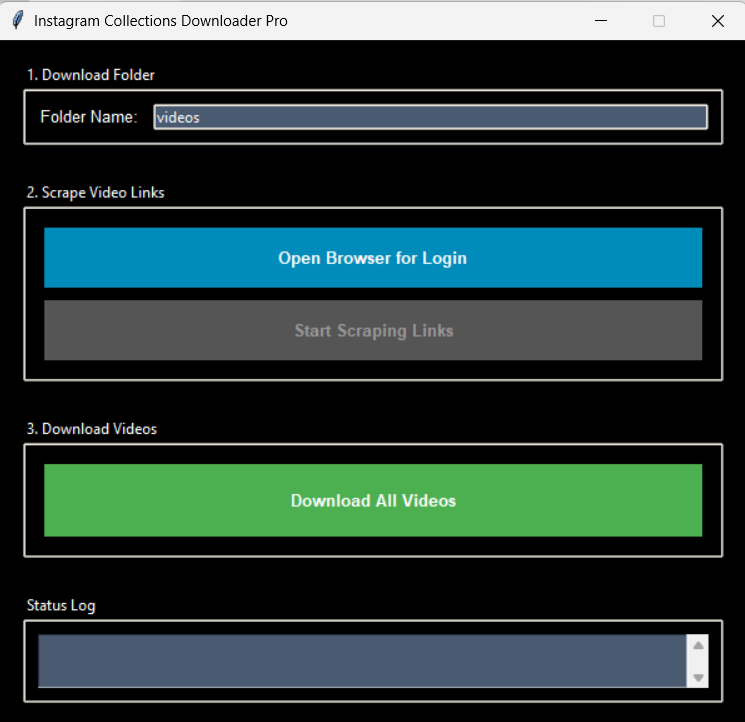
- Simple GUI - Built with Tkinter for an intuitive, user-friendly interface
- Collection-Focused Scraping - Uses Selenium to automatically scroll and collect all post links from your saved collections
- Powerful Downloading - Leverages yt-dlp for reliable, high-quality media downloads
- Cookie-Based Access - Accesses your private collections using exported browser cookies
- Portable - Manages all files (links.txt, cookies.txt, downloads) in its own folder
- Build-Ready - Can be compiled into a standalone executable with PyInstaller
The application uses Selenium to open a Chrome browser window where you log in to Instagram. After you manually navigate to your Saved collection page, the app takes control and automatically scrolls through the entire collection, extracting all post URLs. These links are saved to a local links.txt file for the download step.
Once links are collected, yt-dlp reads the URLs from links.txt and uses your cookies.txt file to authenticate and access your private saved posts. All media files are then downloaded to your specified folder with proper naming conventions.
- Python 3.7+ installed on your system
- Google Chrome browser installed
- Clone the repository:
git clone https://github.com/ShaadyEmad/instagram-collection-downloader.git
cd instagram-collection-downloader- Install required dependencies:
pip install -r requirements.txtThis is the most important step! Without this file, the downloader cannot access your private saved posts.
- Log in to Instagram in your regular browser (Chrome, Firefox, etc.)
- Install a cookie export extension such as:
- Get cookies.txt LOCALLY (Chrome)
- cookies.txt (Firefox)
- Export your cookies in Netscape format
- Save the file as
cookies.txtin the same folder as the application
From source:
python main.pyFrom executable:
Simply double-click the .exe file (if you've built one following the instructions below)
- Enter a folder name where you want videos saved (optional)
- Defaults to
videosif left blank - The folder will be created automatically if it doesn't exist
- Click "Open Browser for Login"
- A Chrome window will open - log in to your Instagram account
- Manually navigate to your Saved collection page (e.g.,
instagram.com/your_username/saved/all-posts/)
- Return to the app and click "Start Scraping Links"
- The app will automatically scroll through your collection and save all post URLs to
links.txt - This may take several minutes depending on the size of your collection
- Ensure your
cookies.txtfile is in the application folder - Click "Download All Videos"
- The download process will begin, and you can monitor progress in the Status Log
- All media will be saved to your specified download folder
You can compile this application into a standalone Windows executable that doesn't require Python to be installed.
- Install PyInstaller:
pip install pyinstaller- Build the executable:
pyinstaller --onefile --windowed main.py-
Your executable will be created in the
distfolder -
Important: Remember to place your
cookies.txtfile in the same folder as the.exefile before running it
instagram-collection-downloader/
├── main.py                 # Main application file
├── requirements.txt        # Python dependencies
├── cookies.txt            # Your exported cookies (you create this)
├── links.txt              # Scraped links (auto-generated)
└── videos/                # Downloaded media (auto-generated)
This tool is for personal and educational use only. Downloading content may be against Instagram's Terms of Service. The developers are not responsible for any misuse of this tool. Use at your own risk and ensure you have the right to download any content you access.
Browser won't open:
- Ensure Google Chrome is installed
- Try updating Chrome to the latest version
Download fails:
- Verify your
cookies.txtfile is present and up-to-date - Re-export your cookies if they're more than a few days old
No links found:
- Make sure you're on the correct collection page before clicking "Start Scraping"
- Ensure you're logged in to Instagram in the browser window
This project is open source and available under the MIT License.
Contributions, issues, and feature requests are welcome! Feel free to check the issues page.
Created by ShaadyEmad
⭐ Star this repo if you find it helpful!