What type of issue is this?
Question
What SharePoint development model, framework, SDK or API is this about?
SharePoint Add-ins
Target SharePoint environment
SharePoint Online
What browser(s) / client(s) have you tested
Additional environment details
No response
Issue description
Usecase:
How can we programmatically find all site collections where Apps have access to the content within the site collection and list these apps using any available API available for SharePoint (CSOM, REST, PowerShell, MS Graph)?
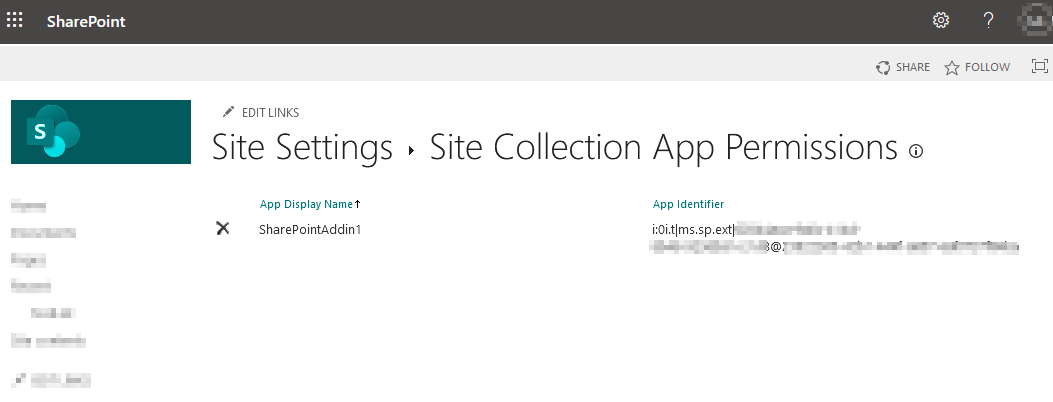
Apps that have access to the content within the site collection are shown at {SiteUrl}/_layouts/15/appprincipals.aspx. But there does not seem any API available to get this data.
Steps to reproduce
- Register a new site collection by following “To register by using AppRegNew.aspx”-step on this page: https://docs.microsoft.com/en-us/sharepoint/dev/sp-add-ins/register-sharepoint-add-ins#to-register-by-using-appregnewaspx
- Note the ClientID of the app.
- Grant permission for the app by going to
{SiteUrl}/_layouts/15/appinv.aspx and enter the ClientID of the app from step 2. in Textbox "App Id"
- Click
Lookup
- For textbox "Permission Request XML" enter the following XML:
<AppPermissionRequests AllowAppOnlyPolicy="true">
<AppPermissionRequest Scope="http://sharepoint/content/sitecollection/web"
Right="FullControl" />
</AppPermissionRequests>
- Click
Create-Button
- Go to
{SiteUrl}/_layouts/15/appprincipals.aspx to show app access. The new app should be visible here.
a. We need to get the results from this page programmatically. How can this be achieved? In best case a API endpoint would contain:
- App Name
- App ID
- List of permissions granted for the current site collection
Things tried so far
- CSOM/JSOM
AppCatalog.GetAppInstances: This method does not return any results for this usecase because it is only used for apps that have been installed in the site collection but not for apps that have only been granted permission for the site.
- Get-PNPApp: This PNP PowerShell command does the same as
AppCatalog.GetAppInstances and therefore does not help either.
- Web Properties: I have checked all web properties of the site collection where I granted the app permissions but there is nothing that is related to Add-In permissions.
- Check for hidden lists: I expected there might be some kind of hidden list in the site collection (e.g. similar to Sharing List) but I did not find anything.

What type of issue is this?
Question
What SharePoint development model, framework, SDK or API is this about?
SharePoint Add-ins
Target SharePoint environment
SharePoint Online
What browser(s) / client(s) have you tested
Additional environment details
No response
Issue description
Usecase:
How can we programmatically find all site collections where Apps have access to the content within the site collection and list these apps using any available API available for SharePoint (CSOM, REST, PowerShell, MS Graph)?
Apps that have access to the content within the site collection are shown at
{SiteUrl}/_layouts/15/appprincipals.aspx. But there does not seem any API available to get this data.Steps to reproduce
{SiteUrl}/_layouts/15/appinv.aspxand enter the ClientID of the app from step 2. in Textbox "App Id"LookupCreate-Button{SiteUrl}/_layouts/15/appprincipals.aspxto show app access. The new app should be visible here.a. We need to get the results from this page programmatically. How can this be achieved? In best case a API endpoint would contain:
Things tried so far
AppCatalog.GetAppInstances: This method does not return any results for this usecase because it is only used for apps that have been installed in the site collection but not for apps that have only been granted permission for the site.AppCatalog.GetAppInstancesand therefore does not help either.