Target SharePoint environment
SharePoint Online
What SharePoint development model, framework, SDK or API is this about?
💥 SharePoint Framework
Developer environment
Windows
What browser(s) / client(s) have you tested
Additional environment details
No response
Describe the bug / error
We currently retrieve the applied SharePoint theme color palette from our SPFx web parts and what I'm seeing right now is that the neutral colors are not being returned with the same values as they are applied in the SharePoint theme. I can reproduce this in code, or even just in the browser console on an out-of-the-box site collection.
For example, if I apply the "Red" out-of-the-box theme and then immediately (without full page reload) look at window['__themeState__'].theme in the console I see the correct colors:
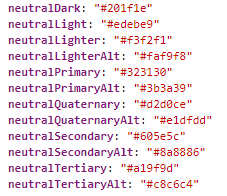
As soon as I refresh the page and retrieve the theme object, the neutrals have changed. No matter what theme I apply, the same values are returned and seem hardcoded. For example, neutralSecondary I can verify is being correctly applied in the UX, but not correct in the __themeState__ object.
After page reload (with Red theme applied, still):
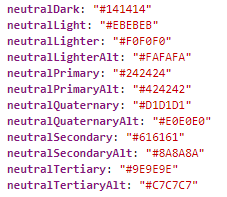
No matter what theme I have applied I get the exact same neutrals returned on page load.
Thoughts?
Steps to reproduce
- Apply a theme (e.g. Red)
- In the console, enter window['__themeState__'].theme and note the neutral colors
- Reload the page and then re-enter into the console window['__themeState__'].theme.
- Notice the neutral colors are now different. No matter which theme you apply, they are always returned this way and not responsive to the actual SharePoint theme properties.
Expected behavior
I would expect to see all the SharePoint theme colors accurately represented based on the theme that is currently applied. This seems to work for the main theme colors (e.g. themePrimary, themeSecondary, etc), but not for neutrals (e.g. neutralSecondary, neutralDark, etc).

Target SharePoint environment
SharePoint Online
What SharePoint development model, framework, SDK or API is this about?
💥 SharePoint Framework
Developer environment
Windows
What browser(s) / client(s) have you tested
Additional environment details
No response
Describe the bug / error
We currently retrieve the applied SharePoint theme color palette from our SPFx web parts and what I'm seeing right now is that the neutral colors are not being returned with the same values as they are applied in the SharePoint theme. I can reproduce this in code, or even just in the browser console on an out-of-the-box site collection.
For example, if I apply the "Red" out-of-the-box theme and then immediately (without full page reload) look at window['__themeState__'].theme in the console I see the correct colors:
As soon as I refresh the page and retrieve the theme object, the neutrals have changed. No matter what theme I apply, the same values are returned and seem hardcoded. For example, neutralSecondary I can verify is being correctly applied in the UX, but not correct in the __themeState__ object.
After page reload (with Red theme applied, still):
No matter what theme I have applied I get the exact same neutrals returned on page load.
Thoughts?
Steps to reproduce
Expected behavior
I would expect to see all the SharePoint theme colors accurately represented based on the theme that is currently applied. This seems to work for the main theme colors (e.g. themePrimary, themeSecondary, etc), but not for neutrals (e.g. neutralSecondary, neutralDark, etc).