You signed in with another tab or window. Reload to refresh your session.You signed out in another tab or window. Reload to refresh your session.You switched accounts on another tab or window. Reload to refresh your session.Dismiss alert
{{ message }}
This repository was archived by the owner on Oct 4, 2023. It is now read-only.
Found an issue or bug with electron-vue? Tell me all about it!
Questions regarding how to use electron or vue are likely to be closed as they are not direct issues with this boilerplate. Please seek solutions from official documentation or their respective communities.
Describe the issue / bug.
#
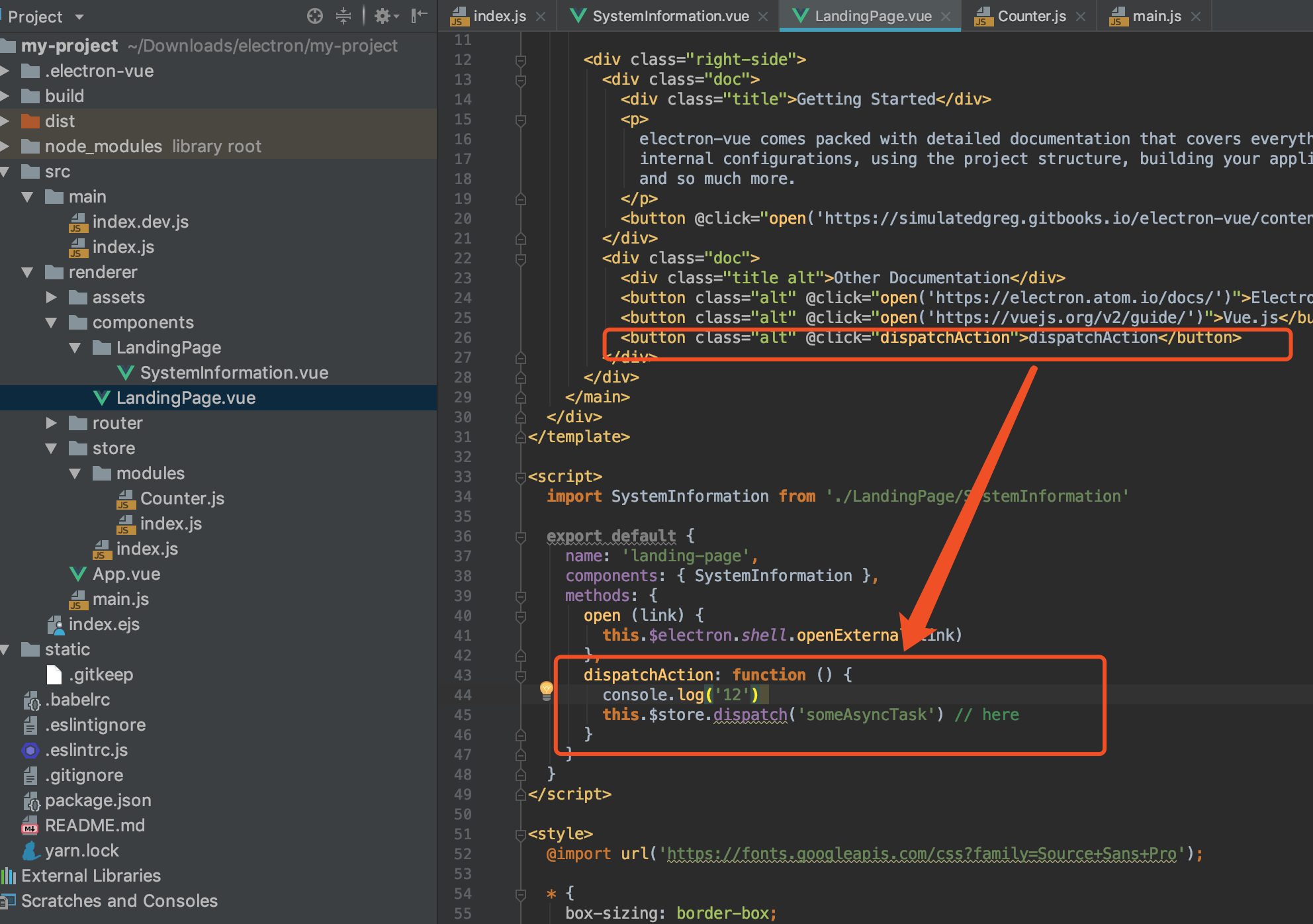
//file . my-project/src/renderer/components/LandingPage.vue
<button class="alt" @click="dispatchAction">dispatchAction</button>
dispatchAction () {
       this.$store.dispatch('someAsyncTask') // here
     }


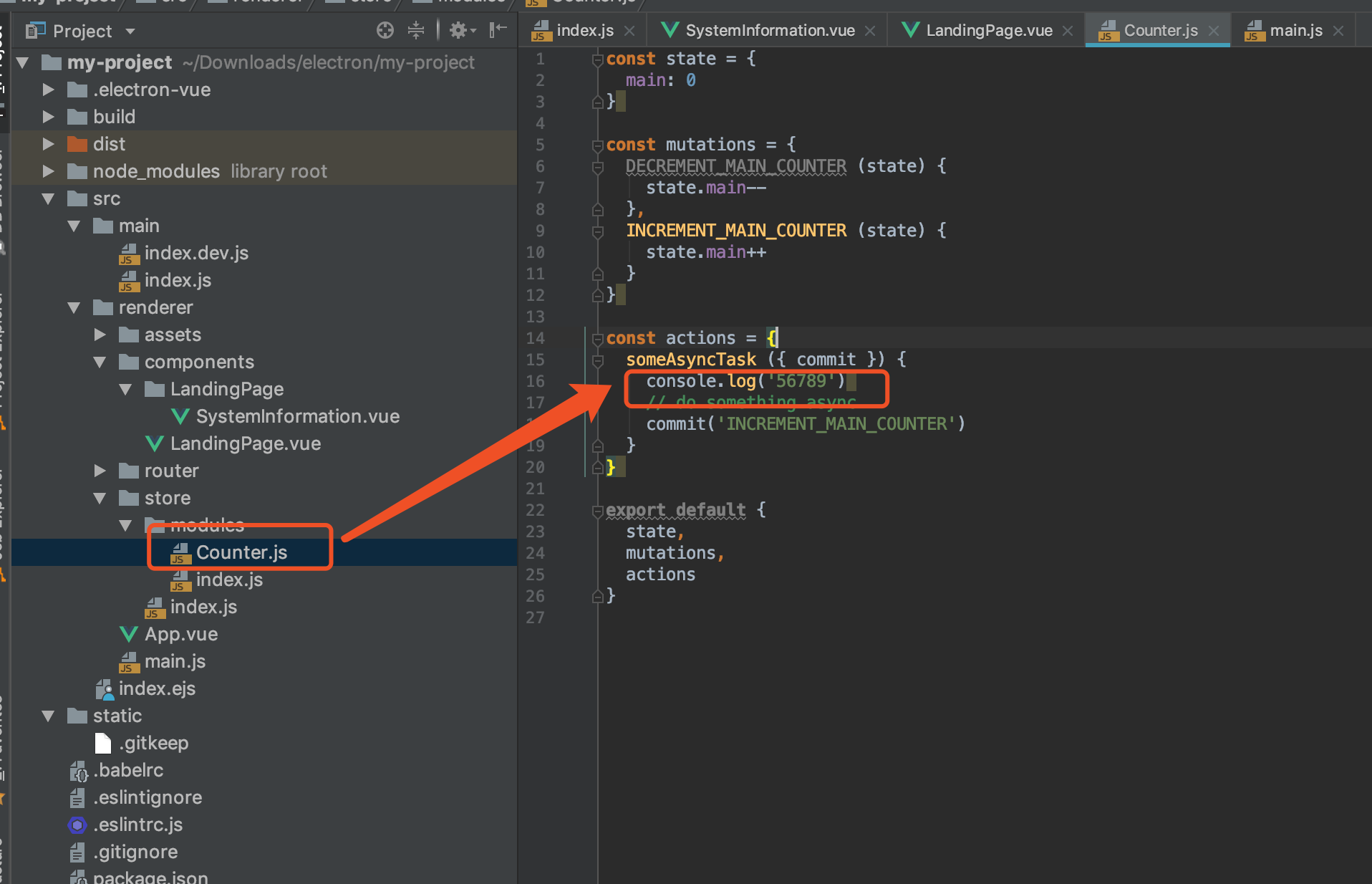
// file . store/modules/Counter.js
const actions = {
 someAsyncTask ({ commit }) {
   console.log('56789')        // here             ---------------- click button ,log not print
   // do something async
   commit('INCREMENT_MAIN_COUNTER')
 }
}

// action can not run
How can I reproduce this problem?
#
<template>
  <div id="wrapper">
    <img id="logo" src="~@/assets/logo.png" alt="electron-vue">
    <main>
      <div class="left-side">
        <span class="title">
          Welcome to your new project!
        </span>
        <system-information></system-information>
      </div>

      <div class="right-side">
        <div class="doc">
          <div class="title">Getting Started</div>
          <p>
            electron-vue comes packed with detailed documentation that covers everything from
            internal configurations, using the project structure, building your application,
            and so much more.
          </p>
          <button @click="open('https://simulatedgreg.gitbooks.io/electron-vue/content/')">Read the Docs</button><br><br>
        </div>
        <div class="doc">
          <div class="title alt">Other Documentation</div>
          <button class="alt" @click="open('https://electron.atom.io/docs/')">Electron</button>
          <button class="alt" @click="open('https://vuejs.org/v2/guide/')">Vue.js</button>
          <button class="alt" @click="dispatchAction">dispatchAction</button>
        </div>
      </div>
    </main>
  </div>
</template>

<script>
  import SystemInformation from './LandingPage/SystemInformation'

  export default {
    name: 'landing-page',
    components: { SystemInformation },
    methods: {
      open (link) {
        this.$electron.shell.openExternal(link)
      },
      dispatchAction () {
        this.$store.dispatch('someAsyncTask') // <<<<<<<<<< .  here .  <<<<<<<<<<<
      }
    }
  }
</script>

<style>
  @import url('https://fonts.googleapis.com/css?family=Source+Sans+Pro');

  * {
    box-sizing: border-box;
    margin: 0;
    padding: 0;
  }

  body { font-family: 'Source Sans Pro', sans-serif; }

  #wrapper {
    background:
      radial-gradient(
        ellipse at top left,
        rgba(255, 255, 255, 1) 40%,
        rgba(229, 229, 229, .9) 100%
      );
    height: 100vh;
    padding: 60px 80px;
    width: 100vw;
  }

  #logo {
    height: auto;
    margin-bottom: 20px;
    width: 420px;
  }

  main {
    display: flex;
    justify-content: space-between;
  }

  main > div { flex-basis: 50%; }

  .left-side {
    display: flex;
    flex-direction: column;
  }

  .welcome {
    color: #555;
    font-size: 23px;
    margin-bottom: 10px;
  }

  .title {
    color: #2c3e50;
    font-size: 20px;
    font-weight: bold;
    margin-bottom: 6px;
  }

  .title.alt {
    font-size: 18px;
    margin-bottom: 10px;
  }

  .doc p {
    color: black;
    margin-bottom: 10px;
  }

  .doc button {
    font-size: .8em;
    cursor: pointer;
    outline: none;
    padding: 0.75em 2em;
    border-radius: 2em;
    display: inline-block;
    color: #fff;
    background-color: #4fc08d;
    transition: all 0.15s ease;
    box-sizing: border-box;
    border: 1px solid #4fc08d;
  }

  .doc button.alt {
    color: #42b983;
    background-color: transparent;
  }
</style>
If visual, provide a screenshot.
#
Tell me about your development environment.
Node version:
NPM version:
vue-cli version: (if necessary)
Operating System:
If you are looking to suggest an enhancement or feature, then feel free to remove everything above.

Found an issue or bug with electron-vue? Tell me all about it!
Questions regarding how to use
electronorvueare likely to be closed as they are not direct issues with this boilerplate. Please seek solutions from official documentation or their respective communities.Describe the issue / bug.
#
How can I reproduce this problem?
#
If visual, provide a screenshot.
#
Tell me about your development environment.
If you are looking to suggest an enhancement or feature, then feel free to remove everything above.