| type | slide | ||||||||
|---|---|---|---|---|---|---|---|---|---|
| slideOptions |
|

Image by https://www.docker.com/, Fair use, https://en.wikipedia.org/w/index.php?curid=70663056
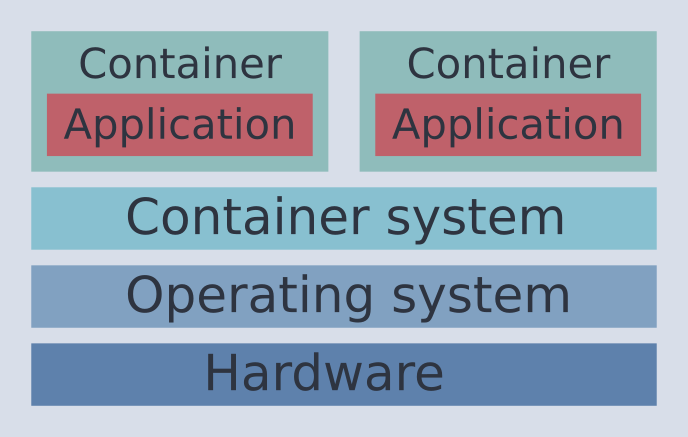
- Container operates in "fenced off" part of the operating system (
namespaces) - Lower overhead than a virtual machine
- Runs on kernel (and libraries) of the host OS
- Cheap to start and stop a container
- Available features depend on Host (Linux, Windows)
- Container can be isolated.
- Microservices
- Reproducible environments for developing and testing (DevOps)
- More and more in science
- High-performance computing, "Bring Your Own Environment"
- Reproducible research
- Plenty of different container formats
- Different solutions with different strengths due to different use cases
- Working on the (Super-)Userspace
- Direct access to hardware vs. encapsulation
- Generic or with integration in software ecosystem (e.g. job schedulers)
- Common standard: Open Container Initiative (OCI)
- 2010: Docker Inc. founded
- 2013: First Docker release
- Open source, Then based on LXC
- 2014: Replaced LXC by own execution environment
- 2017: Moby project for open source development
- 2023: The most popular container solution (survey)
- Docker objects
- Images
- Read-only template for creating a container
- An image can be based on another image
- Containers
- Runnable instance of an image
- Images
- Docker daemon
dockerd- Controlling instance of containers and reacts to API requests
- Server process
- Docker client
- User interface/tools to interact with, create, manage containers etc. via daemon
- That means no direct interaction with containers, images etc.
- Docker registries
- Registries that manage Docker images to be used
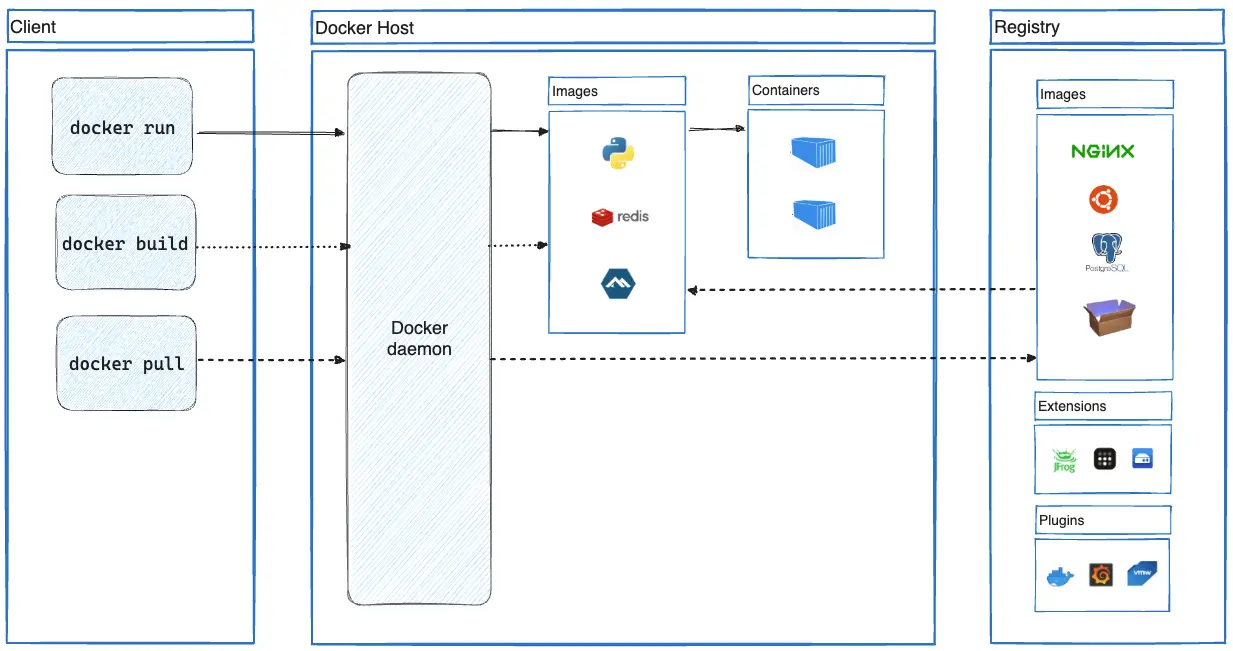
https://docs.docker.com/get-started/docker-overview/
- Container communicates via daemon
dockerd(runs as root) - Strong isolation (
namespacesandcgroups)- You cannot access Host filesystem by default.
- Several mount options available
- Root rights for installation
dockerdruns as root -> Interaction needs root rights- Option 1: Prefix commands with
sudo - Option 2: Be member of group
docker(=makes you root), expected by some applications (e.g.act)
- Option 1: Prefix commands with
- Alternatives:
- Rootless mode
- Run Docker in a VM for better isolation
- Check security notes
docker run OPTIONS- Run a container
docker container ls- List running containers
- Add
-ato see also the stopped containers - Alias:
docker ps
docker pull NAME:TAG- Pulls an image from registry,
TAGoptional
- Pulls an image from registry,
docker container create IMAGE- Create container from image
docker container start/stop NAME- Start/stop container
docker container attach NAME- Attach to running container
docker build- Creates an image from a given Dockerfile
docker cp- Copy files in/out of container
docker image history IMAGE- Show layers of image (including commands)
docker image ls- List locally available images
docker system prune- Remove all unused objects (images, containers...)
Details available in docker_demo.md
- Define container in
Dockerfile- Git-friendly text file
- Start from base image
- Find images on repository such as DockerHub
- Extend image by additional layers
- Layers are added separately -> Keep number of layers low
- Layers are cached
- Changed layer requires downstream layers to be recreated
- Container layers have commit hashes
FROM: Defines base imageRUN: Defines commands to executeWORKDIR: Defines working directory for following commandsCOPY: Copy for from source to destinationADD: Add for from source to destination (powerful and confusing)CMD: Command to run underdocker runENV: Sets environment variableARG: Environment variable for only the build process
FROM ubuntu:24.04

RUN apt update -y && apt install -y neofetch
WORKDIR /app
COPY testfile .
CMD ["neofetch"]Details available in docker_demo.md
- Publication on registry (e.g. DockerHub)
docker build -t ACCOUNT/REPOSITORY[:TAG] .- Creates image
docker push ACCOUNT/REPOSITORY[:TAG]- Push image to registry (default DockerHub)
- Needs account and must be logged in via
docker login
- User ID mapping
- Multistage builds
- Build image by combining layers created from different base images
- Different mount types
- Volumes, bind mount, tmpfs mount
- Persisting data
- Multi-container apps
- And many more. Check out the Docker documentation
- Lightweight virtualization technique
- Run application in isolated environment
- Run application in consistent environment
- Share environments and applications with containers
- Plenty of options and feature-rich CLI
- Important building block for CI/CD pipelines (future lectures)