In this Repository you can find the shopware.postman_collection.json file, which holds the postman collection with examples and in particular the oauth method (with test shop data, so be sure to change it for yours instead)
Find out how to import a collection into Postman
Postman is a tool to Test Web API´s and is very commonly used in developer circles. With this collection you can test individual endpoints of the Shopware API to get a feel for the data that is returned and maybe understand some of the design decisions in this Library a bit better.
Also this will help you to setup your filters and such for a better overall experience and faster feedback.
1.) Use the POST oauth Request first and go to the Body Tab and put your information for your shop here:
{
    "client_id": "$your_client_id",
    "grant_type": "client_credentials",
    "client_secret": "$your_client_secret"
}
(these you can get from your shopware administration webseite, and if you do not have them already you need to create some) 2.) From the Response (something like this)
{
    "token_type": "Bearer",
    "expires_in": 600,
    "access_token": "eyJ0eYAiOiJKV1QiLCJhbGciOiJSUzI1NiJ9.eyJhdWQiOiJTV0lBVEtUWUFERkdVV0MyQ001M1ZGS1dCRyIsImpkkkI6ImU2YWExOGFkMGI4NDk1YzAzZDkzN2NmNWQzMWViZjFhNDZmOTEzY2RkZDgwM2ZkN2Y2MWU4N2Y5ODY2NmQwZDM1ZjcxMzg3NmI1ZDU0MWRjIiwiaWF0IjoxNjYxMzMzMjA0LjgyMjI3NiwibmJmIjoxNjYxMzMzMjA0LjgyMjI4LCJleHAiOjE2NjEzMzM4MDQuODIxNTQyLCJzdWIiOiIiLCccY29wZXMiOlsid3JpdGUiXX0.a4SDvDqtRWvTvlf4VPLqw9Atug7RVYPj7Q5gq2QomcXtp2bcr3IxPgjxFZkLO0nrlcUrjnloj-ThvijktJqGIIHfbCMP0H5D8QuJuFe-G_Zqwlz7uV_VWdaergYvEG4Bo2Tp7sKN_i12FOWLU1QJKsX6ahGdVSUNeDowuD0TpidIFdfReA_1kKhwn9G-PxPFRj9QAGjOW2_Wn3lLYmJ214MpCRhosjBXvpLX-1dapfVd9gPH7iUPGSrVvmTriYUi-FtnG1WkSzweJ21mNXf1CTy8W8961792aGok1abcdefs5UOuLMGFRzVaHWr-Dunr0-Bwq5yIbJDiEfmuy8mwTw"
}
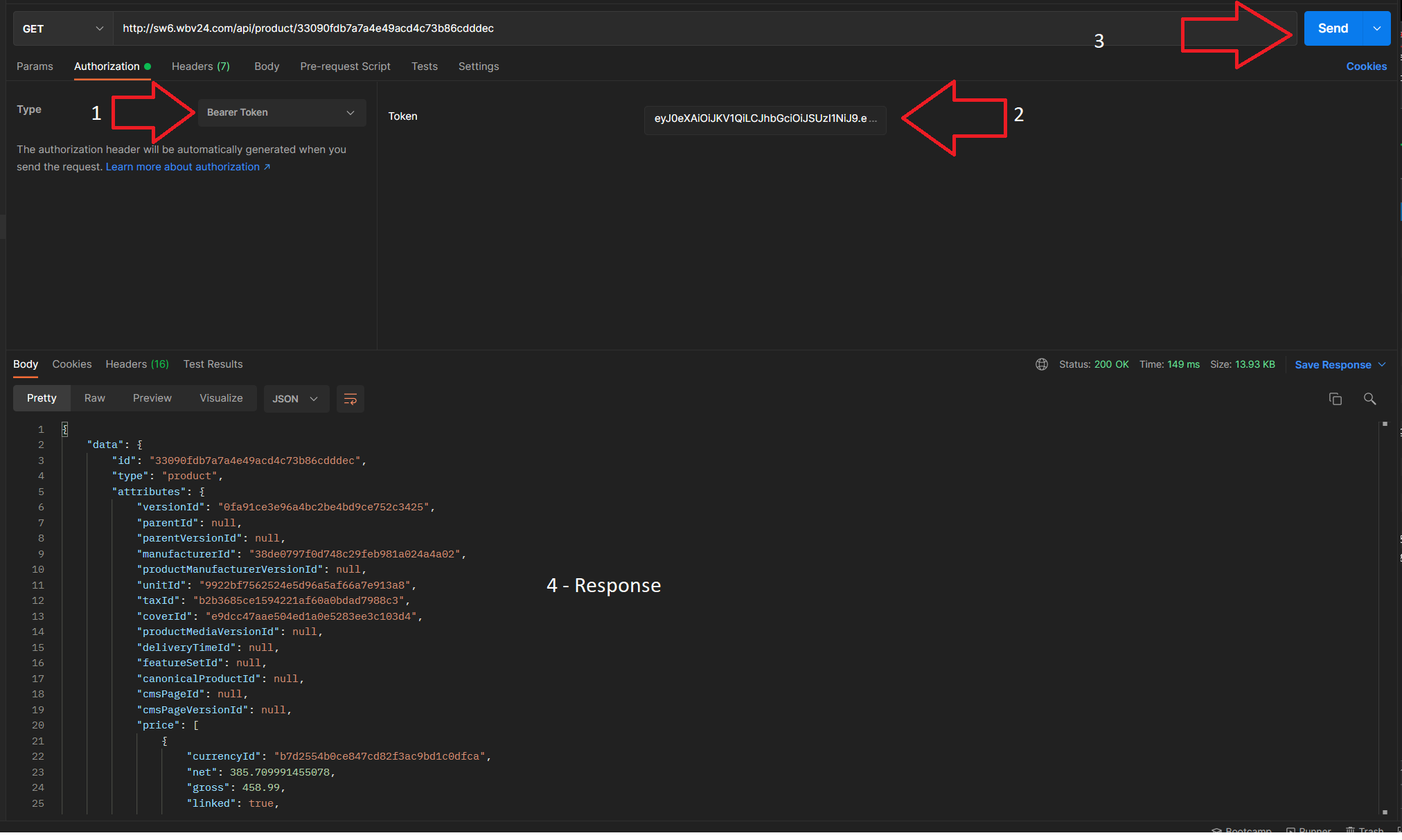
Copy the access_tokens value and paste it in your desired request in the Authorization tab by selecting the Type to be Bearer Token, and pasting the access_token_value into the Token field.
3.) Hit Send and see what you will get
example for product http://sw6.wbv24.com/api/product/33090fdb7a7a4e49acd4c73b86cdddec
4.) Experiment with filters, EntitySegments (like )