
Replies: 4 comments 9 replies

-
|
Why do you want to move focus on buttons, you have to press them with the mouse anyway since you cannot press them with Enter in tkinter. For CTkEntry and Textbox the move of focus is working as expected. I don't think I will implement focus on my custom button, I don't know if its even possible and I would render some sort of frame around the button which is not possible so I would have to make it another color or something, but that would be confusing. |
Beta Was this translation helpful? Give feedback.

-
|
I'm creating an engineering app where users enter a lot of data and tab through inputs and buttons. With a standard tkinter button it's in the tab order and users simply press space (with the button highlighted) to enter the details. Is this functionality on the roadmap for ctk? |
Beta Was this translation helpful? Give feedback.

-
|
@TomSchimansky I'm quite sure it's possible to let buttons |
Beta Was this translation helpful? Give feedback.

-
|
I have been playing around with CTk and found it fantastic to work with, there are some behaviors that I found interesting. It seems you can create the layout with multiple text boxes, input fields and buttons, and the tab does move between, but you cannot see any decoration that will indicate to the user that the button is currently active and will be activated when the enter button is pressed. Consider the following code: import customtkinter as tk
import threading
import time
def run_function(input_param):
status_bar.configure(text="Running...")
for i in range(100):
time.sleep(1)
output_text.configure(state='normal')
output_text.insert(tk.END, f"Output {i} from thread {threading.current_thread().name} with input {input_param}\n")
output_text.see(tk.END)
output_text.configure(state='disabled')
if stop_flag.is_set():
break
status_bar.configure(text="Finished.")
def start_function():
input_param = input_field.get()
global stop_flag
stop_flag = threading.Event()
thread = threading.Thread(target=run_function, args=(input_param,))
thread.start()
def stop_function():
stop_flag.set()
def on_enter_key_start(event):
start_function()
def on_enter_key_stop(event):
stop_function()
root = tk.CTk()
root.geometry('400x500')
root.title("Threaded Function Output")
root.bind_all("<Escape>", on_enter_key_stop)
input_field = tk.CTkEntry(root, placeholder_text='Enter parmater values here')
input_field.pack(side=tk.TOP, fill=tk.X, pady=5, padx=5)
input_field.bind("<Return>", on_enter_key_start)
output_text = tk.CTkTextbox(root, wrap=tk.WORD, state='disabled')
output_scrollbar = tk.CTkScrollbar(root, command=output_text.yview)
output_text['yscrollcommand'] = output_scrollbar.set
output_text.pack(fill=tk.BOTH, expand=True, pady=5, padx=5)
start_button = tk.CTkButton(root, text="Start", command=start_function)
start_button.pack(fill=tk.X, pady=5, padx=5)
start_button.bind("<Return>", on_enter_key_start)
stop_button = tk.CTkButton(root, text="Stop", command=stop_function)
stop_button.pack(fill=tk.X, pady=5, padx=5)
stop_button.bind("<Return>", on_enter_key_stop)
status_bar = tk.CTkLabel(root, text="Ready.", anchor=tk.E)
status_bar.pack(side=tk.BOTTOM, pady=5, padx=5)
root.mainloop()You can enter your input into the top entry field, press tab and enter to start your code, then press tab again and enter to stop it. With tkinter, normal ugly buttons, the button would get a little dotted line around the text indicated it has focus, I have a few places where I would love to implement something like this. @TomSchimansky your work is amazing and I love the look and feel. If I was a better programmer I would make the button have a slight outside border when it has focus or make it the same color as when the mouse hovers over the button. |
Beta Was this translation helpful? Give feedback.
-
|
Please put your code box in “fences” Thanks 😄 |
Beta Was this translation helpful? Give feedback.

-
|
Thank you, still new to this stuff. |
Beta Was this translation helpful? Give feedback.

-
|
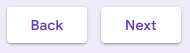
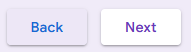
+1 on requesting the ability to focus buttons. In tkinter you can press space to press the focused button. I also use button.bind('<Return>', self.on_enter)
button2.bind('<Return>', self.on_enter)
def on_enter(self, event):
try:
self.focus_get().invoke()
except AttributeError:
passto allow pressing enter to trigger whichever button is focused. The error handling is so no error is raised pressing enter while something besides a button is focused. Google forms uses different colors to indicate a button having focus. It works quite well. In CTk, ideally |
Beta Was this translation helpful? Give feedback.

-
|
Hy @bfedie518, Can u share source code about this Image : https://user-images.githubusercontent.com/17280776/225973715-08df6224-6411-4462-a2a5-a6709946a15c.png Or just tell me, how the shadow works in the buttons ? |
Beta Was this translation helpful? Give feedback.

-
|
That's a screenshot of a Google Form. I didn't make it. |
Beta Was this translation helpful? Give feedback.

-
I think you can implement shadows using an image editor — for example, create a dark rectangle with blurred edges and then place it on a CTkLabel under the button. At least, in practice I often have to come up with solutions like this 😄 |
Beta Was this translation helpful? Give feedback.
-
|
I made the CTkButtons focusable. It's in pull request #1412 As @FluffyBunnySTB discovered, the buttons were already technically focusable. You just couldn't see it. What was being focused was the internal CTkCanvas of the button. I attached the focus events of this canvas to the 'hover' behavior of the button. I also implemented the You can "click" a focused button by pressing space--like in base Tkinter. The biggest limitation is that Technically I could have added the |
Beta Was this translation helpful? Give feedback.
-
|
So nice, I checked it out, does exactly what I expected, showed it to a colleague who also loves it. Going to show it to the users tomorrow who might at that point demand I fast track this, may have to patch all the code on their machines. 😄 |
Beta Was this translation helpful? Give feedback.

-
|
+1 to get this fixed so it works the same as the base Tkinter. I'm a big keyboard user and don't think I can use an app with being being to tab into checkboxes or buttons. |
Beta Was this translation helpful? Give feedback.


Uh oh!
There was an error while loading. Please reload this page.
Uh oh!
There was an error while loading. Please reload this page.
-
I tried many many times to find a way to move focus on buttons by Tab key but I couldn't find a way.
Please help me!
I had a larg app since I found CTk I changed to CTk
But now I just stopped working on it
Until you solve this issue by answering here😊
Thanks a lot 🙏
Beta Was this translation helpful? Give feedback.
All reactions