


A powerful Chrome extension that automatically refreshes web pages at customizable random intervals with persistent settings per page.
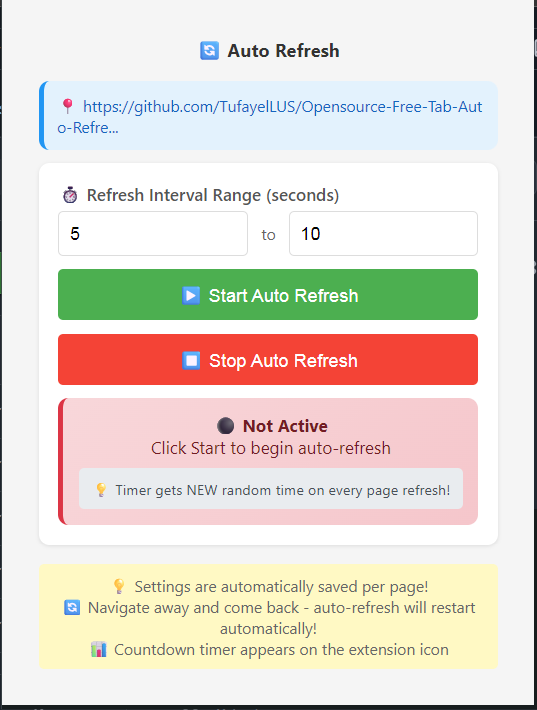
- 🎲 Random Refresh Intervals: Set minimum and maximum seconds for random refresh timing
- 💾 Persistent Settings: Settings are automatically saved per URL and persist across browser sessions
- 🔄 Auto-Restart: Automatically restarts refresh when navigating back to a page with saved settings
- ⏱️ Live Countdown: Real-time countdown timer displayed on the extension icon badge
- 🎨 Beautiful UI: Clean, modern popup interface with status indicators
- 🔒 Secure: Only refreshes pages you explicitly enable, with proper permission handling
Not available yet!
- Download or clone this repository
- Open Chrome and navigate to
chrome://extensions/ - Enable "Developer mode" in the top right
- Click "Load unpacked" and select the extension folder
- The extension will be installed and ready to use
- Navigate to any webpage you want to auto-refresh
- Click the extension icon in your browser toolbar
- Set your refresh interval range (minimum and maximum seconds)
- Click "Start Auto Refresh" - the countdown begins immediately!
- Watch the live countdown on the extension badge
- Settings are automatically saved for this page
- Random Timing: Each refresh uses a new random interval within your specified range
- Persistent: Return to the page later - auto-refresh will restart automatically
- Visual Feedback: Green badge shows countdown, red when nearing refresh
- Easy Control: Start/stop with one click, settings remembered per page
The extension consists of four main components:
- Defines extension metadata, permissions, and entry points
- Uses Manifest V3 for modern Chrome extension standards
- Configures popup UI and background service worker
The brain of the extension that handles:
- Settings Management: Stores refresh settings per URL using Chrome's local storage
- Alarm Scheduling: Uses Chrome alarms API for reliable timing
- Badge Updates: Displays live countdown on extension icon
- Tab Monitoring: Detects page changes and manages refresh cycles
- Message Handling: Communicates with popup for real-time updates
- User Interface: Clean, responsive popup with input controls
- Real-time Status: Shows current refresh state and countdown
- Settings Persistence: Loads and saves per-URL configurations
- Validation: Ensures valid input ranges and provides user feedback
- User sets min/max seconds and clicks "Start"
- Extension generates random interval within range
- Alarm is scheduled for the refresh time
- Badge displays countdown timer
- When alarm triggers, page refreshes
- New random interval generated for next cycle
- Process repeats until stopped
- Settings stored per base URL (protocol + domain + path)
- Survives browser restarts and tab closures
- Automatically reapplies when returning to saved pages
The extension requires the following permissions (all standard for refresh functionality):
activeTab: Access current tab for refresh operationsstorage: Save settings locallytabs: Monitor tab changes and updatesscripting: Execute refresh scriptsalarms: Schedule refresh timershost_permissions:<all_urls>- Only used for pages you explicitly enable
- Chrome browser
- Basic understanding of JavaScript and Chrome Extensions
- Clone the repository
- Enable Developer Mode in
chrome://extensions/ - Load the extension as described in Installation
- Make changes and reload the extension
auto-refresh-extension/
├── manifest.json          # Extension configuration
├── background.js          # Service worker logic
├── popup.html            # Extension popup UI
├── popup.js              # Popup interaction logic
└── README.md             # This file
startRefresh(): Initiates refresh cycle with random intervalstopRefresh(): Completely removes settings and stops timersupdateBadge(): Updates extension icon with countdowngetRandomInterval(): Generates random time within user range
updateUI(): Refreshes popup display with current status- Message listeners for real-time background updates
- Input validation and user interaction handling
Contributions are welcome! Please feel free to submit a Pull Request.
- Fork the repository
- Create your feature branch (
git checkout -b feature/AmazingFeature) - Commit your changes (
git commit -m 'Add some AmazingFeature') - Push to the branch (
git push origin feature/AmazingFeature) - Open a Pull Request
This project is licensed under the MIT License - see the LICENSE file for details.
If you encounter any issues or have suggestions:
- Open an issue on GitHub
- Check the console for error messages
- Ensure you're using a recent version of Chrome
- Built with Chrome Extension Manifest V3
- Uses modern JavaScript async/await patterns
- Inspired by the need for reliable page refresh automation
Made with ❤️ for developers and power users who need automated page refreshing. Contact me to develop custom chrome extensions if you wish.