Check spelling and grammar on your site automatically with multilingual WProofreader plugin for WordPress.
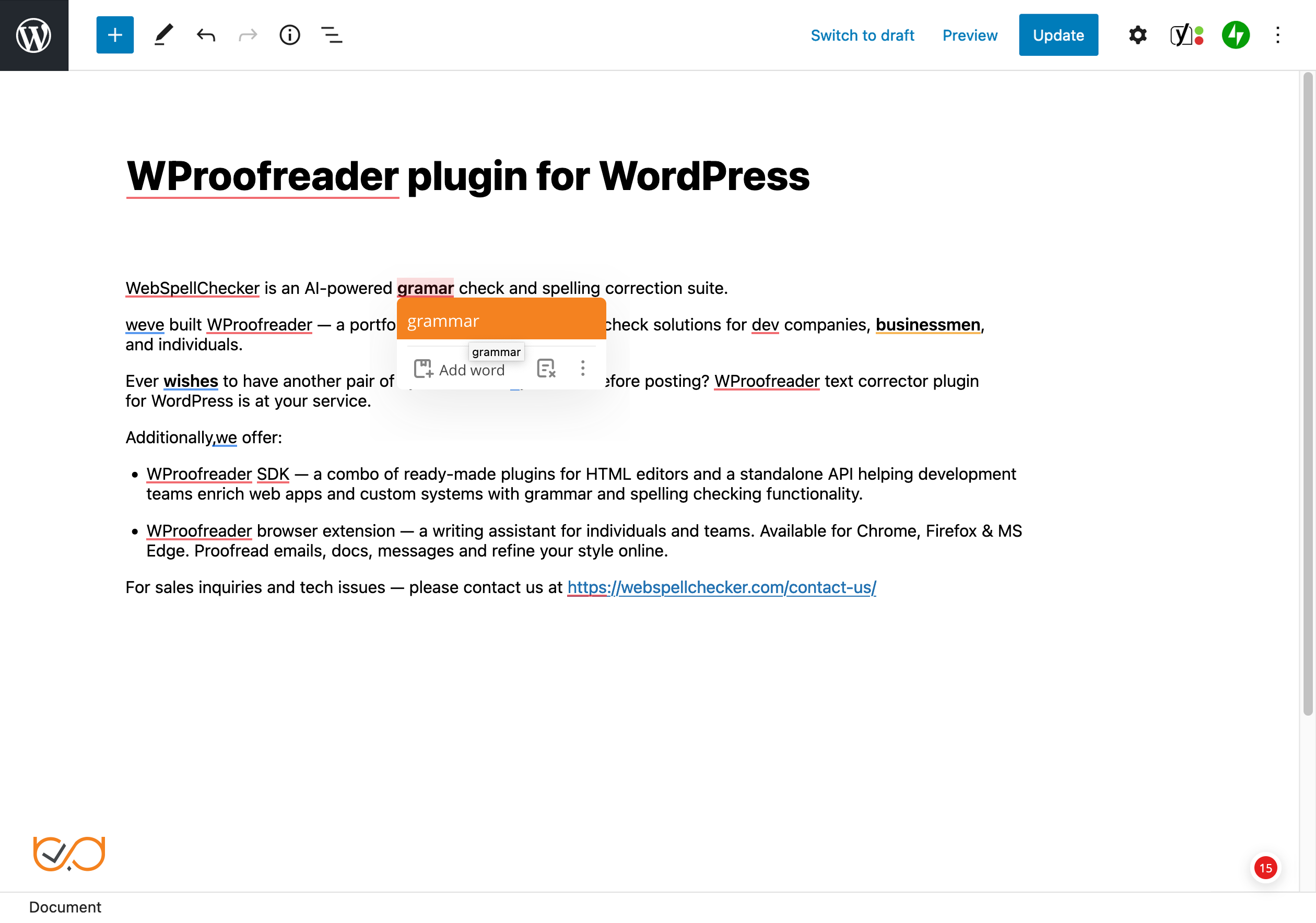
WProofreader plugin for WordPress scans and checks your website content for spelling, grammar, punctuation and style issues. No banner ads on your website!
Compatible with the latest WordPress versions.
WProofreader Free is ideal for a small personal blog or lightweight use:
Add instant spell checking to your WordPress site with support for 20+ languages. The free version comes with a daily word limit and applies to a single website, with a per-browser personal dictionary for storing custom words. Basic spelling and grammar check. No cloud sync. A straightforward, no-cost tool for basic proofreading needs.
WProofreader Pro for professional sites and teams:
A full-featured writing assistant for WordPress with unlimited websites, and no daily limits. Includes spell and grammar checking in dozens of languages, AI-powered text rephrasing and proofreading, text autocomplete, and a cloud-synced personal dictionary accessible from any device or browser. Subscription owners can also set up organization-wide custom dictionaries shared across all connected sites for keeping terminology consistent everywhere.
Check more differences between the WProofreader plugin free and Pro versions on the website.

Proofreading modes
- The check-as-you-type mode instantaneously detects writing mistakes and provides suggestions on-hover.
- The proofread-in-dialog mode aggregates all the issues detected and suggestions provided.
Customizable dictionaries
The Pro version includes:
- User-level custom dictionary allows end users to create personal dictionaries with specific words and terms (complex words, acronyms, proper names, etc.) and use them while working with WordPress. Once a word is added to a personal dictionary, it will not be considered as a misspelling, and will appear in the suggestions list. All words you add are stored either in the browser local storage or on our cloud and are accessible from the browser.
- Organization-level custom dictionary allows creating dictionaries that extend the vocabulary of the standard dictionary with custom words specific to your organization culture, industry, domain, etc. All the words added to a dictionary by the admin will be available to all users within your organization. This type of dictionary is available only under the Pro version.
- Specialized medical spelling dictionaries for English, German, French and Spanish, and legal dictionaries for English. Available for both, Free and Pro versions of the plugin.
Feature-rich
- Multi-language support
- Spelling autocorrect functionality for instant correction of common typos
- Text autocomplete suggestions functionality for faster writing
- Style check functionality with pre-defined non-inclusive and profanity language check for professional writing
- Style guide builder for creating language rules
- User-level and organization-level dictionaries
User-friendly and up-to-date
- Straightforward plugin configuration (check the video tutorial)
- Visible and intuitive text check with different colors used for spelling, grammar, and style guide issues
- Easily toggle on/off the plugin button
- Support the latest version of WordPress
- Seamlessly integrates with the WordPress editor (Gutenberg) and compatible with the classic editor. Supported browsers: Chrome, Firefox, Safari, Microsoft Edge.
- Content elements supported: pages, posts, tag descriptions, category descriptions, WooCommerce, WP eCommerce product descriptions, any custom post types, meta description fields of Yoast SEO plugin, all fields in the Admin panel and user-facing editable fields (disabled by default).
- It saves time proofreading in any of the two modes, check-as-you type and proofread-in-dialog.
- You can create and maintain quality posts in different languages without being worried about possible mistakes.
- Advanced functionality for spelling autocorrect, autocomplete suggestions and style guide for faster and more productive writing.
From your WordPress dashboard:
- Visit 'Plugins > Add New'.
- Search for 'WProofreader'.
- Activate WProofreader from your Plugins page.
From WordPress.org:
- Download WProofreader plugin.
- Upload the 'wproofreader' directory to your '/wp-content/plugins/' directory, using your favorite method (ftp, sftp, scp, etc...)
- Activate WProofreader from your Plugins page.
Automatic updates should run smoothly, but it's always a good idea to back up your site, just in case.
What is a license key and how to obtain one?
A license key is a special data string that verifies authorized access to the Pro version of WProofreader plugin. The license key is provided by the WebSpellChecker when the Pro version is purchased.
Does the WProofreader plugin check the entire website?
The plugin doesn't check the whole website at a time. It is enabled only when the content on your website is in editing mode. Here is the list of content types which can be checked by the plugin: content of pages, content of posts, tag descriptions, category descriptions, WooCommerce and WP eCommerce product descriptions, any Custom Post Type, Meta description fields of Yoast SEO plugin, all fields in the Admin panel and user-facing website elements.
What other languages are available for WProofreader plugin?
The Free version and Pro version of WProofreader plugin support 20+ popular languages.
Note that not all languages support grammar checks. Languages with grammar enabled are marked.
What is a user-level custom dictionary and how can I create one?
WProofreader plugin has a special functionality called a custom dictionary. It allows creating personal dictionaries with specific words and terms (complex words, acronyms, proper names, etc.) and using them across your website. Words added to a personal dictionary will not be marked as misspellings.
To create a new user-level custom dictionary, click the badge in the bottom right corner of the text field and select Settings. Then go to Dictionaries. Name your new dictionary and click Create. All new words will be added to a brand-new dictionary. If you have several personal dictionaries, for example, with different term types, new words will be added to the one, which is currently in use. Check docs.
To create an organization-level custom dictionary to be used across all the websites under your subscription, please follow the instructions in this guide.
Does WProofreader plugin check grammar as well?
Not all languages in the list support grammar checks. Check the updated list of supported languages and the ones that can be used for grammar-check.
Is technical support available for WProofreader plugin?
Priority support is provided by WebSpellChecker for Pro users. Community support is available to all users via the plugin support forum. For Pro inquiries, please contact us.
What are the Terms of Service?
Please see the complete WebSpellChecker Terms of Service for WProofreader plugin.
Is my text secure? What is your Privacy Policy?
We have an extensive Privacy Policy in place to protect your texts. Please see the details here.
What browsers are supported?
The plugin supports the latest versions of Chrome, Firefox, Safari, and MS Edge.
Can I suggest a feature?
Sure, please let us know how we can make the plugin more useful for you. Create a new topic under the support section of this plugin.