All card names are the property of DC. Concept and cards are the property of Cryptozoic.
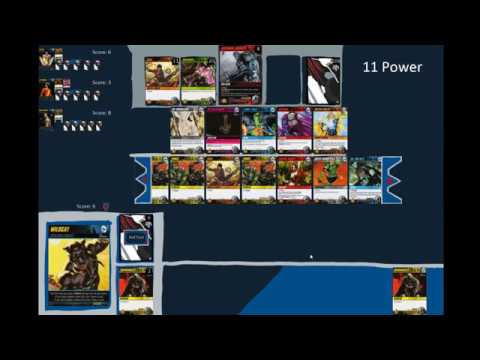
This is a personal project to digitalize the DC Deck Building game by Cryptozoic. It is not intended for commercial use.
There is a terminal and graphical interface. The graphical interface is obviously preffered, but the terminal interface can be good for debugging.
For instructions on running the game, see below.
- Graphical user interface, written 100% in Python with the 'arcade' library. Theoretical eventually goal of converting to a multiplayer web experience
- Base set cards, supervillains, and personas (large cards) are fully programmed and functional
- Heros Unite personas are in
- Forever Evil is in
- Crossover 1: Justice Society of America is in
- Crossover 2: Arrow is in
- Started to get Java <-> Python socket working for creating a java application (although javascript would be preffered)
- Add Heros Unite
- Continue to add smaller sets. Each one will come with new features
- Get python<->Javascript socketing working, I have already played around with it a little to no sucess
- Create Javascript front end (I don't intend on prettying up the python interface because my eventual goal is a Javascript front end anyways)
- Create Android front end (if i continue to have trough getting a Javascript frontend to work)
- Save/Undo functionality (they may be the same mechanic)
To run the graphical game, run window.py. Make sure that the controlers set in the init function of the model class in model.py are as follows:
- Either all CPUs (controlers.cpu or controlers.cpu_greedy)
- or the first controler is controler.human_view (controler.human is for the terminal interface, although, note: should still work)
To run the Terminal game, run main.py. Make sure that the controlers set in the init function of the model class in model.py are as follows:
- Either all CPUs (controlers.cpu or controlers.cpu_greedy)
- or the first controler is controler.human (controler.human_view is for the graphical interface. Usgin human_view will crash the game)
Other things that you may want to set: in globe.py:
- TIME_BETWEEN_CPU_MOVES can be changed to change the delay that is imposed between CPU moves. 0 means the the CPU's do everything instantly, which allows for quicker games, but harder to follow.
- DEBUG and CPU_TERMINAL_INVISIBLE can also be set here
(The game is written in Python 3. Missing modules may need to be installed with pip --install MODULE_NAME) (I have been programming this project on Windows 10, using the Git Bash terminal to run the game.)