This issue is designed to get you familiar with git and act as a crash course in web development with blazor and bootstrap.
First if you haven't already cloned this repo you will need to do so. If you want to do exactly like I have done, I placed the repo in a folder near the root of my hard drive C:\repos. You should be able to place the repo in any folder that works for you though.
https://git-scm.com/docs/git-clone
git clone https://github.com/bonsall/blazor-bootstrap.git
If you have not yet run the project yet, I suggest trying to do that now. If you can not get the project to run please reach out to me so we can troubleshoot the issue.
Once you have cloned the repo I want you to make a new branch and name it with this convention [Issue number]_[Name]. For example: 1_HelloWorld. I suggest using the git documentation to learn how to create a branch.
Once the new branch is made it is time to make a simple change.
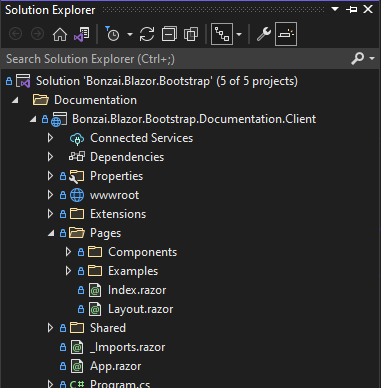
Find the Bonzai.Blazor.Bootstrap.Client.Documentation project. Create a new page (Razor component) underneath the "Pages" folder.
The page should have the route "/hello-world".
Display the text "Hello World" in an h1 tag. Use the display-1 class so the text appear very large. https://getbootstrap.com/docs/5.1/content/typography/#display-headings
Create a dropdown on the page using a <select> element. The options of the dropdown should be the different text color classes that bootstrap provides. https://getbootstrap.com/docs/5.1/utilities/colors/#colors. Selecting a value in the dropdown should update the "Hello World" text on the screen to be that color.
Create a second dropdown. This dropdown is similar in functionality to the first dropdown except that it controls the background color of the page. https://getbootstrap.com/docs/5.1/utilities/background/
Once you have completed this page commit and push your changes. When you are happy with all of your changes, and everything has been pushed to this repo you will need to create a pull request. I will then review the code in the pull request and determine if you need to make any improvements before submitting your code to this repo.

This issue is designed to get you familiar with git and act as a crash course in web development with blazor and bootstrap.
First if you haven't already cloned this repo you will need to do so. If you want to do exactly like I have done, I placed the repo in a folder near the root of my hard drive
C:\repos. You should be able to place the repo in any folder that works for you though.https://git-scm.com/docs/git-clone
git clone https://github.com/bonsall/blazor-bootstrap.gitIf you have not yet run the project yet, I suggest trying to do that now. If you can not get the project to run please reach out to me so we can troubleshoot the issue.
Once you have cloned the repo I want you to make a new branch and name it with this convention [Issue number]_[Name]. For example: 1_HelloWorld. I suggest using the git documentation to learn how to create a branch.
Once the new branch is made it is time to make a simple change.

Find the Bonzai.Blazor.Bootstrap.Client.Documentation project. Create a new page (Razor component) underneath the "Pages" folder.
The page should have the route "/hello-world".
Display the text "Hello World" in an
h1tag. Use thedisplay-1class so the text appear very large. https://getbootstrap.com/docs/5.1/content/typography/#display-headingsCreate a dropdown on the page using a
<select>element. The options of the dropdown should be the different text color classes that bootstrap provides. https://getbootstrap.com/docs/5.1/utilities/colors/#colors. Selecting a value in the dropdown should update the "Hello World" text on the screen to be that color.Create a second dropdown. This dropdown is similar in functionality to the first dropdown except that it controls the background color of the page. https://getbootstrap.com/docs/5.1/utilities/background/
Once you have completed this page
commitandpushyour changes. When you are happy with all of your changes, and everything has been pushed to this repo you will need to create a pull request. I will then review the code in the pull request and determine if you need to make any improvements before submitting your code to this repo.