Symbol Dimensions
By default, symbols are rendered in normalised units: 1 point per narrow bar for linear barcodes and 2 points per module for most 2D symbologies. Bar heights default to 1 inch for linear symbologies. These values produce pixel-locked output when rendered at 72 DPI, ensuring crisp bitmaps without anti-aliasing artefacts.
Three specification-aware modes adjust symbol dimensions to match symbology or application standards:
-
loosespec scales the symbol to its correct physical dimensions when specification data is available, silently falling back to default dimensions when it is not. Combine with gridfit for bitmap output. The recommended mode for most use cases.
-
strictspec is the strict variant of loosespec — it requires specification data to be available and validates that the effective X-dimension is within specification bounds, raising an error otherwise. For production validation.
-
propspec keeps the 1-point-per-module coordinate system but adjusts bar heights to the specification's height-to-width ratio, pixel-locked to whole points. For EPS output where device-dependent operators are not available.
All three modes derive their values from Application Specification Tables (ast) which encode the symbology's specification parameters (nominal X-dimension, height, and bounds). User-supplied values override the AST.
Height of longest bar, in inches.
A 1/2 inch tall EAN-13:
Data:    9520123456788
Options: includetext height=0.5
Encoder: ean13

Stretch the symbol to precisely this width, in inches.
- This parameter literally stretches the symbol and text to the desired width which may distort the human readable text.
- For information about resizing symbols read the article on resizing symbols.
A 2 inch wide Code 93 symbol:
Data:    TERRY
Options: width=2
Encoder: code93
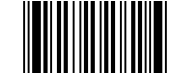
Enable best-fit specification mode. The symbol is rendered at its correct physical dimensions when specification data is available. When the specification data is incomplete (e.g. no nominal X-dimension) or the effective X-dimension falls outside specification bounds, the symbol is rendered without error using the best available dimensions.
- When the AST does not provide xnom and the user has not set xdim, strictspec is silently disabled and the symbol renders at default (1-point-per-module) dimensions.
- When the effective X-dimension falls outside xmin/xmax bounds, the bounds check is skipped and the symbol renders at the resolved dimensions.
- Not compatible with height or width — if either is provided, loosespec and strictspec are silently disabled.
- Combine with gridfit for bitmap output to align module boundaries to the device pixel grid.
- Can be set globally via global context to apply to all symbols:
/uk.co.terryburton.bwipp.global_ctx << /loosespec true >> def
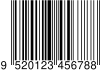
An EAN-13 at best-fit specification dimensions:
Data:    9520123456788
Options: includetext loosespec
Encoder: ean13
All symbols at specification dimensions, bitmap at 300 DPI:
/uk.co.terryburton.bwipp.global_ctx << /loosespec true >> def
10 10 moveto (9520123456788) (includetext gridfit griddpi=300)
/ean13 /uk.co.terryburton.bwipp findresource execEnable strict physical specification mode. The renderer scales the symbol to its correct physical dimensions in millimetres, based on the nominal X-dimension and height from the symbology's specification or selected Application Specification Table (ast).
- Unlike loosespec, strictspec is strict: it raises an error if xnom or xdim is not available, or if the effective X-dimension falls outside specification bounds. Use strictspec for production validation; use loosespec for general-purpose output.
- Use mag to scale the symbol by a magnification factor relative to nominal.
- Use xdim or hdim to directly specify physical dimensions in mm, overriding the nominal values.
- Inkspread is adjusted to maintain a fixed physical reduction regardless of magnification.
- Not compatible with height or width.
- EPS-safe without gridfit. When gridfit is also enabled without an explicit griddpi, device-dependent operators are used to probe the resolution (not EPS-safe).
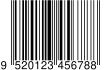
An EAN-13 at 100% specification dimensions:
Data:    9520123456788
Options: includetext strictspec
Encoder: ean13
An EAN-13 at 150% magnification:
Data:    9520123456788
Options: includetext strictspec mag=1.5
Encoder: ean13

Enable proportional specification mode. The symbol stays at 1 point per module but bar heights are adjusted to match the specification's height-to-width ratio. The derived height is rounded to a whole number of points so that bars remain pixel-locked at 72 DPI.
This bakes the specification's height-to-width ratio into the symbol so that any rasteriser at any DPI produces output with the correct proportions — without requiring the rasteriser to understand physical barcode dimensions. The symbol stays at 1 point per module, so the caller (or RIP, or print driver) simply renders the PostScript at the target resolution and the proportions are correct.
For workflows where the caller controls the PostScript interpreter directly, loosespec (optionally with gridfit) provides a more complete solution including physical X-dimension scaling.
- The coordinate system remains at 1 point per module — only bar height changes.
- When the user also supplies an explicit height, it acts as a
multiplier on the specification-derived height (e.g.
height=1.5for 150% of spec height;height=1.0is identity). This allows fine-tuning of the proportional height without needing to know the absolute value. - If the AST does not provide hnom (or the encoder has no AST),
propspecis a harmless no-op — bar height falls back to the encoder's default. - EPS-safe: no device-dependent operators are used.
- Linear barcodes only.
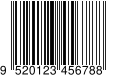
An EAN-13 with specification-proportional bar height:
Data:    9520123456788
Options: includetext propspec
Encoder: ean13
Magnification factor for physical specification mode. Scales the symbol
relative to its nominal specification dimensions. Default: 1.0 (100%).
- Only meaningful with strictspec.
- Mutually exclusive with xdim and hdim.
A QR Code at twice the nominal X-dimension:
Data:    Hello
Options: strictspec mag=2.0 xnom=0.330
Encoder: qrcode

Directly specify the X-dimension (narrow bar width or module size) in millimetres. Overrides the nominal value from the AST.
- Only meaningful with strictspec.
- Mutually exclusive with mag.
- If neither xdim nor xnom is available, an error is raised.
Data:    9520123456788
Options: includetext strictspec xdim=0.400
Encoder: ean13

Directly specify the bar height in millimetres. Overrides the nominal height from the AST. Linear barcodes only.
- Only meaningful with strictspec.
- Mutually exclusive with mag.
Override the nominal X-dimension in millimetres. Normally provided by the Application Specification Table (AST), but can be set by the user.
Override the nominal bar height in millimetres. Normally provided by the AST. Linear barcodes only.
Override the minimum allowed X-dimension in millimetres. Normally provided by the AST.
Override the maximum allowed X-dimension in millimetres. Normally provided by the AST.
Select an Application Specification Table profile. The default profile
(default) provides the symbology's own specification values. Named profiles
(e.g., gs1.sst1 through gs1.sst13) provide GS1-application-specific
values.
- GS1 Symbol Specification Tables (SSTs) define X-dimension bounds and nominal heights for specific application contexts such as retail POS, general distribution, healthcare, and logistics.
- See the GS1 General Specifications, Section 5.12.3 for the full list of SSTs.
An EAN-13 at GS1 SST 2 (general distribution) specification:
Data:    9520123456788
Options: includetext strictspec ast=gs1.sst2
Encoder: ean13

When enabled, the renderer adjusts the symbol scale so that module boundaries align to the device pixel grid, eliminating anti-aliasing artefacts.
This is most useful for non-vector formats rendered at low resolutions where bar or module stability may adversely affect validity or scanning performance.
- Gridfit is automatically disabled for:
- Symbologies with fractional bar widths (e.g. postal codes, Pharmacode).
- Linear barcodes with a non-integer barratio.
- The device resolution is probed automatically. If the user provides griddpi then this value is used directly without hardware probing, which also enables gridfit to operate on devices that would otherwise be skipped (e.g. nullpage).
- When combined with strictspec:
- The effective X-dimension after snapping is validated against xmin and xmax bounds.
- If rounding to the nearest whole pixel produces an X-dimension outside the specification bounds, the alternate rounding direction (ceiling or floor) is tried automatically.
- If neither direction produces an in-spec result, an error is raised.
- When combined with loosespec: if neither rounding direction produces an in-spec result, the snap closest to the nominal X-dimension is chosen instead of raising an error.
Data:    9520123456788
Options: includetext gridfit
Encoder: ean13

Specify the target resolution for grid-aligned module boundaries, in dots per inch. This can be useful if the target device's resolution cannot be probed.
Setting griddpi automatically enables gridfit.
Data:    TESTING
Options: griddpi=300
Encoder: qrcode
