





Q1View is a Windows toolkit for engineers who need to look at the actual pixels — raw frame buffers, codec output, decoded images, and the small visual differences that ordinary media players gloss over.
The media player codec, video, and CV engineers keep open for frame-level work — built to inspect, not just play.
Download from Microsoft Store | Download latest release | User guide | Development guide
Q1View is built for people whose work depends on what individual pixels look like and how two outputs differ — not for browsing a photo library.
- Codec and video engineers validating encoder/decoder output against a reference, frame by frame.
- Imaging engineers verifying camera pipelines, color-space conversions, and ISP tuning against raw buffer dumps.
- Computer vision engineers comparing pre- and post-processing stages or inspecting model input/output frames.
- QA and validation engineers confirming regressions, picking out off-by-one pixel shifts, and checking timing behavior on real material.
- Researchers stepping through experiment outputs and capturing exact pixel values for reports.
- Inspect a raw YUV or RGB dump at any subsampling or bit depth, including odd-width sources, and read source-native channel values at the cursor.
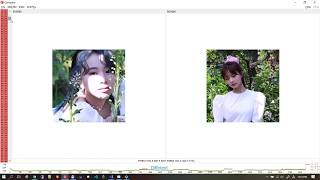
- Compare a reference image against a processed result with PSNR and SSIM overlaid and a pink pixel-diff highlight showing exactly where they disagree.
- Step through an image sequence in a folder (
frame_001.png…frame_100.png) or a video, with synchronized navigation across two to four sources. - Play a video like any player, then stop on any frame with frame-accurate seek and step, a frame/time progress readout, and source-native pixel values at the cursor on the exact frame you stopped on.
- Pull a clipboard screenshot in and check pixel coordinates, hex values, and small color drifts.
- Drive two Viewer windows in sync to compare different decodes of the same source while panning and zooming as one.
Q1View is not intended to manage photo libraries or win the consumer media-player race — subtitles, playlists, streaming, and skins are not the goal. It is focused on codec development, imaging validation, and quick frame-level investigation.
Most players are built to make video disappear into smooth playback. Q1View does the opposite: it keeps every frame addressable, so you can stop, scrub to an exact frame, and read what is actually there.
It is the player codec, video, and CV engineers open instead of a consumer one — not because it plays more formats, but because it lets you inspect what plays:
- Frame-accurate seek and step, with the current frame counter and video-style time/duration on the timeline when source timing is known.
- Source-native YUV / RGB values under the cursor, read in the source color space you select rather than the display approximation.
- Save a frame or capture a range straight from playback.
- Hand two clips to synchronized playback and jump to PSNR / SSIM and a pixel diff without leaving the app.
- Raw dumps, image sequences, and decoded video all open in the same UX, so the clip you are debugging and the reference you check it against behave the same.
In short, it is not a playback app — it is a player you can inspect.
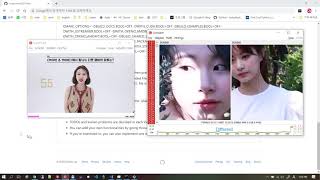
Open an image, raw dump, sequence, or video; zoom down to pixels, inspect coordinates and values, step through frames with frame/time progress, or link multiple Viewer windows.

Open two to four sources side by side and see a visual difference together with objective similarity measurements.

Get Q1View from the Microsoft Store for automatic background updates and simple installation:

Alternatively, get the latest Windows x64 build from the GitHub Releases page.
- Installer:
Q1ViewSetup-x64.exe - Portable package:
Q1View-windows-x64.zip
The installer registers separate Start Menu entries for Q1View Viewer and Q1View Comparator.
- BMP, JPEG, PNG, TIFF, WebP
- HEIF, HEIC, HIF
- AVIF / AV1 still images
- Video files supported by the packaged OpenCV/FFmpeg runtime
- Raw frame dumps and clipboard images
- User Guide: screens, workflows, menus, and shortcuts
- Development Guide: local build and release packaging
- HEIF and AVIF Support: decoder dependency details
Q1View builds with Visual Studio 2022 and the MSVC v143 toolset on Windows x64.
msbuild Viewer\Viewer.sln /m /restore /p:Configuration=Release /p:Platform=x64
msbuild Comparator\Comparator.sln /m /restore /p:Configuration=Release /p:Platform=x64
See the Development Guide for dependencies, packaging, and release assets.
| Intro | Viewer | Comparator |
|---|---|---|
 |
 |
 |