| description | The fedify command is a CLI toolchain for Fedify and debugging ActivityPub-enabled federated server apps. This section explains the key features of the fedify command. |
|---|
The fedify command is a CLI toolchain for Fedify and debugging
ActivityPub-enabled federated server apps. Although it is primarily designed
for developers who use Fedify, it can be used with any ActivityPub-enabled
server.
If you have Node.js or Bun installed, you can install fedify by running
the following command:
::: code-group
npm install -g @fedify/clibun install -g @fedify/cli:::
If you are using macOS or Linux and have Homebrew installed, you can install
fedify by running the following command:
brew install fedifyIf you are using Windows and have Scoop installed, you can install fedify
by running the following command:
scoop install fedifyIf you have Deno installed, you can install fedify by running the following
command:
::: code-group
deno install \
  -gA \
  --unstable-fs --unstable-kv \
  -n fedify \
  jsr:@fedify/cli
deno install \
-gA \
--unstable-fs --unstable-kv \
-n fedify \
jsr:@fedify/clideno install `
-gA `
--unstable-fs --unstable-kv `
-n fedify `
jsr:@fedify/cli:::
On Deno versions earlier than 2.7.0, add --unstable-temporal to the install
command above.
If you have mise installed, you can install fedify by running the following
command:
mise use -g github:fedify-dev/fedifyYou can download the pre-built executables from the releases page. Download
the appropriate executable for your platform and put it in your PATH.
This feature is available since Fedify 2.0.0.
The fedify command supports configuration files to set default values for
command options. Configuration files are written in TOML format.
Configuration files are loaded from the following locations in order, with later files taking precedence over earlier ones:
- System-wide configuration directories (see below)
- ~/.config/fedify/config.toml (user-level, or
$XDG_CONFIG_HOME/fedify/config.toml) - .fedify.toml in the current working directory (project-level)
- Custom path specified via
--configoption (highest precedence)
The system-wide and user-level config paths vary by operating system:
- Linux/macOS (system): Directories listed in
$XDG_CONFIG_DIRS(default: /etc/xdg/fedify/config.toml) - Linux/macOS (user):
$XDG_CONFIG_HOME/fedify/config.toml(default: ~/.config/fedify/config.toml) - Windows (system): %ProgramData%\fedify\config.toml
- Windows (user): %APPDATA%\fedify\config.toml
You can specify an additional configuration file to load using the --config
option:
fedify --config ./my-config.toml lookup @user@example.comThis file is loaded after all standard configuration files and takes the highest precedence.
The --ignore-config option skips loading all configuration files. This is
useful for CI environments or when you want reproducible behavior:
fedify --ignore-config lookup @user@example.comBelow is an example configuration file showing all available options:
# Global settings (apply to all commands)
debug = false
userAgent = "MyApp/1.0"
tunnelService = "localhost.run"  # "localhost.run", "serveo.net", or "pinggy.io"

[webfinger]
allowPrivateAddress = false
maxRedirection = 5

[lookup]
authorizedFetch = false
firstKnock = "draft-cavage-http-signatures-12"  # or "rfc9421"
allowPrivateAddress = false
traverse = false
suppressErrors = false
reverse = false
defaultFormat = "default"  # "default", "raw", "compact", or "expand"
separator = "----"
timeout = 30  # seconds

[inbox]
actorName = "Fedify Ephemeral Actor"
actorSummary = "An ephemeral actor for testing purposes."
authorizedFetch = false
noTunnel = false
follow = ["@user@example.com"]
acceptFollow = ["*"]

[relay]
protocol = "mastodon"  # or "litepub"
port = 8000
name = "Fedify Relay"
persistent = "/path/to/relay.db"  # optional, uses in-memory if not specified
noTunnel = false
acceptFollow = ["*"]
rejectFollow = []

[nodeinfo]
raw = false
bestEffort = false
showFavicon = true
showMetadata = false
All configuration options are optional. Command-line arguments always take precedence over configuration file values.
This command is available since Fedify 0.12.0.
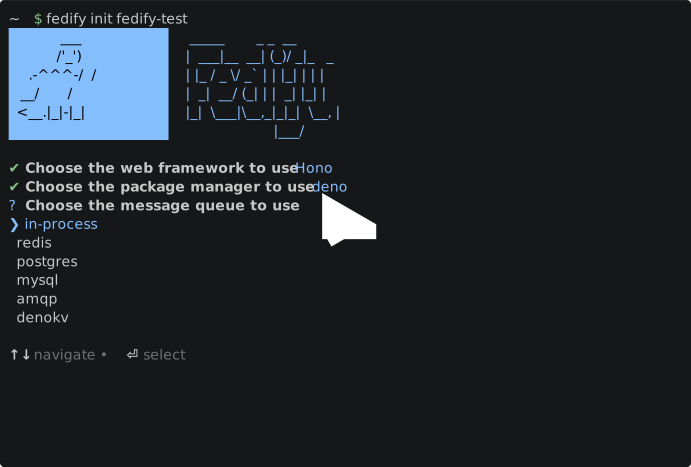
The fedify init command is used to initialize a new Fedify project.
It creates a new directory with the necessary files and directories for a
Fedify project. To create a new Fedify project, run the below command:
fedify init my-fedify-projectThe above command will start the interactive prompt to initialize a new Fedify project. It will ask you a few questions to set up the project:
- Web framework: Bare-bones, Hono, Elysia, Express, Nitro, Next.js, or Astro
- Package manager: Deno, Bun, npm, pnpm, or Yarn
- Message queue: In-Process, Redis, PostgreSQL, AMQP (e.g., RabbitMQ), or Deno KV (if Deno)
- Key–value store: In-Memory, Redis, PostgreSQL, or Deno KV (if Deno)
Tip
Projects created with fedify init automatically include @fedify/lint
for consistent code linting. Deno projects get a lint plugin configured in
deno.json, while Node.js and Bun projects get an eslint.config.ts with
@fedify/lint.
Note
If you find the full @fedify/cli toolchain too heavy for your needs, you
can use @fedify/create instead to scaffold a new Fedify project without
installing the CLI globally. See the
Alternative: Using @fedify/create
section for details.
Alternatively, you can specify the options in the command line to skip some of interactive prompts:
You can specify the package manager by using the -p/--package-manager
option. The available options are:
You can specify the web framework to integrate with Fedify by using
the -w/--web-framework option. The available options are:
bare-bones: A minimal setup without any web framework integration, but in Node.js, Hono is used for a simple adapter for a lightweight experience.hono: Hononitro: Nitronext: Next.jselysia: Elysiaastro: Astroexpress: Express
You can specify the key–value store to use by using the -k/--kv-store
option. The available options are:
in-memory: An in-memory key–value store that does not persist data across restarts. This is useful for testing and development purposes.redis: Redispostgres: PostgreSQLdenokv: Deno KV (if Deno)
You can specify the message queue to use by using the -m/--message-queue
option. The available options are:
in-process: An in-process message queue that does not persist messages across restarts. This is useful for testing and development purposes.redis: Redispostgres: PostgreSQLamqp: AMQP (e.g., RabbitMQ)denokv: Deno KV (if Deno)
This option is available since Fedify 1.8.0.
The --dry-run option allows you to preview what files and configurations would
be created without actually creating them. This is useful for reviewing the
project structure before committing to the initialization.
fedify init my-fedify-project --dry-runWhen using --dry-run, the command will:
- Display all files that would be created with their contents
- Show which dependencies would be installed
- Preview any commands that would be executed
- Not create any directories or files on your filesystem
This option works with all other initialization options, allowing you to preview different configurations before making a decision.
This option is available since Fedify 2.2.0.
By default, fedify init asks for confirmation before using a directory that
already contains files. This prompt protects you from accidentally
initializing a project in the wrong directory. In non-interactive scripts or
CI jobs, use the --allow-non-empty option to allow a non-empty target
directory:
fedify init . --allow-non-emptyThis option does not overwrite existing project files. Before making changes,
fedify init checks the files it would generate and fails if any of them
already exist. Unrelated files can remain in the target directory only when
the selected framework scaffolder accepts them. Some scaffolders, such as
create-next-app, still reject unrelated files even if fedify init skips its
own confirmation prompt, while a freshly initialized .git directory remains
acceptable.
The fedify lookup command is used to look up an ActivityPub object by its URL
or an actor by its handle.
For example, the below command looks up a Note object with the given URL:
fedify lookup https://todon.eu/@hongminhee/112341925069749583The output will be like the below:
Note {
id: URL "https://todon.eu/users/hongminhee/statuses/112341925069749583",
attachments: [
Document {
name: "The demo video on my terminal",
url: URL "https://todon.eu/system/media_attachments/files/112/341/916/300/016/369/original/f83659866f94054f.mp"... 1 more character,
mediaType: "video/mp4"
}
],
attribution: URL "https://todon.eu/users/hongminhee",
contents: [
'<p>I'm working on adding a CLI toolchain to <a href="https://todon.eu/tags/Fedify" class="mentio'... 379 more characters,
<en> '<p>I'm working on adding a CLI toolchain to <a href="https://todon.eu/tags/Fedify" class="mentio'... 379 more characters
],
published: 2024-04-27T07:08:57Z,
replies: Collection {
id: URL "https://todon.eu/users/hongminhee/statuses/112341925069749583/replies",
first: CollectionPage {
items: [
URL "https://todon.eu/users/hongminhee/statuses/112343493232608516"
],
partOf: URL "https://todon.eu/users/hongminhee/statuses/112341925069749583/replies",
next: URL "https://todon.eu/users/hongminhee/statuses/112341925069749583/replies?min_id=112343493232608516&page"... 5 more characters
}
},
url: URL "https://todon.eu/@hongminhee/112341925069749583",
to: URL "https://www.w3.org/ns/activitystreams#Public",
cc: URL "https://todon.eu/users/hongminhee/followers",
sensitive: false
}
You can also look up an actor by its handle or URL. For example, the below command looks up an actor with the given handle:
fedify lookup @fedify-example@fedify-blog.deno.devThe output will be like the below:
Person {
  id: URL "https://fedify-blog.deno.dev/users/fedify-example",
  name: "Fedify Example Blog",
  published: 2024-03-03T13:18:11.857384756Z,
  summary: "This blog is powered by Fedify, a fediverse server framework.",
  url: URL "https://fedify-blog.deno.dev/",
  preferredUsername: "fedify-example",
  publicKey: CryptographicKey {
    id: URL "https://fedify-blog.deno.dev/users/fedify-example#main-key",
    owner: URL "https://fedify-blog.deno.dev/users/fedify-example",
    publicKey: CryptoKey {
      type: "public",
      extractable: true,
      algorithm: {
        name: "RSASSA-PKCS1-v1_5",
        modulusLength: 4096,
        publicExponent: Uint8Array(3) [ 1, 0, 1 ],
        hash: { name: "SHA-256" }
      },
      usages: [ "verify" ]
    }
  },
  inbox: URL "https://fedify-blog.deno.dev/users/fedify-example/inbox",
  outbox: URL "https://fedify-blog.deno.dev/users/fedify-example/outbox",
  following: URL "https://fedify-blog.deno.dev/users/fedify-example/following",
  followers: URL "https://fedify-blog.deno.dev/users/fedify-example/followers",
  endpoints: Endpoints { sharedInbox: URL "https://fedify-blog.deno.dev/inbox" },
  discoverable: true,
  suspended: false,
  memorial: false,
  indexable: true
}
You can omit the @ prefix when looking up an actor by handle:
fedify lookup fedify-example@fedify-blog.deno.devOr you can look up an actor by acct: URL:
fedify lookup acct:fedify-example@fedify-blog.deno.devYou can also look up multiple objects at once by specifying multiple URLs or handles. For example, the below command looks up multiple objects:
fedify lookup @hongminhee@fosstodon.org @fedify@hollo.socialThe output will be like the below:
Person {
  ...
}
----
Person {
  ...
}
As you can see, the outputs are separated by ---- by default. You can change
the separator by using the -s/--separator
option.
This option is available since Fedify 0.14.0.
The -t/--traverse option is used to traverse the collection when looking up
a collection object. For example, the below command looks up a collection
object:
fedify lookup --traverse https://fosstodon.org/users/hongminhee/outboxThe difference between with and without the -t/--traverse option is that
the former will output the objects in the collection, while the latter will
output the collection object itself.
When this option is enabled, each argument has to resolve to a collection.
This option is available since Fedify 2.1.0.
The --recurse option is used to recursively follow an object relationship.
This is useful when you want to walk a reply chain through replyTarget, or
follow quote relationships through quote or quoteUrl.
fedify lookup --recurse=replyTarget https://hollo.social/@fedify/019c8522-b247-79d3-b0e7-c6a2293bb1cfYou can also provide the fully qualified property IRI:
fedify lookup --recurse=https://www.w3.org/ns/activitystreams#inReplyTo https://hollo.social/@fedify/019c8522-b247-79d3-b0e7-c6a2293bb1cfFor quote relationships, both the short form and the full IRI are accepted:
fedify lookup --recurse=quote https://hollo.social/@fedify/019c8522-b247-79d3-b0e7-c6a2293bb1cf
fedify lookup --recurse=https://w3id.org/fep/044f#quote https://hollo.social/@fedify/019c8522-b247-79d3-b0e7-c6a2293bb1cf
fedify lookup --recurse=quoteUrl https://hollo.social/@fedify/019c8522-b247-79d3-b0e7-c6a2293bb1cf
fedify lookup --recurse=https://www.w3.org/ns/activitystreams#quoteUrl https://hollo.social/@fedify/019c8522-b247-79d3-b0e7-c6a2293bb1cf
For short names, only Fedify property naming is accepted. For example,
replyTarget, quote, and quoteUrl are accepted, while inReplyTo,
_misskey_quote, and quoteUri are not accepted as short forms.
Note
--recurse and -t/--traverse
are mutually exclusive.
Recursive fetches disallow private/localhost addresses by default for
safety. URLs explicitly provided on the command line always allow private
addresses, while recursive object fetches honor
-p/--allow-private-address
when you explicitly opt in. Recursive JSON-LD @context URLs still remain
blocked.
This option is available since Fedify 2.1.0.
The --recurse-depth option sets the maximum recursion depth when using
--recurse. By default, it
is set to 20.
fedify lookup --recurse=replyTarget --recurse-depth=10 https://hollo.social/@fedify/019c8522-b247-79d3-b0e7-c6a2293bb1cfThis option depends on the --recurse option.
This option is available since Fedify 0.14.0.
The -S/--suppress-errors option is used to suppress partial errors during
traversal or recursion.
For traversal mode:
fedify lookup --traverse --suppress-errors https://fosstodon.org/users/hongminhee/outboxFor recursion mode:
fedify lookup --recurse=replyTarget --suppress-errors https://hollo.social/@fedify/019c8522-b247-79d3-b0e7-c6a2293bb1cfThe difference between with and without the -S/--suppress-errors option is
that the former will suppress the partial errors during traversal or recursion,
while the latter will stop on the first such error.
Note
This option is mutually exclusive with -e/--expanded and -r/--raw.
You can also output the object in the compacted JSON-LD format by using the
-c/--compact option:
fedify lookup --compact https://todon.eu/@hongminhee/112341925069749583The output will be like the below:
{
"@context": "https://www.w3.org/ns/activitystreams",
"id": "https://todon.eu/users/hongminhee/statuses/112341925069749583",
"type": "Note",
"attachment": {
"type": "Document",
"mediaType": "video/mp4",
"name": "The demo video on my terminal",
"url": "https://todon.eu/system/media_attachments/files/112/341/916/300/016/369/original/f83659866f94054f.mp4"
},
"attributedTo": "https://todon.eu/users/hongminhee",
"cc": "https://todon.eu/users/hongminhee/followers",
"content": "<p>I'm working on adding a CLI toolchain to <a href=\"https://todon.eu/tags/Fedify\" class=\"mention hashtag\" rel=\"tag\">#<span>Fedify</span></a> to help with debugging. The first feature I implemented is the ActivityPub object lookup.</p><p>Here's a demo.</p><p><a href=\"https://todon.eu/tags/fedidev\" class=\"mention hashtag\" rel=\"tag\">#<span>fedidev</span></a> <a href=\"https://todon.eu/tags/ActivityPub\" class=\"mention hashtag\" rel=\"tag\">#<span>ActivityPub</span></a></p>",
"contentMap": {
"en": "<p>I'm working on adding a CLI toolchain to <a href=\"https://todon.eu/tags/Fedify\" class=\"mention hashtag\" rel=\"tag\">#<span>Fedify</span></a> to help with debugging. The first feature I implemented is the ActivityPub object lookup.</p><p>Here's a demo.</p><p><a href=\"https://todon.eu/tags/fedidev\" class=\"mention hashtag\" rel=\"tag\">#<span>fedidev</span></a> <a href=\"https://todon.eu/tags/ActivityPub\" class=\"mention hashtag\" rel=\"tag\">#<span>ActivityPub</span></a></p>"
},
"published": "2024-04-27T07:08:57Z",
"replies": {
"id": "https://todon.eu/users/hongminhee/statuses/112341925069749583/replies",
"type": "Collection",
"first": {
"type": "CollectionPage",
"items": "https://todon.eu/users/hongminhee/statuses/112343493232608516",
"next": "https://todon.eu/users/hongminhee/statuses/112341925069749583/replies?min_id=112343493232608516&page=true",
"partOf": "https://todon.eu/users/hongminhee/statuses/112341925069749583/replies"
}
},
"as:sensitive": false,
"to": "as:Public",
"url": "https://todon.eu/@hongminhee/112341925069749583"
}Note
This option is mutually exclusive with -c/--compact and -r/--raw.
You can also output the object in the expanded JSON-LD format by using the
-e/--expanded option:
fedify lookup --expand https://todon.eu/@hongminhee/112341925069749583The output will be like the below:
[
{
"@id": "https://todon.eu/users/hongminhee/statuses/112341925069749583",
"@type": [
"https://www.w3.org/ns/activitystreams#Note"
],
"https://www.w3.org/ns/activitystreams#attachment": [
{
"@type": [
"https://www.w3.org/ns/activitystreams#Document"
],
"https://www.w3.org/ns/activitystreams#mediaType": [
{
"@value": "video/mp4"
}
],
"https://www.w3.org/ns/activitystreams#name": [
{
"@value": "The demo video on my terminal"
}
],
"https://www.w3.org/ns/activitystreams#url": [
{
"@id": "https://todon.eu/system/media_attachments/files/112/341/916/300/016/369/original/f83659866f94054f.mp4"
}
]
}
],
"https://www.w3.org/ns/activitystreams#attributedTo": [
{
"@id": "https://todon.eu/users/hongminhee"
}
],
"https://www.w3.org/ns/activitystreams#cc": [
{
"@id": "https://todon.eu/users/hongminhee/followers"
}
],
"https://www.w3.org/ns/activitystreams#content": [
{
"@value": "<p>I'm working on adding a CLI toolchain to <a href=\"https://todon.eu/tags/Fedify\" class=\"mention hashtag\" rel=\"tag\">#<span>Fedify</span></a> to help with debugging. The first feature I implemented is the ActivityPub object lookup.</p><p>Here's a demo.</p><p><a href=\"https://todon.eu/tags/fedidev\" class=\"mention hashtag\" rel=\"tag\">#<span>fedidev</span></a> <a href=\"https://todon.eu/tags/ActivityPub\" class=\"mention hashtag\" rel=\"tag\">#<span>ActivityPub</span></a></p>"
},
{
"@language": "en",
"@value": "<p>I'm working on adding a CLI toolchain to <a href=\"https://todon.eu/tags/Fedify\" class=\"mention hashtag\" rel=\"tag\">#<span>Fedify</span></a> to help with debugging. The first feature I implemented is the ActivityPub object lookup.</p><p>Here's a demo.</p><p><a href=\"https://todon.eu/tags/fedidev\" class=\"mention hashtag\" rel=\"tag\">#<span>fedidev</span></a> <a href=\"https://todon.eu/tags/ActivityPub\" class=\"mention hashtag\" rel=\"tag\">#<span>ActivityPub</span></a></p>"
}
],
"https://www.w3.org/ns/activitystreams#published": [
{
"@type": "http://www.w3.org/2001/XMLSchema#dateTime",
"@value": "2024-04-27T07:08:57Z"
}
],
"https://www.w3.org/ns/activitystreams#replies": [
{
"@id": "https://todon.eu/users/hongminhee/statuses/112341925069749583/replies",
"@type": [
"https://www.w3.org/ns/activitystreams#Collection"
],
"https://www.w3.org/ns/activitystreams#first": [
{
"@type": [
"https://www.w3.org/ns/activitystreams#CollectionPage"
],
"https://www.w3.org/ns/activitystreams#items": [
{
"@id": "https://todon.eu/users/hongminhee/statuses/112343493232608516"
}
],
"https://www.w3.org/ns/activitystreams#next": [
{
"@id": "https://todon.eu/users/hongminhee/statuses/112341925069749583/replies?min_id=112343493232608516&page=true"
}
],
"https://www.w3.org/ns/activitystreams#partOf": [
{
"@id": "https://todon.eu/users/hongminhee/statuses/112341925069749583/replies"
}
]
}
]
}
],
"https://www.w3.org/ns/activitystreams#sensitive": [
{
"@value": false
}
],
"https://www.w3.org/ns/activitystreams#to": [
{
"@id": "https://www.w3.org/ns/activitystreams#Public"
}
],
"https://www.w3.org/ns/activitystreams#url": [
{
"@id": "https://todon.eu/@hongminhee/112341925069749583"
}
]
}
]This option is available since Fedify 0.15.0.
Note
This option is mutually exclusive with -c/--compact and -e/--expanded.
You can also output the fetched object in the raw JSON format by using
the -r/--raw option:
fedify lookup --raw https://todon.eu/@hongminhee/112341925069749583The output will be like the below:
{
"@context": [
"https://www.w3.org/ns/activitystreams",
{
"ostatus": "http://ostatus.org#",
"atomUri": "ostatus:atomUri",
"inReplyToAtomUri": "ostatus:inReplyToAtomUri",
"conversation": "ostatus:conversation",
"sensitive": "as:sensitive",
"toot": "http://joinmastodon.org/ns#",
"votersCount": "toot:votersCount",
"blurhash": "toot:blurhash",
"focalPoint": {
"@container": "@list",
"@id": "toot:focalPoint"
},
"Hashtag": "as:Hashtag"
}
],
"id": "https://todon.eu/users/hongminhee/statuses/112341925069749583",
"type": "Note",
"summary": null,
"inReplyTo": null,
"published": "2024-04-27T07:08:57Z",
"url": "https://todon.eu/@hongminhee/112341925069749583",
"attributedTo": "https://todon.eu/users/hongminhee",
"to": [
"https://www.w3.org/ns/activitystreams#Public"
],
"cc": [
"https://todon.eu/users/hongminhee/followers"
],
"sensitive": false,
"atomUri": "https://todon.eu/users/hongminhee/statuses/112341925069749583",
"inReplyToAtomUri": null,
"conversation": "tag:todon.eu,2024-04-27:objectId=90184788:objectType=Conversation",
"content": "<p>I'm working on adding a CLI toolchain to <a href=\"https://todon.eu/tags/Fedify\" class=\"mention hashtag\" rel=\"tag\">#<span>Fedify</span></a> to help with debugging. The first feature I implemented is the ActivityPub object lookup.</p><p>Here's a demo.</p><p><a href=\"https://todon.eu/tags/fedidev\" class=\"mention hashtag\" rel=\"tag\">#<span>fedidev</span></a> <a href=\"https://todon.eu/tags/ActivityPub\" class=\"mention hashtag\" rel=\"tag\">#<span>ActivityPub</span></a></p>",
"contentMap": {
"en": "<p>I'm working on adding a CLI toolchain to <a href=\"https://todon.eu/tags/Fedify\" class=\"mention hashtag\" rel=\"tag\">#<span>Fedify</span></a> to help with debugging. The first feature I implemented is the ActivityPub object lookup.</p><p>Here's a demo.</p><p><a href=\"https://todon.eu/tags/fedidev\" class=\"mention hashtag\" rel=\"tag\">#<span>fedidev</span></a> <a href=\"https://todon.eu/tags/ActivityPub\" class=\"mention hashtag\" rel=\"tag\">#<span>ActivityPub</span></a></p>"
},
"attachment": [
{
"type": "Document",
"mediaType": "video/mp4",
"url": "https://todon.eu/system/media_attachments/files/112/341/916/300/016/369/original/f83659866f94054f.mp4",
"name": "The demo video on my terminal",
"blurhash": "U87_4lWB_3WBt7bHazWV~qbHaybFozj[ayfj",
"width": 1092,
"height": 954
}
],
"tag": [
{
"type": "Hashtag",
"href": "https://todon.eu/tags/fedify",
"name": "#fedify"
},
{
"type": "Hashtag",
"href": "https://todon.eu/tags/fedidev",
"name": "#fedidev"
},
{
"type": "Hashtag",
"href": "https://todon.eu/tags/activitypub",
"name": "#activitypub"
}
],
"replies": {
"id": "https://todon.eu/users/hongminhee/statuses/112341925069749583/replies",
"type": "Collection",
"first": {
"type": "CollectionPage",
"next": "https://todon.eu/users/hongminhee/statuses/112341925069749583/replies?min_id=112343493232608516&page=true",
"partOf": "https://todon.eu/users/hongminhee/statuses/112341925069749583/replies",
"items": [
"https://todon.eu/users/hongminhee/statuses/112343493232608516"
]
}
}
}You can also use the -a/--authorized-fetch option to fetch the object with
authentication. Under the hood, this option generates a one-time key pair,
spins up a temporary ActivityPub server to serve the public key, and signs
the request with the private key.
Here's an example where the fedify lookup fails due to the object being
protected:
fedify lookup @tchambers@indieweb.socialThe above command will output the below error:
Failed to fetch the object.
It may be a private object.  Try with -a/--authorized-fetch.
However, you can fetch the object with the -a/--authorized-fetch option:
fedify lookup --authorized-fetch @tchambers@indieweb.socialThis time, the above command will output the object successfully:
Person {
  id: URL "https://indieweb.social/users/tchambers",
  attachments: [
    PropertyValue {
      name: "Indieweb Site",
      value: '<a href="http://www.timothychambers.net" target="_blank" rel="nofollow noopener noreferrer me" trans'... 128 more characters
    },
    PropertyValue {
      name: "Gravatar",
      value: '<a href="https://en.gravatar.com/tchambers" target="_blank" rel="nofollow noopener noreferrer me" tr'... 134 more characters
    },
    PropertyValue {
      name: "Threads",
      value: '<a href="https://www.threads.net/@timothyjchambers" target="_blank" rel="nofollow noopener noreferre'... 150 more characters
    },
    PropertyValue {
      name: "GitHub",
      value: '<a href="https://github.com/Timothyjchambers" target="_blank" rel="nofollow noopener noreferrer me" '... 138 more characters
    }
  ],
  name: "Tim Chambers",
  icon: Image {
    url: URL "https://cdn.masto.host/indiewebsocial/accounts/avatars/000/000/002/original/5de753df6fe336d5.png",
    mediaType: "image/png"
  },
  image: Image {
    url: URL "https://cdn.masto.host/indiewebsocial/accounts/headers/000/000/002/original/38c44f4142b84cf4.png",
    mediaType: "image/png"
  },
  published: 2019-08-30T00:00:00Z,
  summary: "<p>Technologist, writer, admin of indieweb.social. Fascinated by how new politics impacts technology"... 346 more characters,
  url: URL "https://indieweb.social/@tchambers",
  preferredUsername: "tchambers",
  publicKey: CryptographicKey {
    id: URL "https://indieweb.social/users/tchambers#main-key",
    owner: URL "https://indieweb.social/users/tchambers",
    publicKey: CryptoKey {
      type: "public",
      extractable: true,
      algorithm: {
        name: "RSASSA-PKCS1-v1_5",
        modulusLength: 2048,
        publicExponent: Uint8Array(3) [ 1, 0, 1 ],
        hash: { name: "SHA-256" }
      },
      usages: [ "verify" ]
    }
  },
  manuallyApprovesFollowers: false,
  inbox: URL "https://indieweb.social/users/tchambers/inbox",
  outbox: URL "https://indieweb.social/users/tchambers/outbox",
  following: URL "https://indieweb.social/users/tchambers/following",
  followers: URL "https://indieweb.social/users/tchambers/followers",
  endpoints: Endpoints { sharedInbox: URL "https://indieweb.social/inbox" },
  discoverable: true,
  memorial: false,
  indexable: true
}
This option is available since Fedify 1.6.0.
The --first-knock option is used to specify which HTTP Signatures spec to
try first when using the -a/--authorized-fetch option. The ActivityPub
ecosystem currently uses different versions of HTTP Signatures specifications,
and the double-knocking technique (trying one version, then falling back to
another if rejected) allows for better compatibility across servers.
Available options are:
draft-cavage-http-signatures-12
: HTTP Signatures, which is obsolete but still widely adopted in
the fediverse as of May 2025.
rfc9421 (default)
: RFC 9421: HTTP Message Signatures, which is the final revision of
the specification and is recommended, but not yet widely adopted
in the fediverse as of June 2025.
If the first signature attempt fails, Fedify will automatically try the other specification format, implementing the double-knocking technique described in the ActivityPub HTTP Signatures specification.
The --tunnel-service option is used to specify which tunneling service to use
when using the -a/--authorized-fetch option. The authorized fetch feature
requires a temporary server to be exposed to the public internet, and this
option allows you to choose the tunneling service. Available services can be
found in the output of the fedify lookup --help command. For example, to use
serveo.net as the tunneling service:
fedify lookup --authorized-fetch --tunnel-service serveo.net @user@example.comThis option is available since Fedify 1.3.0.
By default, the fedify lookup command sends the User-Agent header with the
value Fedify/1.3.0 (Deno/2.0.4) (version numbers may vary). You can specify
a custom User-Agent header by using the -u/--user-agent option. For
example, to send the User-Agent header with the value MyApp/1.0, run the
below command:
fedify lookup --user-agent MyApp/1.0 @fedify@hollo.socialURLs explicitly provided on the command line always allow private or localhost addresses, so local servers can be looked up without any extra flags:
fedify lookup http://localhost:8000/users/aliceThe -p/--allow-private-address option additionally allows private
addresses for URLs discovered during traversal or recursive object fetches.
It only affects discovered URLs used by
-t/--traverse and
--recurse, since URLs
embedded in remote responses are otherwise rejected to mitigate SSRF
attacks against private addresses. Recursive JSON-LD @context URLs are
still blocked even when this option is enabled.
fedify lookup --traverse --allow-private-address http://localhost:8000/users/alice/outbox
fedify lookup --recurse=replyTarget --allow-private-address http://localhost:8000/notes/1This option is available since Fedify 1.3.0.
You can specify the separator between the outputs when looking up multiple
objects at once by using the -s/--separator option. For example, to use
the separator ==== between the outputs, run the below command:
fedify lookup -s ==== @fedify@hollo.social @hongminhee@fosstodon.orgIt does not affect the output when looking up a single object.
Tip
The separator is also used when looking up a collection object with the
-t/--traverse option.
This option is available since Fedify 2.1.0.
The --reverse option reverses the output order of fetched results.
It affects output order only, and does not change lookup semantics.
fedify lookup @fedify@hollo.social @hongminhee@fosstodon.org --reverse
fedify lookup --traverse https://fosstodon.org/users/hongminhee/outbox --reverse
fedify lookup --recurse=replyTarget https://hollo.social/@fedify/019c8522-b247-79d3-b0e7-c6a2293bb1cf --reverse
When using --reverse, fedify lookup buffers results before printing.
This may increase memory usage for large traversals or long recursion chains.
This option is available since Fedify 1.8.0.
You can specify the output file path to save lookup results, instead of printing results to stdout. For example, to save the retrieved information about the specified objects to a given path, run the command below:
fedify lookup -o actors.json @fedify@hollo.social @hongminhee@fosstodon.orgThis option is available since Fedify 1.9.0.
You can specify the request timeout duration by using the -T/--timeout
option. The duration should be an integer in seconds. By default, there is no
timeout. For example, to set the request timeout to 10 seconds, run the below
command:
fedify lookup --timeout 10 @fedify@hollo.socialThe fedify inbox command is used to spin up an ephemeral server that serves
the ActivityPub inbox with a one-time actor, through a short-lived public DNS
with HTTPS. This is useful when you want to test and debug the outgoing
activities of your server. To start an ephemeral inbox server,
run the below command:
fedify inboxIf it goes well, you will see the output like the below (without termination; press ^C to stop the server):
✔ The ephemeral ActivityPub server is up and running: https://f9285cf4974c86.lhr.life/
✔ Sent follow request to @faguscus_dashirniul@activitypub.academy.
╭───────────────┬─────────────────────────────────────────╮
│ Actor handle: │ i@f9285cf4974c86.lhr.life               │
├───────────────┼─────────────────────────────────────────┤
│    Actor URI: │ https://f9285cf4974c86.lhr.life/i       │
├───────────────┼─────────────────────────────────────────┤
│  Actor inbox: │ https://f9285cf4974c86.lhr.life/i/inbox │
├───────────────┼─────────────────────────────────────────┤
│ Shared inbox: │ https://f9285cf4974c86.lhr.life/inbox   │
╰───────────────┴─────────────────────────────────────────╯
Although the given URIs and handle are short-lived, they are anyway publicly dereferenceable until the server is terminated. You can use these URIs and handle to test and debug the outgoing activities of your server.
If any incoming activities are received, the server will log them to the console:
╭────────────────┬─────────────────────────────────────╮
│     Request #: │ 2                                   │
├────────────────┼─────────────────────────────────────┤
│ Activity type: │ Follow                              │
├────────────────┼─────────────────────────────────────┤
│  HTTP request: │ POST /i/inbox                       │
├────────────────┼─────────────────────────────────────┤
│ HTTP response: │ 202                                 │
├────────────────┼─────────────────────────────────────┤
│        Details │ https://f9285cf4974c86.lhr.life/r/2 │
╰────────────────┴─────────────────────────────────────╯
You can also see the details of the incoming activities by visiting the
/r/:id endpoint of the server in your browser:

The -f/--follow option is used to follow an actor. You can specify the
actor handle or URI to follow. For example, to follow the actor with the
handle @john@doe.com and @jane@doe.com, run the below command:
fedify inbox -f @john@doe.com -f @jane@doe.comNote
Although -f/--follow option sends Follow activities to the specified
actors, it does not guarantee that they will accept the follow requests.
If the actors accept the follow requests, you will receive the Accept
activities in the inbox server, and the server will log them to the console:
╭────────────────┬─────────────────────────────────────╮
│     Request #: │ 0                                   │
├────────────────┼─────────────────────────────────────┤
│ Activity type: │ Accept                              │
├────────────────┼─────────────────────────────────────┤
│  HTTP request: │ POST /i/inbox                       │
├────────────────┼─────────────────────────────────────┤
│ HTTP response: │ 202                                 │
├────────────────┼─────────────────────────────────────┤
│        Details │ https://f9285cf4974c86.lhr.life/r/0 │
╰────────────────┴─────────────────────────────────────╯
The -a/--accept-follow option is used to accept follow requests from
actors. You can specify the actor handle or URI to accept follow requests.
Or you can accept all follow requests by specifying the wildcard *.
For example, to accept follow requests from the actor with the handle
@john@doe.com and @jane@doe.com, run the below command:
fedify inbox -a @john@doe.com -a @jane@doe.comWhen the follow requests are received from the specified actors, the server
will immediately send the Accept activities to them. Otherwise, the server
will just log the Follow activities to the console without sending the
Accept activities.
The -T/--no-tunnel option is used to disable the tunneling feature of the
inbox server. By default, the inbox server tunnels the local server to the
public internet, so that the server is accessible from the outside. If you
want to disable the tunneling feature, run the below command:
fedify inbox --no-tunnelIt would be useful when you want to test the server locally but are worried about the security implications of exposing the server to the public internet.
Note
If you disable the tunneling feature, the ephemeral ActivityPub instance will be served via HTTP instead of HTTPS.
The --tunnel-service option is used to specify which tunneling service to use
for exposing the ephemeral inbox server to the public internet. Available
services can be found in the output of the fedify inbox --help command.
For example, to use serveo.net as the tunneling service:
fedify inbox --tunnel-service serveo.netNote
This option cannot be used together with -T/--no-tunnel.
The -A/--authorized-fetch option enables authorized fetch mode on the
ephemeral inbox server. When enabled, incoming requests without valid HTTP
Signatures are rejected with 401 Unauthorized.
fedify inbox --authorized-fetchThis is useful for testing whether your ActivityPub server correctly signs its outgoing requests, as many instances in the fediverse (such as Mastodon with secure mode) require valid signatures.
This command is available since Fedify 1.8.0.
The fedify node alias is deprecated and will be removed in version 2.0.0.

The fedify nodeinfo command fetches the given instance's NodeInfo document
and visualizes it in neofetch-style. The argument can be either a bare
hostname or a full URL.
Tip
Not all instances provide the NodeInfo document. If the given instance does not provide the NodeInfo document, the command will output an error message.
Note
This option is mutually exclusive with -b/--best-effort, --no-favicon
and -m/--metadata.
You can also output the fetched NodeInfo document in the raw JSON format by
using the -r/--raw option:
fedify nodeinfo --raw fosstodon.orgThe output will be like the below:
{
  "version": "2.0",
  "software": {
    "name": "mastodon",
    "version": "4.4.2"
  },
  "protocols": [
    "activitypub"
  ],
  "services": {
    "outbound": [],
    "inbound": []
  },
  "usage": {
    "users": {
      "total": 62444,
      "activeMonth": 8788,
      "activeHalfyear": 14000
    },
    "localPosts": 4335412
  },
  "openRegistrations": false,
  "metadata": {
    "nodeName": "Fosstodon",
    "nodeDescription": "Fosstodon is an invite only Mastodon instance that is open to those who are interested in technology; particularly free & open source software.\r\n\r\nIf you wish to join, contact us for an invite."
  }
}Note
This option is mutually exclusive with -r/--raw.
The -b/--best-effort option is used to parse the NodeInfo document with
best effort. If the NodeInfo document is not well-formed, the option will
try to parse it as much as possible.
Note
This option is mutually exclusive with -r/--raw.
The --no-favicon option is used to disable fetching the favicon of the
instance.
Note
This option is mutually exclusive with -r/--raw.
The -m/--metadata option is used to show the extra metadata of the NodeInfo,
i.e., the metadata field of the document.
This option is available since Fedify 1.3.0.
By default, the fedify nodeinfo command sends the User-Agent header with the
value Fedify/1.3.0 (Deno/2.0.4) (version numbers may vary). You can specify
a custom User-Agent header by using the -u/--user-agent option. For
example, to send the User-Agent header with the value MyApp/1.0, run the
below command:
fedify nodeinfo --user-agent MyApp/1.0 mastodon.socialThis command is available since Fedify 2.0.0.
The fedify relay command is used to spin up an ephemeral ActivityPub relay
server that forwards activities between federated instances. The server can use
either Mastodon or LitePub compatible relay protocol.
To start a relay server, you must specify the relay protocol using the
-p/--protocol option:
fedify relay -p mastodonIf it goes well, you will see the output like the below (without termination; press ^C to stop the server):
✔ Relay server is running: https://f9285cf4974c86.lhr.life/
╭───────────────┬──────────────────────────────────────────╮
│    Actor URI: │ https://f9285cf4974c86.lhr.life/actor    │
├───────────────┼──────────────────────────────────────────┤
│ Shared Inbox: │ https://f9285cf4974c86.lhr.life/inbox    │
├───────────────┼──────────────────────────────────────────┤
│     Protocol: │ mastodon                                 │
├───────────────┼──────────────────────────────────────────┤
│         Name: │ Fedify Relay                             │
├───────────────┼──────────────────────────────────────────┤
│      Storage: │ in-memory                                │
╰───────────────┴──────────────────────────────────────────╯

Press ^C to stop the relay server.
By default, the relay server is tunneled to the public internet so that external instances can connect to it.
The -p/--protocol option specifies which relay protocol to use.
This option is required. The available options are:
The --persistent option specifies a path to a SQLite database file for
persistent storage. If not specified, the relay uses in-memory storage which
is lost when the server stops.
fedify relay -p mastodon --persistent relay.dbThe -P/--port option specifies the local port to listen on. By default,
it listens on port 8000.
fedify relay -p mastodon -P 3000The -n/--name option specifies the relay display name. By default, it is
Fedify Relay.
fedify relay -p mastodon -n "My Relay"The -a/--accept-follow option specifies which actors' follow requests to
accept. The argument can be either an actor URI, a handle, or a wildcard (*).
This option can be specified multiple times. If a wildcard is specified, all
follow requests will be accepted.
fedify relay -p mastodon -a @john@doe.com -a @jane@doe.comThe -r/--reject-follow option specifies which actors' follow requests to
reject. The argument can be either an actor URI, a handle, or a wildcard (*).
This option can be specified multiple times. If a wildcard is specified, all
follow requests will be rejected.
fedify relay -p mastodon -r @spammer@example.comNote
When both -a/--accept-follow and -r/--reject-follow are specified,
a follow request is accepted only if the actor matches the accept list and
does not match the reject list.
The -T/--no-tunnel option disables the tunneling feature of the relay
server. By default, the relay server tunnels the local server to the public
internet for external access.
fedify relay -p mastodon --no-tunnelNote
If you disable the tunneling feature, the relay server will be served via HTTP instead of HTTPS.
The --tunnel-service option specifies which tunneling service to use for
exposing the relay server to the public internet. Available services can be
found in the output of the fedify relay --help command. For example, to use
serveo.net as the tunneling service:
fedify relay -p mastodon --tunnel-service serveo.netNote
This option cannot be used together with -T/--no-tunnel.
This command is available since Fedify 0.13.0.
The fedify tunnel command is used to expose a local HTTP server to the public
internet using a secure tunnel. It is useful when you want to test your
local ActivityPub server with the real-world ActivityPub instances.
To create a tunnel for a local server, for example, running on port 3000, run the below command:
fedify tunnel 3000Tip
The HTTP requests through the tunnel have the following headers:
X-Forwarded-For
: The IP address of the client.
X-Forwarded-Proto
: The protocol of the client, either http or https.
X-Forwarded-Host
: The host of the public tunnel server.
If you want to make your local server aware of these headers, you can use the x-forwarded-fetch middleware in front of your HTTP server.
For more information, see How the Federation object recognizes the domain
name
section
in the Federation document.
The -s/--service option is used to specify the tunneling service to use.
The --tunnel-service is an alias for consistency with other commands that
support tunneling. Available services can be found in the output of the
fedify tunnel --help command. For example, to use serveo.net, run the below
command:
fedify tunnel --service serveo.net 3000This command is available since Fedify 1.8.0.
The fedify webfinger command is used to look up a WebFinger resource by
resource URI or handle. WebFinger is a protocol that allows discovery of
information about people and other entities on the Internet using simple web
requests. This command is useful for debugging and testing WebFinger
implementations.
To look up a WebFinger resource, for example, for a user handle, run the below command:
fedify webfinger @username@domain.comThe output will be like the below:
{
  "subject": "acct:username@domain.com",
  "aliases": [
    "https://domain.com/@username",
    "https://domain.com/users/username"
  ],
  "links": [
    {
      "rel": "http://webfinger.net/rel/profile-page",
      "type": "text/html",
      "href": "https://domain.com/@username"
    },
    {
      "rel": "self",
      "type": "application/activity+json",
      "href": "https://domain.com/users/username"
    }
  ]
}
You can also look up a WebFinger resource by its URL. For example, the below command looks up a WebFinger resource by http or acct URL:
fedify webfinger https://domain.com/@username
fedify webfinger acct:username@domain.com
Or, you can also look up multiple WebFinger resources at once. For example, the below command looks up multiple WebFinger resources:
fedify webfinger @user1@domain.com https://domain.com/@username acct:username@domain.comThe outputs will be displayed sequentially, each preceded by a success message indicating which resource was found.
By default, the fedify webfinger command sends the User-Agent header with
the value Fedify/1.8.0 (Deno/2.4.0) (version numbers may vary). You can
specify a custom User-Agent header by using the -a/--user-agent option.
For example, to send the User-Agent header with the value MyApp/1.0, run
the below command:
fedify webfinger --user-agent MyApp/1.0 @username@domain.comThe -p/--allow-private-address option is used to allow private IP addresses.
If you want to allow private IP addresses, run the below command:
fedify webfinger --allow-private-address @username@localhostMostly useful for testing purposes. Do not use this in production.
The --max-redirection option is used to control the maximum number of
redirections allowed during WebFinger lookups. By default, it is set to 5.
If you want to set a custom limit, run the below command:
# Use default redirection limit (5)
fedify webfinger @user@example.com

# Set custom redirection limit
fedify webfinger @user@example.com --max-redirection 3

# Disable redirections entirely
fedify webfinger @user@example.com --max-redirection 0The fedify command supports shell completions for Bash,
Fish, and Zsh.
To enable Bash completions add the following line to your profile file (~/.bashrc, ~/.bash_profile, or ~/.profile):
source <(fedify completions bash)To enable Fish completions add the following line to your profile file (~/.config/fish/config.fish):
source (fedify completions fish | psub)To enable Zsh completions add the following line to your profile file (~/.zshrc):
source <(fedify completions zsh)