How Do I ?
You can create an instance of Dexecutor simply by providing two instances.
- ExecutorService : All the tasks would be run using this concurrent service. This in turn should be passed to ExecutionEngine
- TaskProvider : When it comes to task execution, Dexecutor would consult TaskProvider to provide a task to be executed.
Other non mandatory parameters are Validator (Defaults to CyclicValidator) and Traversar (Defaults to MergedLevelOrderTraversar)
Here is the code snippet
   ExecutorService executorService = newExecutor();
   ExecutionEngine<Integer, Integer> executionEngine = new DefaultExecutionEngine<>(executorService);

   DexecutorConfig<Integer, Integer> config = new DexecutorConfig<>(executorService, new SleepyTaskProvider());
   DefaultDexecutor<Integer, Integer> executor = new DefaultDexecutor<Integer, Integer>(config);


	private ExecutorService newExecutor() {
		return Executors.newFixedThreadPool(ThreadPoolUtil.ioIntesivePoolSize());
	}

	private static class SleepyTaskProvider implements TaskProvider<Integer, Integer> {

		public Task<Integer, Integer> provideTask(final Integer id) {

			return new Task<Integer, Integer>() {

				public Integer execute() {
					try {
						Thread.sleep(500);
					} catch (InterruptedException e) {
						e.printStackTrace();
					}
					return id;
				}
			};
		}
}Use Dexecutor.addDependency method
    DefaultDexecutor<Integer, Integer> executor = newTaskExecutor();
    //Building
    executor.addDependency(1, 2);
    executor.addDependency(2, 3);
    executor.addDependency(3, 4);
    executor.addDependency(4, 5);
    //Execution
    executor.execute(ExecutionConfig.TERMINATING);
The above code would generate the following graph
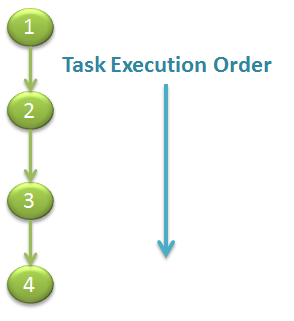
Which means task#1 would start first, once it finishes task#2 would start, once it finishes task#3 would start and so on...
Use DefaultDexecutor.addIndependent method
    DefaultDexecutor<Integer, Integer> executor = newTaskExecutor();
    //Building
    executor.addIndependent(1);
    executor.addIndependent(2);
    executor.addIndependent(3);
    executor.addIndependent(4);
    //Execution
    executor.execute(ExecutionConfig.TERMINATING);
The above code would generate the following graph
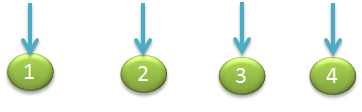
Which means tasks #1,#2,#3 and #4 all would run in parallel independently
Use combination of DefaultDexecutor.addIndependent and DefaultDexecutor.addDependency methods
    DefaultDexecutor<Integer, Integer> executor = newTaskExecutor();

    executor.addDependency(1, 2);
    executor.addDependency(1, 2);
    executor.addDependency(1, 3);
    executor.addDependency(3, 4);
    executor.addDependency(3, 5);
    executor.addDependency(3, 6);

    executor.addDependency(2, 7);
    executor.addDependency(2, 9);
    executor.addDependency(2, 8);
    executor.addDependency(9, 10);
    executor.addDependency(12, 13);
    executor.addDependency(13, 4);
    executor.addDependency(13, 14);
    executor.addIndependent(11);

    executor.execute(new ExecutionConfig().immediateRetrying(2));
This would generate the following graph
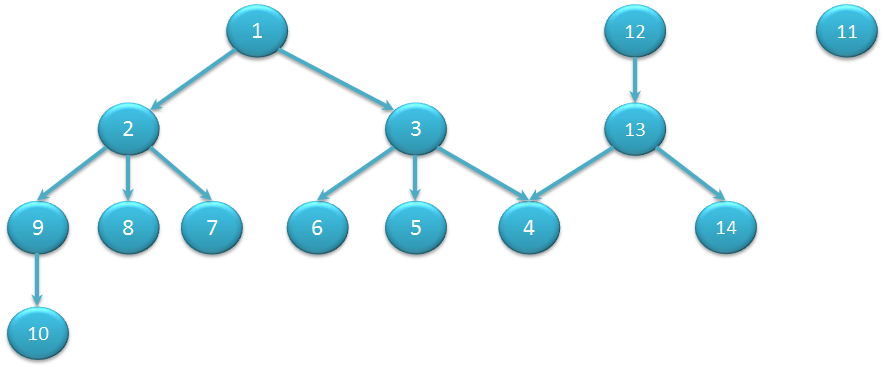
This means tasks # 1 , 12 and 11 would run in parallel, once one of them finishes its dependent tasks would kick off, for example once task#1 finishes, its dependent tasks #2 and #3 would kick off
    DefaultDexecutor<Integer, Integer> executor = newTaskExecutor();
                   :
                   :
executor.execute(ExecutionConfig.NON_TERMINATING); DefaultDexecutor<Integer, Integer> executor = newTaskExecutor();
:
:
executor.execute(ExecutionConfig.TERMINATING); DefaultDexecutor<Integer, Integer> executor = newTaskExecutor();
:
:
executor.execute(new ExecutionConfig().immediateRetrying(2));In the above code retry would happen twice (As 2 is passed as parameter to immediateRetrying method)
    DefaultDexecutor<Integer, Integer> executor = newTaskExecutor();
                   :
                   :
    executor.execute(new ExecutionConfig().scheduledRetrying(4, new Duration(1, TimeUnit.NANOSECONDS)));
In the above code retry would happen four times (As 4 is passed as parameter to scheduledRetryingmethod)
    DefaultDexecutor<Integer, Integer> executor = newTaskExecutor();
		executor.addDependency(1, 2);
		StringBuilder builder = new StringBuilder();
		executor.print(new LevelOrderTraversar<Integer, Integer>(), new StringTraversarAction<Integer, Integer>(builder));
assertThat(builder.toString(), equalTo("Path #0\n1[] \n2[1] "));Set DexecutorConfig.setValidator with your custom implementation and use this constructor DefaultDexecutor(com.github.dexecutor.core.DexecutorConfig) to create dexecutor
Set DexecutorConfig.setTraversar with your custom implementation and use this constructor DefaultDexecutor(com.github.dexecutor.core.DexecutorConfig<T, R>) to create dexecutor
Consider Task.shouldConsiderExecutionError method
Override Task.shouldExecute method, as shown below
@Test
public void testDependentTaskExecution() {

    DefaultDexecutor<String, String> = newTaskExecutor();

    executor.addDependency("A", "B");
    executor.addIndependent("C");

    executor.execute(new ExecutionConfig().immediateRetrying(2));

}

private static class SleepyTaskProvider implements TaskProvider<String, String> {

    public Task<String, String> provideTask(final String id) {

        return new Task<String, String>() {

            @Override
            public String execute() {
                try {
                    //Perform some task
                    Thread.sleep(500);
                } catch (InterruptedException e) {
                    e.printStackTrace();
                }
                String result = id + "processed";
                return result;
            }

            @Override
            public boolean shouldExecute(ExecutionResults<String, String> parentResults) {
                ExecutionResult<String, String> firstParentResult = parentResults.getFirst();
                //Do some logic with parent result
                if ("B".equals(id) && firstParentResult.isSkipped() && firstParentResult.getResult() == "No") {
                    return false;
                }
                return true;
            }
        };
    }

}Use com.github.dexecutor.core.ExecutionListener
Here is how you can do it
DexecutorConfig<Integer, Integer> config = new DexecutorConfig<>(executorService, new SleepyTaskProvider());
config.setExecutionListener(newTaskExecutionListener());
DefaultDexecutor<Integer, Integer> executor = new DefaultDexecutor<Integer, Integer>(config);
ExecutionResults<Integer, Integer> errors = executor.execute(ExecutionConfig.NON_TERMINATING);
you have to change the execution engine to InfinispanExecutionEngine, to do that follow this steps
  <dependency>
	<groupId>com.github.dexecutor</groupId>
	<artifactId>dexecutor-infinispan</artifactId>
	<version>LATEST_RELEASE</version>
</dependency>Here is the Sample code from this project
Just call this.getResult(id) from within a task
Refer this as an example