-
Notifications
You must be signed in to change notification settings - Fork 0
added files for api, admin, core #4
New issue
Have a question about this project? Sign up for a free GitHub account to open an issue and contact its maintainers and the community.
By clicking “Sign up for GitHub”, you agree to our terms of service and privacy statement. We’ll occasionally send you account related emails.
Already on GitHub? Sign in to your account
Merged
Merged
Changes from 1 commit
Commits
Show all changes
3 commits
Select commit
Hold shift + click to select a range
File filter
Filter by extension
Conversations
Failed to load comments.
Loading
Jump to
Jump to file
Failed to load files.
Loading
Diff view
Diff view
There are no files selected for viewing
This file contains hidden or bidirectional Unicode text that may be interpreted or compiled differently than what appears below. To review, open the file in an editor that reveals hidden Unicode characters.
Learn more about bidirectional Unicode characters
| Original file line number | Diff line number | Diff line change |
|---|---|---|
| @@ -0,0 +1,11 @@ | ||
| # Introduction | ||
|
|
||
| Dotkernel Admin is an application (skeleton) intended for quickly setting up an administration site for your platform. | ||
|
|
||
| Dotkernel Admin: | ||
|
|
||
| - Is a fast and reliable way to manage records in your database with a simple table-based approach | ||
| - Allows you to monitor your platform via its built-in reports and graphs. | ||
| - Contains many graphical components to ensure an intuitive user experience. | ||
| - Has a PSR-Compliant Middleware Stack to promote a lean, modular architecture and create a common ground between components from various sources. | ||
| - Implements [PSR-7](https://www.php-fig.org/psr/psr-7/) (HTTP message interfaces) and [PSR-15](https://www.php-fig.org/psr/psr-15/) (HTTP Server Request Handlers) as defined by the [PHP Framework Interop Group](https://www.php-fig.org/). |
This file contains hidden or bidirectional Unicode text that may be interpreted or compiled differently than what appears below. To review, open the file in an editor that reveals hidden Unicode characters.
Learn more about bidirectional Unicode characters
| Original file line number | Diff line number | Diff line change |
|---|---|---|
| @@ -0,0 +1,19 @@ | ||
| # Usage | ||
|
|
||
| Dotkernel API can be installed independently or together with other applications in the Dotkernel suite, based on your business requirements. | ||
| These components are designed to complement each other (out-of-box they are separate codebases): | ||
|
|
||
| - **Dotkernel API** exposes the content to 3rd-party frontends or backends. | ||
| - **Dotkernel Admin** (optional) manages the data (create, edit, delete). | ||
| - **Dotkernel Queue** (optional) queue management microservice. | ||
|
|
||
| A safe bet is to start with Dotkernel API and integrate it into your existing platform. | ||
| The API can manage the access permissions to keep your data secure: | ||
|
|
||
| - Admin-level users create and edit the data for your existing backend. | ||
| - Regular users read the data for your frontend. | ||
|
|
||
| Later on you can add: | ||
|
|
||
| - Dotkernel Admin for its simple table-based approach, its reports and graphs. | ||
| - Dotkernel Queue for its asynchronous task processing. |
This file contains hidden or bidirectional Unicode text that may be interpreted or compiled differently than what appears below. To review, open the file in an editor that reveals hidden Unicode characters.
Learn more about bidirectional Unicode characters
| Original file line number | Diff line number | Diff line change |
|---|---|---|
| @@ -0,0 +1,10 @@ | ||
| # Introduction | ||
|
|
||
| Dotkernel API is a REST API based on the Mezzio skeleton. | ||
| The API is the root or the Dotkernel Headless Platform. | ||
|
|
||
| Dotkernel API: | ||
|
|
||
| - Ensures that you build a cohesive system that contains an API-first backend with the same architecture and standards support as other Dotkernel tools and applications. | ||
| - Has a PSR-Compliant Middleware Stack to promote a lean, modular architecture and create a common ground between components from various sources. | ||
| - Implements [PSR-7](https://www.php-fig.org/psr/psr-7/) (HTTP message interfaces) and [PSR-15](https://www.php-fig.org/psr/psr-15/) (HTTP Server Request Handlers) as defined by the [PHP Framework Interop Group](https://www.php-fig.org/). |
This file contains hidden or bidirectional Unicode text that may be interpreted or compiled differently than what appears below. To review, open the file in an editor that reveals hidden Unicode characters.
Learn more about bidirectional Unicode characters
| Original file line number | Diff line number | Diff line change |
|---|---|---|
| @@ -0,0 +1,19 @@ | ||
| # Usage | ||
|
|
||
| Dotkernel API can be installed independently or together with other applications in the Dotkernel suite, based on your business requirements. | ||
| These components are designed to complement each other (out-of-box they are separate codebases): | ||
|
|
||
| - **Dotkernel API** exposes the content to 3rd-party frontends or backends. | ||
| - **Dotkernel Admin** (optional) manages the data (create, edit, delete). | ||
| - **Dotkernel Queue** (optional) queue management microservice. | ||
|
|
||
| A safe bet is to start with Dotkernel API and integrate it into your existing platform. | ||
| The API can manage the access permissions to keep your data secure: | ||
|
|
||
| - Admin-level users create and edit the data for your existing backend. | ||
| - Regular users read the data for your frontend. | ||
|
|
||
| Later on you can add: | ||
|
|
||
| - Dotkernel Admin for its simple table-based approach, its reports and graphs. | ||
| - Dotkernel Queue for its asynchronous task processing. |
This file contains hidden or bidirectional Unicode text that may be interpreted or compiled differently than what appears below. To review, open the file in an editor that reveals hidden Unicode characters.
Learn more about bidirectional Unicode characters
| Original file line number | Diff line number | Diff line change |
|---|---|---|
| @@ -0,0 +1,12 @@ | ||
| # Benefits of the Core Submodule | ||
|
|
||
| This design pattern ensures: | ||
|
|
||
| - Design flexibility. | ||
| - Scalability based on future requirements. | ||
| - Consistent, enterprise-level growth, while also being suited for smaller applications. | ||
| - The ability to split the work to multiple developers. | ||
| - Easier bugfixes and onboarding. | ||
|
|
||
| As your platform expands, each new application connects to the Dotkernel Headless Platform via the central API which services everything the other applications require. | ||
| This ensures consistency throughout your platform, while allowing any number of outside connections as requirements arise. |
This file contains hidden or bidirectional Unicode text that may be interpreted or compiled differently than what appears below. To review, open the file in an editor that reveals hidden Unicode characters.
Learn more about bidirectional Unicode characters
| Original file line number | Diff line number | Diff line change |
|---|---|---|
| @@ -0,0 +1,40 @@ | ||
| # Creating a Core Submodule | ||
|
|
||
| The full steps for creating a submodule are described in [Git Tools – Submodules](https://git-scm.com/book/en/v2/Git-Tools-Submodules). | ||
|
|
||
| > There is already a Core module in some of the Dotkernel applications, but it works like any other module (App, Page, or User). | ||
| > The Core modules are designed to be a starting point for the module’s transformation into a Git submodule. | ||
|
|
||
| First create a new Git repository that will contain the Core code. | ||
| To create the submodule in an application, you need to have Git create the `.gitmodules` file in the root of the main repository by running the command below. | ||
| Use the url from the new repository you just created instead of `<url>`: | ||
|
|
||
| ```shell | ||
| git submodule add <url> | ||
| ``` | ||
|
|
||
| > You can have multiple submodules, but for this tutorial we will only create the Core submodule. | ||
|
|
||
| The `.gitmodules` file maps the submodules and its corresponding local directory within the main project (e.g. `src/Core`). | ||
| This allows Git to manage the submodule correctly, from cloning, to updating, to tracking its changes. | ||
|
|
||
| > None of the Dotkernel applications have the .gitmodules file out of the box. | ||
| > Only after isolating the Core into a Git submodule and pushing it to a separate Git repository does it become available to be included into any Dotkernel application. | ||
|
|
||
| From now on, any changes to the Core submodule must be commited from within the Core folder, like for any other Git repository, using these commands (simplified version, provided as an example): | ||
|
|
||
| ```shell | ||
| cd <path/to/submodule> | ||
| git add . | ||
| git commit -m "comment" | ||
| git push | ||
| ``` | ||
|
|
||
| Whenever you clone the project, you simply need to `init` and `update` the submodule with these commands: | ||
|
|
||
| ```shell | ||
| git submodule init | ||
| git submodule update | ||
| ``` | ||
|
|
||
| > Do not forget to delete the existing Core module before adding the submodule to other applications. |
This file contains hidden or bidirectional Unicode text that may be interpreted or compiled differently than what appears below. To review, open the file in an editor that reveals hidden Unicode characters.
Learn more about bidirectional Unicode characters
| Original file line number | Diff line number | Diff line change |
|---|---|---|
| @@ -0,0 +1,13 @@ | ||
| # Introduction | ||
|
|
||
| The Core submodule is a common codebase set up to be used by the Dotkernel applications you added to your project. | ||
| The project setup may differ - e.g. two APIs, one Admin, 3 Frontends - but the Core submodule can be included in all of them. | ||
|
|
||
| By having a common module in your Dotkernel applications, you ensure that each of them uses entities and services in the same way. | ||
| It helps to make service updates easier to sync in all the application in your platform. | ||
|
|
||
| General rules: | ||
|
|
||
| - The golden rule for the Core codebase is that it is the only place which manages the database entities. | ||
| - As much as possible, all Doctrine entities must reside in Core. | ||
| - The current location of the Core submodule is `src/Core`. |
This file contains hidden or bidirectional Unicode text that may be interpreted or compiled differently than what appears below. To review, open the file in an editor that reveals hidden Unicode characters.
Learn more about bidirectional Unicode characters
| Original file line number | Diff line number | Diff line change |
|---|---|---|
| @@ -0,0 +1,25 @@ | ||
| # Using the Core Submodule | ||
|
|
||
| Once the shared Core submodule is separated and imported into each application, your platform can look like in the example below: | ||
|
|
||
| - API + Core | ||
| - Admin + Core | ||
| - Queue + Core | ||
|
|
||
| 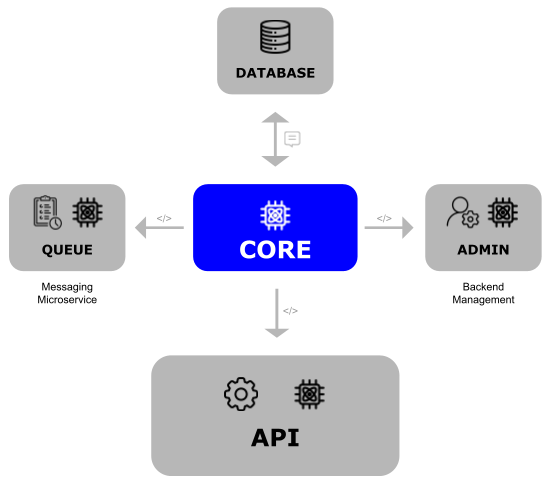 | ||
|
|
||
| > Each box in the image is a different Git repository. | ||
|
|
||
| Whenever work begins on a new feature or update, the devs should normally have the most recent Core in their development environment. | ||
| In our example we have four code bases which will be kept in four separate repositories. | ||
|
|
||
| The Dotkernel applications include various entities to get you started quickly. | ||
| This is not a complete list, but it should help you understand what each application is aimed toward, for example: | ||
|
|
||
| - The admin has admins, admin logins and settings entities. | ||
| - The api has both users and admins, as well as authentication entities. | ||
|
|
||
| There are already shared entities which are identical, so the best place for them is within the Core submodule. | ||
| Whenever you create new shared code, you should add it in the Core submodule and make sure to keep it updated in all your applications. | ||
|
|
||
| > This does not mean that all new code should be in Core, as there are plenty of instances when certain functionality is designed to only be used by only one application. |
This file contains hidden or bidirectional Unicode text that may be interpreted or compiled differently than what appears below. To review, open the file in an editor that reveals hidden Unicode characters.
Learn more about bidirectional Unicode characters
| Original file line number | Diff line number | Diff line change |
|---|---|---|
| @@ -1 +1,6 @@ | ||
| # Introduction | ||
|
|
||
| The principle of a Headless Platform is to decouple the User Interface (frontend) from the backend services. | ||
| The responses from the platform are then used by another system, such as a website or mobile app. | ||
|
|
||
| 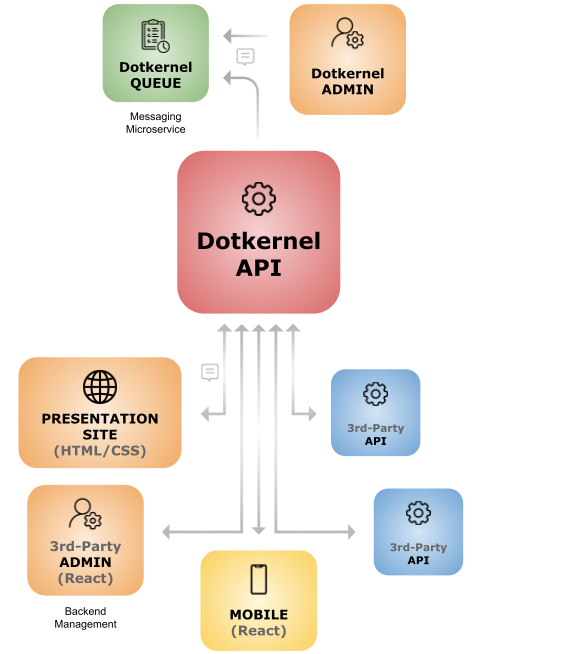 | ||
This file contains hidden or bidirectional Unicode text that may be interpreted or compiled differently than what appears below. To review, open the file in an editor that reveals hidden Unicode characters.
Learn more about bidirectional Unicode characters
Add this suggestion to a batch that can be applied as a single commit.
This suggestion is invalid because no changes were made to the code.
Suggestions cannot be applied while the pull request is closed.
Suggestions cannot be applied while viewing a subset of changes.
Only one suggestion per line can be applied in a batch.
Add this suggestion to a batch that can be applied as a single commit.
Applying suggestions on deleted lines is not supported.
You must change the existing code in this line in order to create a valid suggestion.
Outdated suggestions cannot be applied.
This suggestion has been applied or marked resolved.
Suggestions cannot be applied from pending reviews.
Suggestions cannot be applied on multi-line comments.
Suggestions cannot be applied while the pull request is queued to merge.
Suggestion cannot be applied right now. Please check back later.
There was a problem hiding this comment.
Choose a reason for hiding this comment
The reason will be displayed to describe this comment to others. Learn more.
Avantages of a headless platoform: