As you mat know, whenever a user opens the details window for a specific movie, the HTTP request is sent to the NetflixFrontend service with the activity information. This activity, let's call it MovieDetailsViewedEvent is stored as an object in S3, to be used in the future.
Besides storing the activity in S3, there are a few more microservices in the system who might be interested in the MovieDetailsViewedEvent:
- Search service: Handles user queries for content.
- Recommendation service: Provides personalized content suggestions.
- Streaming service: Manages video delivery and playback.
- User service: Manages user profiles and subscription data.
In a naive approach, the NetflixFrontend service could directly send HTTP requests to each of these microservices with the event information:
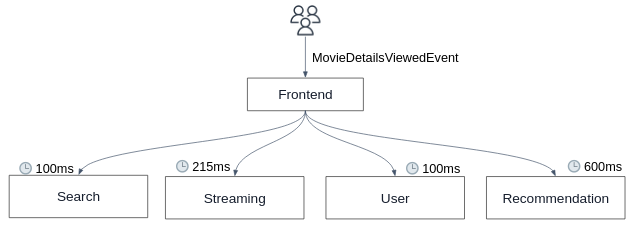
However, this synchronous communication pattern introduces several challenges:
- Each HTTP request adds latency, making the system slower and less responsive.
- As the number of microservices grows, the complexity and potential for failure increase, leading to a tightly coupled system that is difficult to scale and maintain.
To address these issues, we can introduce a message broker system:
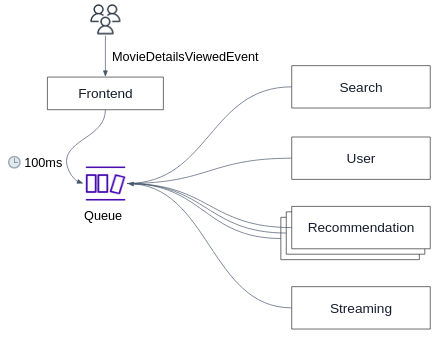
The NetflixFrontend service produce the MovieDetailsViewedEvent event to a queue. Each interested microservice can then consume the event from the queue at its own pace.
This kind of asynchronously communication decouples the services, reduces latency, and simplifies the overall architecture, making the system more scalable, resilient, and easier to manage.
This kind of queuing system is also known as a message broker, in our case, we'll use a simple message broker manages by AWS, called SQS.
This is a very common design in event driven and microservices architectures which can significantly improve the scalability and reliability of the system:
- Scalability: Multiple consumers can concurrently process messages from the queue (as can be seen in the above figure for the Recommendation service), allowing the system to handle high loads efficiently.
- Fault Tolerance: If a consumer fails to process an event, the message is returned to the queue for another attempt.
-
Open the Amazon SQS console at https://console.aws.amazon.com/sqs/
-
Choose Create queue.
-
For Type, the Standard queue type is set by default.
-
Enter a Name for your queue, e.g.
netflix-events. -
Under Configuration, set values for parameters according to the following characteristics:
- We let consumer
60 secondsto process a single message. - The amount of time a single message will be stored in the queue until it's processed by one of the consumers is
1 day. - We don't want any delay between the time the message is produced to the queue to the time it is consumed.
- We know that the maximal message size is
256KB.
- We let consumer
-
Choose the Basic Access policy.
-
Choose Create queue. Amazon SQS creates the queue and displays the queue's Details page.
- Run the NetflixFrontend (either locally or in an EC2) while providing the
AWS_SQS_QUEUE_URLand theAWS_REGIONenvironment variables. - Visit the app in your web browser, generate some MovieDetailsViewedEvent events by open the details pane window for some movies.
- Make sure your queue is filled with the event messages by navigating to the AWS SQS console and confirming that the messages are visible in the queue.
- Consume the messages in the queue by simulating the behavior of the "Recommendation service":
# recommendation_service_simulate.py

import boto3

sqs = boto3.client('sqs', region_name='YOUR_REGION_NAME')
queue_name = 'YOUR_QUEUE_NAME'

def receive_messages_from_queue():
   while True:
       try:
           response = sqs.receive_message(QueueUrl=queue_name, MaxNumberOfMessages=1, WaitTimeSeconds=10)

           if 'Messages' in response:
               for message in response['Messages']:
                   print(f"Received message: {message['Body']}")

                   # Here comes the logic to process the event by the recommendation service...

                   # When done, delete the message from the queue
                   sqs.delete_message(QueueUrl=queue_name, ReceiptHandle=message['ReceiptHandle'])
                   print(f"Deleted message: {message['MessageId']}")

           else:
               print("No messages received from the queue.")

       except Exception as e:
           print(f"Error receiving messages: {e}")

if __name__ == '__main__':
receive_messages_from_queue()- Try to run multiple instances of the above consumer, as if the Recommendation service is running multiple instances. What is the expected behaviour?
So far, we've seen how a single microservice consumes messages from the queue.
What about scenarios where multiple services need to consume the same event simultaneously? Why isn't a single SQS queue suitable for this?
Let's address this by dedicating a separate queue for each microservice aimed at handling specific events:
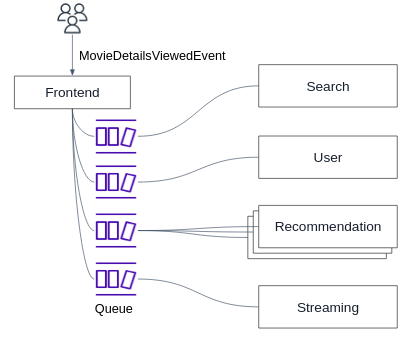
But now hoe can the NetflixFrontend efficiently produce the same event message to multiple queues?
The naive approach is to manually send the same event message to each queue, which introduces complexity and potential inconsistencies.
Here SQS comes in.
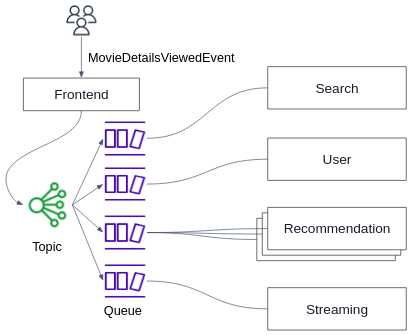
SNS allows you to publish messages to a topic. The messages can be delivered to a large number of subscribers (a.k.a. pub/sub) in parallel. In our case, the subscribers are the SQS queues.
Note
SNS is a fully managed messaging service for both application-to-application (A2A) and application-to-person (A2P) communication. Subscribers can be SQS queues, Lambda functions, HTTP endpoints, and more, ensuring that multiple services can react to the same event in parallel.
-
Sign in to the Amazon SNS console at https://console.aws.amazon.com/sns/home.
-
Do one of the following:
- If no topics have ever been created under your AWS account before, read the description of Amazon SNS on the home page.
- If topics have been created under your AWS account before, on the navigation panel, choose Topics.
-
On the Topics page, choose Create topic.
-
On the Create topic page, in the Details section, do the following:
- For Type, choose a Standard type.
- Enter a Name for the topic. E.g.
netflix-events-topic
-
Enter a Display name for the topic.
-
To configure how Amazon SNS retries failed message delivery attempts, expand the Delivery retry policy (HTTP/S) section. For more information, see Amazon SNS message delivery retries.
-
Choose Create topic.
- Open the Amazon SQS console at https://console.aws.amazon.com/sqs/
- In the navigation pane, choose Queues.
- From the list of queues, choose the queue to subscribe to the SNS topic.
- From Actions, choose Subscribe to Amazon SNS topic.
- From the Specify an Amazon SNS topic available for this queue menu, choose the SNS topic for your queue. If the SNS topic isn't listed in the menu, choose Enter Amazon SNS topic ARN and then enter the topic's Amazon Resource Name (ARN).
- Choose Save.
- For an SNS topic to be able to send messages to a queue, you must set a policy on the queue that allows the SNS topic to perform the
sqs:SendMessageaction:-
In your SQS page, choose the Access policy tab, and then choose Edit.
-
Add the below statement into the
Statementlist:{ "Effect": "Allow", "Principal": { "Service": "sns.amazonaws.com" }, "Action": "sqs:SendMessage", "Resource": "YOUR_SQS_ARN_HERE", "Condition": { "ArnEquals": { "aws:SourceArn": "YOUR_SNS_ARN_HERE" } } }While changing
YOUR_SQS_ARN_HEREandYOUR_SNS_ARN_HEREvalues.
-
- Run the NetflixFrontend (either locally or in an EC2) while providing the
AWS_SNS_TOPICand theAWS_REGIONenvironment variables. - Visit the app in your web browser, generate some MovieDetailsViewedEvent events by open the details pane window for some movies.
- Make sure the event was published to your queue through the SNS topic.
- Create another SQS queue and subscribe it to your topic.
- Using the above Python code, create a simulation of multiple microservices consuming messages from their queues. Make sure the event was published to all queues and consumed by the different microservices.
We wanted to send the MovieDetailsViewedEvent event in our app to multiple microservices.
Using the naive approach, we would have needed to manually initiate an HTTP request to each microservice, which is slow, cumbersome and not scalable.
Now, using a single HTTP request from the NetflixFrontend to the SNS topic, we would be able to efficiently publish the event to as many microservices as we want:
- SNS: Used to broadcast the event to multiple SQS queues.
- SQS: Each microservice has its own queue to process the events independently.