Like the Linux OS, Kubernetes (or shortly, k8s) is shipped by many different distributions, each aimed for a specific purpose. Throughout this course we will be working with Minikube, and later, with Elastic Kubernetes Service (EKS), which is a Kubernetes cluster managed by AWS.
Minikube is a lightweight and single-node Kubernetes distribution that is primarily used for local development and learning.
Minikube is one of the preferred learning tools in Kubernetes official documentation.
Follow the Get Started! page in minikube docs to install it on your local machine. Your minikube cluster relies upon some virtualization platform, we will be using Docker as the minikube driver (install Docker if needed).
Note:
If your machine isn't strong enough to run minikube, you can run it on anmediumUbuntu EC2 instance with 30GB disk.
You can start the cluster by:
minikube start --driver dockerkubectl is a command-line tool used to interact with Kubernetes clusters.
Download and install the kubectl binary from Kubernetes official site.
Make sure kubectl successfully communicates with your cluster:
$ kubectl get nodes
NAME       STATUS   ROLES           AGE   VERSION
minikube   Ready    control-plane   10h   v1.27.4
The tutorial was written for Kubernetes version >= v1.27.
The k8s dashboard is a web-based user interface. You can use the dashboard to troubleshoot your application, and manage the cluster resources.
To enable the k8s dashboard in minikube, perform:
minikube dashboard --port 30001This command occupies the terminal, allowing you to access the dashboard from your local machine. The dashboard url will be printed to stdout.
Note
If you run minikube on a remote machine, in order to access the dashboard, make sure to forward port 30001 when connecting over ssh:
ssh -i <pem-file> -L 30001:localhost:30001 ubuntu@<ip>When you deploy Kubernetes (using minikube, or any other distro), you get a cluster.
A Kubernetes cluster consists of a set of worker machines, called nodes, that run containerized applications (known as Pods). Every cluster has at least one worker node.
The control plane manages the worker nodes and the Pods in the cluster. In production environments, the control plane usually runs across multiple computers and a cluster usually runs multiple nodes, providing fault-tolerance and high availability.
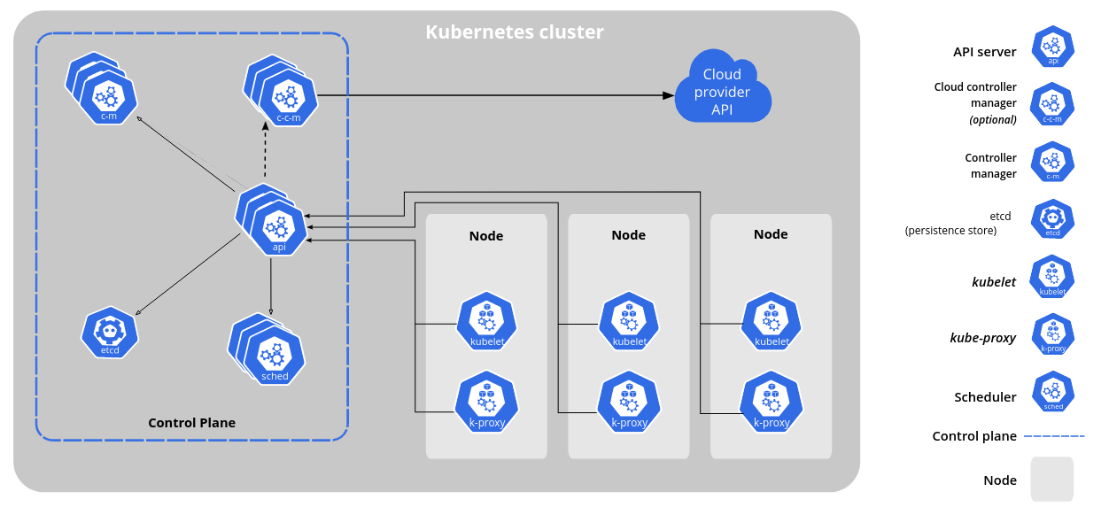
The control plane's components make global decisions about the cluster (for example, scheduling), as well as detecting and responding to cluster events (for example, starting up a new pod when a deployment's replicas field is unsatisfied).
- kube-apiserver: The API server is the front end for the Kubernetes control plane.
- etcd: Consistent and highly-available key value store used as Kubernetes' backing store for all cluster data.
- kube-scheduler: Watches for newly created Pods with no assigned node, and selects a node for them to run on.
- kube-controller-manager: Runs controllers. There are many different types of controllers. Some examples of them are:
- Responsible for noticing and responding when nodes go down.
- Responsible for noticing and responding when a Deployment is not in its desired state.
Node components run on every node, maintaining running pods and providing the Kubernetes runtime environment.
- kubelet: An agent that runs on each node in the cluster. It makes sure that containers are running in a Pod.
- kube-proxy: kube-proxy is a network proxy that runs on each node in your cluster. It allows network communication to your Pods from network sessions inside or outside your cluster.
- Container runtime: It is responsible for managing the execution and lifecycle of containers (containerd or CRI-O).
Let's see Kubernetes cluster in all his glory!
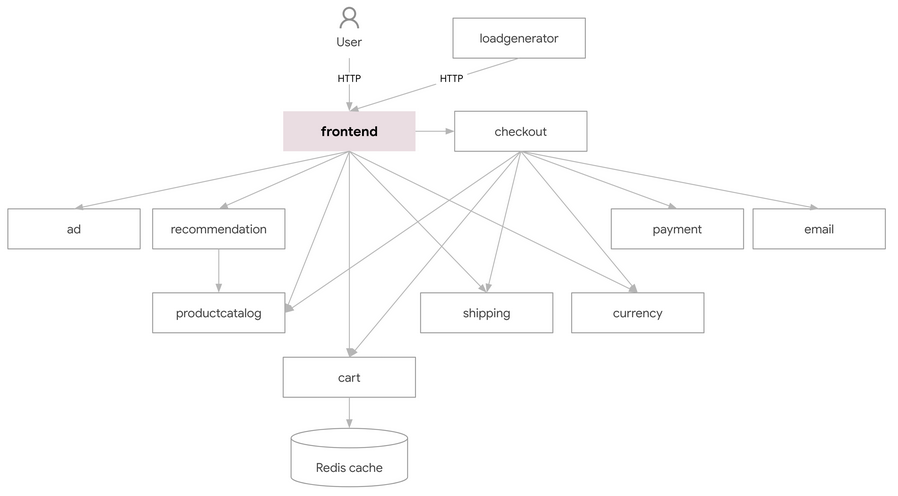
Online Boutique is a microservices demo application, consists of an 11-tier microservices. The application is a web-based e-commerce app where users can browse items, add them to the cart, and purchase them.
Here is the app architecture and description of each microservice:
| Service | Language | Description |
|---|---|---|
| frontend | Go | Exposes an HTTP server to serve the website. Does not require signup/login and generates session IDs for all users automatically. |
| cartservice | C# | Stores the items in the user's shopping cart in Redis and retrieves it. |
| productcatalogservice | Go | Provides the list of products from a JSON file and ability to search products and get individual products. |
| currencyservice | Node.js | Converts one money amount to another currency. Uses real values fetched from European Central Bank. It's the highest QPS service. |
| paymentservice | Node.js | Charges the given credit card info (mock) with the given amount and returns a transaction ID. |
| shippingservice | Go | Gives shipping cost estimates based on the shopping cart. Ships items to the given address (mock) |
| emailservice | Python | Sends users an order confirmation email (mock). |
| checkoutservice | Go | Retrieves user cart, prepares order and orchestrates the payment, shipping and the email notification. |
| recommendationservice | Python | Recommends other products based on what's given in the cart. |
| adservice | Java | Provides text ads based on given context words. |
| loadgenerator | Python/Locust | Continuously sends requests imitating realistic user shopping flows to the frontend. |
To deploy the app in you cluster, perform the below command from the root directory of our course repo (make sure the YAML file exists):
kubectl apply -f k8s/release-0.8.0.yamlBy default, applications running within the cluster are not accessible from outside the cluster. There are various techniques available to enable external access, we will cover some of them later on.
Using port forwarding allows developers to establish a temporary tunnel for debugging purposes and access applications running inside the cluster from their local machines.
kubectl port-forward svc/frontend 8080:80Note:
If you run minikube on a remote machine, and want to access the application using the EC2 public ip address, perform:kubectl port-forward svc/frontend 8080:80 --address 0.0.0.0
Finally, delete the Online Boutique Service resources by:
kubectl delete -f k8s/release-0.8.0.yamlMinikube includes a set of built-in addons that can be enabled, disabled and opened in the local Kubernetes environment.
List the currently supported addons:
minikube addons listEnable an addon, the metrics-server addon:
minikube addons enable metrics-serverMetrics Server is an application (running in a container within your cluster) that collects metrics (e.g. Pod CPU and Memory utilization) from the cluster node and exposes them in Kubernetes apiserver.
This short exercise demonstrates and stresses the fact that k8s is just containers orchestrator, and under the hood, there are nothing but running docker containers in each cluster's node.
In real k8s cluster, nodes are usually virtual machines, like EC2 instances. But in Minikube node are virtualized within the machine minikube is running on. Nevertheless, minikube nodes have an IP address, and you can connect them via ssh as if you are connecting to a real server.
Connect to one of your cluster's nodes using the ssh command (don't use the minikube ssh utility):
- The cluster name (profile name) and node IP can be found in
minikube profile list. - The username is
docker. - The private key identity file can be found in
~/.minikube/machines/<CLUSTER_NAME>/id_rsa.
Inside the node, use docker command to list the running containers on that node.
Can you recognize the containers running the Online Boutique app?