-
Notifications
You must be signed in to change notification settings - Fork 58
Expand file tree
/
Copy pathInterpolation.fsx
More file actions
599 lines (446 loc) · 24.6 KB
/
Interpolation.fsx
File metadata and controls
599 lines (446 loc) · 24.6 KB
1
2
3
4
5
6
7
8
9
10
11
12
13
14
15
16
17
18
19
20
21
22
23
24
25
26
27
28
29
30
31
32
33
34
35
36
37
38
39
40
41
42
43
44
45
46
47
48
49
50
51
52
53
54
55
56
57
58
59
60
61
62
63
64
65
66
67
68
69
70
71
72
73
74
75
76
77
78
79
80
81
82
83
84
85
86
87
88
89
90
91
92
93
94
95
96
97
98
99
100
101
102
103
104
105
106
107
108
109
110
111
112
113
114
115
116
117
118
119
120
121
122
123
124
125
126
127
128
129
130
131
132
133
134
135
136
137
138
139
140
141
142
143
144
145
146
147
148
149
150
151
152
153
154
155
156
157
158
159
160
161
162
163
164
165
166
167
168
169
170
171
172
173
174
175
176
177
178
179
180
181
182
183
184
185
186
187
188
189
190
191
192
193
194
195
196
197
198
199
200
201
202
203
204
205
206
207
208
209
210
211
212
213
214
215
216
217
218
219
220
221
222
223
224
225
226
227
228
229
230
231
232
233
234
235
236
237
238
239
240
241
242
243
244
245
246
247
248
249
250
251
252
253
254
255
256
257
258
259
260
261
262
263
264
265
266
267
268
269
270
271
272
273
274
275
276
277
278
279
280
281
282
283
284
285
286
287
288
289
290
291
292
293
294
295
296
297
298
299
300
301
302
303
304
305
306
307
308
309
310
311
312
313
314
315
316
317
318
319
320
321
322
323
324
325
326
327
328
329
330
331
332
333
334
335
336
337
338
339
340
341
342
343
344
345
346
347
348
349
350
351
352
353
354
355
356
357
358
359
360
361
362
363
364
365
366
367
368
369
370
371
372
373
374
375
376
377
378
379
380
381
382
383
384
385
386
387
388
389
390
391
392
393
394
395
396
397
398
399
400
401
402
403
404
405
406
407
408
409
410
411
412
413
414
415
416
417
418
419
420
421
422
423
424
425
426
427
428
429
430
431
432
433
434
435
436
437
438
439
440
441
442
443
444
445
446
447
448
449
450
451
452
453
454
455
456
457
458
459
460
461
462
463
464
465
466
467
468
469
470
471
472
473
474
475
476
477
478
479
480
481
482
483
484
485
486
487
488
489
490
491
492
493
494
495
496
497
498
499
500
501
502
503
504
505
506
507
508
509
510
511
512
513
514
515
516
517
518
519
520
521
522
523
524
525
526
527
528
529
530
531
532
533
534
535
536
537
538
539
540
541
542
543
544
545
546
547
548
549
550
551
552
553
554
555
556
557
558
559
560
561
562
563
564
565
566
567
568
569
570
571
572
573
574
575
576
577
578
579
580
581
582
583
584
585
586
587
588
589
590
591
592
593
594
595
596
597
(**
---
title: Interpolation
index: 8
category: Documentation
categoryindex: 0
---
*)
(*** hide ***)
(*** condition: prepare ***)
#r "nuget: FSharpAux.Core, 2.0.0"
#r "nuget: FSharpAux, 2.0.0"
#r "nuget: FSharpAux.IO, 2.0.0"
#r "nuget: OptimizedPriorityQueue, 5.1.0"
#r "nuget: FsMath, 0.0.2"
#I "../src/FSharp.Stats/bin/Release/.net8.0/"
#r "FSharp.Stats.dll"
#r "nuget: Plotly.NET, 4.0.0"
open FsMath
Plotly.NET.Defaults.DefaultDisplayOptions <-
Plotly.NET.DisplayOptions.init (PlotlyJSReference = Plotly.NET.PlotlyJSReference.NoReference)
(*** condition: ipynb ***)
#if IPYNB
#r "nuget: Plotly.NET, 4.0.0"
#r "nuget: Plotly.NET.Interactive, 4.0.0"
#r "nuget: FSharp.Stats"
open Plotly.NET
#endif // IPYNB
(**
# Interpolation
[](https://mybinder.org/v2/gh/fslaborg/FSharp.Stats/gh-pages?urlpath=/tree/home/jovyan/Interpolation.ipynb)
[]({{root}}{{fsdocs-source-basename}}.ipynb)
_Summary:_ This tutorial demonstrates several ways of interpolating with FSharp.Stats
## Summary
With the `FSharp.Stats.Interpolation` module you can apply various interpolation methods. While interpolating functions always go through the input points (knots), methods to predict function values
from x values (or x vectors in multivariate interpolation) not contained in the input, vary greatly. A `Interpolation` type provides many common methods for interpolation of two dimensional data. These include
- Linear spline interpolation (connecting knots by straight lines)
- Polynomial interpolation
- Hermite spline interpolation
- Cubic spline interpolation with 5 boundary conditions
- Akima subspline interpolation
The following code snippet summarizes all interpolation methods. In the following sections, every method is discussed in detail!
*)
open Plotly.NET
open FSharp.Stats
let testDataX = [|1. .. 10.|]
let testDataY = [|0.5;-1.;0.;0.;0.;0.;1.;1.;3.;3.5|]
let coefStep = Interpolation.interpolate(testDataX,testDataY,InterpolationMethod.Step) // step function
let coefLinear = Interpolation.interpolate(testDataX,testDataY,InterpolationMethod.LinearSpline) // Straight lines passing all points
let coefAkima = Interpolation.interpolate(testDataX,testDataY,InterpolationMethod.AkimaSubSpline) // Akima cubic subspline
let coefCubicNa = Interpolation.interpolate(testDataX,testDataY,InterpolationMethod.CubicSpline Interpolation.CubicSpline.BoundaryCondition.Natural) // cubic spline with f'' at borders is set to 0
let coefCubicPe = Interpolation.interpolate(testDataX,testDataY,InterpolationMethod.CubicSpline Interpolation.CubicSpline.BoundaryCondition.Periodic) // cubic spline with equal f' at borders
let coefCubicNo = Interpolation.interpolate(testDataX,testDataY,InterpolationMethod.CubicSpline Interpolation.CubicSpline.BoundaryCondition.NotAKnot) // cubic spline with continous f''' at second and penultimate knot
let coefCubicPa = Interpolation.interpolate(testDataX,testDataY,InterpolationMethod.CubicSpline Interpolation.CubicSpline.BoundaryCondition.Parabolic) // cubic spline with quadratic polynomial at borders
let coefCubicCl = Interpolation.interpolate(testDataX,testDataY,InterpolationMethod.CubicSpline (Interpolation.CubicSpline.BoundaryCondition.Clamped (0,-1))) // cubic spline with border f' set to 0 and -1
let coefHermite = Interpolation.interpolate(testDataX,testDataY,InterpolationMethod.HermiteSpline HermiteMethod.CSpline)
let coefHermiteMono = Interpolation.interpolate(testDataX,testDataY,InterpolationMethod.HermiteSpline HermiteMethod.PreserveMonotonicity)
let coefHermiteSlop = Interpolation.interpolate(testDataX,testDataY,InterpolationMethod.HermiteSpline (HermiteMethod.WithSlopes (vector [0.;0.;0.;0.;0.;0.;0.;0.;0.;0.])))
let coefPolynomial = Interpolation.interpolate(testDataX,testDataY,InterpolationMethod.Polynomial) // interpolating polynomial
let coefApproximate = Interpolation.Approximation.approxWithPolynomialFromValues(testDataX,testDataY,10,Interpolation.Approximation.Spacing.Chebyshev) //interpolating polynomial of degree 9 with knots spaced according to Chebysehv
let interpolationComparison =
[
Chart.Point(testDataX,testDataY,Name="data")
[1. .. 0.01 .. 10.] |> List.map (fun x -> x,Interpolation.predict(coefStep) x) |> Chart.Line |> Chart.withTraceInfo "Step"
[1. .. 0.01 .. 10.] |> List.map (fun x -> x,Interpolation.predict(coefLinear) x) |> Chart.Line |> Chart.withTraceInfo "Linear"
[1. .. 0.01 .. 10.] |> List.map (fun x -> x,Interpolation.predict(coefAkima) x) |> Chart.Line |> Chart.withTraceInfo "Akima"
[1. .. 0.01 .. 10.] |> List.map (fun x -> x,Interpolation.predict(coefCubicNa) x) |> Chart.Line |> Chart.withTraceInfo "Cubic_natural"
[1. .. 0.01 .. 10.] |> List.map (fun x -> x,Interpolation.predict(coefCubicPe) x) |> Chart.Line |> Chart.withTraceInfo "Cubic_periodic"
[1. .. 0.01 .. 10.] |> List.map (fun x -> x,Interpolation.predict(coefCubicNo) x) |> Chart.Line |> Chart.withTraceInfo "Cubic_notaknot"
[1. .. 0.01 .. 10.] |> List.map (fun x -> x,Interpolation.predict(coefCubicPa) x) |> Chart.Line |> Chart.withTraceInfo "Cubic_parabolic"
[1. .. 0.01 .. 10.] |> List.map (fun x -> x,Interpolation.predict(coefCubicCl) x) |> Chart.Line |> Chart.withTraceInfo "Cubic_clamped"
[1. .. 0.01 .. 10.] |> List.map (fun x -> x,Interpolation.predict(coefHermite) x) |> Chart.Line |> Chart.withTraceInfo "Hermite cSpline"
[1. .. 0.01 .. 10.] |> List.map (fun x -> x,Interpolation.predict(coefHermiteMono) x) |> Chart.Line |> Chart.withTraceInfo "Hermite monotone"
[1. .. 0.01 .. 10.] |> List.map (fun x -> x,Interpolation.predict(coefHermiteSlop) x) |> Chart.Line |> Chart.withTraceInfo "Hermite slope"
[1. .. 0.01 .. 10.] |> List.map (fun x -> x,Interpolation.predict(coefPolynomial) x) |> Chart.Line |> Chart.withTraceInfo "Polynomial"
[1. .. 0.01 .. 10.] |> List.map (fun x -> x,coefApproximate.Predict x) |> Chart.Line |> Chart.withTraceInfo "Chebyshev"
]
|> Chart.combine
|> Chart.withTemplate ChartTemplates.lightMirrored
|> Chart.withXAxisStyle("x data")
|> Chart.withYAxisStyle("y data")
|> Chart.withSize(800.,600.)
(*** condition: ipynb ***)
#if IPYNB
interpolationComparison
#endif // IPYNB
(***hide***)
interpolationComparison |> GenericChart.toChartHTML
(***include-it-raw***)
(**
## Polynomial Interpolation
Here a polynomial is fitted to the data. In general, a polynomial with degree = dataPointNumber - 1 has sufficient flexibility to interpolate all data points.
The least squares approach is not sufficient to converge to an interpolating polynomial! A degree other than n-1 results in a regression polynomial.
*)
open Plotly.NET
open FSharp.Stats
let xData = vector [|1.;2.;3.;4.;5.;6.|]
let yData = vector [|4.;7.;9.;8.;7.;9.;|]
//Polynomial interpolation
//Define the polynomial coefficients. In Interpolation the order is equal to the data length - 1.
let coefficients =
Interpolation.Polynomial.interpolate xData yData
let interpolFunction x =
Interpolation.Polynomial.predict coefficients x
let rawChart =
Chart.Point(xData,yData)
|> Chart.withTraceInfo "raw data"
let interpolPol =
let fit = [|1. .. 0.1 .. 6.|] |> Array.map (fun x -> x,interpolFunction x)
fit
|> Chart.Line
|> Chart.withTraceInfo "interpolating polynomial"
let chartPol =
[rawChart;interpolPol]
|> Chart.combine
|> Chart.withTemplate ChartTemplates.lightMirrored
(*** condition: ipynb ***)
#if IPYNB
chartPol
#endif // IPYNB
(***hide***)
chartPol |> GenericChart.toChartHTML
(***include-it-raw***)
(**
## Cubic spline interpolation
Splines are flexible strips of wood, that were used by shipbuilders to draw smooth shapes. In graphics and mathematics a piecewise cubic polynomial (order = 3) is called spline.
The curvature (second derivative) of a cubic polynomial is proportional to its tense energy and in spline theory the curvature is minimized. Therefore, the resulting function is very smooth.
To solve for the spline coefficients it is necessary to define two additional constraints, so called boundary conditions:
- natural spline (most used spline variant): `f''` at borders is set to 0
- periodic spline: `f'` at first point is the same as `f'` at the last point
- parabolic spline: `f''` at first/second and last/penultimate knot are equal
- notAKnot spline: `f'''` at second and penultimate knot are continuous
- quadratic spline: first and last polynomial are quadratic, not cubic
- clamped spline: `f'` at first and last knot are set by user
In general, piecewise cubic splines only are defined within the region defined by the used x values. Using `predict` with x values outside this range, uses the slopes and intersects of the nearest knot and utilizes them for prediction.
### Related information
- [Cubic Spline Interpolation](https://en.wikiversity.org/wiki/Cubic_Spline_Interpolation)
- [Boundary conditions](https://timodenk.com/blog/cubic-spline-interpolation/)
- [Cubic spline online tool](https://tools.timodenk.com/cubic-spline-interpolation)
*)
open Plotly.NET
open FSharp.Stats.Interpolation
let xValues = vector [1.;2.;3.;4.;5.5;6.]
let yValues = vector [1.;8.;6.;3.;7.;1.]
//calculates the spline coefficients for a natural spline
let coeffSpline =
CubicSpline.interpolate CubicSpline.BoundaryCondition.Natural xValues yValues
//cubic interpolating splines are only defined within the region defined in xValues
let interpolateFunctionWithinRange x =
CubicSpline.predictWithinRange coeffSpline x
//to interpolate x_Values that are out of the region defined in xValues
//interpolates the interpolation spline with linear prediction at borderknots
let interpolateFunction x =
CubicSpline.predict coeffSpline x
//to compare the spline interpolate with an interpolating polynomial:
let coeffPolynomial =
Interpolation.Polynomial.interpolate xValues yValues
let interpolateFunctionPol x =
Interpolation.Polynomial.predict coeffPolynomial x
//A linear spline draws straight lines to interpolate all data
let coeffLinearSpline = Interpolation.LinearSpline.interpolate (Array.ofSeq xValues) (Array.ofSeq yValues)
let interpolateFunctionLinSp = Interpolation.LinearSpline.predict coeffLinearSpline
let splineChart =
[
Chart.Point(xValues,yValues) |> Chart.withTraceInfo "raw data"
[ 1. .. 0.1 .. 6.] |> List.map (fun x -> x,interpolateFunctionPol x) |> Chart.Line |> Chart.withTraceInfo "fitPolynomial"
[-1. .. 0.1 .. 8.] |> List.map (fun x -> x,interpolateFunction x) |> Chart.Line |> Chart.withLineStyle(Dash=StyleParam.DrawingStyle.Dash) |> Chart.withTraceInfo "fitSpline"
[ 1. .. 0.1 .. 6.] |> List.map (fun x -> x,interpolateFunctionWithinRange x)|> Chart.Line |> Chart.withTraceInfo "fitSpline_withinRange"
[ 1. .. 0.1 .. 6.] |> List.map (fun x -> x,interpolateFunctionLinSp x) |> Chart.Line |> Chart.withTraceInfo "fitLinearSpline"
]
|> Chart.combine
|> Chart.withTitle "Interpolation methods"
|> Chart.withTemplate ChartTemplates.lightMirrored
(*** condition: ipynb ***)
#if IPYNB
splineChart
#endif // IPYNB
(***hide***)
splineChart |> GenericChart.toChartHTML
(***include-it-raw***)
//additionally you can calculate the derivatives of the spline
//The cubic spline interpolation is continuous in f, f', and f''.
let derivativeChart =
[
Chart.Point(xValues,yValues) |> Chart.withTraceInfo "raw data"
[1. .. 0.1 .. 6.] |> List.map (fun x -> x,interpolateFunction x) |> Chart.Line |> Chart.withTraceInfo "spline fit"
[1. .. 0.1 .. 6.] |> List.map (fun x -> x,CubicSpline.getFirstDerivative coeffSpline x) |> Chart.Point |> Chart.withTraceInfo "fst derivative"
[1. .. 0.1 .. 6.] |> List.map (fun x -> x,CubicSpline.getSecondDerivative coeffSpline x) |> Chart.Point |> Chart.withTraceInfo "snd derivative"
[1. .. 0.1 .. 6.] |> List.map (fun x -> x,CubicSpline.getThirdDerivative coeffSpline x) |> Chart.Point |> Chart.withTraceInfo "trd derivative"
]
|> Chart.combine
|> Chart.withTitle "Cubic spline derivatives"
|> Chart.withTemplate ChartTemplates.lightMirrored
(*** condition: ipynb ***)
#if IPYNB
derivativeChart
#endif // IPYNB
(***hide***)
derivativeChart |> GenericChart.toChartHTML
(***include-it-raw***)
(**
## Akima subspline interpolation
Akima subsplines are highly connected to default cubic spline interpolation. The main difference is the missing constraint of curvature continuity. This enhanced curvature flexibility diminishes oscillations of the
interpolating piecewise cubic subsplines. Subsplines differ from regular splines because they are discontinuous in the second derivative. See http://www.dorn.org/uni/sls/kap06/f08_0204.htm for more information.
*)
let xVal = [|1. .. 10.|]
let yVal = [|1.;-0.5;2.;2.;2.;3.;3.;3.;5.;4.|]
let akimaCoeffs = Akima.interpolate xVal yVal
let akima =
[0. .. 0.1 .. 11.]
|> List.map (fun x ->
x,Akima.predict akimaCoeffs x)
|> Chart.Line
let cubicCoeffs = CubicSpline.interpolate CubicSpline.BoundaryCondition.Natural (vector xVal) (vector yVal)
let cubicSpline =
[0. .. 0.1 .. 11.]
|> List.map (fun x ->
x,CubicSpline.predict cubicCoeffs x)
|> Chart.Line
let akimaChart =
[
Chart.Point(xVal,yVal,Name="data")
cubicSpline |> Chart.withTraceInfo "cubic spline"
akima |> Chart.withTraceInfo "akima spline"
]
|> Chart.combine
|> Chart.withTitle "Cubic spline derivatives"
|> Chart.withTemplate ChartTemplates.lightMirrored
(*** condition: ipynb ***)
#if IPYNB
akimaChart
#endif // IPYNB
(***hide***)
akimaChart |> GenericChart.toChartHTML
(***include-it-raw***)
(**
## Hermite interpolation
In Hermite interpolation the user can define the slopes of the function in the knots. This is especially useful if the function is oscillating and thereby generates local minima/maxima.
Intuitively the slope of a knot should be between the slopes of the adjacent straight lines. By using this slope calculation a monotone knot behavior results in a monotone spline.
- [Slope calculation](http://www.korf.co.uk/spline.pdf)
*)
open FSharp.Stats
open FSharp.Stats.Interpolation
open Plotly.NET
//example from http://www.korf.co.uk/spline.pdf
let xDataH = vector [0.;10.;30.;50.;70.;80.;82.]
let yDataH = vector [150.;200.;200.;200.;180.;100.;0.]
//Get slopes for Hermite spline. Try to interpolate a monotone function.
let tryMonotoneSlope = CubicSpline.Hermite.interpolatePreserveMonotonicity xDataH yDataH
//get function for Hermite spline
let funHermite = fun x -> CubicSpline.Hermite.predict tryMonotoneSlope x
//get coefficients and function for a classic natural spline
let coeffSpl = CubicSpline.interpolate CubicSpline.BoundaryCondition.Natural xDataH yDataH
let funNaturalSpline x = CubicSpline.predict coeffSpl x
//get coefficients and function for a classic polynomial interpolation
let coeffPolInterpol =
//let neutralWeights = Vector.init 7 (fun x -> 1.)
//Fitting.LinearRegression.OLS.Polynomial.coefficientsWithWeighting 6 neutralWeights xDataH yDataH
Interpolation.Polynomial.interpolate xDataH yDataH
let funPolInterpol x =
//Fitting.LinearRegression.OLS.Polynomial.fit 6 coeffPolInterpol x
Interpolation.Polynomial.predict coeffPolInterpol x
let splineComparison =
[
Chart.Point(xDataH,yDataH) |> Chart.withTraceInfo "raw data"
[0. .. 82.] |> List.map (fun x -> x,funNaturalSpline x) |> Chart.Line |> Chart.withTraceInfo "natural spline"
[0. .. 82.] |> List.map (fun x -> x,funHermite x ) |> Chart.Line |> Chart.withTraceInfo "hermite spline"
[0. .. 82.] |> List.map (fun x -> x,funPolInterpol x ) |> Chart.Line |> Chart.withTraceInfo "polynomial"
]
|> Chart.combine
|> Chart.withTemplate ChartTemplates.lightMirrored
(*** condition: ipynb ***)
#if IPYNB
splineComparison
#endif // IPYNB
(***hide***)
splineComparison |> GenericChart.toChartHTML
(***include-it-raw***)
(**
## Bezier interpolation
In Bezier interpolation the user can define control points in order to interpolate between points. The first and last point (within the given coordinate sequence) are interpolated, while all others serve as control points that stretch the connection.
If there is just one control point (coordinate collection length=3) the resulting curve is quadratic, two control points create a cubic curve etc.. Nested LERPs are used to identify the desired y-value from an given x value.
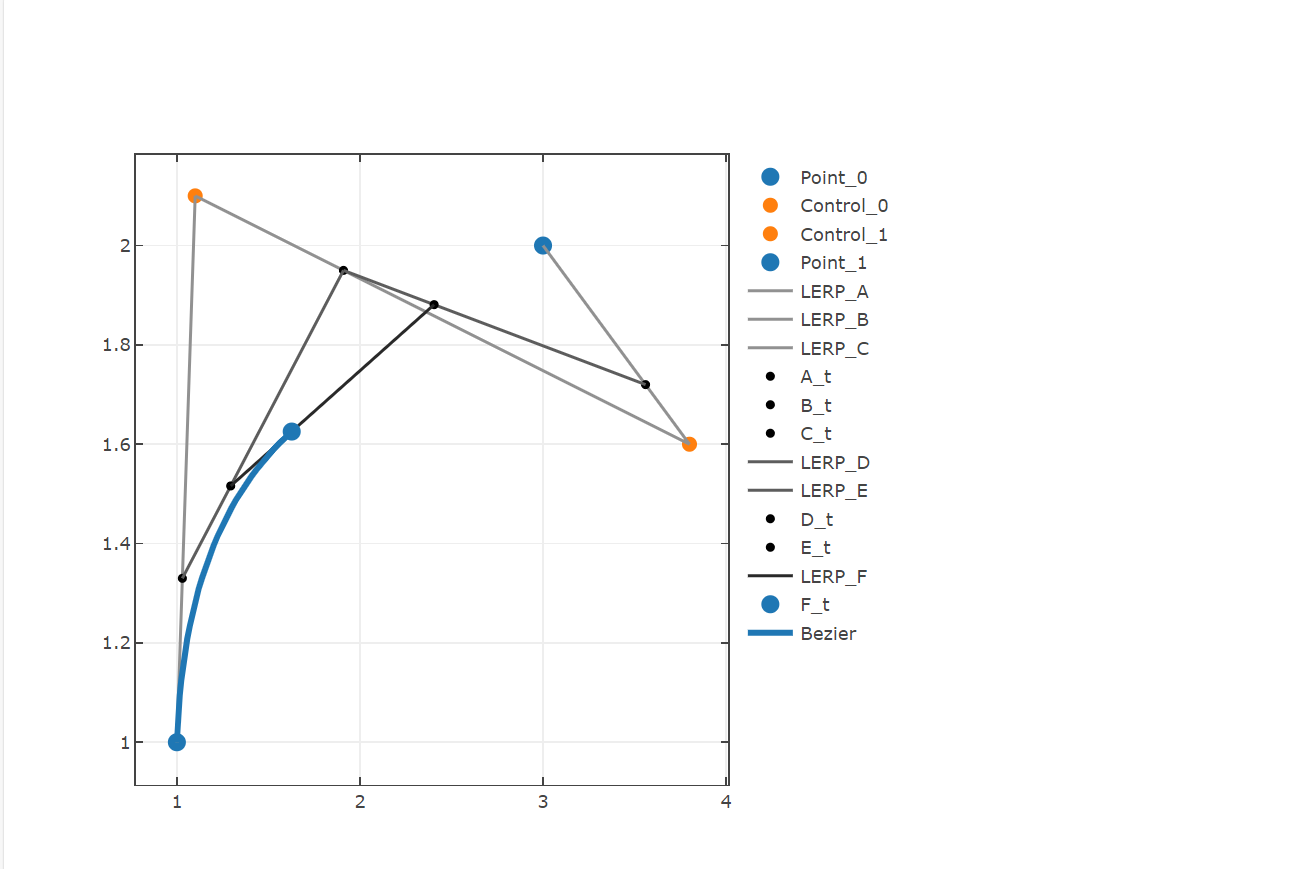
*)
open FSharp.Stats
open FSharp.Stats.Interpolation
open Plotly.NET
let bezierInterpolation =
let t = 0.3
let p0 = vector [|3.;0.|] //point 0 that should be traversed
let c0 = vector [|-1.5;8.|] //control point 0
let c1 = vector [|1.5;9.|] //control point 1
let c2 = vector [|6.5;-1.5|] //control point 2
let c3 = vector [|13.5;4.|] //control point 3
let p1 = vector [|10.;5.|] //point 1 that should be traversed
let toPoint (v : Vector<float>) = v[0],v[1]
let interpolate = Bezier.interpolate [|p0;c0;c1;c2;c3;p1|] >> toPoint
[
Chart.Point([p0.[0]],[p0.[1]],Name="Point_0",MarkerColor=Color.fromHex "#1f77b4") |> Chart.withMarkerStyle(Size=12)
Chart.Point([c0.[0]],[c0.[1]],Name="Control_0",MarkerColor=Color.fromHex "#ff7f0e")|> Chart.withMarkerStyle(Size=10)
Chart.Point([c1.[0]],[c1.[1]],Name="Control_1",MarkerColor=Color.fromHex "#ff7f0e")|> Chart.withMarkerStyle(Size=10)
Chart.Point([c2.[0]],[c2.[1]],Name="Control_2",MarkerColor=Color.fromHex "#ff7f0e")|> Chart.withMarkerStyle(Size=10)
Chart.Point([c3.[0]],[c3.[1]],Name="Control_3",MarkerColor=Color.fromHex "#ff7f0e")|> Chart.withMarkerStyle(Size=10)
Chart.Point([p1.[0]],[p1.[1]],Name="Point_1",MarkerColor=Color.fromHex "#1f77b4") |> Chart.withMarkerStyle(Size=12)
[0. .. 0.01 .. 1.] |> List.map interpolate |> Chart.Line |> Chart.withTraceInfo "Bezier" |> Chart.withLineStyle(Color=Color.fromHex "#1f77b4")
]
|> Chart.combine
|> Chart.withTemplate ChartTemplates.lightMirrored
(*** condition: ipynb ***)
#if IPYNB
bezierInterpolation
#endif // IPYNB
(***hide***)
bezierInterpolation |> GenericChart.toChartHTML
(***include-it-raw***)
(**
Bezier interpolation is not limited to 2D points, it can be also be used to interpolate vectors.
*)
let bezierInterpolation3d =
let p0 = vector [|1.;1.;1.|] //point 0 that should be traversed
let c0 = vector [|1.5;2.1;2.|] //control point 0
let c1 = vector [|5.8;1.6;1.4|] //control point 1
let p1 = vector [|3.;2.;0.|] //point 1 that should be traversed
let to3Dpoint (v : Vector<float>) = v[0],v[1],v[2]
let interpolate = Bezier.interpolate [|p0;c0;c1;p1|] >> to3Dpoint
[
Chart.Point3D([p0.[0]],[p0.[1]],[p0.[2]],Name="Point_0",MarkerColor=Color.fromHex "#1f77b4") |> Chart.withMarkerStyle(Size=12)
Chart.Point3D([c0.[0]],[c0.[1]],[c0.[2]],Name="Control_0",MarkerColor=Color.fromHex "#ff7f0e")|> Chart.withMarkerStyle(Size=10)
Chart.Point3D([c1.[0]],[c1.[1]],[c1.[2]],Name="Control_1",MarkerColor=Color.fromHex "#ff7f0e")|> Chart.withMarkerStyle(Size=10)
Chart.Point3D([p1.[0]],[p1.[1]],[p1.[2]],Name="Point_1",MarkerColor=Color.fromHex "#1f77b4") |> Chart.withMarkerStyle(Size=12)
[0. .. 0.01 .. 1.] |> List.map interpolate |> Chart.Line3D |> Chart.withTraceInfo "Bezier" |> Chart.withLineStyle(Color=Color.fromHex "#1f77b4",Width=10.)
]
|> Chart.combine
|> Chart.withTemplate ChartTemplates.lightMirrored
(*** condition: ipynb ***)
#if IPYNB
bezierInterpolation3d
#endif // IPYNB
(***hide***)
bezierInterpolation3d |> GenericChart.toChartHTML
(***include-it-raw***)
(**
## Chebyshev function approximation
Polynomials are great when it comes to slope/area determination or the investigation of signal properties.
When faced with an unknown (or complex) function it may be beneficial to approximate the data using polynomials, even if it does not correspond to the real model.
Polynomial regression can cause difficulties if the signal is flexible and the required polynomial degree is high. Floating point errors sometimes lead to vanishing coefficients and even though the
SSE should decrease, it does not and a strange, squiggly shape is generated.
Polynomial interpolation can help to obtain a robust polynomial description of the data, but is prone to Runges phenomenon.
In the next section, data is introduced that should be converted to a polynomial approximation.
*)
let xs = [|0. .. 0.2 .. 3.|]
let ys = [|5.;5.5;6.;6.1;4.;1.;0.7;0.3;0.5;0.9;5.;9.;9.;8.;6.5;5.;|]
let chebyChart =
Chart.Line(xs,ys,Name="raw",ShowMarkers=true)
|> Chart.withTemplate ChartTemplates.lightMirrored
(*** condition: ipynb ***)
#if IPYNB
chebyChart
#endif // IPYNB
(***hide***)
chebyChart |> GenericChart.toChartHTML
(***include-it-raw***)
(**
Let's fit a interpolating polynomial to the points:
*)
// calculates the coefficients of the interpolating polynomial
let coeffs =
Interpolation.Polynomial.interpolate (vector xs) (vector ys)
// determines the y value of a given x value with the interpolating coefficients
let interpolatingFunction x =
Interpolation.Polynomial.predict coeffs x
// plot the interpolated data
let interpolChart =
let ys_interpol =
[|0. .. 0.01 .. 3.|]
|> Seq.map (fun x -> x,interpolatingFunction x)
Chart.Line(ys_interpol,Name="interpol")
|> Chart.withTemplate ChartTemplates.lightMirrored
|> Chart.withXAxisStyle "xs"
|> Chart.withYAxisStyle "ys"
let cbChart =
[
chebyChart
interpolChart
]
|> Chart.combine
(*** condition: ipynb ***)
#if IPYNB
cbChart
#endif // IPYNB
(***hide***)
cbChart |> GenericChart.toChartHTML
(***include-it-raw***)
(**
Because of Runges phenomenon the interpolating polynomial overshoots in the outer areas of the data. It would be detrimental if this function approximation is used to investigate signal properties.
To reduce this overfitting you can use x axis nodes that are spaced according to Chebyshev. Here, nodes are sparse in the center of the analysed function and are more dense in the outer areas.
*)
// new x values are determined in the x axis range of the data. These should reduce overshooting behaviour.
// since the original data consisted of 16 points, 16 nodes are initialized
let xs_cheby =
Interpolation.Approximation.chebyshevNodes (Interval.CreateClosed<float>(0.,3.)) 16
// to get the corresponding y values to the xs_cheby a linear spline is generated that approximates the new y values
let ys_cheby =
let ls = Interpolation.LinearSpline.interpolate xs ys
xs_cheby |> Array.map (Interpolation.LinearSpline.predict ls)
// again polynomial interpolation coefficients are determined, but here with the x and y data that correspond to the chebyshev spacing
let coeffs_cheby = Interpolation.Polynomial.interpolate xs_cheby ys_cheby
// Note: the upper panel can be summarized by the follwing function:
Interpolation.Approximation.approxWithPolynomialFromValues(xData=xs,yData=ys,n=16,spacing=Approximation.Spacing.Chebyshev)
(**
Using the determined polynomial coefficients, the standard approach for fitting can be used to plot the signal together with the function approximation. Obviously the example data
is difficult to approximate, but the chebyshev spacing of the x-nodes drastically reduces the overfitting in the outer areas of the signal.
*)
// function using the cheby_coefficients to get y values of given x value
let interpolating_cheby x = Interpolation.Polynomial.predict coeffs_cheby x
let interpolChart_cheby =
let ys_interpol_cheby =
vector [|0. .. 0.01 .. 3.|]
|> Seq.map (fun x -> x,interpolating_cheby x)
Chart.Line(ys_interpol_cheby,Name="interpol_cheby")
|> Chart.withTemplate ChartTemplates.lightMirrored
|> Chart.withXAxisStyle "xs"
|> Chart.withYAxisStyle "ys"
let cbChart_cheby =
[
chebyChart
interpolChart
Chart.Line(xs_cheby,ys_cheby,ShowMarkers=true,Name="cheby_nodes") |> Chart.withTemplate ChartTemplates.lightMirrored|> Chart.withXAxisStyle "xs"|> Chart.withYAxisStyle "ys"
interpolChart_cheby
]
|> Chart.combine
|> Chart.withTemplate ChartTemplates.lightMirrored
|> Chart.withXAxisStyle "xs"
|> Chart.withYAxisStyle "ys"
(*** condition: ipynb ***)
#if IPYNB
cbChart_cheby
#endif // IPYNB
(***hide***)
cbChart_cheby |> GenericChart.toChartHTML
(***include-it-raw***)
(**
If a non-polynomal function should be approximated as polynomial you can use `Interpolation.Approximation.approxWithPolynomial` with specifying the interval in which the function should be approximated.
## Further reading
- Amazing blog post regarding Runges phenomenon and chebyshev spacing https://www.mscroggs.co.uk/blog/57
*)