|
1 | | -# GEMC: Geant4 Monte-Carlo |
| 1 | +# GEMC |
2 | 2 |
|
| 3 | +[![Deploy and Test][ci-badge]][ci] |
| 4 | +[![Doxygen][docs-badge]][docs] |
| 5 | +[![Sanitize][sanitize-badge]][sanitize] |
| 6 | +[![CodeQL][codeql-badge]][codeql] |
| 7 | +[![Nightly Dev Release][nightly-badge]][nightly] |
| 8 | +[![Homepage][site-badge]][site] |
| 9 | +[![License][license-badge]][license] |
3 | 10 |
|
4 | | - A database-driven Monte Carlo simulation program |
| 11 | +GEMC, the GEant Monte-Carlo, is a database-driven [Geant4](https://geant4.web.cern.ch) application for detector and radiation-transport simulations. It keeps detector descriptions outside the compiled C++ application: users define geometry, materials, optics, mirrors, sensitive detectors, and run configuration in Python or data files, then GEMC loads those definitions at run time and executes the full Geant4 simulation pipeline. |
5 | 12 |
|
| 13 | +The project goal is to make Geant4-based simulation accessible to users who want to prototype detector systems without writing a custom Geant4 application, while still preserving C++ extension points for advanced detector response and output workflows. |
6 | 14 |
|
7 | | -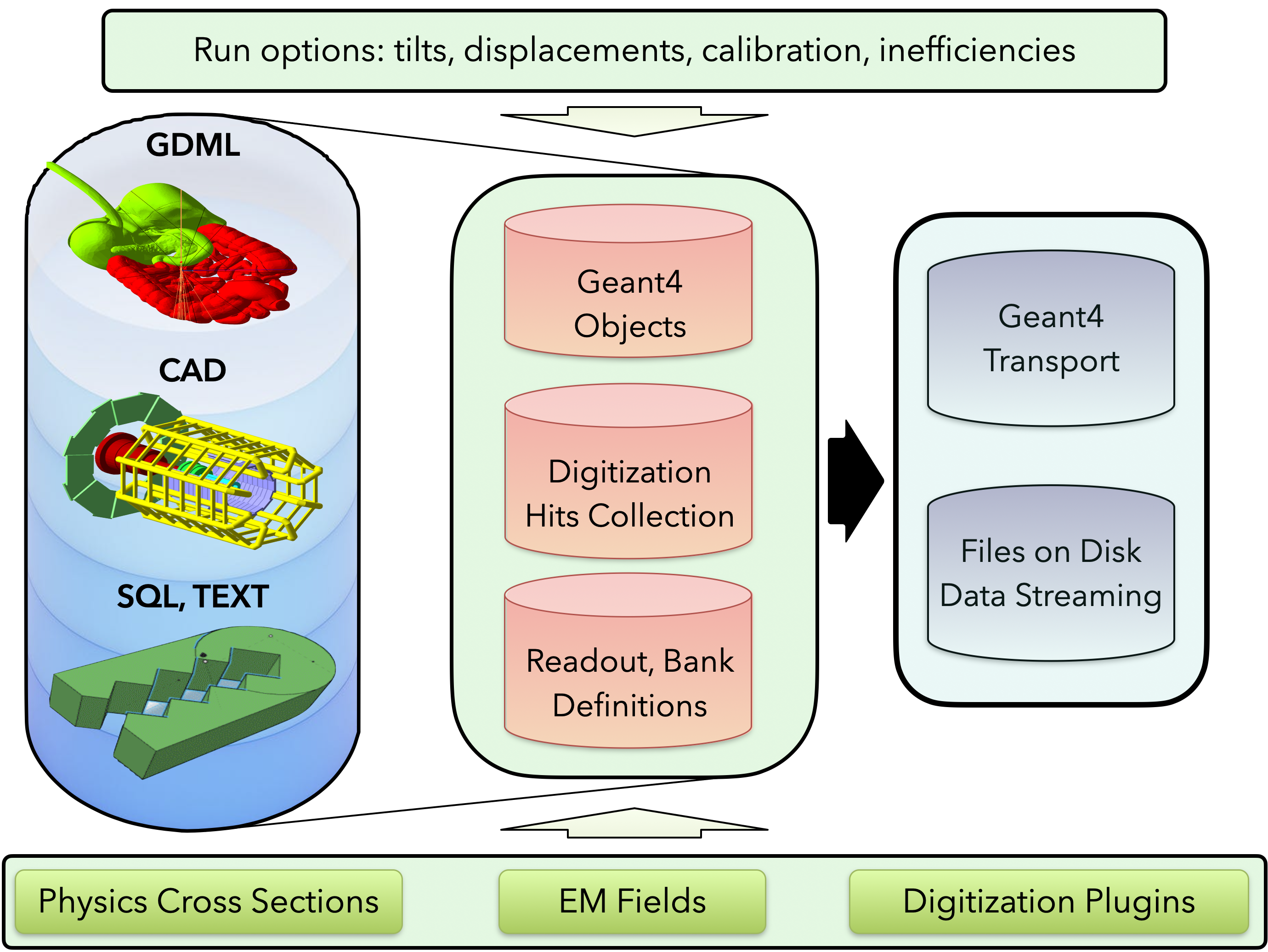 |
| 15 | + |
8 | 16 |
|
| 17 | +## Highlights |
9 | 18 |
|
10 | | -<br/> |
11 | | -<br/> |
| 19 | +- Python-first detector definition through [`pygemc`](https://github.com/gemc/pygemc) |
| 20 | +- Geometry and material storage in SQLite or GEMC ASCII databases |
| 21 | +- Geometry imports from native GEMC databases, GDML, and CAD meshes |
| 22 | +- Run-number and variation support for reusable detector configurations |
| 23 | +- Built-in sensitive detector digitizations: `flux`, `dosimeter`, and `particle_counter` |
| 24 | +- Dynamic C++ plugin infrastructure for custom digitization, fields, particle readers, and output streamers |
| 25 | +- Event generation from command-line/YAML particle definitions and Lund files |
| 26 | +- Output streamers for ASCII, CSV, JSON, JLAB SRO, and optional ROOT output |
| 27 | +- Magnetic-field support, including a built-in multipole field plugin |
| 28 | +- Interactive Geant4/Qt visualization and off-screen image generation |
| 29 | +- PyVista geometry preview, interactive Qt display, and VTK.js export from Python geometry scripts |
| 30 | +- Python analyzer for plotting GEMC CSV and ROOT output |
| 31 | +- Meson-based C++ build with CI-tested Docker images for Linux `amd64` and `arm64` |
12 | 32 |
|
| 33 | +## Repository Layout |
13 | 34 |
|
14 | | -## Continuous Integration |
| 35 | +| Path | Purpose | |
| 36 | +| --- | --- | |
| 37 | +| `actions/`, `g4system/`, `gdetector/`, `gphysics/` | Geant4 application integration and detector construction | |
| 38 | +| `gsystem/` | Geometry-system loading from SQLite, ASCII, CAD, and GDML sources | |
| 39 | +| `gdynamicDigitization/` | Built-in and dynamically loaded digitization routines | |
| 40 | +| `gstreamer/` | Output plugins for event, run, and frame data | |
| 41 | +| `gparticle/` | Particle generation and particle-file readers | |
| 42 | +| `gfields/` | Magnetic-field abstractions and field plugins | |
| 43 | +| `examples/` | Complete Python/YAML examples used by tests and documentation | |
| 44 | +| `subprojects/pygemc/` | Meson subproject copy of the Python API | |
| 45 | +| `ci/` | Build, Docker, release, and documentation automation | |
15 | 46 |
|
16 | | -### Platforms |
| 47 | +## Quickstart |
17 | 48 |
|
18 | | -| OS | version | architecture | |
19 | | -|:----------|---------:|--------------:| |
20 | | -| ubuntu | 24.04 | amd64, arm64 | |
21 | | -| ubuntu | 26.04 | amd64, arm64 | |
22 | | -| fedora | 44 | amd64, arm64 | |
23 | | -| almalinux | 9.4 | amd64, arm64 | |
24 | | -| almalinux | 10 | amd64, arm64 | |
25 | | -| debian | 13 | amd64, arm64 | |
26 | | -| archlinux | latest | amd64 | |
| 49 | +The fastest way to try GEMC is through the hosted examples: |
27 | 50 |
|
| 51 | +- [Documentation and examples](https://gemc.github.io/home/) |
| 52 | +- [Installation guide](https://gemc.github.io/home/installation/) |
| 53 | +- [Quickstart tutorial](https://gemc.github.io/home/documentation/quickstart/) |
| 54 | +- [Examples gallery](https://gemc.github.io/home/examples/) |
28 | 55 |
|
29 | | -### Deployment |
| 56 | +A minimal local workflow looks like this after installation: |
30 | 57 |
|
31 | | -[![CI][CI-badge]][CI] |
| 58 | +```shell |
| 59 | +gemc-system-template -s counter |
| 60 | +cd counter |
| 61 | +./counter.py |
| 62 | +gemc counter.yaml |
| 63 | +gemc-analyzer counter_t0_digitized.csv totEdep --kind csv --bins 50 |
| 64 | +``` |
32 | 65 |
|
33 | | -[![Docs][Docs-badge]][Docs] |
| 66 | +The template command creates a small detector system, the Python script writes `gemc.db`, `gemc` runs the simulation, and `gemc-analyzer` plots a variable from the CSV output. |
34 | 67 |
|
| 68 | +## Installation |
35 | 69 |
|
36 | | -[![Site][Site-badge]][Site] |
| 70 | +### From Source |
37 | 71 |
|
| 72 | +GEMC uses [Meson](https://mesonbuild.com). A normal source build is: |
38 | 73 |
|
39 | | -[CI]: https://github.com/gemc/src/actions/workflows/dockers_deploy_and_test.yml |
40 | | -[CI-badge]: https://github.com/gemc/src/actions/workflows/dockers_deploy_and_test.yml/badge.svg |
| 74 | +```shell |
| 75 | +git clone --recurse-submodules https://github.com/gemc/src.git gemc-src |
| 76 | +cd gemc-src |
| 77 | +meson setup build --native-file=core.ini --prefix=/path/to/gemc |
| 78 | +meson compile -C build |
| 79 | +meson install -C build |
| 80 | +``` |
41 | 81 |
|
| 82 | +After installation, add the GEMC binary directory and the installed Python environment to your shell: |
42 | 83 |
|
43 | | -[Docs]: https://github.com/gemc/src/actions/workflows/doxygen.yml |
44 | | -[Docs-badge]: https://github.com/gemc/src/actions/workflows/doxygen.yml/badge.svg |
| 84 | +```shell |
| 85 | +export GEMC_VERSION=dev |
| 86 | +export PATH=/path/to/gemc/$GEMC_VERSION/bin:/path/to/gemc/$GEMC_VERSION/python_env/bin:$PATH |
| 87 | +``` |
45 | 88 |
|
46 | | -[Nightly]: https://github.com/gemc/src/actions/workflows/dev_release.yml |
47 | | -[Nightly-badge]: https://github.com/gemc/src/actions/workflows/dev_release.yml/badge.svg |
| 89 | +Build options: |
48 | 90 |
|
49 | | -[Site]: https://github.com/gemc/home/actions/workflows/jekyll.yml |
50 | | -[Site-badge]: https://github.com/gemc/home/actions/workflows/jekyll.yml/badge.svg |
| 91 | +- `-Droot=enabled` enables ROOT output when ROOT is installed. |
| 92 | +- `-Di_test=true` enables GUI-oriented tests. |
| 93 | +- `meson install -C build` builds and installs the current tree. |
51 | 94 |
|
52 | | -[Sanitize]: https://github.com/gemc/src/actions/workflows/sanitize.yml |
53 | | -[Sanitize-badge]: https://github.com/gemc/src/actions/workflows/sanitize.yml/badge.svg |
| 95 | +### Docker |
54 | 96 |
|
55 | | -[CodeQL]: https://github.com/gemc/src/actions/workflows/codeql.yml |
56 | | -[CodeQL-badge]: https://github.com/gemc/src/actions/workflows/codeql.yml/badge.svg |
| 97 | +Pre-built development images are published to GitHub Container Registry. For example: |
57 | 98 |
|
| 99 | +```shell |
| 100 | +docker run -it --rm -v "$PWD":/work ghcr.io/gemc/src:dev-ubuntu-24.04 bash |
| 101 | +``` |
58 | 102 |
|
| 103 | +Published image families include: |
59 | 104 |
|
60 | | -### Metrics |
| 105 | +| OS | Version | Architectures | |
| 106 | +| --- | --- | --- | |
| 107 | +| AlmaLinux | 10 | `amd64`, `arm64` | |
| 108 | +| Arch Linux | latest | `amd64` | |
| 109 | +| Debian | 13 | `amd64`, `arm64` | |
| 110 | +| Fedora | 44 | `amd64`, `arm64` | |
| 111 | +| Ubuntu | 24.04, 26.04 | `amd64`, `arm64` | |
61 | 112 |
|
62 | | -[![Sanitize][Sanitize-badge]][Sanitize] |
| 113 | +See the [installation page](https://gemc.github.io/home/installation/) for Docker, browser GUI, and Apptainer examples. |
63 | 114 |
|
64 | | -[![CodeQL][CodeQL-badge]][CodeQL] |
| 115 | +## Python Geometry Workflow |
65 | 116 |
|
66 | | -### Nightly |
| 117 | +Detector systems are usually written with `pygemc`: |
67 | 118 |
|
68 | | -[![Nightly][Nightly-badge]][Nightly] |
| 119 | +```python |
| 120 | +from pygemc import GVolume, autogeometry |
| 121 | + |
| 122 | +cfg = autogeometry("examples", "counter") |
| 123 | + |
| 124 | +flux = GVolume("flux_box") |
| 125 | +flux.description = "air flux box" |
| 126 | +flux.make_box(40.0, 40.0, 2.0) |
| 127 | +flux.set_position(0, 0, 100) |
| 128 | +flux.material = "G4_AIR" |
| 129 | +flux.color = "3399FF" |
| 130 | +flux.digitization = "flux" |
| 131 | +flux.set_identifier("box", 2) |
| 132 | +flux.publish(cfg) |
| 133 | +``` |
| 134 | + |
| 135 | +Geometry scripts can write SQLite or ASCII databases, display geometry with PyVista, or export VTK.js files: |
| 136 | + |
| 137 | +```shell |
| 138 | +./counter.py --factory sqlite |
| 139 | +./counter.py -pv |
| 140 | +./counter.py -pvvtk counter -pvz 0.25 |
| 141 | +``` |
| 142 | + |
| 143 | +### PyVista Visualization |
| 144 | + |
| 145 | +PyVista is part of the normal GEMC geometry workflow. It lets users inspect detector geometry before running Geant4, export portable VTK.js scenes for documentation, and catch placement or rotation mistakes while editing Python geometry scripts. |
| 146 | + |
| 147 | +| B1 | B2 | |
| 148 | +| --- | --- | |
| 149 | +| <a href="https://gemc.github.io/home/assets/vtkjs-viewer.html?fileURL=https://gemc.github.io/home/assets/images/examples/b1/b1.vtksz"><img src="https://gemc.github.io/home/assets/images/examples/b1/geometry.png" alt="B1 PyVista geometry" width="200" height="200"></a> | <a href="https://gemc.github.io/home/assets/vtkjs-viewer.html?fileURL=https://gemc.github.io/home/assets/images/examples/b2/b2.vtksz"><img src="https://gemc.github.io/home/assets/images/examples/b2/geometry.png" alt="B2 PyVista geometry" width="200" height="200"></a> | |
| 150 | +| Materials | Simple Flux | |
| 151 | +| <a href="https://gemc.github.io/home/assets/vtkjs-viewer.html?fileURL=https://gemc.github.io/home/assets/images/examples/materials/material.vtksz"><img src="https://gemc.github.io/home/assets/images/examples/materials/geometry.png" alt="Materials PyVista geometry" width="200" height="200"></a> | <a href="https://gemc.github.io/home/assets/vtkjs-viewer.html?fileURL=https://gemc.github.io/home/assets/images/examples/simple_flux/simple_flux.vtksz"><img src="https://gemc.github.io/home/assets/images/examples/simple_flux/geometry.png" alt="Simple Flux PyVista geometry" width="200" height="200"></a> | |
| 152 | + |
| 153 | +Open the linked interactive PyVista scenes generated from the GEMC examples. |
| 154 | + |
| 155 | +GitHub README pages cannot embed `.vtksz` scenes directly, so the image above links to the hosted VTK.js viewer. |
| 156 | + |
| 157 | +## Running Simulations |
| 158 | + |
| 159 | +GEMC is configured with YAML files and equivalent command-line options. A compact steering file can define the run number, event count, generator, geometry systems, output streamers, and world volume: |
| 160 | + |
| 161 | +```yaml |
| 162 | +runno: 1 |
| 163 | +n: 100 |
| 164 | +nthreads: 1 |
| 165 | + |
| 166 | +gparticle: |
| 167 | + - name: proton |
| 168 | + p: 1500 |
| 169 | + vz: -5.0 |
| 170 | + |
| 171 | +gsystem: |
| 172 | + - name: counter |
| 173 | + factory: sqlite |
| 174 | + |
| 175 | +gstreamer: |
| 176 | + - filename: counter |
| 177 | + format: csv |
| 178 | + - filename: counter |
| 179 | + format: json |
| 180 | + |
| 181 | +root: G4Box, 15*cm, 15*cm, 15*cm, G4_AIR |
| 182 | +``` |
| 183 | +
|
| 184 | +Run in batch mode: |
| 185 | +
|
| 186 | +```shell |
| 187 | +gemc counter.yaml |
| 188 | +``` |
| 189 | + |
| 190 | +Run with the Geant4 GUI: |
| 191 | + |
| 192 | +```shell |
| 193 | +gemc counter.yaml -gui |
| 194 | +``` |
| 195 | + |
| 196 | +Generate an off-screen Geant4 image: |
| 197 | + |
| 198 | +```shell |
| 199 | +gemc counter.yaml -n=10 \ |
| 200 | + -g4view="[{driver: TOOLSSG_OFFSCREEN, segsPerCircle: 200}]" \ |
| 201 | + -g4camera="[{phi: -10*deg, theta: 250*deg}]" \ |
| 202 | + -g4light="[{phi: 160*deg, theta: 120*deg}]" |
| 203 | +``` |
| 204 | + |
| 205 | +## Output and Analysis |
| 206 | + |
| 207 | +The output layer is plugin-based. Built-in streamer formats include: |
| 208 | + |
| 209 | +| Format | Notes | |
| 210 | +| --- | --- | |
| 211 | +| `ascii` | Human-readable text output | |
| 212 | +| `csv` | Per-thread CSV tables for digitized hits, true information, generated particles, and tracked generated particles | |
| 213 | +| `json` | Structured event output | |
| 214 | +| `jlabsro` | Binary JLAB SRO frame records | |
| 215 | +| `root` | ROOT TTrees, available when GEMC is built with ROOT | |
| 216 | + |
| 217 | +Analyze CSV or ROOT output with: |
| 218 | + |
| 219 | +```shell |
| 220 | +gemc-analyzer counter_t0_digitized.csv totEdep --kind csv --bins 50 |
| 221 | +gemc-analyzer out.root E --kind root --detector flux --save energy.png |
| 222 | +``` |
| 223 | + |
| 224 | +## Examples |
| 225 | + |
| 226 | +The repository includes examples under `examples/`, with matching documentation and rendered assets on the project site: |
| 227 | + |
| 228 | +- `examples/basic/simple_flux`: flux digitization and output analysis |
| 229 | +- `examples/basic/b1`: Geant4 basic B1-style geometry |
| 230 | +- `examples/basic/b2`: Geant4 basic B2-style geometry |
| 231 | +- `examples/basic/material`: material and optical-property definitions |
| 232 | +- `examples/basic/pyvista`: PyVista visualization examples |
| 233 | +- `examples/optical/cherenkov`: optical photon and Cherenkov workflow |
| 234 | + |
| 235 | +## Development |
| 236 | + |
| 237 | +Build and install: |
| 238 | + |
| 239 | +```shell |
| 240 | +meson install -C build |
| 241 | +``` |
| 242 | + |
| 243 | +List tests: |
| 244 | + |
| 245 | +```shell |
| 246 | +meson test -C build --list |
| 247 | +``` |
| 248 | + |
| 249 | +Run one test with logs: |
| 250 | + |
| 251 | +```shell |
| 252 | +meson test -C build -v --print-errorlogs <testname> |
| 253 | +``` |
| 254 | + |
| 255 | +The CI system also builds Docker images, runs the Meson test suite, runs sanitizer builds, generates Doxygen documentation, performs CodeQL analysis, and publishes nightly development release notes. |
| 256 | + |
| 257 | +## Documentation |
| 258 | + |
| 259 | +- [Project homepage](https://gemc.github.io/home/) |
| 260 | +- [Installation](https://gemc.github.io/home/installation/) |
| 261 | +- [User documentation](https://gemc.github.io/home/documentation/) |
| 262 | +- [Examples](https://gemc.github.io/home/examples/) |
| 263 | +- [Doxygen workflow](https://github.com/gemc/src/actions/workflows/doxygen.yml) |
| 264 | +- [GEMC2 / CLAS12 repository](https://github.com/gemc/clas12Tags) |
| 265 | + |
| 266 | +This repository is GEMC version 3 and newer. CLAS12 GEMC2 simulations are maintained separately in `gemc/clas12Tags`. |
| 267 | + |
| 268 | +## Contributing |
| 269 | + |
| 270 | +Contributions are welcome through normal pull requests. Before opening a pull request, run the relevant Meson tests and keep changes focused. See: |
| 271 | + |
| 272 | +- [`CONTRIBUTING.md`](CONTRIBUTING.md) |
| 273 | +- [`CODE_OF_CONDUCT.md`](CODE_OF_CONDUCT.md) |
| 274 | +- [`SECURITY.md`](SECURITY.md) |
| 275 | + |
| 276 | +## Citation |
| 277 | + |
| 278 | +If you use GEMC in scientific work, cite: |
| 279 | + |
| 280 | +> M. Ungaro, "Geant4 Monte-Carlo (GEMC) A database-driven simulation program," EPJ Web of Conferences 295, 05005 (2024). https://doi.org/10.1051/epjconf/202429505005 |
| 281 | +
|
| 282 | +BibTeX and additional citation formats are in [`CITATION.md`](CITATION.md). |
| 283 | + |
| 284 | +## License |
| 285 | + |
| 286 | +GEMC is distributed under the project license in [`LICENSE.md`](LICENSE.md). The software also depends on separately licensed third-party components, including Geant4, CLHEP, Qt, ROOT, SQLite, and Assimp. |
| 287 | + |
| 288 | +[ci]: https://github.com/gemc/src/actions/workflows/dockers_deploy_and_test.yml |
| 289 | +[ci-badge]: https://github.com/gemc/src/actions/workflows/dockers_deploy_and_test.yml/badge.svg |
| 290 | +[docs]: https://github.com/gemc/src/actions/workflows/doxygen.yml |
| 291 | +[docs-badge]: https://github.com/gemc/src/actions/workflows/doxygen.yml/badge.svg |
| 292 | +[sanitize]: https://github.com/gemc/src/actions/workflows/sanitize.yml |
| 293 | +[sanitize-badge]: https://github.com/gemc/src/actions/workflows/sanitize.yml/badge.svg |
| 294 | +[codeql]: https://github.com/gemc/src/actions/workflows/codeql.yml |
| 295 | +[codeql-badge]: https://github.com/gemc/src/actions/workflows/codeql.yml/badge.svg |
| 296 | +[nightly]: https://github.com/gemc/src/actions/workflows/dev_release.yml |
| 297 | +[nightly-badge]: https://github.com/gemc/src/actions/workflows/dev_release.yml/badge.svg |
| 298 | +[site]: https://github.com/gemc/home/actions/workflows/jekyll.yml |
| 299 | +[site-badge]: https://github.com/gemc/home/actions/workflows/jekyll.yml/badge.svg |
| 300 | +[license]: LICENSE.md |
| 301 | +[license-badge]: https://img.shields.io/badge/license-GEMC-blue.svg |

0 commit comments