

See where your AI spend goes.




You pay for Claude, Codex, Cursor, and a stack of other AI tools. The bill tells you the total. It never tells you that half of it went to conversation instead of code, or that an expensive model burned your budget on work a cheaper one would have one-shot.
CodeBurn does. It reads the session files your tools already write to disk and breaks down every token and dollar by task, model, tool, and project, across 31 AI tools.
Everything runs locally. No wrapper, no proxy, no API keys, nothing leaves your machine. Pricing comes from LiteLLM, refreshed daily.
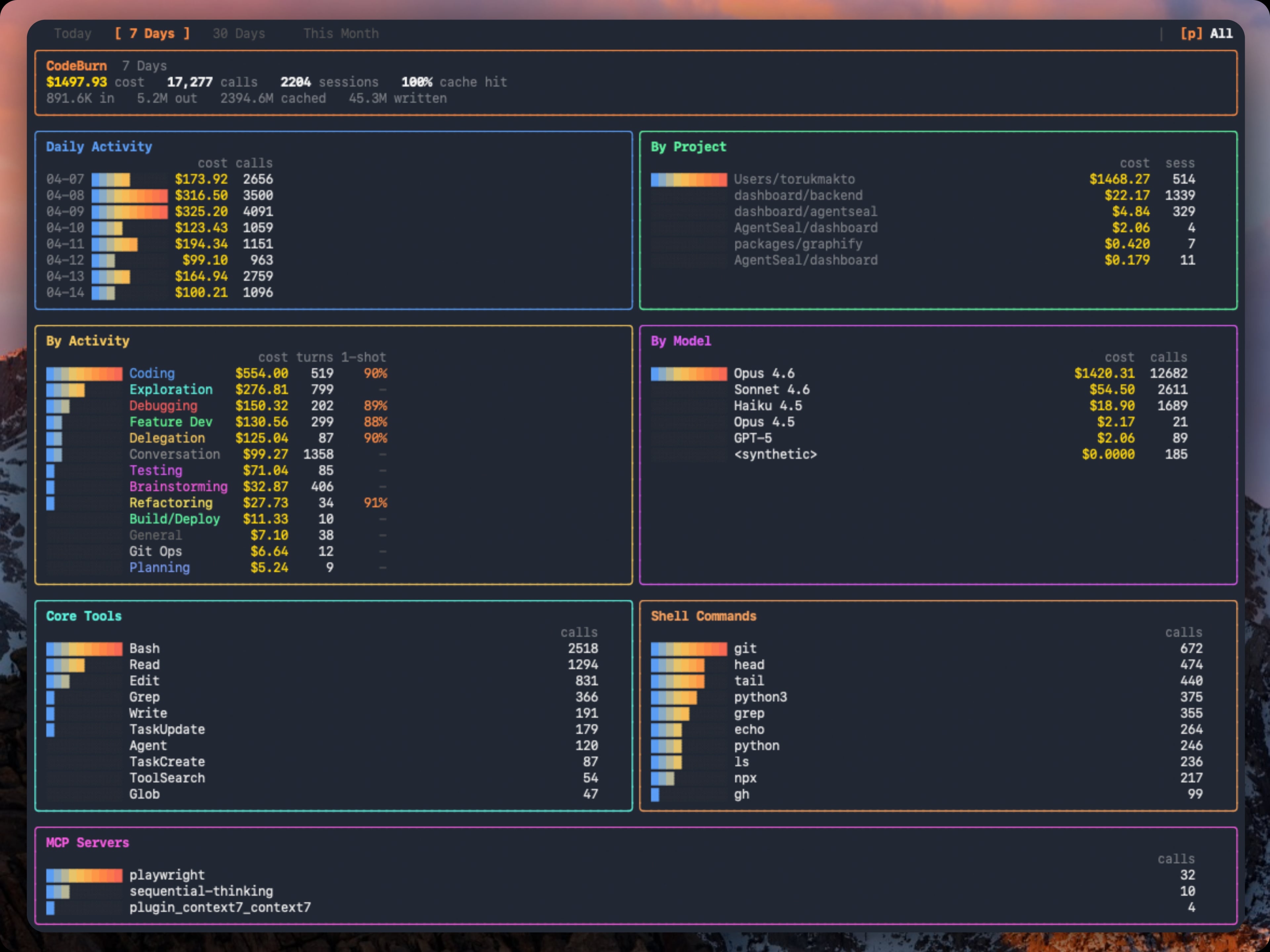
A week across every tool you use, in one screen.
Quick start · Find waste · Compare models · Track what shipped · Supported tools · Commands · Features · How it reads data
Run it instantly, no install needed:
npx codeburnThat opens the interactive dashboard (last 7 days by default). Arrow keys switch periods, q quits. That is the 30-second version. You now know where your AI budget goes.
Install it for a permanent codeburn command:
npm install -g codeburnAlso runs via bunx codeburn or dx codeburn, or brew install codeburn on macOS.
Menu bar app for macOS, with your spend always in the menu bar:
codeburn menubarRequires Node.js 22.13+ and at least one supported tool with session data on disk. For Cursor and OpenCode, better-sqlite3 installs automatically.
codeburn overview                                    # this month, clean tables
codeburn overview --no-color                         # plain text, ready to paste
codeburn overview --from 2026-06-01 --to 2026-06-15  # any date range
codeburn overview -p all                             # all time
codeburn overview --provider claude                  # one tool only
codeburn overview prints a copy-pasteable summary of where your AI spend went: totals (cost, tokens, cache hit), a breakdown by tool and by top model, your highest-value days, top projects, a per-day table, and activity and tool usage. Pipe it anywhere (into pbcopy, a PR, Slack, or a tweet); color drops automatically when the output is not a terminal, or pass --no-color.
CodeBurn  June 2026

Totals
  Cost       $2,795.10
  Tokens     3.49B   in 23.9M / out 20.2M / cache-w 72.5M / cache-r 3.38B
  Calls      14,755   sessions 753
  Cache hit  99.3%

By tool
┌──────────┬───────────┬────────┬───────┐
│ Tool     │      Cost │ Tokens │ Share │
├──────────┼───────────┼────────┼───────┤
│ claude   │ $2,662.37 │  3.34B │   95% │
│ codex    │   $119.12 │ 128.1M │    4% │
└──────────┴───────────┴────────┴───────┘

(plus Top models, Highest-value days, Top projects, a per-day table, By activity, and Tools)
codeburn optimize                       # scan the last 30 days
codeburn optimize -p today              # today only
codeburn optimize -p week               # last 7 days
codeburn optimize --provider claude     # restrict to one provider
codeburn optimize --format json         # setup health + findings as JSON
codeburn optimize scans your sessions and your ~/.claude/ setup for waste patterns:
- Files Claude re-reads across sessions (same content, same context, over and over)
- Low Read:Edit ratio (editing without reading leads to retries and wasted tokens)
- Wasted bash output (uncapped
BASH_MAX_OUTPUT_LENGTH, trailing noise) - Unused MCP servers still paying their tool-schema overhead every session
- Ghost agents, skills, and slash commands defined in
~/.claude/but never invoked - Bloated
CLAUDE.mdfiles (with@-importexpansion counted) - Cache creation overhead and junk directory reads
- Context-heavy sessions where effective input/cache tokens swamp output
- Possibly low-worth expensive sessions with no edit turns or repeated retries
when no
git/ghdelivery command is observed
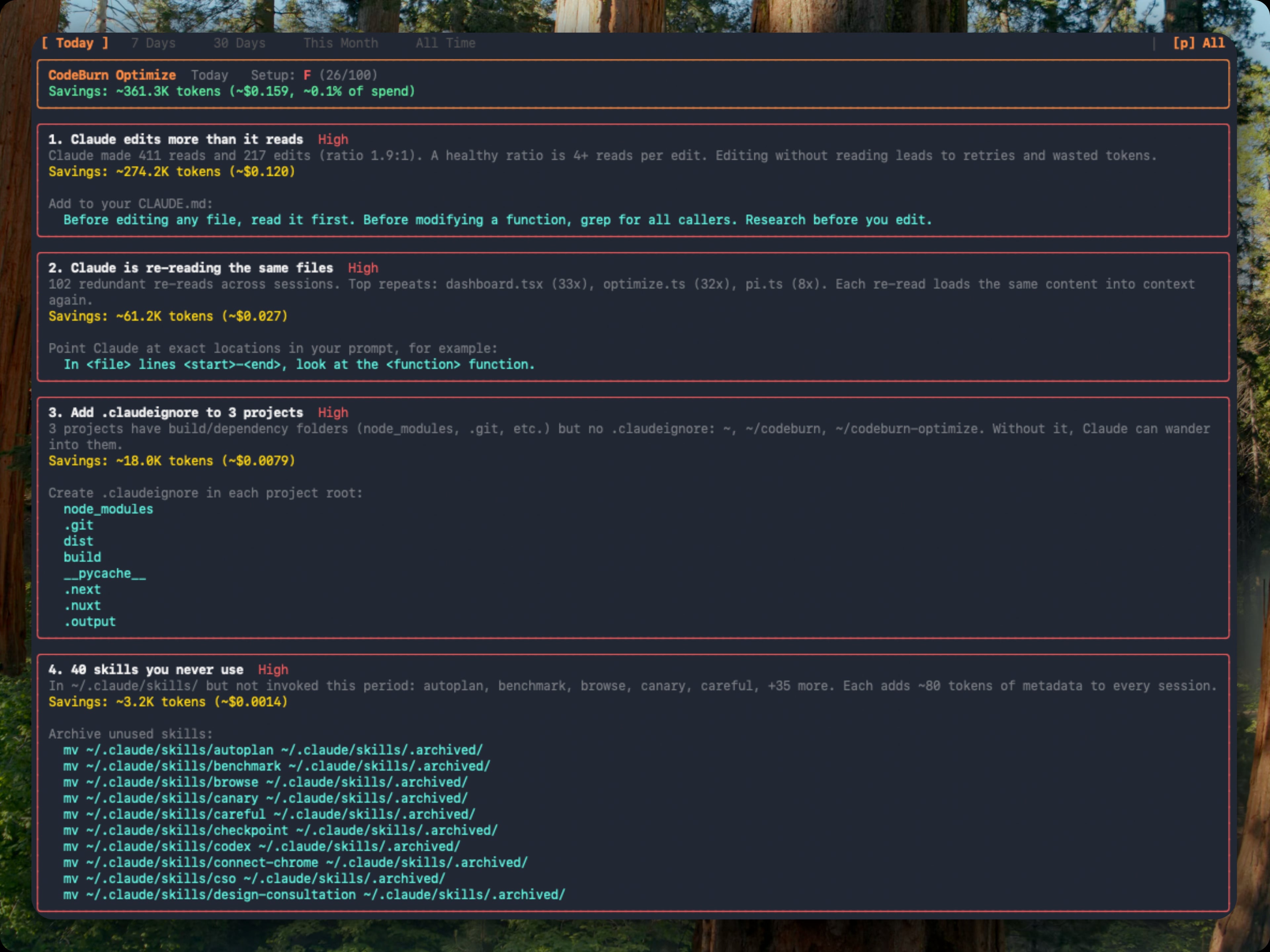
Each finding shows the estimated token and dollar savings plus a ready-to-paste fix: a CLAUDE.md line, an environment variable, or a mv command to archive unused items. Findings are ranked by urgency (impact weighted against observed waste) and rolled up into an A to F setup health grade. Repeat runs classify each finding as new, improving, or resolved against a 48-hour recent window.
You can also open it inline from the dashboard: press o when a finding count appears in the status bar, b to return.
codeburn compare                        # interactive model picker (default: last 6 months)
codeburn compare -p week                # last 7 days
codeburn compare -p today               # today only
codeburn compare --provider claude      # Claude Code sessions only
Which model is actually better for your work? Press c in the dashboard, or run codeburn compare. Arrow keys switch periods, b to return.
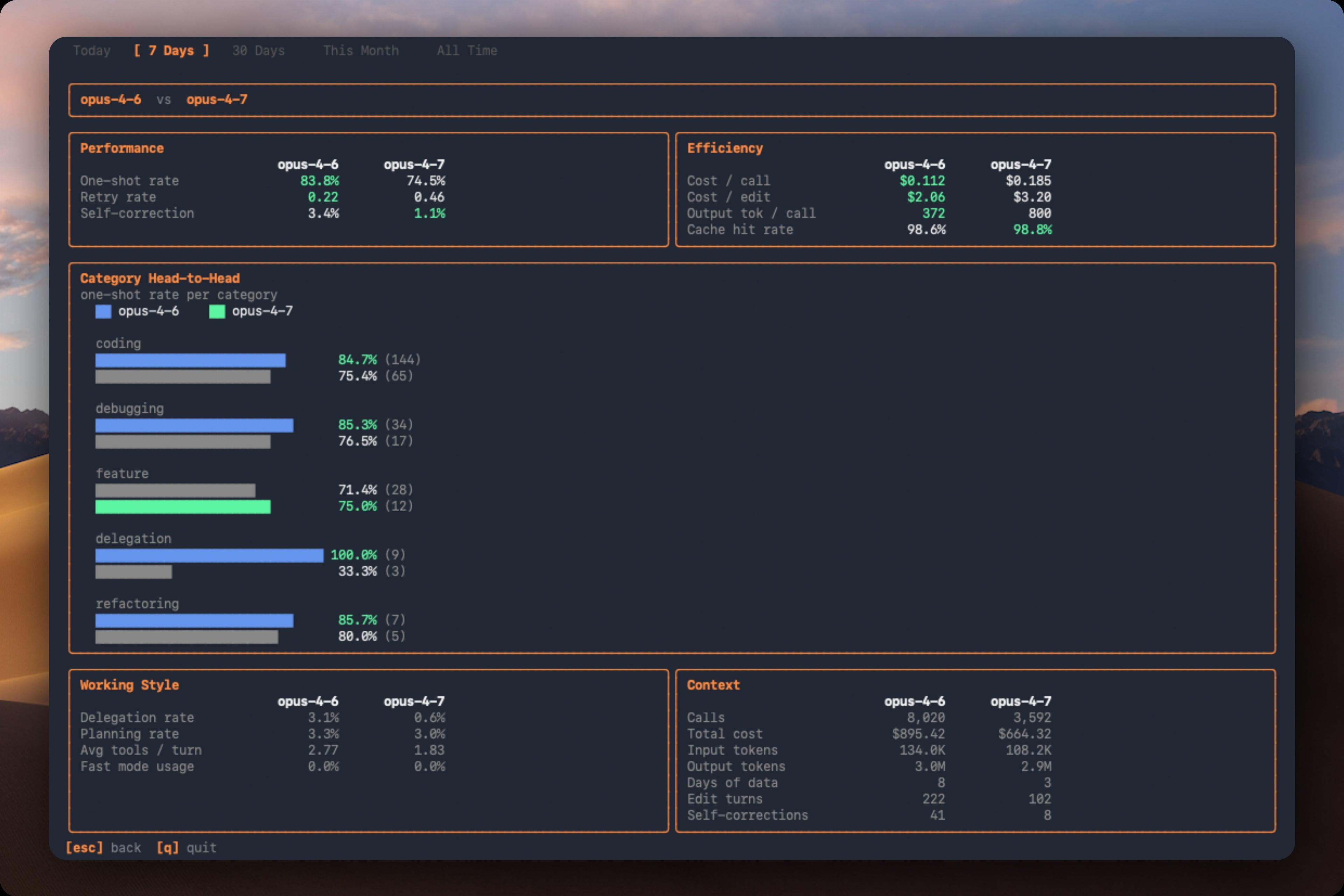
| Section | Metric | What it measures |
|---|---|---|
| Performance | One-shot rate | Edits that succeed without retries |
| Performance | Retry rate | Average retries per edit turn |
| Performance | Self-correction | Turns where the model corrected its own mistake |
| Efficiency | Cost per call | Average cost per API call |
| Efficiency | Cost per edit | Average cost per edit turn |
| Efficiency | Output tokens per call | Average output tokens per call |
| Efficiency | Cache hit rate | Proportion of input from cache |
Also compares per-category one-shot rates, delegation rate, planning rate, average tools per turn, and fast mode usage.
codeburn yield                  # last 7 days (default)
codeburn yield -p today         # today only
codeburn yield -p 30days        # last 30 days
codeburn yield -p month         # this calendar month
codeburn yield --format json    # productive/reverted/abandoned spend as JSON
Did the spend actually ship? codeburn yield correlates AI sessions with git commits by timestamp:
| Category | Meaning |
|---|---|
| Productive | Commits from this session landed in main |
| Reverted | Commits were later reverted |
| Abandoned | No commits near session, or commits never merged |
Requires a git repository. Run from your project directory.
codeburn web                    # opens http://localhost:4747 in your browser
codeburn web -p 30days          # start on a different period
codeburn web --port 8080        # pick a port (falls back to a free one if taken)
codeburn web --no-open          # start the server without opening a browser
A local web dashboard with the same task, model, tool, and project breakdowns as the TUI, rendered with charts. Everything is read from disk on your machine and the server binds to localhost; nothing is uploaded.
See one total across your laptop, desktop, and work machine on the same network. On each other device, share its usage:
codeburn share --pair # opens a pairing window and prints a PINThen add it once from your main device (the PIN authorizes the pairing):
codeburn devices add            # find nearby devices and pair, or: add <host> --pin <pin>
codeburn devices                # combined totals by machine
codeburn devices rm <name>      # forget a device
Pairing is PIN-authorized and stays on your local network. You can also discover and pair devices straight from the browser dashboard.
codeburn menubarOne command: downloads the latest .app, installs into ~/Applications, and launches it. Re-run with --force to reinstall. Native Swift and SwiftUI app lives in mac/ (see mac/README.md for build details).
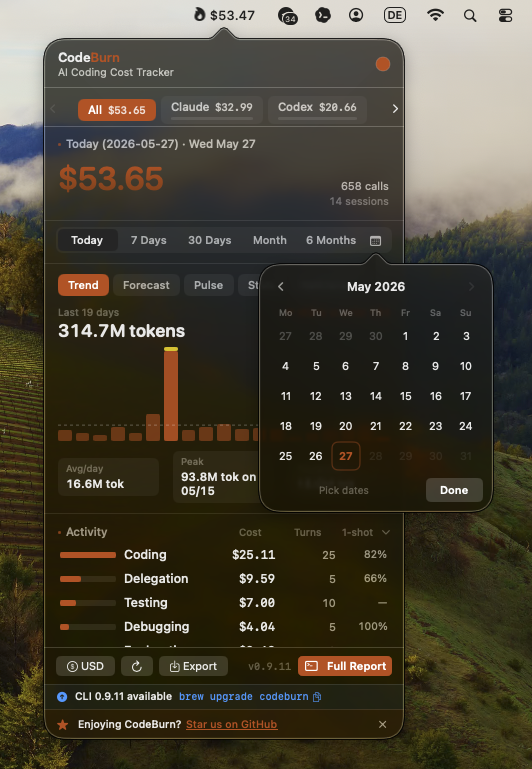
The menubar icon shows the spend period selected in Settings (Today by default; Week, Month, and 6 Months are also available). Non-today periods add a short suffix such as $42 / mo so the menu bar value stays clear. Click to open a popover with agent tabs, period switcher (Today, 7 Days, 30 Days, Month, All), Trend, Forecast, Pulse, Stats, and Plan insights, activity and model breakdowns, optimize findings, and CSV/JSON export. Refreshes every 30 seconds.
You can also set the menubar status period from Terminal:
defaults write org.agentseal.codeburn-menubar CodeBurnMenubarPeriod -string monthAllowed values are today, week, month, and sixMonths. Relaunch the app to apply external defaults changes.
Compact mode shrinks the menubar item to fit the text, dropping decimals (e.g. $110 instead of $110.20):
defaults write org.agentseal.codeburn-menubar CodeBurnMenubarCompact -bool trueRelaunch the app to apply. To revert: defaults delete org.agentseal.codeburn-menubar CodeBurnMenubarCompact.
CodeBurn auto-detects which AI tools you use. Each logo links to its provider doc.


If multiple providers have session data on disk, press p in the dashboard to toggle between them.
Each provider doc lists the exact data location, storage format, and known quirks. Linux and Windows paths are detected automatically. If a path has changed or is wrong, please open an issue.
The --provider flag filters any command to a single provider: codeburn report --provider claude, codeburn today --provider codex, codeburn export --provider cursor. Works on all commands: report, today, month, overview, status, export, web, optimize, compare, yield.
Adding a new provider is a single file. See src/providers/codex.ts for an example.
All commands and keyboard shortcuts
Run codeburn for the dashboard, or use a subcommand below. Most commands also accept --provider, --project / --exclude, and a period flag (-p today|week|30days|month|all).
Dashboard & reports
| Command | What it does |
|---|---|
codeburn |
Interactive dashboard, last 7 days (the default view) |
codeburn today |
Today's usage |
codeburn month |
This calendar month's usage |
codeburn overview |
Plain-text monthly summary, copy-pasteable (--no-color, --from/--to) |
codeburn report -p 30days |
Rolling 30-day window |
codeburn report -p all |
Every recorded session |
codeburn report --from 2026-04-01 --to 2026-04-10 |
An exact date range |
codeburn report --format json |
Full dashboard data as JSON, printed to stdout |
codeburn report --refresh 60 |
Auto-refresh every 60s (default 30s; --refresh 0 disables) |
Status & export
| Command | What it does |
|---|---|
codeburn status |
Compact one-liner: today + month totals |
codeburn status --format json |
The same totals as JSON |
codeburn export |
CSV covering today, 7 days, and 30 days |
codeburn export -f json |
Export as JSON instead of CSV |
Web & devices
| Command | What it does |
|---|---|
codeburn web |
Local browser dashboard with charts (http://localhost:4747) |
codeburn share --pair |
Share this device's usage to your other devices (PIN pairing) |
codeburn devices add |
Find and pair a nearby device |
codeburn devices |
Combined usage totals across your paired devices |
Analysis
| Command | What it does |
|---|---|
codeburn optimize |
Scan for waste and print copy-paste fixes (last 30 days) |
codeburn optimize -p week |
Scope the waste scan to the last 7 days |
codeburn compare |
Side-by-side model comparison |
codeburn yield |
Productive vs reverted/abandoned spend, correlated against git |
codeburn yield -p 30days |
Yield analysis for the last 30 days |
Models
| Command | What it does |
|---|---|
codeburn models |
Per-model token + cost table (last 30 days) |
codeburn models --by-task |
Break each model into per-task-type rows |
codeburn models --top 10 |
Only the 10 most expensive models |
codeburn models --format markdown |
Emit a paste-friendly markdown table |
codeburn models --task feature |
Filter to feature-development work |
codeburn models --provider claude |
Filter to a single provider |
Arrow keys switch between Today, 7 Days, 30 Days, Month, and 6 Months (use --from / --to for an exact historical window). Press q to quit, 1 2 3 4 5 as shortcuts, c to open model comparison, o to open optimize. The dashboard auto-refreshes every 30 seconds by default (--refresh 0 to disable). It also shows average cost per session and the five most expensive sessions across all projects.
Pricing, task categories, plans, currency, filtering, and more
Prices every API call using input, output, cache read, cache write, and web search token counts, with a fast mode multiplier for Claude. Prices are fetched from LiteLLM and cached locally for 24 hours at ~/.cache/codeburn/. Hardcoded fallbacks for all Claude and GPT-5 models prevent fuzzy-matching mispricing.
13 categories classified from tool usage patterns and user message keywords. No LLM calls, fully deterministic.
| Category | What triggers it |
|---|---|
| Coding | Edit, Write tools |
| Debugging | Error/fix keywords + tool usage |
| Feature Dev | "add", "create", "implement" keywords |
| Refactoring | "refactor", "rename", "simplify" |
| Testing | pytest, vitest, jest in Bash |
| Exploration | Read, Grep, WebSearch without edits |
| Planning | EnterPlanMode, TaskCreate tools |
| Delegation | Agent tool spawns |
| Git Ops | git push/commit/merge in Bash |
| Build/Deploy | npm build, docker, pm2 |
| Brainstorming | "brainstorm", "what if", "design" |
| Conversation | No tools, pure text exchange |
| General | Skill tool, uncategorized |
Daily cost chart, per-project, per-model (Opus, Sonnet, Haiku, GPT-5, GPT-4o, Gemini, Kiro, and more), per-activity with one-shot rate, core tools, shell commands, and MCP servers.
For categories that involve code edits, CodeBurn tracks file-aware retry cycles. A retry is when the same file is re-edited after a shell command in between (Edit foo.ts, Bash, Edit foo.ts). Editing different files across shell steps is not a retry. The one-shot column shows the percentage of edit turns that succeeded without retries. Coding at 90% means the AI got it right first try 9 out of 10 times. File-level tracking is available for Claude, Codex, and Goose; other providers fall back to tool-name-based detection.
codeburn plan set claude-max                                  # $200/month
codeburn plan set claude-pro                                  # $20/month
codeburn plan set cursor-pro                                  # $20/month
codeburn plan set custom --monthly-usd 200 --provider codex   # ChatGPT Pro-style custom plan
codeburn plan reset --provider codex                          # remove one provider plan
codeburn plan set none                                        # disable plan view
codeburn plan                                                 # show configured plans
codeburn plan reset                                           # remove plan config
Subscription tracking for Claude Pro, Claude Max, Cursor Pro, and custom provider plans. Plans are stored per provider, so you can track Claude and Codex/Cursor subscriptions at the same time; the dashboard shows one overage line per active provider plan. A legacy/custom all plan remains a single aggregate plan and is replaced when you add a provider-specific plan, avoiding double-counted overage rows. Existing single-plan config is still read as a fallback. Presets use publicly stated plan prices (as of April 2026); they do not model exact token allowances, because vendors do not publish precise consumer-plan limits.
codeburn currency GBP          # set to British Pounds
codeburn currency AUD          # set to Australian Dollars
codeburn currency JPY          # set to Japanese Yen
codeburn currency CNY          # set to Chinese Yuan
codeburn currency              # show current setting
codeburn currency --reset      # back to USD
Any ISO 4217 currency code is supported (162 currencies). Exchange rates fetched from Frankfurter (European Central Bank data, free, no API key) and cached for 24 hours. Config stored at ~/.config/codeburn/config.json. The currency setting applies everywhere: dashboard, status bar, menu bar, CSV/JSON exports, and JSON API output.
If you see $0.00 for some models, the model name reported by your provider does not match any entry in the LiteLLM pricing data. This commonly happens when using a proxy that rewrites model names.
codeburn model-alias "my-proxy-model" "claude-opus-4-6"   # add alias
codeburn model-alias --list                                # show configured aliases
codeburn model-alias --remove "my-proxy-model"             # remove alias
Aliases are stored in ~/.config/codeburn/config.json and applied at runtime before pricing lookup. The target name can be anything in the LiteLLM model list or a canonical name from the fallback table (e.g. claude-sonnet-4-6, claude-opus-4-5, gpt-4o). Built-in aliases ship for known proxy model name variants. User-configured aliases take precedence over built-ins.
codeburn report --project myapp                  # show only projects matching "myapp"
codeburn report --exclude myapp                  # show everything except "myapp"
codeburn report --exclude myapp --exclude tests  # exclude multiple projects
codeburn month --project api --project web       # include multiple projects
codeburn export --project inventory              # export only "inventory" project data
Filter by provider, project name (case-insensitive substring), or exact date range. The --project and --exclude flags work on all commands and can be combined with --provider.
codeburn report --from 2026-04-01 --to 2026-04-10   # explicit window
codeburn report --from 2026-04-01                    # this date through today
codeburn report --to 2026-04-10                      # earliest data through this date
Either flag alone is valid. Inverted or malformed dates exit with a clear error. In the TUI, the custom range sets the initial load only; pressing 1 through 5 switches back to predefined periods.
report, today, and month support --format json to output the full dashboard data as structured JSON to stdout:
codeburn report --format json             # 7-day JSON report
codeburn today --format json              # today's data as JSON
codeburn month --format json              # this month as JSON
codeburn report -p 30days --format json   # 30-day window
The JSON includes all dashboard panels: overview (cost, calls, sessions, cache hit %), daily breakdown, projects (with avgCostPerSession), models with token counts, activities with one-shot rates, core tools, MCP servers, and shell commands. Pipe to jq for filtering:
codeburn report --format json | jq '.projects'
codeburn today --format json | jq '.overview.cost'
For lighter output, use status --format json (today and month totals only), optimize --format json (setup health, findings, and copy-paste fixes), yield --format json (productive/reverted/abandoned spend), or file exports (export -f json).
Signals and what they might mean
CodeBurn surfaces the data, you read the story. A few patterns worth knowing:
| Signal you see | What it might mean |
|---|---|
| Cache hit < 80% | System prompt or context is not stable, or caching not enabled |
Lots of Read calls per session |
Agent re-reading same files, missing context |
| Low 1-shot rate (Coding 30%) | Agent struggling with edits, retry loops |
| Opus 4.6 dominating cost on small turns | Overpowered model for simple tasks |
dispatch_agent / task heavy |
Sub-agent fan-out, expected or excessive |
| No MCP usage shown | Either you don't use MCP servers, or your config is broken |
Bash dominated by git status, ls |
Agent exploring instead of executing |
| Conversation category dominant | Agent talking instead of doing |
These are starting points, not verdicts. A 60% cache hit on a single experimental session is fine. A persistent 60% cache hit across weeks of work is a config issue.
Per-tool data locations and parsing
| Provider | Data location | Notes |
|---|---|---|
| Claude Code | ~/.claude/projects/<sanitized-path>/<session-id>.jsonl |
Each assistant entry carries model name, token usage (input, output, cache read, cache write), tool_use blocks, and timestamps. |
| Claude (multiple config dirs) | Set via CLAUDE_CONFIG_DIRS (e.g. ~/.claude-work:~/.claude-personal) |
Scans every listed directory and merges sessions into one row per project so totals reflect all your Claude usage. Use : on POSIX, ; on Windows; overrides CLAUDE_CONFIG_DIR. Missing or unreadable directories are skipped. |
| Codex (OpenAI) | ~/.codex/sessions/YYYY/MM/DD/rollout-*.jsonl |
Reads token_count events (per-call and cumulative usage) and function_call entries for tool tracking; attributes cost by project working directory. codeburn report --provider codex views Codex alone. |
| Cursor | SQLite state.vscdb under globalStorage: macOS ~/Library/Application Support/Cursor/User/globalStorage/, Linux ~/.config/Cursor/User/globalStorage/, Windows %APPDATA%/Cursor/User/globalStorage/; results cached at ~/.cache/codeburn/cursor-results.json |
Token counts live in cursorDiskKV entries with a bubbleId: prefix; the cache auto-invalidates when the database changes. "Auto" mode hides the model, so cost is estimated at Sonnet rates (labeled "Auto (Sonnet est.)"), and a Languages panel replaces Core Tools/Shell/MCP since Cursor logs no individual tool calls. First run on a large database can take a minute, then results are cached. |
| OpenCode | SQLite ~/.local/share/opencode/opencode*.db (respects XDG_DATA_HOME) |
Queries session, message, and part read-only and recalculates cost via LiteLLM (falling back to OpenCode's own cost field for unpriced models). Subtask sessions (parent_id IS NOT NULL) are excluded to avoid double counting; multiple channel databases are supported. |
| Gemini CLI | ~/.gemini/tmp/<project>/chats/session-*.json |
One JSON file per session with real token counts (input, output, cached, thoughts) per message, so no estimation is needed. Input is reported inclusive of cached, so CodeBurn subtracts cached before pricing to avoid double charging. |
| Antigravity (CLI & IDE) | Session files under .gemini/ folders, plus the running language server |
Pulls granular trajectory and pricing from the language server process. For the short-lived CLI, optionally install a status-line hook with codeburn antigravity-hook install so usage is captured between menubar refreshes. The IDE is detected via the --app-data-dir antigravity-ide flag on Windows. |
| GitHub Copilot | ~/.copilot/session-state/ (legacy CLI) and VS Code/VSCodium workspaceStorage/*/GitHub.copilot-chat/transcripts/ |
Editor transcripts carry no explicit token counts, so tokens are estimated from content length and the model is inferred from tool call ID prefixes. |
| Kiro | .chat JSON files |
Token counts are estimated from content length. The model is not exposed, so sessions are labeled kiro-auto and costed at Sonnet rates. |
| Mistral Vibe | ~/.vibe/logs/session/ (or $VIBE_HOME/logs/session/); each folder has meta.json + messages.jsonl |
Reads cumulative prompt/completion totals and model pricing from meta.json, then the first user prompt and tool calls from messages.jsonl. Emits one record per session (source data is cumulative, not per turn); subagent sessions under agents/ are counted separately. |
| OpenClaw | ~/.openclaw/agents/*.jsonl (legacy .clawdbot, .moltbot, .moldbot) |
Token usage comes from assistant message usage blocks; the model from modelId or message.model. |
| Warp | ~/Library/Group Containers/2BBY89MBSN.dev.warp/Library/Application Support/dev.warp.Warp-Stable/warp.sqlite (Preview fallback) |
Reads agent_conversations, ai_queries, and blocks, emitting one call per finalized exchange. Exchange token share is estimated from prompt-size weighting normalized to conversation totals; run_command blocks attach to the nearest preceding exchange by timestamp. |
| Forge | SQLite ~/.forge/.forge.db |
Queries conversations read-only and parses context.messages. Assistant usage entries provide prompt, completion, and cached counts; CodeBurn subtracts cached from prompt for input pricing, emits one call per assistant message, and extracts tool calls plus shell commands. |
| Pi / OMP | ~/.pi/agent/sessions/<sanitized-cwd>/*.jsonl (Pi), ~/.omp/agent/sessions/<sanitized-cwd>/*.jsonl (OMP) |
Each assistant message carries usage (input, output, cacheRead, cacheWrite) plus inline toolCall blocks. Tool names normalize to the standard set (bash → Bash, dispatch_agent → Agent); bash commands come from toolCall.arguments.command. |
| Codebuff (formerly Manicode) | ~/.config/manicode/projects/<project>/chats/<chatId>/chat-messages.json (honors CODEBUFF_DATA_DIR; walks manicode-dev / manicode-staging) |
Bills in credits, so each completed assistant message is costed at the public rate of $0.01/credit via msg.credits. When an upstream provider's stashed RunState records token-level usage (message.metadata.runState.sessionState.mainAgentState.messageHistory[*].providerOptions), the real tokens and LiteLLM cost take precedence. Native tool names (read_files, str_replace, run_terminal_command, spawn_agents) normalize to Read, Edit, Bash, Agent. |
| Cline / Roo Code / KiloCode | VS Code globalStorage: Cline at saoudrizwan.claude-dev and ~/.cline/data; Roo Code and KiloCode across VS Code, VS Code Insiders, and VSCodium |
Cline-family agents. CodeBurn reads ui_messages.json from each task directory, extracting token counts from type: "say" entries with say: "api_req_started". |
| IBM Bob | User/globalStorage/ibm.bob-code/tasks/<task-id>/ (GA IBM Bob and preview Bob-IDE app folders) |
Reads ui_messages.json for API request token/cost records and api_conversation_history.json for the selected model. |
| Kimi Code CLI | $KIMI_SHARE_DIR/sessions/<workdir-hash>/<session-id>/ or ~/.kimi/sessions/<workdir-hash>/<session-id>/ |
Reads wire.jsonl StatusUpdate.token_usage records, mapping input_other, input_cache_read, input_cache_creation, and output into the standard token columns; includes subagents under each session's subagents/ folder. |
| Vercel AI Gateway | Vercel AI Gateway reporting API (cloud, not local logs) | Set AI_GATEWAY_API_KEY or VERCEL_OIDC_TOKEN (from vercel env pull / vercel dev); requires a Vercel plan with Custom Reporting. Without credentials it's skipped silently in the combined dashboard. |
CodeBurn deduplicates messages (by API message ID for Claude, by cumulative token cross-check for Codex, by conversation/timestamp for Cursor, by session ID for Gemini, by session+message ID for OpenCode, by responseId for Pi/OMP, by chat folder + message ID for Codebuff, by session+message ID for Kimi), filters by date range per entry, and classifies each turn.
Override data directories and paths
| Variable | Description |
|---|---|
CLAUDE_CONFIG_DIR |
Override Claude Code data directory (default: ~/.claude) |
CLAUDE_CONFIG_DIRS |
OS-delimited list of Claude data directories to scan together (e.g. ~/.claude-work:~/.claude-personal). Sessions merge into one row per project. Overrides CLAUDE_CONFIG_DIR when set. |
CODEX_HOME |
Override Codex data directory (default: ~/.codex) |
CODEBUFF_DATA_DIR |
Override Codebuff data directory (default: ~/.config/manicode) |
FACTORY_DIR |
Override Droid data directory (default: ~/.factory) |
KIMI_SHARE_DIR |
Override Kimi Code CLI share directory (default: ~/.kimi) |
KIMI_MODEL_NAME |
Override Kimi model name when Kimi sessions do not record the model |
QWEN_DATA_DIR |
Override Qwen data directory (default: ~/.qwen/projects) |
VIBE_HOME |
Override Mistral Vibe home directory (default: ~/.vibe) |
WARP_DB_PATH |
Override Warp database path (default: Warp Stable, then Warp Preview) |
CodeBurn is free, runs entirely on your machine, and exists to cut your AI bill. If it has already saved you more than a sponsorship costs, consider sending a little of that back.
Keeping 30 integrations accurate is constant work. The tools underneath change every week: Cursor reshapes its database, Claude moves a config path, new models ship at new prices. Sponsorship keeps CodeBurn current with all of it, so the numbers you see are always the real ones.
Where your sponsorship goes:
- Honest numbers. New models and price changes mapped quickly, so your cost is the real cost, not a guess.
- More tools. Every one of the 30 providers started as a single file. Sponsorship funds the next one.
- Fast fixes. When a vendor breaks something, paid time is what gets it patched now instead of someday.
Sponsoring as a team or company? Your logo lands right here, in front of every developer who opens the repo. The first sponsor gets it to themselves until the next one shows up.

MIT
Pricing data from LiteLLM. Exchange rates from Frankfurter.
Built by AgentSeal.