You signed in with another tab or window. Reload to refresh your session.You signed out in another tab or window. Reload to refresh your session.You switched accounts on another tab or window. Reload to refresh your session.Dismiss alert
Let's learn about Bash via these 58 free blog posts. They are ordered by HackerNoon reader engagement data. Visit the /Learn or LearnRepo.com to find the most read blog posts about any technology.
The Bourne-Again SHell, a command processor for Unix-like operating systems, essential for scripting and automating tasks in development and system administration.
Microsoft recently joined hands with Canonical (the parent company of Ubuntu) to bring the entire userland into Windows, minus the Linux Kernel. So as a result, you, as a developer, get access to the whole range of Ubuntu command-line tools and utilities with bash shell integrated with Windows. Let’s look at how we can install Bash on Windows 10 and take full advantage of the new feature.
If you are a Python programmer, it is quite likely that you have experience in shell scripting. It is not uncommon to face a task that seems trivial to solve with a shell command. Therefore, it is useful to be familiar with how to call these commands efficiently from your Python code and know their limitations.
In this article, you will walk through the creation of a simple Bash shell script to send messages to Telegram messenger using the Curl command. Then you will use this script to send a notification on every ssh login into your server.
Normal development flow requires continuous patching the production database with local changes normally made automatically by the orm software, this method is not perect but deceptively simple, all we'll use is standard Unix commands, and is good enough for us.
If you are looking for a way to use Bash shell, or Unix shell commands within Javascript to automate your workflow, then ShellJS is the perfect library for you.
Are you frustrated to run same scripts again & again before resuming your work?? Here is a simple solution to automate starting those scripts before you start.
Dive into the exciting world of Bash scripting and learn how to automate tasks, manage files, and navigate your system like a pro. This beginner-friendly tutori
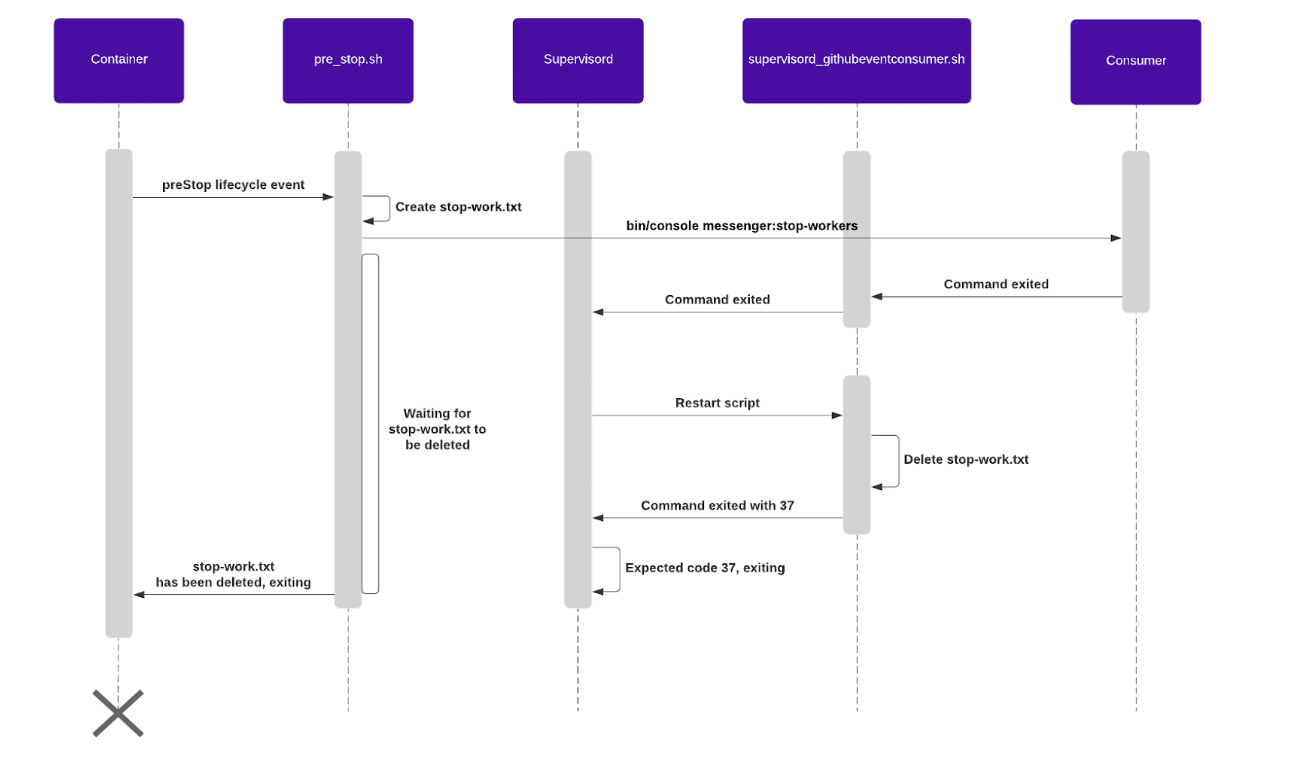
At Debricked we have been using Symfony for our web backend for a while now. It has served us very well and when they announced the Messenger component back in Symfony 4.1, we were eager to try it out. Since then we have used the component for asynchronous queuing emails.
Bash is a language that is quite useful for automation no matter what language you write in. Bash can do so many powerful system level tasks. Even if you are on windows these days you are likely to come accross bash inside a cloud VM, Continuous Integration, or even inside of docker.
For years I have been frustrated and I wanted to find a proper way of sorting my pictures. I had photos coming from several devices, and made manual copies on my laptop and on my external hard drive. I ended up with tons of folders and a lot of duplicates.
Amazon web services (AWS) is a powerful platform for almost every webservice you can imagine. With AWS API Gateway and Lambda you are able to create REST API’s with ease! API gateway is enables you to create the API. Lambda lets you execute code when the API is invoked. This code can be in many programming languages like Python or Node.JS.
Most of the programmers use programming languages such as C,C++, Python, Javascript. They use shell for many tasks . But most of them don’t know that they can program with shell for automating stuff that we find ourselves doing over and over again.
I am a lazy DevOps Engineer. So whenever I came across the same task more than 2 times I automate that. Although now we have many automation tools, still the first thing that hit into our mind for automation is bash or shell script.
Can you use your command-line shell history as a second brain? Should you? Here are some ideas to help leverage the humble Ctrl-r key to supercharge your work.
As good as it is, having your own blog outside of Medium is still not a bad idea. It enables you to have another channel you can totally own to communicate with your readers. And who knows, no company can last forever, what if Medium got acquired by some other company or something even worse happen. You can still sleep well at night knowing you won’t lose all your articles.
If you're like me you create scripts to automate things all the time. While you can do quite a bit with bash, it's just a lot easier to use your primary language--in this case TypeScript. With just a few tricks you can start writing your scripts in TypeScript.
Few things are more satisfying to me than one elegant line of Bash that automates hours of tedious work. As part of some recent explorations into automatically re-creating my laptop with Bash scripts (post to come!), I wanted to find a way to easily clone my GitHub-hosted repositories to a new machine. After a bit of digging around, I wrote a one-liner that did just that. Then, in the spirit of not putting all our eggs in the same basket, I wrote another one-liner to automatically create and push to GitLab-hosted backups as well. Here they are.
Master essential Linux terminal commands with explanations and practical examples. Learn how to navigate, copy, delete files, and more. Enhance your command-lin
I have just released an open-source introduction to Bash scripting ebook/guide that will help you learn the basics of Bash scripting and start writing awesome Bash scripts that will help you automate your daily SysOps, DevOps, and Dev tasks.
Send visual feedback and reminders from scripts, using notify-send and at commands on Linux. Also how to get MacOS to do it as well, through some jury-rigging.
If your work needs you to use Linux, these Bash Tips can save you plenty of time and effort in your day-to-day operations while streamlining your processes.
With Bash, developers can do lots of computer processes right from the terminal without ever having to use their mouse or keyboard for interaction. Learn Bash.
In part one, I have shown how to create a remote development using DigitalOcean and rsync. In part two, I will show how to automate the entire process using Bash script.
Explore the command line through funny analogies, uncover essential commands, and get insights from an iOS developer's journey into CLI and terminal's darkness
Linux follows tough rules when it comes to permission. Being a root user or sudo user gives you permission to do almost anything which normal user don’t have. Several commands need sudo keyword to run and each time you try to run sudo, Linux asks for a password, today we will configure a passwordless sudo.
We created a script that can be automatically run on certain kinds of events, as well as interpret its results, basing the automation execution logic on them.
Amy Tom chats with Michael Nitschinger, a Software Architect at Couchbase, and Jonathan D. Turner (AKA JT), the Co-Creator of NuShell, about Shell scripting.
If you have worked with software systems long enough you have surely worked with crons. Cron is a time-based task scheduler in UNIX-like operating systems. We use to run some task/script periodically, for example, every day at 9:30 AM.
I spend a lot of time working on the bash command line, and I've come to highly value the availability of my custom set of shortcuts, preferences, and tricks, r