


Note: We are actively working on hls4ml integration to auto-convert sparse models to HLS, along with a major upgrade with partial parallelization and streaming for sparse layers in HLS. Stay tuned!
With Python >= 3.10:
pip install sparsepixels
Import sparse layers and quantization library (HGQ2):
import keras
from keras.layers import Flatten, Activation
from hgq.layers import QConv2D, QDense
from hgq.config import QuantizerConfigScope, LayerConfigScope
from hgq.quantizer.config import QuantizerConfig
from sparsepixels.layers import InputReduce, QConv2DSparse, AveragePooling2DSparse
Build an example sparse CNN within HGQ2 quantization scopes. A custom input quantizer
config with higher initial fractional bits (f0=8) is used to prevent the default (f0=2)
from zeroing out sparse signals in early training epochs:
iq_conf = QuantizerConfig(place='datalane', q_type='kif', i0=4, f0=8, overflow_mode='WRAP')

with (
    QuantizerConfigScope(place='all', default_q_type='kbi', overflow_mode='SAT_SYM'),
    QuantizerConfigScope(place='datalane', default_q_type='kif', overflow_mode='WRAP'),
    LayerConfigScope(enable_ebops=True, enable_iq=True, beta0=1e-5),
):
    x_in = keras.Input(shape=(28, 28, 1), name='x_in')

    # Sparse input reduction: retain up to n_max_pixels active pixels
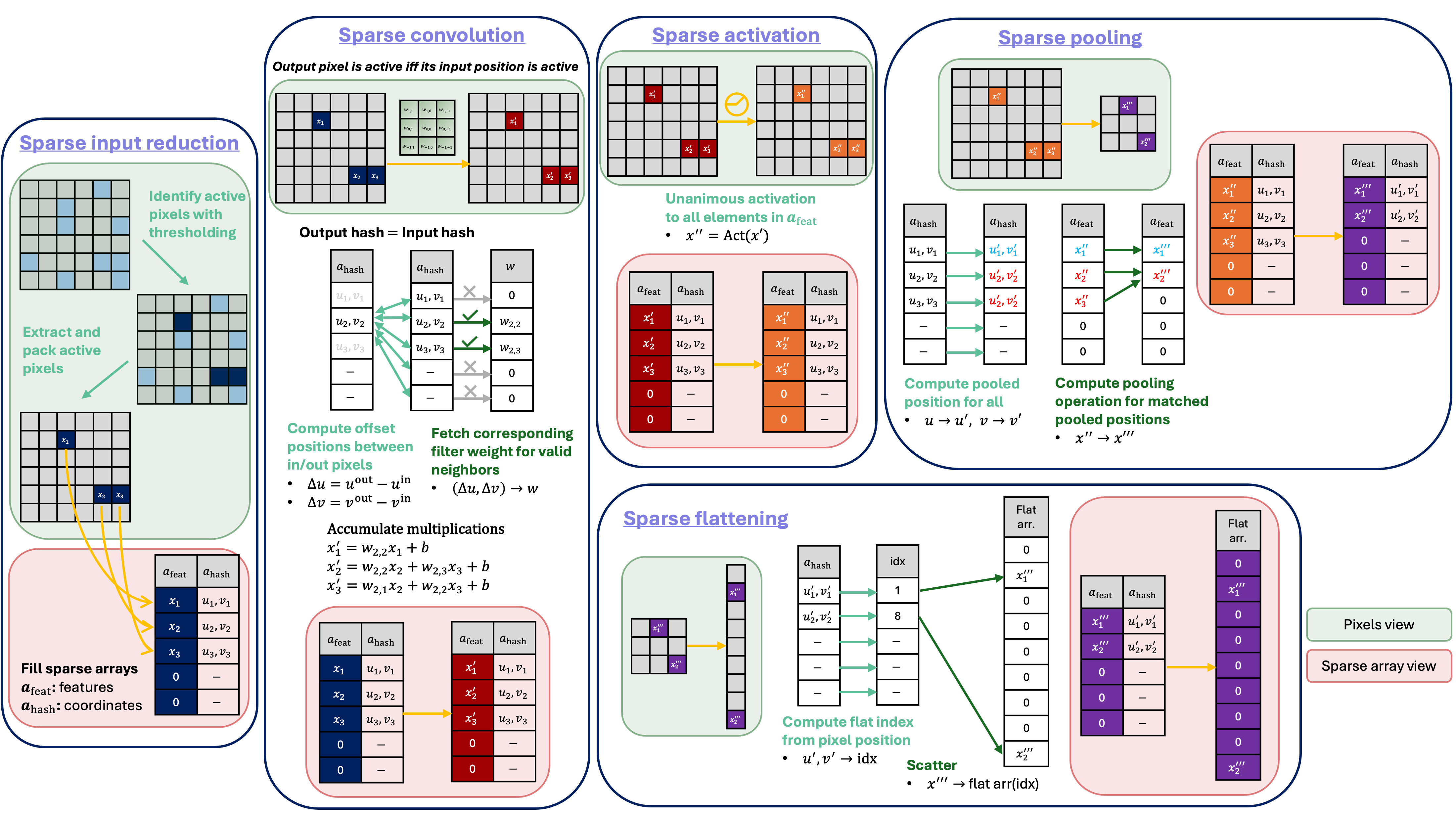
    x, keep_mask = InputReduce(n_max_pixels=20, threshold=0.1, name='input_reduce')(x_in)

    # Sparse convolution
    x = QConv2DSparse(filters=3, kernel_size=3, name='conv1', padding='same', strides=1,
                      activation='relu', iq_conf=iq_conf)([x, keep_mask])

    # Sparse pooling
    x, keep_mask = AveragePooling2DSparse(2, name='pool1')([x, keep_mask])

    x = Flatten(name='flatten')(x)
    x = QDense(10, name='dense1', activation='relu', iq_conf=iq_conf)(x)
    x = Activation('softmax', name='softmax')(x)

model = keras.Model(x_in, x)Note: A PR adding
sparsepixelssupport to the official hls4ml repo has been submitted but is not yet merged. In the meantime you can install hls4ml from the PR branch on this fork to try the converter:pip install "git+https://github.com/hftsoi/hls4ml.git@sparsepixels"
Once installed, converting a trained sparsepixels model to HLS is as usual:
import hls4ml

hls_config = hls4ml.utils.config_from_keras_model(model, granularity='name')
hls_config.setdefault('Model', {})['PipelineStyle'] = 'dataflow'  # use "#pragma HLS DATAFLOW" (instead of the default "#pragma HLS PIPELINE" for io_parallel)

hls_model = hls4ml.converters.convert_from_keras_model(
    model,
    hls_config=hls_config,
    output_dir='hls_proj/my_sparse_cnn',
    backend='Vitis',
    io_type='io_parallel',  # io_stream is not supported yet
)
hls_model.write()
hls_model.compile()
y_hls = hls_model.predict(x_test)
Note: The converter currently supports only fully parallelized
io_parallelHLS. We are working on expanding to partial parallelization andio_streamfor larger flexibility.
If you find this useful in your research, please consider citing:
@article{Tsoi:2025nvg,
    author = "Tsoi, Ho Fung and Rankin, Dylan and Loncar, Vladimir and Harris, Philip",
    title = "{SparsePixels: Efficient Convolution for Sparse Data on FPGAs}",
    eprint = "2512.06208",
    archivePrefix = "arXiv",
    primaryClass = "cs.AR",
    month = "12",
    year = "2025"
}