Before this tutorial, you should have already completed the Flipper Tutorial. This tutorial targets developers with no experience in ink! and a basic level in Rust.
In this tutorial we will implement events, using the most basic contract Flipper as an example.
In this tutorial you will learn how to define, read, and write storage.
This is a step-by-step explanation of how to perform actions with storage in ink! smart contracts.
When we implement smart contracts, we always need to save some value. Sometimes we need temporary variables and we just use default variables. But in most smart contracts we need to store data that doesn’t disappear after finishing message runtime. Storage is the only way to do this.
- Rust primitives type
boolu{8,16,32,64,128}i{8,16,32,64,128}String- tuples
- arrays
- Substrate specific types:
AccountIdBalanceHash
- ink! provided
- Types provided in
ink_prelude - Types provided in ****
ink_storage
- Types provided in
- Enums
- Custom data structure details
The simplest example of using Storage is in a standard Flipper contract. It implements this way:
#[ink(storage)]
pub struct Flipper {
    value: bool,
}
It just stores bool value on-chain and gives access to the smart contract to read and write this field.
Defining storage is the first step to developing a smart contract. It must include fields to store data on-cain. Ink! makes this process very simple for developers. Owing to the ink! macros, smart contract implementation looks like a simple rust struct that has some fields and implements some methods. So defining Storage is just defining struct with #[ink::storage] macro.
#[ink(storage)]
pub struct Contract {
    ...
}
Every field in the Contract struct will be stored in Storage.
Let’s add some different fields to our Contract to show how it works.
#[ink(storage)]
pub struct Contract {
    bool_value: bool,
    value: i32,
    vec: ink::prelude::vec::Vec<i32>,
    string: ink::prelude::string::String,
    last_account: AccountId,
    hash: Hash,
    balance: Balance,
    map: ink::storage::Mapping<AccountId, i32>
}
But it’s not enough to define Storage yet. As a next step, we need to initialize all fields in the constructor. Let’s define one (a smart contract may have multiple constructors):
impl Contract {
    #[ink(constructor)]
    pub fn new() -> Self {
        Self {
            bool_value: false,
            value: 0,
            vec: ink::prelude::vec::Vec::new(),
            string: ink::prelude::string::String::from(""),
            account: Self::env().caller(),
            hash: Hash::from([0x0; 32]),
            balance: 0,
            map: ink::storage::Mapping::new()
        }
    }
...
}It’s very simple to read from the Storage. You just need to use self.<field> syntax. For example:
#[ink(message)]
pub fn get_value(&self) -> i32 {
    self.value
}As you know, every message takes self as the first argument. If you need to only read values from Storage you may use &self syntax, but if you want to mutate values you should use &mut self. In this case you can use self.<field> = <value> syntax:
#[ink(message)]
pub fn get_value(&self) -> i32 {
    self.value
}

#[ink(message)]
pub fn set_value(&mut self, value: i32) {
    self.value = value;
}We can store Enums in the storage field. Let’s define it:
enum Enum {
    A,
    B,
    C
}

#[ink(storage)]
pub struct Contract {
    ...
		enum_value: Enum,
}
The values of an enum should be referenced as Enum::A, Enum::B, Enum::C.
To understand how Lazy works, let’s dive deeper into the concepts behind ink! storage.
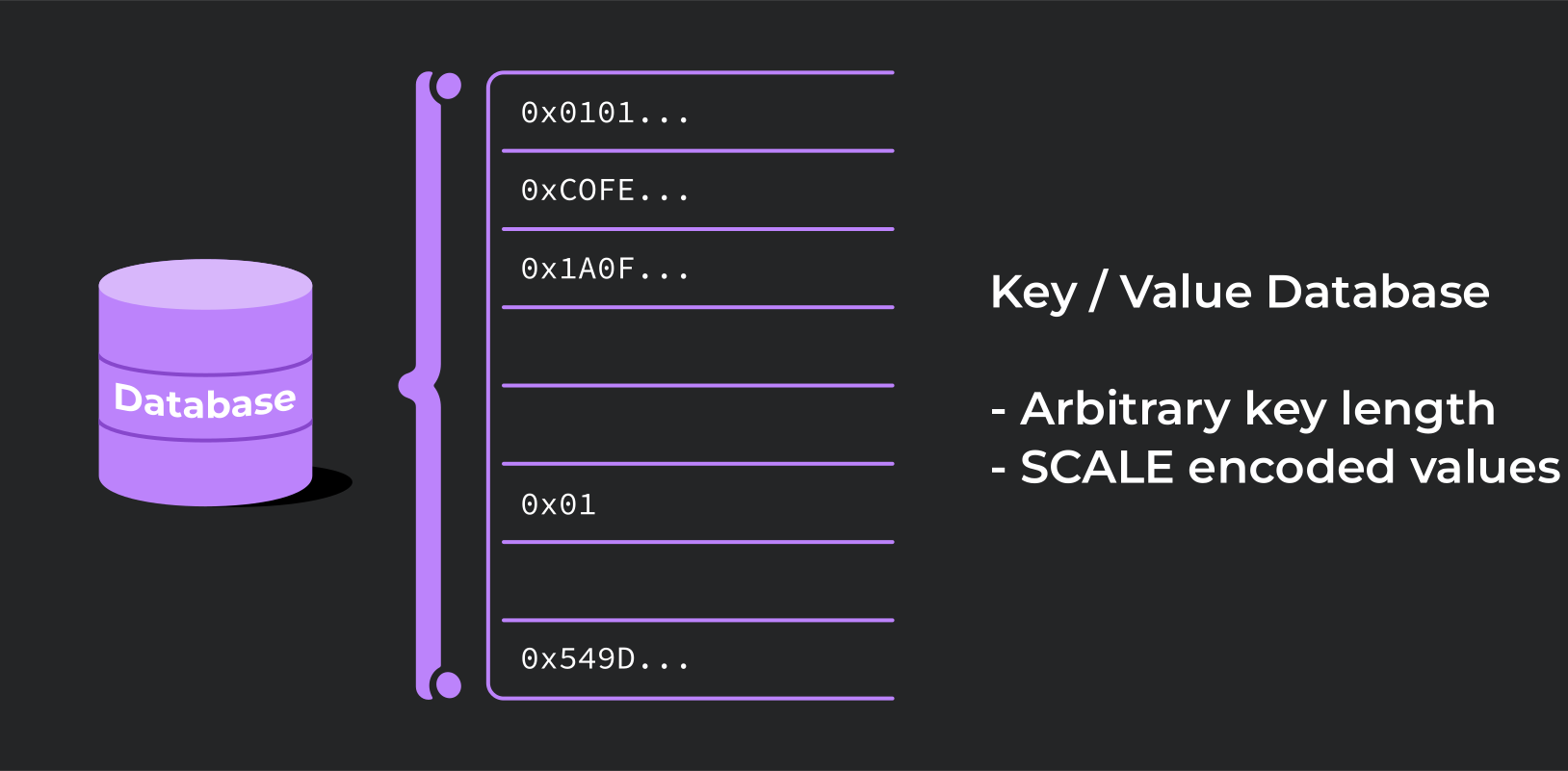
The following image illustrates how ink! storage store values:

Storage data is always encoded with the [SCALE](https://docs.substrate.io/reference/scale-codec/) codec. The storage API works by saving and retrieving entries in a single storage cell. Each storage cell has its own exclusive storage key for accessing the stored data. In many ways, the storage API operates similarly to a traditional key-value database.
Types that can be stored entirely under a single storage cell are considered [Packed](https://docs.rs/ink_storage_traits/4.0.0/ink_storage_traits/trait.Packed.html). By default, ink! tries to store all storage struct fields under a single storage cell. Consequently, with a Packed storage layout, any message interacting with the contract storage will always need to operate on the entire contract storage structure.
If we have a few tiny fields in storage it’s not a problem to load all of them in every message, but if we have a large field with Packed type and if it’s not used in every message, it’s not rational to load this field every time.
In this situation Lazy<> comes into the game. Lazy<> wrapper makes a field to store in another storage cell. And it will be loaded from storage only if you will interact with that field.

https://use.ink/img/storage-layout.svg
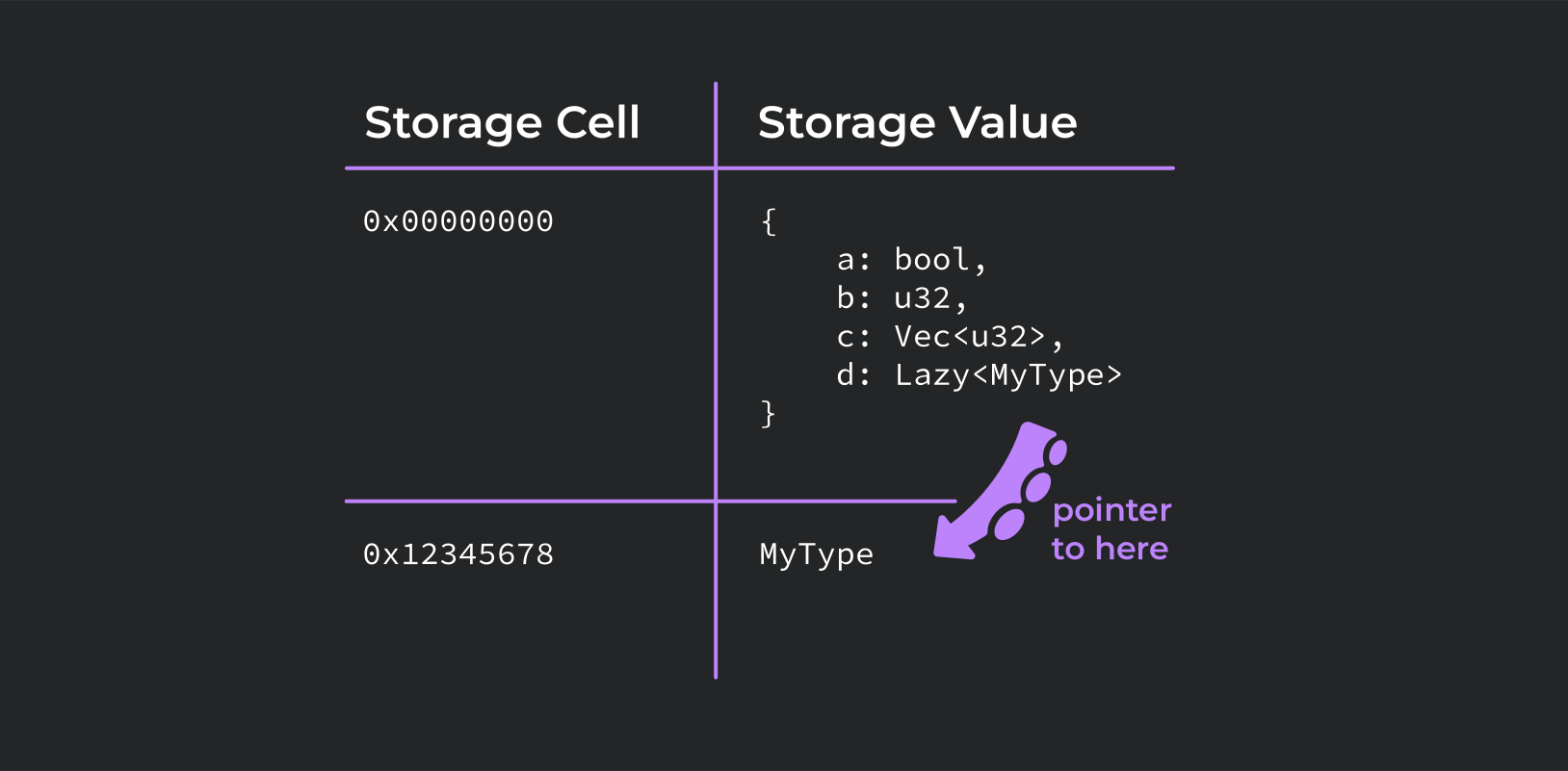
For example, we have a Vec<String> with a huge amount of entries. We want to load it from storage only in one method. So we can wrap it in Lazy<>.
#[ink::contract]
mod contract {
		use ink::storage::Mapping;
		use ink::storage::Lazy;
		use ink::prelude::vec::Vec;

		#[derive(Default)]
		#[ink(storage)]
		pub struct Contract {
		    vec: Lazy<Vec<i32>>,
		}

		impl Contract {
		    #[ink(constructor)]
		    pub fn new() -> Self {
		        Self::default()
		    }

		    #[ink(message)]
		    pub fn get_vec_value(&self) -> Vec<i32> {
		        self.vec.get_or_default()
		    }

		    #[ink(message)]
		    pub fn push_value(&mut self, value: i32) {
		        let mut vec = self.vec.get_or_default();
		        vec.push(value);
		        self.vec.set(&vec);
		    }
		}
}
To read Lazy<> wrapped fields we should use Lazy::get() method and Lazy::set() to write. Also, you can specify the storage key.
#[ink(storage)]
pub struct Contract {
    vec: Lazy<Vec<i32>, ManualKey<0x123123>>,
}
By default, it calculates automatically by [AutoKey](https://docs.rs/ink_storage_traits/4.0.0/ink_storage_traits/struct.AutoKey.html) primitive. But this possibility might be useful to make all your storage keys always stay the same regardless of the version of your contract or ink! itself (note that the key calculation algorithm may change with future ink! versions). Using ManualKey instead of AutoKey might be especially desirable for upgradable contracts, as using AutoKey might result in a different storage key for the same field in a newer version of the contract. This may break your contract after an upgrade.
Mapping is a data structure that is very similar to Map(HashMap, BTreeMap…). The main difference and advantage of Mapping use in smart contracts is the way how key-value pairs are stored in the Storage. Every key-value pair of Mapping is stored in different storage cells and because of that when we want to read or write one value Mapping will load only this key-value pair from the storage. It is called lazy loading. It saves a lot of gas when you use it in your smart contract. However, it is not possible to iterate over the contents of a Mapping. For example, you can use Mapping to save some value for every account that has ever called this smart contract.
#[ink::contract]
mod contract {
use ink::storage::Mapping;

#[ink(storage)]
pub struct Contract {
    values: Mapping<AccountId, i32>,
}

impl Contract {
    #[ink(constructor)]
    pub fn new() -> Self {
        Self {
            values: Mapping::new(),
        }
    }

    #[ink(message)]
    pub fn get_value(&self) -> i32 {
        self.values.get(self.env().caller()).unwrap_or(0)
    }

    #[ink(message)]
    pub fn set_value(&mut self, value: i32) {
        self.values.insert(self.env().caller(), &value);
    }
}
As you see, to get a value from Mapping<K, V> you need to use Mapping::get() function, which returns Option<V>. If there is no value for the requested key it will return None, otherwise Some(value), so we need to unwrap() to get value. To store value in Mapping, just use Mapping::insert(key, value) function.
We can define structs that use any of the types that were used before in this guide and store it in the field. Any custom type wanting to be compatible with ink! storage must implement the [Storable](https://docs.rs/ink_storage_traits/4.0.0/ink_storage_traits/trait.Storable.html) trait, so it can be SCALE [encoded](https://docs.rs/parity-scale-codec/3.2.2/parity_scale_codec/trait.Encode.html) and [decoded](https://docs.rs/parity-scale-codec/3.2.2/parity_scale_codec/trait.Decode.html). Additionally, the traits [StorageLayout](https://docs.rs/ink_storage_traits/4.0.0/ink_storage_traits/trait.StorageLayout.html) and [TypeInfo](https://docs.rs/scale-info/2.3.1/scale_info/trait.TypeInfo.html) are required as well. But don't worry, usually these traits can just be derived:
enum Enum {
    A,
    B,
    C
}

#[derive(scale::Decode, scale::Encode)]
#[cfg_attr(
    feature = "std",
    derive(scale_info::TypeInfo, ink::storage::traits::StorageLayout)
)]
struct Struct {
    bool_value: bool,
    value: i32,
    vec: ink::prelude::vec::Vec<i32>,
    string: ink::prelude::string::String,
    last_account: crate::contract::AccountId,
    hash: Hash,
    balance: Balance,
    map: ink::storage::Mapping<i32, i32>,
    enum_value: Enum
}

#[ink(storage)]
pub struct Contract {
    struct_value: Struct,
}
Also, you can simply use #[ink::storage_item] macro:
#[ink::storage_item]
struct Struct {
    ...
}Now you know how to use storage in ink! smart contracts.