-
Notifications
You must be signed in to change notification settings - Fork 2.3k
Expand file tree
/
Copy pathspringtask.md
More file actions
288 lines (208 loc) · 11.9 KB
/
springtask.md
File metadata and controls
288 lines (208 loc) · 11.9 KB
1
2
3
4
5
6
7
8
9
10
11
12
13
14
15
16
17
18
19
20
21
22
23
24
25
26
27
28
29
30
31
32
33
34
35
36
37
38
39
40
41
42
43
44
45
46
47
48
49
50
51
52
53
54
55
56
57
58
59
60
61
62
63
64
65
66
67
68
69
70
71
72
73
74
75
76
77
78
79
80
81
82
83
84
85
86
87
88
89
90
91
92
93
94
95
96
97
98
99
100
101
102
103
104
105
106
107
108
109
110
111
112
113
114
115
116
117
118
119
120
121
122
123
124
125
126
127
128
129
130
131
132
133
134
135
136
137
138
139
140
141
142
143
144
145
146
147
148
149
150
151
152
153
154
155
156
157
158
159
160
161
162
163
164
165
166
167
168
169
170
171
172
173
174
175
176
177
178
179
180
181
182
183
184
185
186
187
188
189
190
191
192
193
194
195
196
197
198
199
200
201
202
203
204
205
206
207
208
209
210
211
212
213
214
215
216
217
218
219
220
221
222
223
224
225
226
227
228
229
230
231
232
233
234
235
236
237
238
239
240
241
242
243
244
245
246
247
248
249
250
251
252
253
254
255
256
257
258
259
260
261
262
263
264
265
266
267
268
269
270
271
272
273
274
275
276
277
278
279
280
---
category:
- Java企业级开发
tag:
- Spring Boot
title: Spring Boot 整合 Spring Task 实现定时任务
---
定时任务的应用场景其实蛮常见的:
- 数据备份
- 订单未支付则自动取消
- 定时爬取数据
- 定时推送信息
- 定时发布文章
- 定时生成报表
- 等等(想不到其他场景了,就只能等等来凑,等等也算是一种定时的场景吧!)
### Timer
JDK 1.3 就开始支持的一种定时任务的实现方式。内部通过 TaskQueue 的类来存放定时任务,用起来比较简单,但缺陷比较多,比如说一个 Timer 就会起一个线程,任务多了性能就非常差,再比如说如果执行任务期间某个 TimerTask 耗时比较久,就会影响其他任务的调度。
```java
@Slf4j
public class TimerDemo {
public static void main(String[] args) {
TimerTask task = new TimerTask() {
@Override
public void run() {
log.debug("当前时间{}线程名称{}", DateTime.now(),
Thread.currentThread().getName());
}
};
log.debug("当前时间{}线程名称{}", DateTime.now(),
Thread.currentThread().getName());
Timer timer = new Timer("TimerDemo");
timer.schedule(task,1000L);
}
}
```
代码跑起来后的日志如下所示:
```
13:11:45.268 [main] DEBUG top.springtask.TimerDemo - 当前时间2022-04-27 13:11:45线程名称main
13:11:46.280 [TimerDemo] DEBUG top.springtask.TimerDemo - 当前时间2022-04-27 13:11:46线程名称TimerDemo
```
### ScheduledThreadPoolExecutor
JDK 1.5 开始提供的的定时任务,它继承了 ThreadPoolExecutor,实现了 ScheduledExecutorService 接口,所以支持并发场景下的任务执行。同时,优化了 Timer 的缺陷。不过,由于使用了队列来实现定时器,就有出入队列、调整堆等操作,所以定时不是非常非常准确(吹毛求疵)。
```java
@Slf4j
public class ScheduledThreadPoolExecutorDemo {
public static void main(String[] args) throws InterruptedException {
TimerTask task = new TimerTask() {
@Override
public void run() {
log.debug("当前时间{}线程名称{}", DateTime.now(),
Thread.currentThread().getName());
}
};
log.debug("当前时间{}线程名称{}", DateTime.now(),
Thread.currentThread().getName());
ScheduledExecutorService executorService = Executors.newScheduledThreadPool(3);
executorService.scheduleAtFixedRate(task, 1000L,1000L, TimeUnit.MILLISECONDS);
Thread.sleep(1000+1000*4);
executorService.shutdown();
}
}
```
输出结果如下所示:
```
14:43:41.740 [main] DEBUG top.springtask.ScheduledThreadPoolExecutorDemo - 当前时间2022-04-27 14:43:41线程名称main
14:43:42.752 [pool-1-thread-1] DEBUG top.springtask.ScheduledThreadPoolExecutorDemo - 当前时间2022-04-27 14:43:42线程名称pool-1-thread-1
14:43:43.748 [pool-1-thread-1] DEBUG top.springtask.ScheduledThreadPoolExecutorDemo - 当前时间2022-04-27 14:43:43线程名称pool-1-thread-1
14:43:44.749 [pool-1-thread-2] DEBUG top.springtask.ScheduledThreadPoolExecutorDemo - 当前时间2022-04-27 14:43:44线程名称pool-1-thread-2
14:43:45.749 [pool-1-thread-2] DEBUG top.springtask.ScheduledThreadPoolExecutorDemo - 当前时间2022-04-27 14:43:45线程名称pool-1-thread-2
14:43:46.749 [pool-1-thread-2] DEBUG top.springtask.ScheduledThreadPoolExecutorDemo - 当前时间2022-04-27 14:43:46线程名称pool-1-thread-2
```
### 关于 Spring Task
Spring Task 是 Spring 提供的轻量级定时任务工具,也就意味着不需要再添加第三方依赖了,相比其他第三方类库更加方便易用。
好像关于 Spring Task,没有其他废话可说了,我们来直接上手。
第一步,新建配置类 SpringTaskConfig,并添加 @EnableScheduling注解开启 Spring Task。
```java
@Configuration
@EnableScheduling
public class SpringTaskConfig {
}
```
当然了,也可以不新建这个配置类,直接在主类上添加 @EnableScheduling 注解。
```java
@SpringBootApplication
@EnableScheduling
public class CodingmoreSpringtaskApplication {
public static void main(String[] args) {
SpringApplication.run(CodingmoreSpringtaskApplication.class, args);
}
}
```
第二步,新建定时任务类 CronTask,使用 @Scheduled 注解注册 Cron 表达式执行定时任务。
```java
@Slf4j
@Component
public class CronTask {
@Scheduled(cron = "0/1 * * ? * ?")
public void cron() {
log.info("定时执行,时间{}", DateUtil.now());
}
}
```
启动服务器端,发现每隔一秒钟会打印一次日志,证明 Spring Task 的 cron 表达式形式已经起效了。
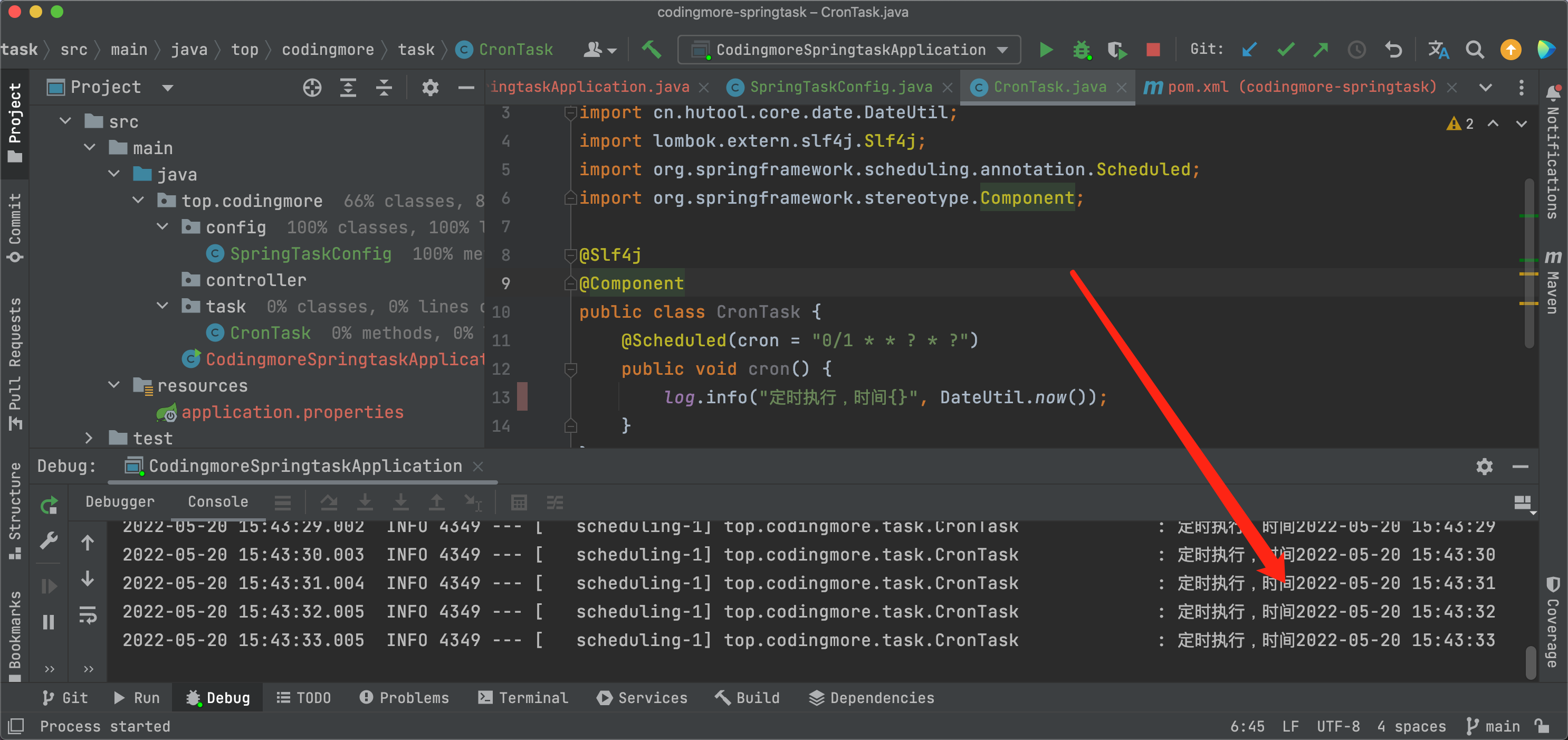
默认情况下,@Scheduled 创建的线程池大小为 1,如果想增加线程池大小的话,可以让 SpringTaskConfig 类实现 SchedulingConfigurer 接口,通过 setPoolSize 增加线程池大小。
```java
@Configuration
@EnableScheduling
public class SpringTaskConfig implements SchedulingConfigurer {
@Override
public void configureTasks(ScheduledTaskRegistrar taskRegistrar) {
ThreadPoolTaskScheduler threadPoolTaskScheduler = new ThreadPoolTaskScheduler();
threadPoolTaskScheduler.setPoolSize(10);
threadPoolTaskScheduler.setThreadNamePrefix("my-scheduled-task-pool-");
threadPoolTaskScheduler.initialize();
taskRegistrar.setTaskScheduler(threadPoolTaskScheduler);
}
}
```
服务热部署完成后,会在控制台看到这样的信息:
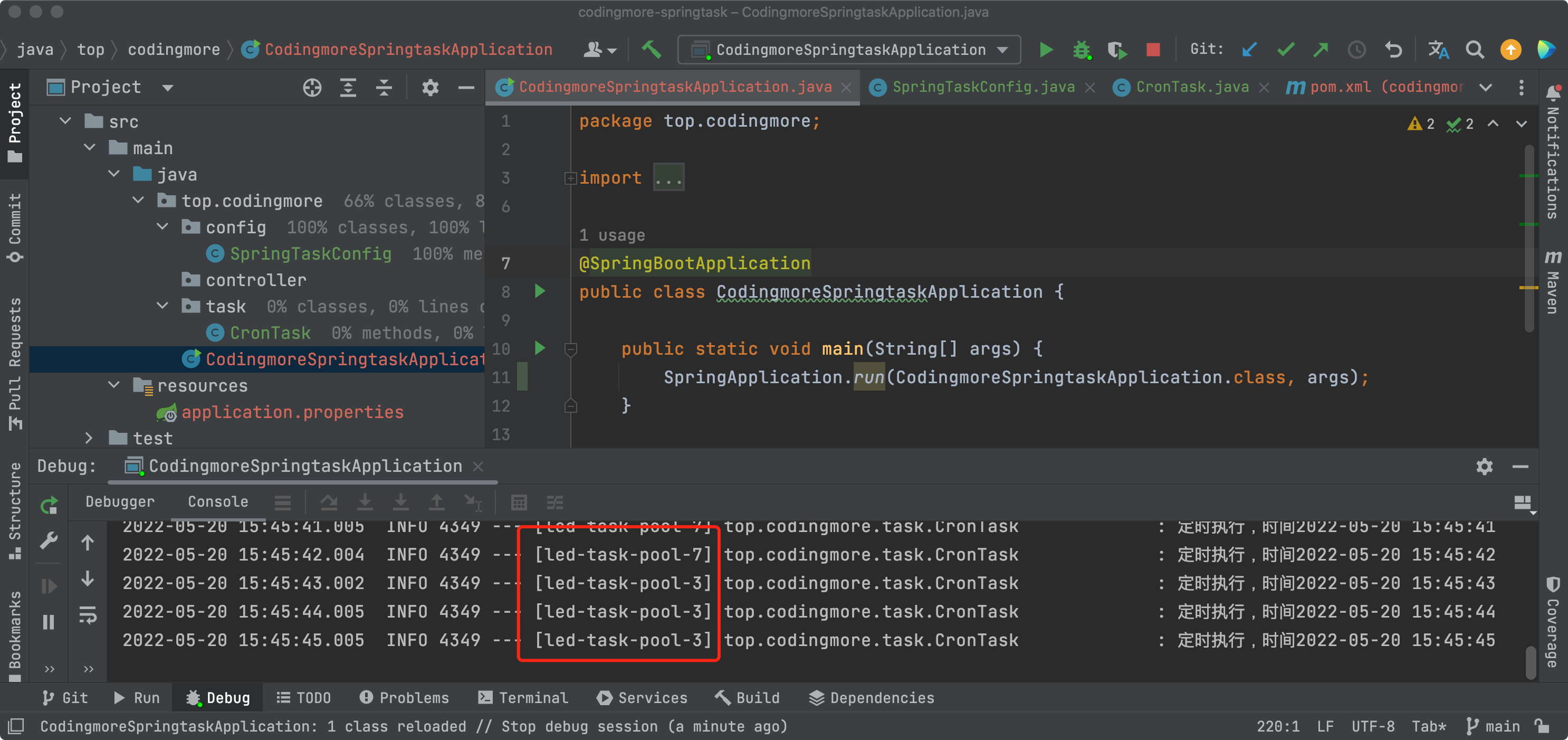
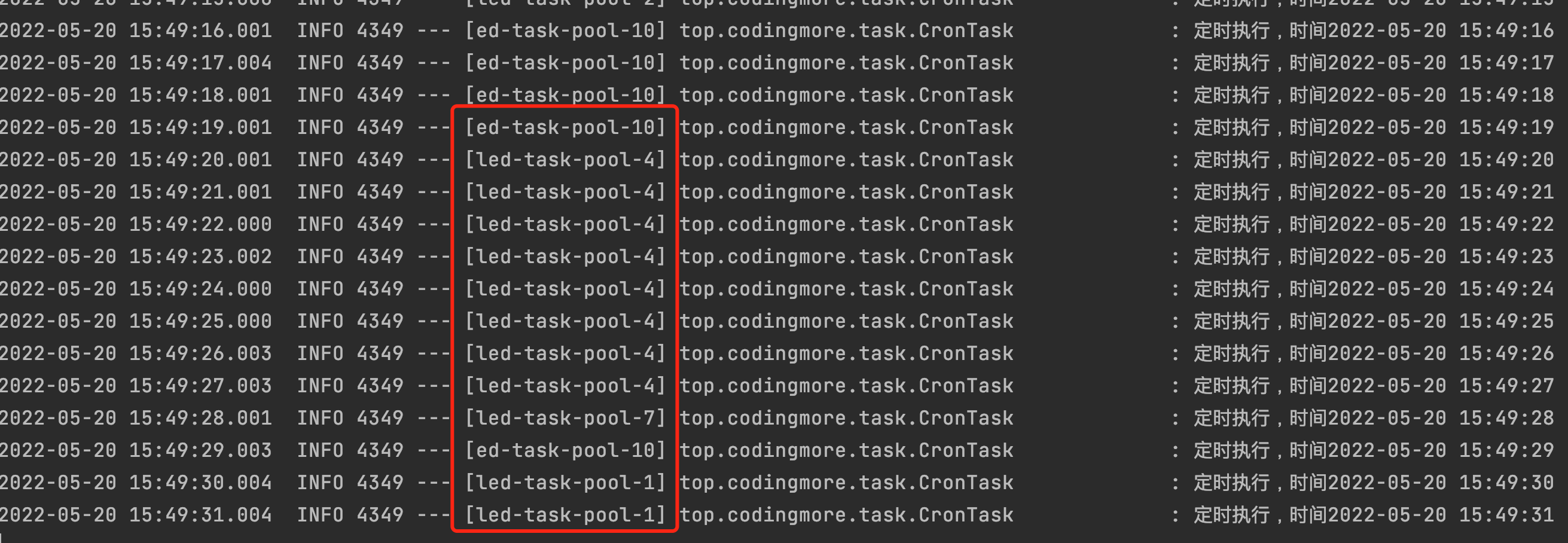
可以确认自定义线程池大小已经生效了,有的任务用的是线程led-task-pool-3,有的是线程led-task-pool-7,跑时间长了,可以发现 led-task-pool-1 到 led-task-pool-10 的都有。
Spring Task 除了支持 Cron 表达式,还有 fixedRate(固定速率执行)、fixedDelay(固定延迟执行)、initialDelay(初始延迟)三种用法。
```java
/**
* fixedRate:固定速率执行。每5秒执行一次。
*/
@Scheduled(fixedRate = 5000)
public void reportCurrentTimeWithFixedRate() {
log.info("Current Thread : {}", Thread.currentThread().getName());
log.info("Fixed Rate Task : The time is now {}", DateUtil.now());
}
/**
* fixedDelay:固定延迟执行。距离上一次调用成功后2秒才执。
*/
@Scheduled(fixedDelay = 2000)
public void reportCurrentTimeWithFixedDelay() {
try {
TimeUnit.SECONDS.sleep(3);
log.info("Fixed Delay Task : The time is now {}",DateUtil.now());
} catch (InterruptedException e) {
e.printStackTrace();
}
}
/**
* initialDelay:初始延迟。任务的第一次执行将延迟5秒,然后将以5秒的固定间隔执行。
*/
@Scheduled(initialDelay = 5000, fixedRate = 5000)
public void reportCurrentTimeWithInitialDelay() {
log.info("Fixed Rate Task with Initial Delay : The time is now {}", DateUtil.now());
}
```
不过,fixedRate 有个坑,假如某个方法的定时器设定的固定速率是每5秒执行一次,这个方法现在要执行下面四个任务,四个任务的耗时是:6s、6s、 2s、 3s,任务会如何执行呢(单线程环境下)?
```
2022-04-27 15:25:52.400 INFO 4343 --- [led-task-pool-1] c.codingmore.component.PublishPostTask : Fixed Rate Task : The time is now 2022-04-27 15:25:52
2022-04-27 15:25:58.401 INFO 4343 --- [led-task-pool-1] c.codingmore.component.PublishPostTask : Fixed Rate Task : The time is now 2022-04-27 15:25:58
2022-04-27 15:26:00.407 INFO 4343 --- [led-task-pool-1] c.codingmore.component.PublishPostTask : Fixed Rate Task : The time is now 2022-04-27 15:26:00
2022-04-27 15:26:04.318 INFO 4343 --- [led-task-pool-1] c.codingmore.component.PublishPostTask : Fixed Rate Task : The time is now 2022-04-27 15:26:04
```
第一个任务开始的相对时间是第 0 秒,但由于执行了 6 秒,所以原来应该是第 5 秒执行的任务,延迟到第 6 秒才开始执行,第三个任务延迟了 12 秒,原本应该是第 10 秒执行,第三个任务没有延迟,正常 15 秒后执行。
假如我们使用 @EnableAsync 注解开启多线程环境的话,结果会怎么样呢?
```
2022-04-27 15:33:01.385 INFO 4421 --- [led-task-pool-1] c.codingmore.component.PublishPostTask : Fixed Rate Task : The time is now 2022-04-27 15:33:01
2022-04-27 15:33:07.390 INFO 4421 --- [led-task-pool-1] c.codingmore.component.PublishPostTask : Fixed Rate Task : The time is now 2022-04-27 15:33:07
2022-04-27 15:33:09.391 INFO 4421 --- [led-task-pool-1] c.codingmore.component.PublishPostTask : Fixed Rate Task : The time is now 2022-04-27 15:33:09
2022-04-27 15:33:13.295 INFO 4421 --- [led-task-pool-1] c.codingmore.component.PublishPostTask : Fixed Rate Task : The time is now 2022-04-27 15:33:13
```
### 关于 Cron 表达式
这里顺带普及一下 Cron 表达式,在定时任务中会经常会遇到。Cron 这个词来源于希腊语 chronos,原意也就是时间。
Cron 表达式是一个含有时间意义的字符串,以 5 个空格隔开,分成 6 个时间元素。举几个例子就一目了然了。
示例|说明
---|---
`0 15 10 ? * *`|每天上午10:15执行任务
`0 0 10,14,16 * * ?`|每天10 点、14 点、16 点执行任务
`0 0 12 ? * 3`|每个星期三中午 12 点执行任务
`0 15 10 15 * ?`|每月 15 日上午 10 点 15 执行任务
Cron 的语法格式可以总结为:
>Seconds Minutes Hours DayofMonth Month DayofWeek
每个时间元素的取值范围,以及可出现的特殊字符如下所示。
时间元素|取值范围|可出现的特殊字符
---|---|---
秒|`[0,59]`|`*,-/`
分钟|`[0,59]`|`*,-/`
小时|`[0,59]`|`*,-/`
日期|`[0,31]`|`*,-/?LW`
月份|`[1,12]`|`*,-/`
星期|`[1,7]`|`*,-/?L#`
特殊字符的含义和示例如下所示。
特殊字符|含义|示例
---|---|---
`*`|所有可能的值|很好理解,月域中为每个月,星期域中每个星期几
`,`|枚举的值|很好理解,小时域中 `10,14,16`,就表示这几个小时可选
`-`|范围|很好理解,分钟域中 `10-19`,就表示 10-19 分钟每隔一分钟执行一次
`/`|指定数值的增量|很好理解,分钟域中 `0/15`,就表示每隔 15 分钟执行一次
`?`|不指定值|很好理解,日期域指定了星期域就不能指定值,反之亦然,因为日期域和星期域属于冲突关系
`L`|单词 Last 的首字母|很好理解,日期域和星期域支持,表示月的最后一天或者星期的最后一天
`W`|除周末以外的工作日|很好理解,仅日期域支持
`#`|每个月的第几个星期几|很好理解,仅星期域支持,`4#2`表示某月的第二个星期四
### 小结
Spring Task 虽然用起来很方便,但用法过去简单,很多复杂的业务逻辑是没有办法实现的,比如说编程喵的定时发布文章功能,只用 Spring Task 是没办法的。
----
更多内容,只针对《二哥的Java进阶之路》星球用户开放,需要的小伙伴可以[戳链接🔗](https://javabetter.cn/zhishixingqiu/)加入我们的星球,一起学习,一起卷。。**编程喵**🐱是一个 Spring Boot+Vue 的前后端分离项目,融合了市面上绝大多数流行的技术要点。通过学习实战项目,你可以将所学的知识通过实践进行检验、你可以拓宽自己的技术边界,你可以掌握一个真正的实战项目是如何从 0 到 1 的。
----
### 源码路径
> - 编程喵:[https://github.com/itwanger/coding-more](https://github.com/itwanger/coding-more)
> - codingmore-springtask:[https://github.com/itwanger/codingmore-learning](https://github.com/itwanger/codingmore-learning/tree/main/codingmore-springtask)
