Core Concept in spring security
- Authentication : Who are you , can you prove that's you , Who is this user?
- Knowledge based authenticaion :
- Password
- Pin code
- Answer to a secret / personal question
- Possession based authenticaion :
- Phone/ text Message
- Key Cards and badges
- Access token device
- Knowledge based authenticaion :
- Authorization : Can this user do this / Are they allowed to do this?
- Principal : Currently loggern in user
- Granted Authority : What they can do
- Roles : Group of Authorities ROLE_ADMIN
- Adding just
spring-boot-starter-security - Adds mandatory authentication for URLs
- Add login form
- Handles login error
- Create a user and sets a default password
- We can configure user and password in properties files
- Created spring security configuration using extending WebSecurityConfigurerAdapter and overried configure method
- AuthenticationManger provides the configure methos using AuthenticationMangerBuilder
protected void configure(AuthenticationManagerBuilder auth) throws Exception
- In-memory authentication configuration
- AuthenticationManger provides the configure methos using HttpSecurity
protected void configure(HttpSecurity http) throws Exception
@Override
    protected void configure(HttpSecurity http) throws Exception {
        http.authorizeHttpRequests()
                .antMatchers("/admin").hasRole("ADMIN")
                .antMatchers("/user").hasAnyRole("USER", "ADMIN")
                .antMatchers("/").permitAll()
                .and().formLogin();
}- Spring security add spring security filter before application and it intercept each request
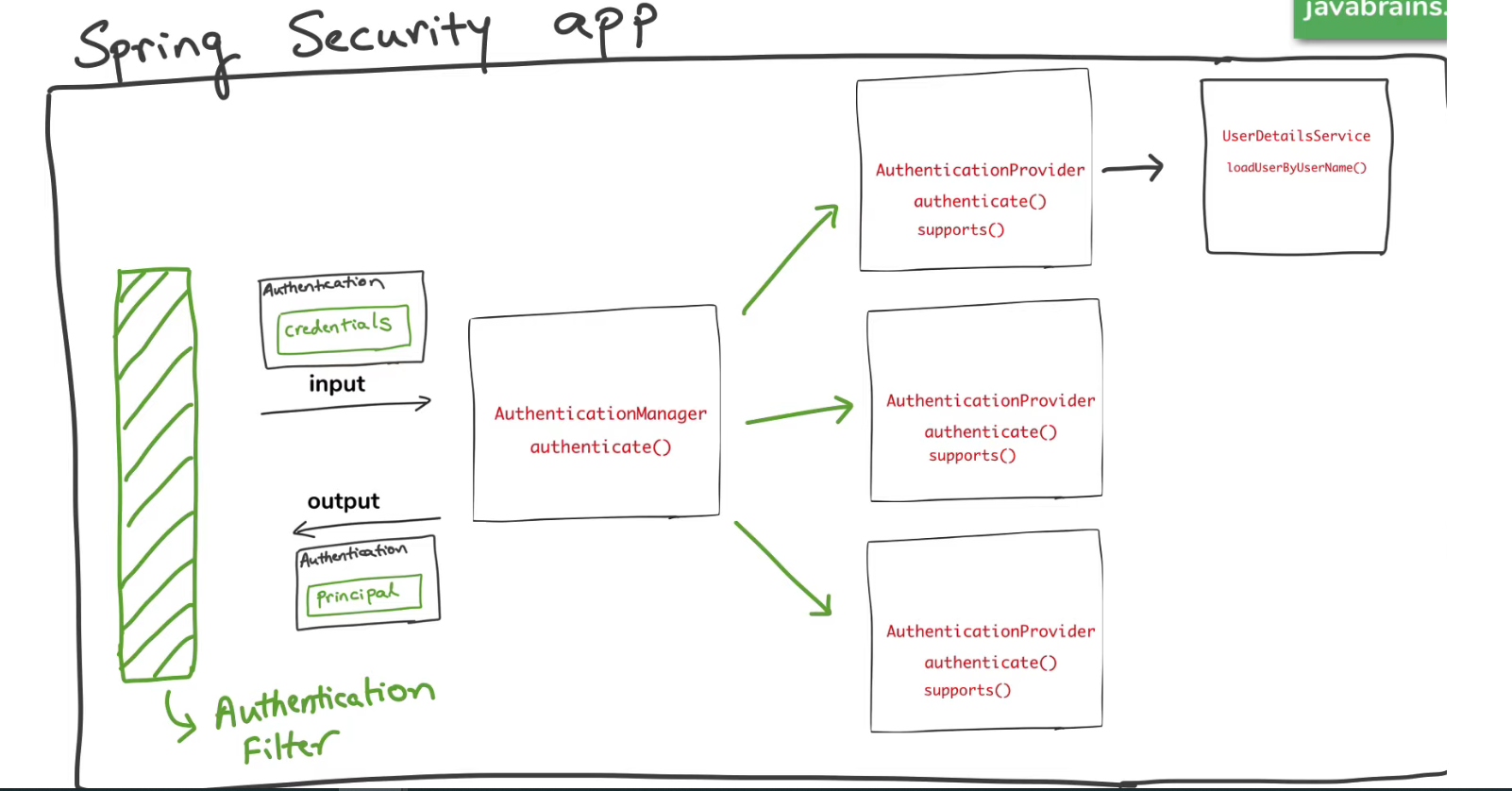
- AuthenticationProvider Interface has authenticate() method which takes Authentication object as arguement and return Authentication object
	public interface AuthenticationProvider {
	    Authentication authenticate(Authentication authentication) throws AuthenticationException;

	    boolean supports(Class<?> authentication);
}- Authentication interface hasall details about user
	     public interface Authentication extends Principal, Serializable {
	    Collection<? extends GrantedAuthority> getAuthorities();

	    Object getCredentials();

	    Object getDetails();

	    Object getPrincipal();

	    boolean isAuthenticated();

	    void setAuthenticated(boolean isAuthenticated) throws IllegalArgumentException;
}- ProviderManager implements AuthenticationManager and override authenticate() and support() method for different providers like inmemory , ldap and jdbc
- AuthenticationProvider talks wtih Identity Store andusing username and get the
UserDetailsobject
	public interface UserDetails extends Serializable {
	    Collection<? extends GrantedAuthority> getAuthorities();

	    String getPassword();

	    String getUsername();

	    boolean isAccountNonExpired();

	    boolean isAccountNonLocked();

	    boolean isCredentialsNonExpired();

	    boolean isEnabled();
}- Setup datasourcer it might be in-memory or my sql , oracle in property file and inject DataSource object into cofigure methods
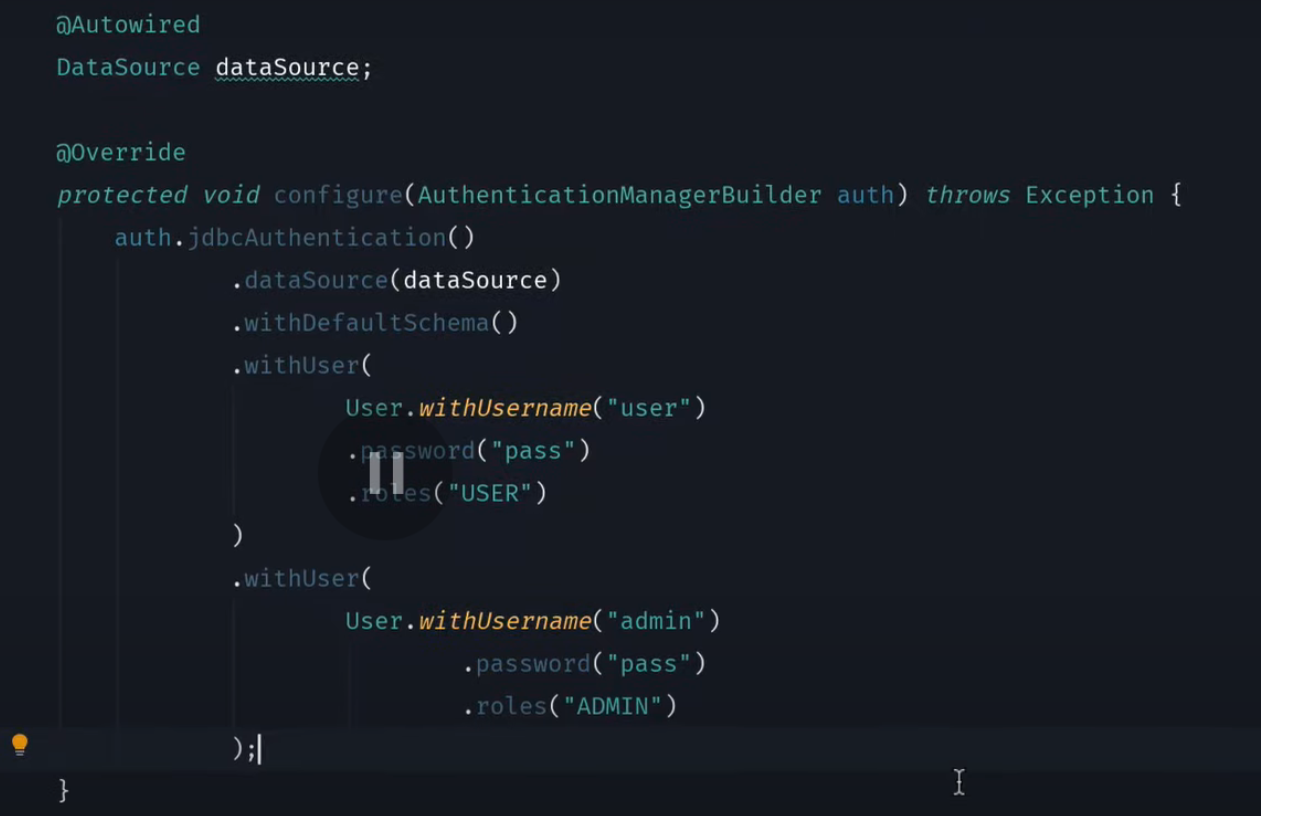
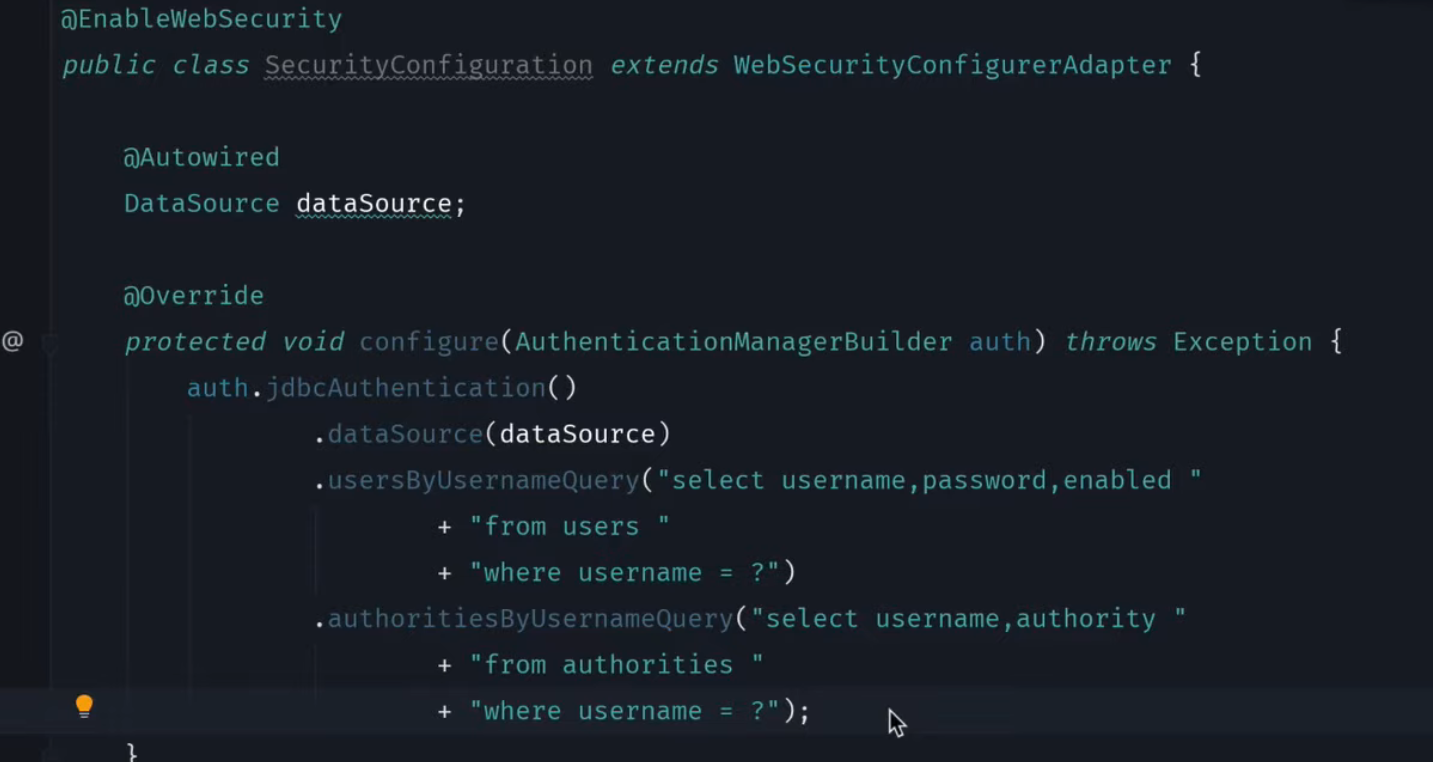
- We can create our own table strucuter but we have to provide like usernae, password , enable and required information for authroties and we can put custom query in cofigure method to fetch data from our custom tables
-
- create user table in mysqldb
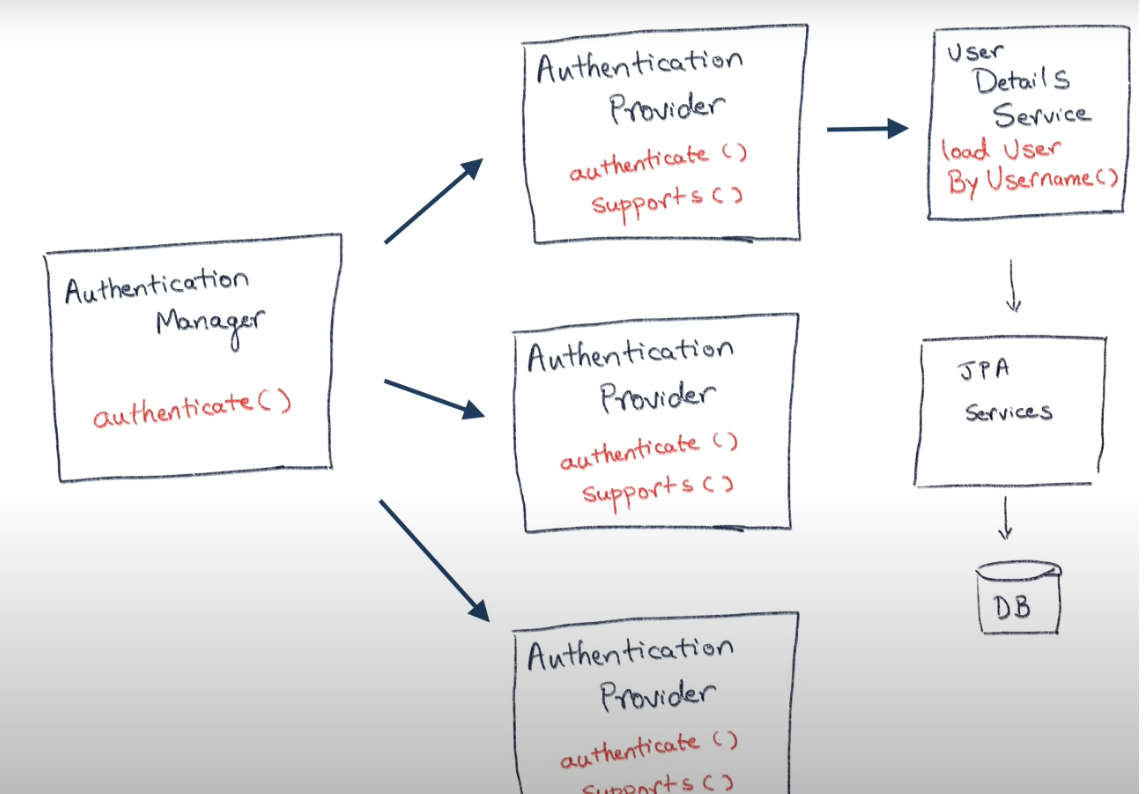
- AuthenticationProvided -> UserDetailsService -> loadUserByUsername() -> JPARepository -> findByUserName() from DB
  public UserDetails loadUserByUsername(String username) throws UsernameNotFoundException {

        Optional<User> byUserName = userRepository.findByUserName(username);
        byUserName.orElseThrow(() -> new UsernameNotFoundException("user not found : "+username));
        return byUserName.map(MyUserDetails::new).get();

} @Override
protected void configure(AuthenticationManagerBuilder auth) throws Exception {
auth.userDetailsService(userDetailsService);
}- LDAP : Lightweight Directory Access Protocol which mains data into tree hirarchay
- We need dependcey for security for the LDAP
spring-security-ldap - As we are running ladp locally we need to setup ladpa also for that we need to add dependecny
unboundid-ldapsdk - User information store in ldap file extension is
ldif
   	      dn: uid=ben,ou=people,dc=springframework,dc=org
   	objectclass: top
   	objectclass: person
   	objectclass: organizationalPerson
   	objectclass: inetOrgPerson
   	cn: Ben Alex
   	sn: Alex
   	uid: ben
   	userPassword: $2a$10$c6bSeWPhg06xB1lvmaWNNe4NROmZiSpYhlocU/98HNr2MhIOiSt36
           @Override
    protected void configure(AuthenticationManagerBuilder auth) throws Exception {
        auth
                .ldapAuthentication()
                .userDnPatterns("uid={0},ou=people")
                .groupSearchBase("ou=groups")
                .contextSource()
                .url("ldap://localhost:8389/dc=springframework,dc=org")
                .and()
                .passwordCompare()
                .passwordEncoder(new BCryptPasswordEncoder())
                .passwordAttribute("userPassword");


    }

    @Override
    protected void configure(HttpSecurity http) throws Exception {
        http.authorizeHttpRequests()
                .anyRequest()
                .authenticated()
                .and().formLogin();
    }
- JSON Web Tokens are an open, industry standard RFC 7519 method for representing claims securely between two parties.
- JSON Web Token (JWT) is a compact, URL-safe means of representing claims to be transferred between two parties. The claims in a JWT are encoded as a JSON object that is used as the payload of a JSON Web Signature (JWS) structure or as the plaintext of a JSON Web Encryption (JWE) structure, enabling the claims to be digitally signed or integrity protected with a Message Authentication Code (MAC) and/or encrypted.
- There are type of authorization strategies
- Session Token
- JSON Web Token
- As HTTP is stateless protocol
- SessionID + Cookies is most popular mechnaism for authorization
- In first time authentication server generate token (session id) and gives as response user browser set this sessionid in cookies or header for subsquent request and server will validate the same session id access for the other resources
- This mechanism was good if we have monolothic and only on instance of serveris running but if our app has many instances and diffrenet request is going to difenrenct instance then othe instance are not going to recognize the session id and invalidate that
- For this we have difference solution like sessionaffiniti which will forward request to same instance for the same user but in this case scalling not porper implemented
- Second solution is that create Shared case in Redis and stor session information in one place and each instance will get the session info from here
- Now JWT comes into picture and solve this issue using JWT token
- which contain some information about user which will genetate from server and this whole information not just id and in every subsuent request this token will be passed which can be validated by any instance of the application
- This JWT has 3 part Header , Payload and signature https://jwt.io/
- Header : has info about which type = 'jwt' and encrptio algo "HS256"
- Payload : This has info about the user like id, username , expiration etc
- Signature : its auto generation using hearder , payload and secret it will change if you payload ot header has been changed
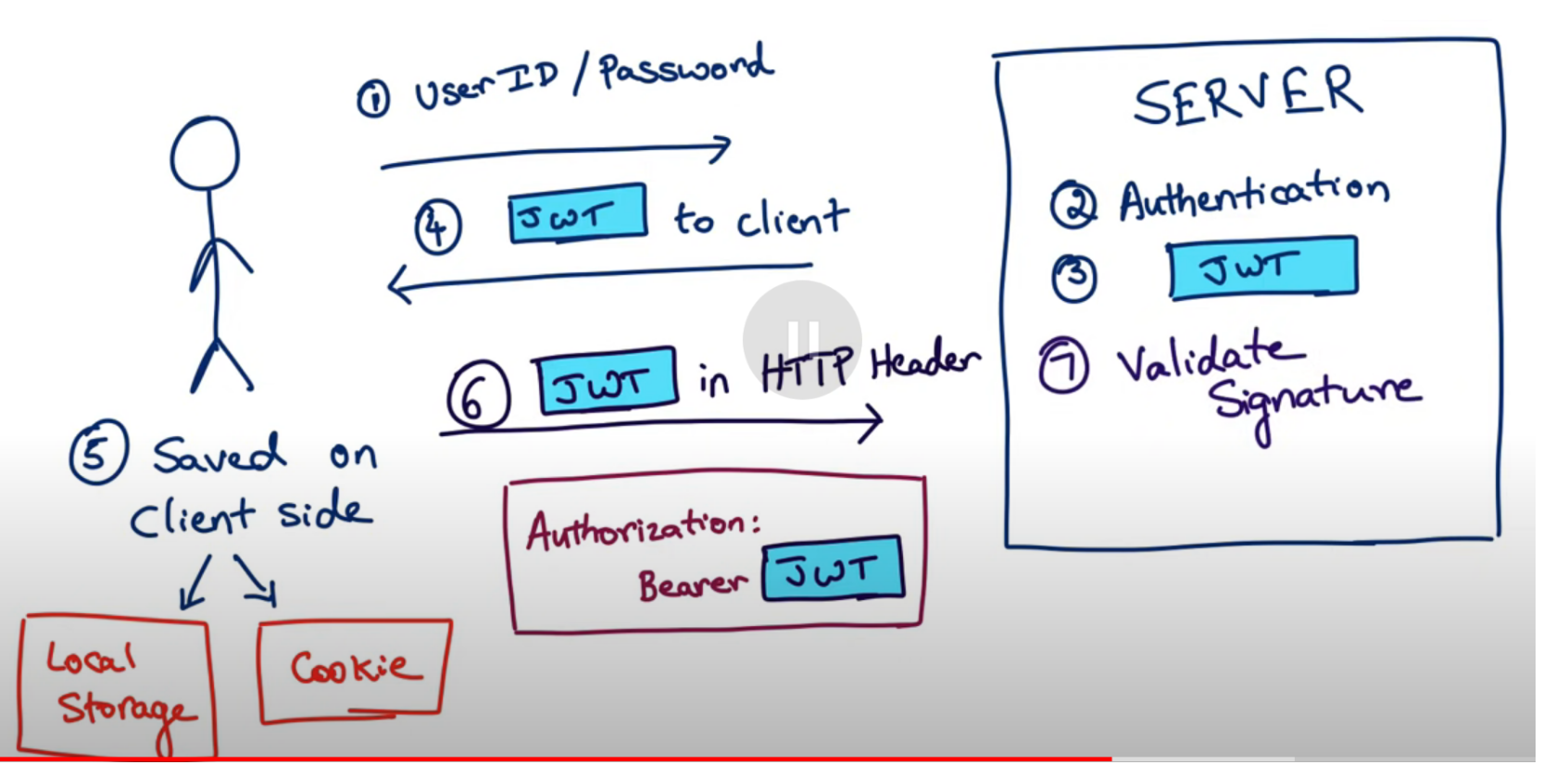
- JWT process flow
- We need to add 2 dependcies
    <dependency>
			<groupId>io.jsonwebtoken</groupId>
			<artifactId>jjwt</artifactId>
			<version>0.9.1</version>
		</dependency>

		<dependency>
			<groupId>javax.xml.bind</groupId>
			<artifactId>jaxb-api</artifactId>
			<version>2.3.0</version>
		</dependency>
- create /authentication api endpoint which are accept the user id and password and return the JWT token as repsone
- Intercept the all incoming request except the /authenication api and anyreques authneticated
    protected void configure(HttpSecurity http) throws Exception {
      http.csrf().disable()
              .authorizeRequests().antMatchers("/authenticate").permitAll()
              .anyRequest().authenticated()
              .and().sessionManagement()
              .sessionCreationPolicy(SessionCreationPolicy.STATELESS);

      http.addFilterBefore(jwtRequestFilter, UsernamePasswordAuthenticationFilter.class);
  }
- exract the JWT from header and validate
- After validation sety into the SecurityContext
- First authenticate user details based on username and pass
- Once authenticatio done get UserDetails Object
- Pass UserDetails Object to JWTUtill for generate token
- Get Generate JWT token and pass in reponse for authentication api endpoint
- Create filter for intercept all requests
- Extend
OncePerRequestFilterand override doFilterInternal - in filter get the JWT tokent exreact the username and validate tokent get userdetails obj and set userdetails obj into UsernamePasswordAuthenticationToken and set authenticationToken token into SecurityContextHolder after put filterChain.doFilter(request, response); for moving farword the request
- OAuth is for Authorization
- Authorization between services
- Access delegation
- OAuthFlow
- Resource : Proteced resource
- Resource Owenr : Owner who is giving permission
- Resource Server : Google
- Client : requested on behalf of the resource owner
- Authorization server : who is issuing the access tokens
- Oauth Flow 1 : giving authtorization token to client then client again sending auth token to auth server the auth server giviong access toket to clien now client will give this tocke to resourcer server
- Ouath Flow 2 : Implicit flow : Auth server giving access token directly
- Oauth Flow 3 : Client Credentials Flow : when client is well trusted in case of microservice one service is calling to another service
- service 1 will get the access token form auth server then this access token will be send to the service 2
- Add depoendency
spring-security-oauth2-autconfiguration - @EnableOauth2Sso annotation on main spring boot applicaiton
- create app in facebbook , google or github
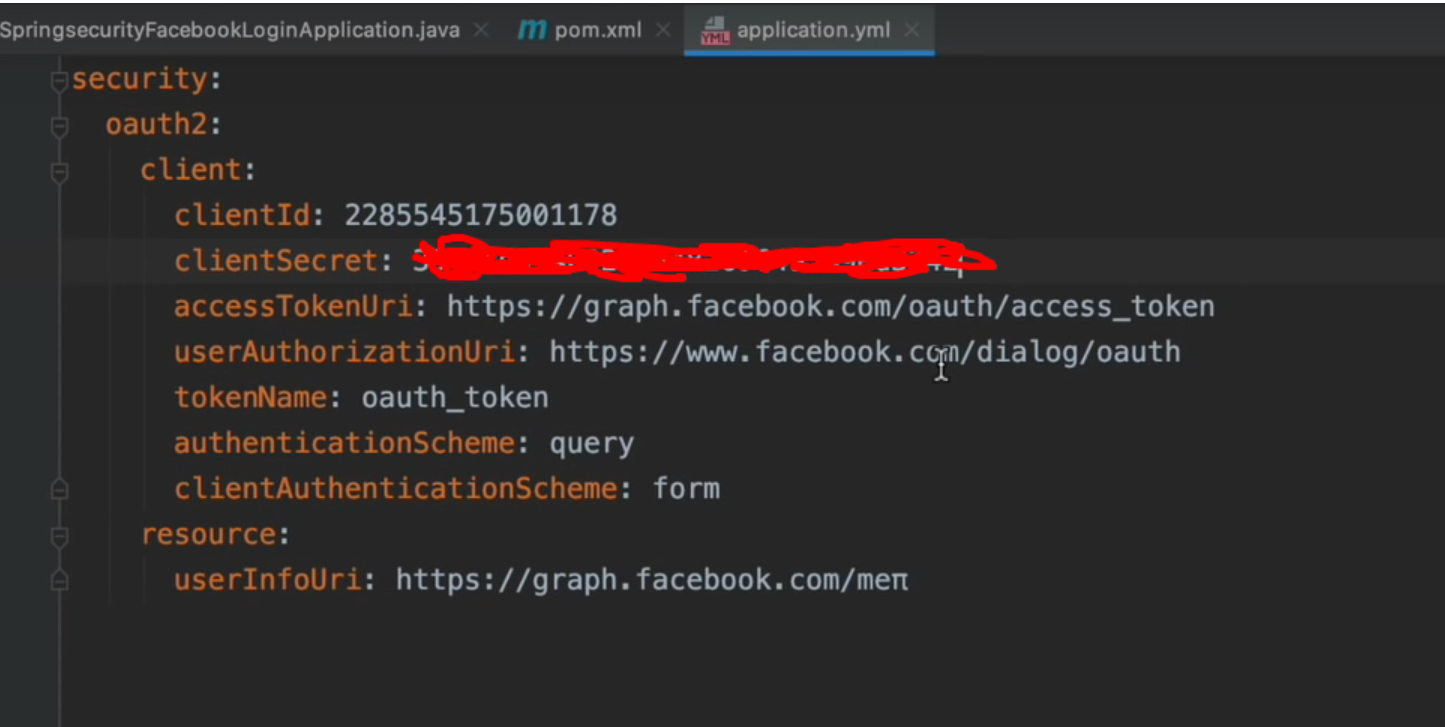
- set configuration propeties
- Once will hit the application URL it will redirec to facebook for permission allow then redirect to application URL
- https://docs.spring.io/spring-security/reference/index.html
- understand spring security architecture : https://amigoscode.com/courses/full-stack-professional/lectures/45688270
- https://github.com/jdbirla/jd-dev-notes/blob/master/docs/springboot/spring-security-jwt.md
- JWTUtil.java : This class will give all utilities methods for token like generating the signed tokens, validating tokens
- SecurityFilterChainConfig : Configuraiton for permits and denied request
- SecurityConfig : This just a confiuration class for bean definition like PasswordEncoder, AuthenticationManager, AuthenticationProvider
- JWTAuthenticationFilter : This calls extendeds
OncePerRequestFilter, in this will get the subject and load uderdetials from db and call validate token method usingjwtanduserdetailsservicecreateUsernamePasswordAuthenticationTokenans set intoSecurityContextHolderand go to next filter - DelegatedAuthEntryPoint : This class implements
implements AuthenticationEntryPoint, it resolves the exception like when resource not found should give the forbidden exception instead it will give an actual thrown exception. - CorsConfig : This class enable CORS
- AuthenticationService : This is a service for
authwhich will give generate token for subsquent requests
 Authentication authentication = authenticationManager.authenticate(
        new UsernamePasswordAuthenticationToken(request.username(), request.password()));

    Customer principal = (Customer) authentication.getPrincipal();
    CustomerDTO customerDTO = customerDTOMapper.apply(principal);

    String jwtToken = jwtUtil.issueToken(customerDTO.username(), customerDTO.roles());
    return new AuthenticationResponse(jwtToken, customerDTO);